1. הקדמה
The Perixx PERIMICE-819B is an ergonomic vertical mouse designed for comfort and versatility. It features 3-in-1 wireless connectivity, allowing connection via Bluetooth, 2.4 GHz USB-A receiver, or 2.4 GHz USB-C receiver. This mouse is equipped with silent-click buttons, adjustable DPI settings, and a built-in rechargeable battery, making it suitable for prolonged use across various devices.

Image: The ergonomic design promotes a natural handshake position, reducing wrist strain.

Image: The compact size of the PERIMICE-819B makes it highly portable for on-the-go use.
2. פּעקל אינהאַלט
ביטע באַשטעטיקן אַז אַלע זאכן זענען פאַראַן אין דיין פּעקל:
- Perixx PERIMICE-819B Vertical Mouse
- וסב-א ופנעמער
- וסב-C ופנעמער
- טשאַרדזשינג קאַבלע
- באַניצער מאַנואַל
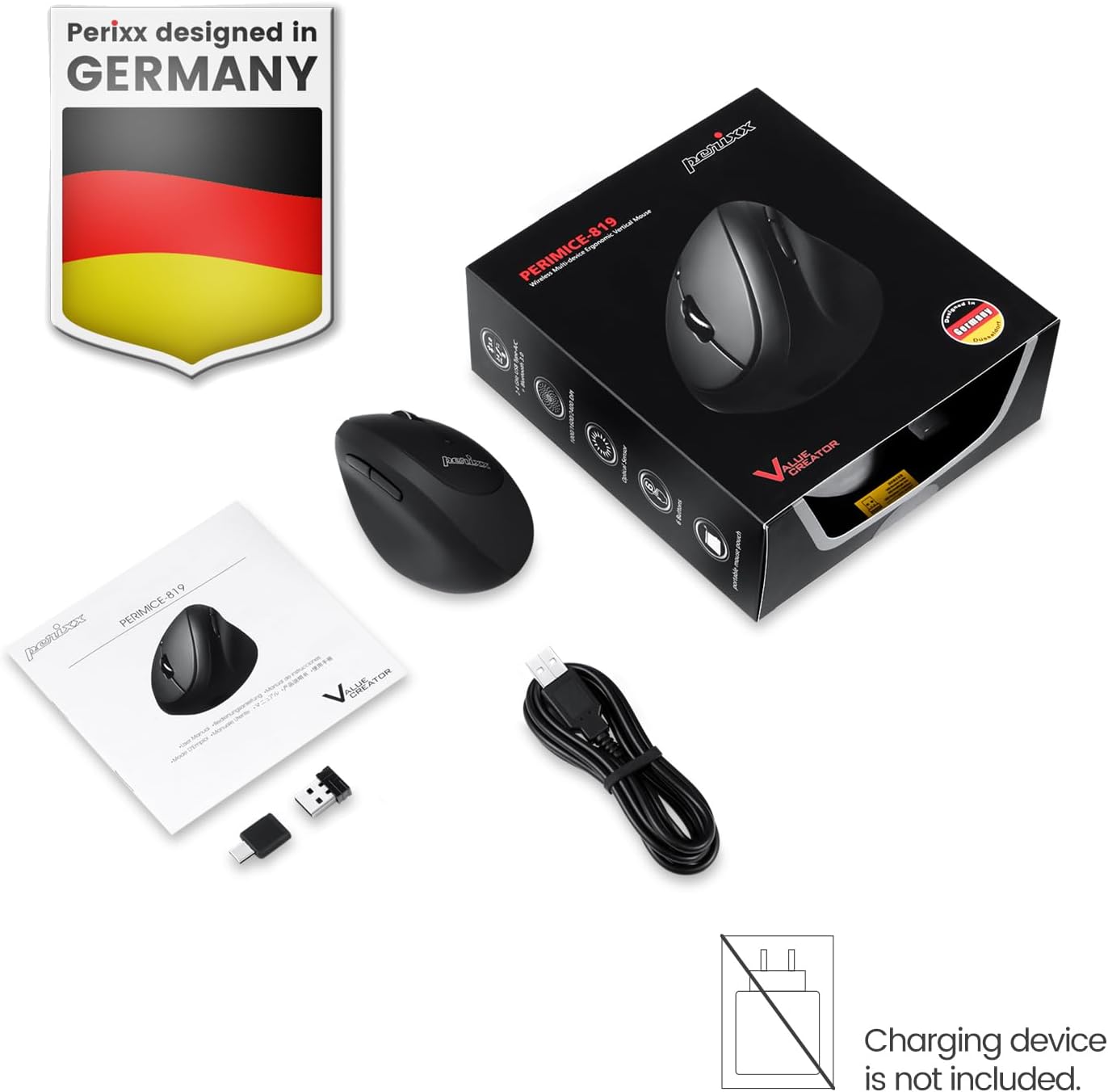
Image: The package includes the mouse, USB-A and USB-C receivers, a charging cable, and the user manual.
3. סעטאַפּ אינסטרוקציעס
3.1 אויפלאָדן די מויז
Before initial use, fully charge the mouse. Connect the provided charging cable to the mouse's charging port and to a USB power source. The LED indicator will show charging status. A full charge can last up to 15 days with typical use (4 hours/day).

Image: Connect the mouse to a USB port using the charging cable to recharge its internal battery.
3.2 פֿאַרבינדן די מויז
The PERIMICE-819B offers three wireless connection methods:

Image: The bottom of the mouse displays the connectivity switch and receiver storage.
- 2.4 GHz Wireless (USB-A or USB-C Receiver):
- Locate the USB-A or USB-C receiver stored in the mouse's bottom compartment.
- Plug the desired receiver into an available USB port on your computer.
- צינדט אָן די מויז מיטן אָן/אויס קנעפּל וואָס געפינט זיך אויף דער אונטערשטער טייל.
- די מויז זאָל זיך אויטאָמאַטיש פֿאַרבינדן.
- בלועטאָאָטה קאַנעקשאַן:
- צינדט אָן די מויז מיטן אָן/אויס קנעפּל.
- Press the 'Connect' button on the bottom of the mouse to enter Bluetooth pairing mode. The LED indicator will flash.
- אויף אייער דעווייס (קאמפיוטער, טאַבלעט, סמאַרטפאָון), גייט צו בלועטוט סעטטינגס און זוכט פֿאַר נייע דעווייסעס.
- Select "PERIMICE-819B" from the list of available devices to pair.

Image: The mouse supports Bluetooth, 2.4 GHz USB-A, and 2.4 GHz USB-C wireless connections.
4. אַפּערייטינג ינסטרוקטיאָנס
4.1 דפּי אַדזשאַסטמאַנט
The PERIMICE-819B features an adjustable DPI (Dots Per Inch) switch, allowing you to change the mouse cursor speed and sensitivity. Press the DPI button, located behind the scroll wheel, to cycle through the available settings: 1000, 1600, and 2400 DPI. Choose the setting that best suits your task and preference.
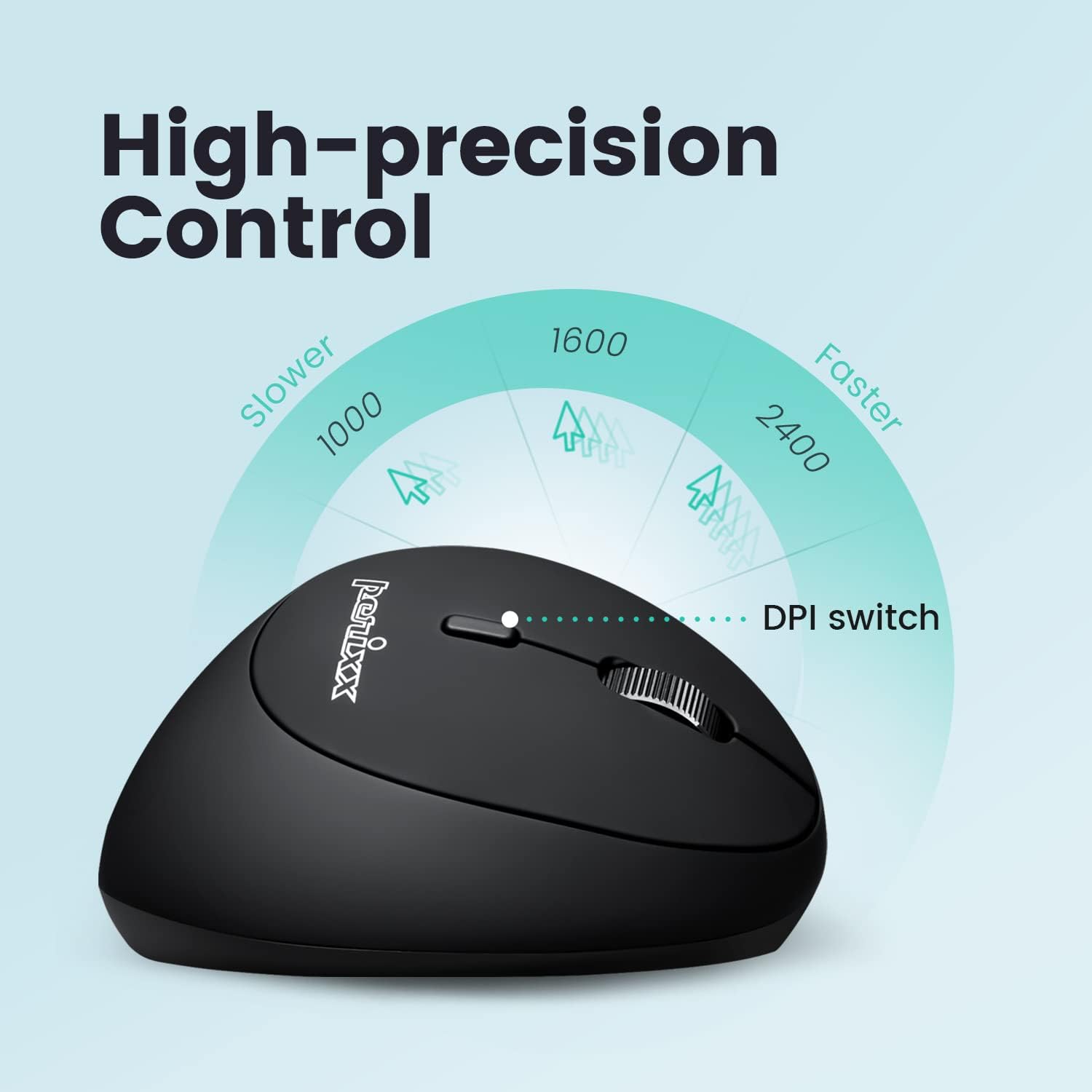
Image: Adjust the mouse sensitivity using the DPI switch for optimal control.
4.2 Silent Click Buttons
The left and right mouse buttons are designed for silent clicking, providing a quiet working environment.
4.3 נאַוויגאַציע קנעפּלעך
The mouse includes convenient forward and backward buttons located on the side, typically operated by the thumb. These buttons allow for quick navigation in web בראַוזערז און file עקספּלאָרערס. Note: Forward and backward buttons may not be fully functional on macOS.

Image: Use the side buttons for quick page navigation (backward and forward).
5. וישאַלט
5.1 באַטערי מאַנאַגעמענט
The PERIMICE-819B features a built-in rechargeable Li-Po 300mAh battery. To conserve power, the mouse will automatically enter sleep mode after a period of inactivity. Move the mouse or click a button to wake it up. Recharge the mouse when the battery indicator shows low power to ensure uninterrupted use.
5.2 רייניקונג
To clean the mouse, use a soft, dry cloth. Avoid using harsh chemicals or abrasive materials that could damage the surface.
6. טראָובלעשאָאָטינג
- מויז ענטפערט נישט:
- זייט זיכער אַז די מויז איז אנגעצינדן.
- קאָנטראָלירן די באַטאַרייע מדרגה און ריטשאַרדזש אויב נייטיק.
- For 2.4 GHz connection, ensure the receiver is securely plugged into a USB port. Try a different USB port.
- פֿאַר אַ בלועטוט פֿאַרבינדונג, זאָרגט אַז בלועטוט איז אַקטיווירט אויף אייער מיטל און די מויז איז ריכטיק צוזאַמענגעפּאַרט. פּרוּווט ווידער צו פֿאַרבינדן.
- Cursor movement is erratic or stops:
- Ensure the mouse sensor is clean and free from obstructions.
- Use the mouse on a suitable surface (e.g., a mouse pad).
- קוק צי עס איז א נידריגע באַטעריע.
- Interference from other wireless devices can affect performance. Try moving closer to the receiver or device.
- DPI איינשטעלונג טוישט זיך נישט:
- זייט זיכער אַז איר דריקט דעם ריכטיקן DPI סוויטש קנעפּל.
- The change in cursor speed should be noticeable. If not, try restarting the mouse and your device.
7. ספּעסאַפאַקיישאַנז
| שטריך | דעטאַל |
|---|---|
| מאָדעל נומער | PERIMICE-819 (12013) |
| קאַנעקטיוויטי טעכנאָלאָגיע | Bluetooth, 2.4 GHz Radio Frequency (USB-A, USB-C) |
| באַוועגונג דעטעקטיאָן | אָפּטיש |
| דפּי סעטטינגס | 1000 / 1600 / 2400 |
| ספּעציעלע פֿעיִקייטן | Ergonomic Design, Portable, Rechargeable, Silent-Click |
| באַטערי טיפּ | Built-in Li-Po 300mAh |
| דורכשניטלעך באַטאַרייע לעבן | Up to 60 hours (approx. 15 days at 4 hours/day) |
| פּונקט וואָג | 2.93 אונסעס |
| פּראָדוקט דימענשאַנז (LxWxH) | 4.5 X 2.64 X 2.28 אינטשעס |
| קאָליר | שוואַרץ |
| קאַמפּאַטאַבילאַטי | Windows OS, Linux Ubuntu 16.04, Chromebook, iPadOS, Android, Amazon Fire Tablet. Partial compatibility with macOS (forward/backward buttons not available). |
8. וואָראַנטי און שטיצן
Perixx products typically come with a manufacturer's warranty. For specific warranty details, please refer to the warranty information included with your purchase or visit the official Perixx website. For technical support, product inquiries, or assistance with troubleshooting, please contact Perixx customer service through their official channels.
פאַבריקאַנט: פּעריקסקס קאָמפּיוטער גאַם
Webפּלאַץ: www.perixx.com