1. הקדמה
Thank you for choosing the HTC True Wireless Earbuds 1. This manual provides essential information to help you set up, operate, and maintain your earbuds for optimal performance.
פּעקל אינהאַלט
זיכער מאַכן אַז אַלע זאכן זענען פאַראַן אין דיין פּעקל:
- 1 Pair HTC True Wireless Earbuds
- 1 וסב-C טשאַרדזשינג קאַבלע
- 2 Pairs of Rubber Eartips (S/L)
- 1 שנעל גייד
- 1 וואָראַנטי קאַרד
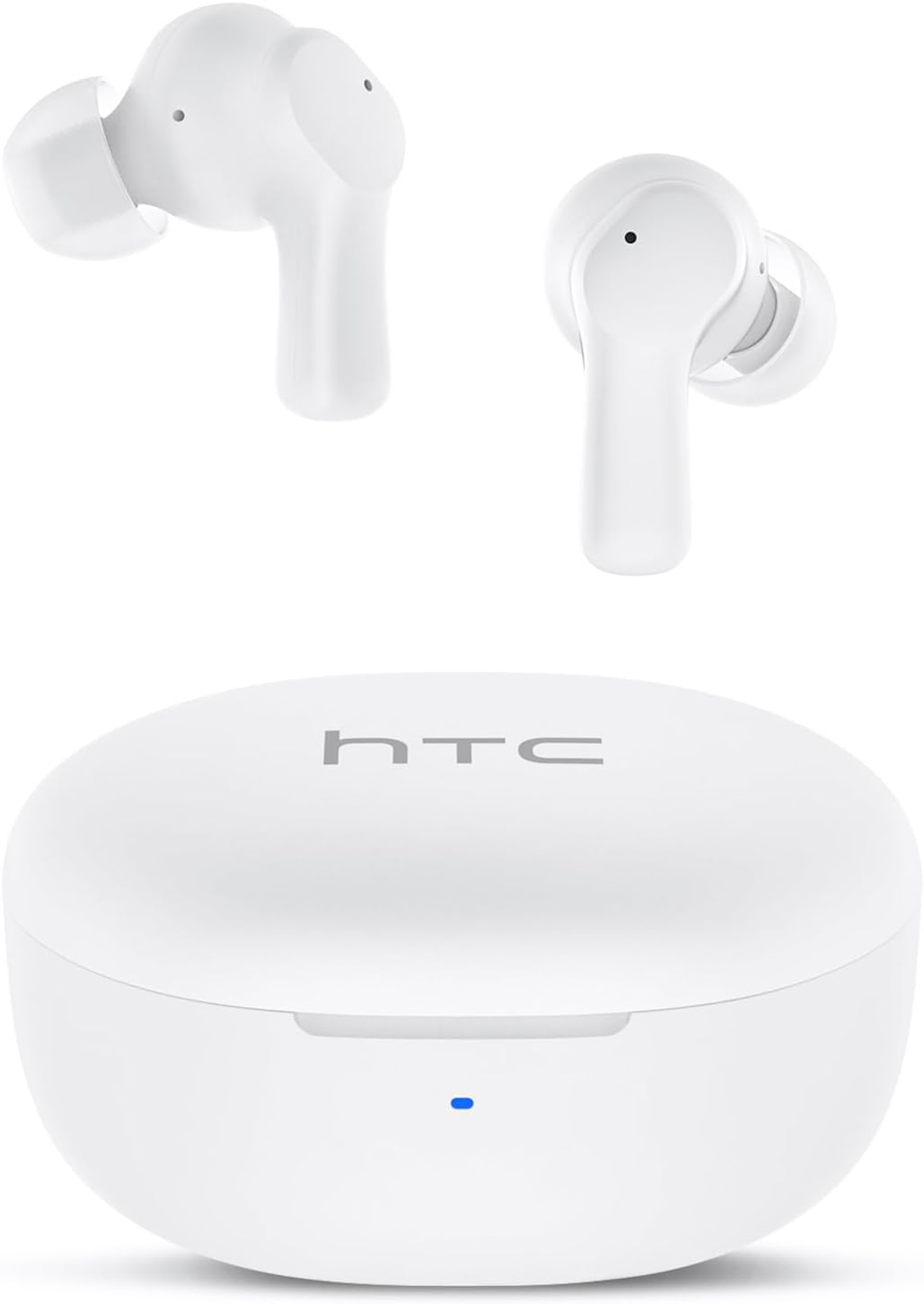
Image: HTC True Wireless Earbuds 1 and their charging case.

Image: The charging case opened, showing the two earbuds nestled inside.
2. סעטאַפּ און פּערינג
ערשט סעטאַפּ
- אַראָפּנעמען פּראַטעקטיוו פילם: Before first use, remove the protective film from the charging contacts on both earbuds.
- אויפלאָדן אויערקנעפּלעך: Place the earbuds back into the charging case and close the lid. Connect the charging case to a USB power source using the provided USB-C cable. Ensure the earbuds and case are fully charged before initial use.
- מאַכט אויף: עפֿנט דעם דעקל פֿונעם טשאַרדזשינג קעסטל. די אויערקנעפּלעך וועלן זיך אויטאָמאַטיש אָנצינדן און אַרײַן אין פּערינג מאָדע.
בלועטאָאָטה פּערינג
The HTC True Wireless Earbuds 1 feature one-step auto-pairing after the initial setup.
- אַקטאַווייט בלועטאָאָטה: אויף אייער דעווייס (סמאַרטפאָן, טאַבלעט, קאָמפּיוטער), אַקטיווירט בלועטוט.
- זוכן פֿאַר מכשירים: אין אייער דעווייס'ס בלועטוט סעטינגס, זוכט פאר פארהאן דעווייסעס.
- Select 'HTC TWS2': From the list of found devices, select 'HTC TWS2' to connect.
- באַשטעטיקונג: אַמאָל פארבונדן, וועט איר הערן אַן אַודיאָ פּראָמפּט, און די אויערקנעפּלעך וועלן זיין גרייט פֿאַר נוצן.
After the first successful pairing, the earbuds will automatically connect to the last paired device when taken out of the charging case, provided Bluetooth is enabled on the device.

Image: Illustration of the one-step auto-pairing process, showing earbuds connecting to a smartphone.
3. ווי צו טראָגן
For optimal sound quality and comfort, it is important to wear the earbuds correctly.
- Choose Eartips: Select the rubber eartips (S, M, L) that best fit your ear canal. A proper seal enhances bass response and noise isolation.
- אַריינשטעלן אויערקנעפּלעך: Gently insert each earbud into its corresponding ear (L for left, R for right).
- Rotate to Lock: Rotate the earbud slightly forward or backward until it feels secure and comfortable in your ear canal.

Image: Diagram showing how to properly insert the earbuds and the available S/M/L silicone eartips.
4. Operating Instructions (Touch Control)
The HTC True Wireless Earbuds 1 feature intuitive touch controls on each earbud. The following actions can be performed:
| קאַמף | קאָנטראָל | פֿונקציע |
|---|---|---|
| מוזיק פּלייַבאַקק | Single tap (either earbud) | שפּיל / פּויזע |
| מוזיק פּלייַבאַקק | טאָפּל צאַפּן לינקס עאַרבוד | פרייַערדיק ליד |
| מוזיק פּלייַבאַקק | טאָפּל צאַפּן רעכט עאַרבוד | ווייַטער ליד |
| רופט | Single tap (either earbud) | ענטפֿערן / סוף רוף |
| רופט | Long press (either earbud) | אָפּוואַרפן רופן |
| קול אַססיסטאַנט | Triple tap (either earbud) | אַקטיווירן שטימע אַסיסטאַנט (סירי, גוגל אַסיסטאַנט, אאז"וו) |
| באַנד קאָנטראָל | Long press left earbud | באַנד אַראָפּ |
| באַנד קאָנטראָל | Long press right earbud | באַנד אַרויף |
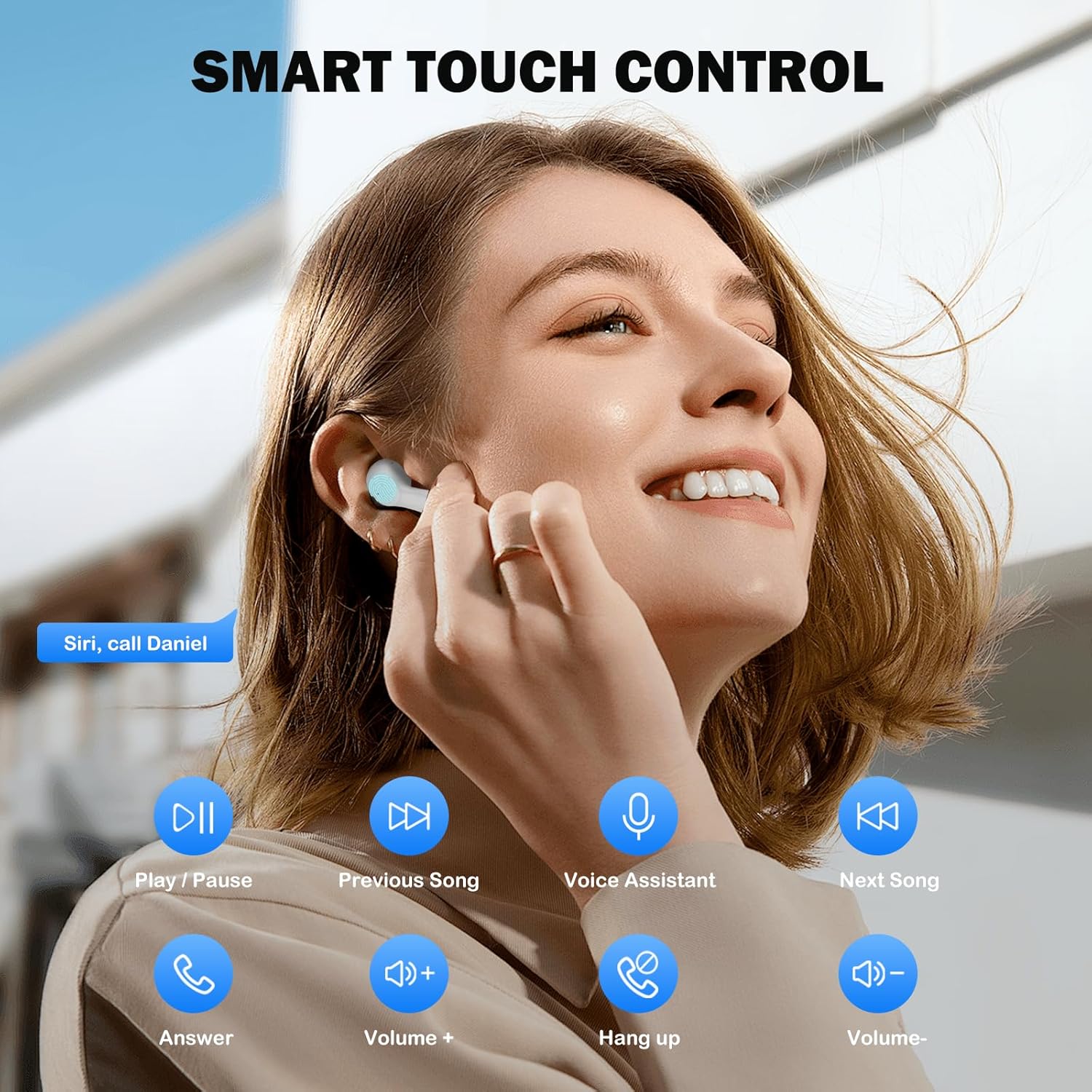
Image: Visual guide to the smart touch controls for music, calls, and voice assistant.
5. טשאַרדזשינג
The earbuds and charging case are powered by internal rechargeable batteries.
טשאַרדזשינג די עאַרבודז
Place the earbuds into the charging case. They will automatically begin charging. The LED indicator on the case will show charging status.
טשאַרדזשינג די קאַסטן
Connect the provided USB-C cable to the charging port on the case and to a USB power adapter (not included). The LED indicator on the case will show charging progress. A full charge for the earbuds takes approximately 40 minutes.
באַטערי לעבן
- עאַרבודז: Up to 8 hours of listening time on a single charge (at 50% volume).
- מיט טשאַרדזשינג קאַסטן: ביז 40 שעה פון גאַנץ שפּיל צייט מיט קייפל טשאַרדזשיז פון די קעסטל.
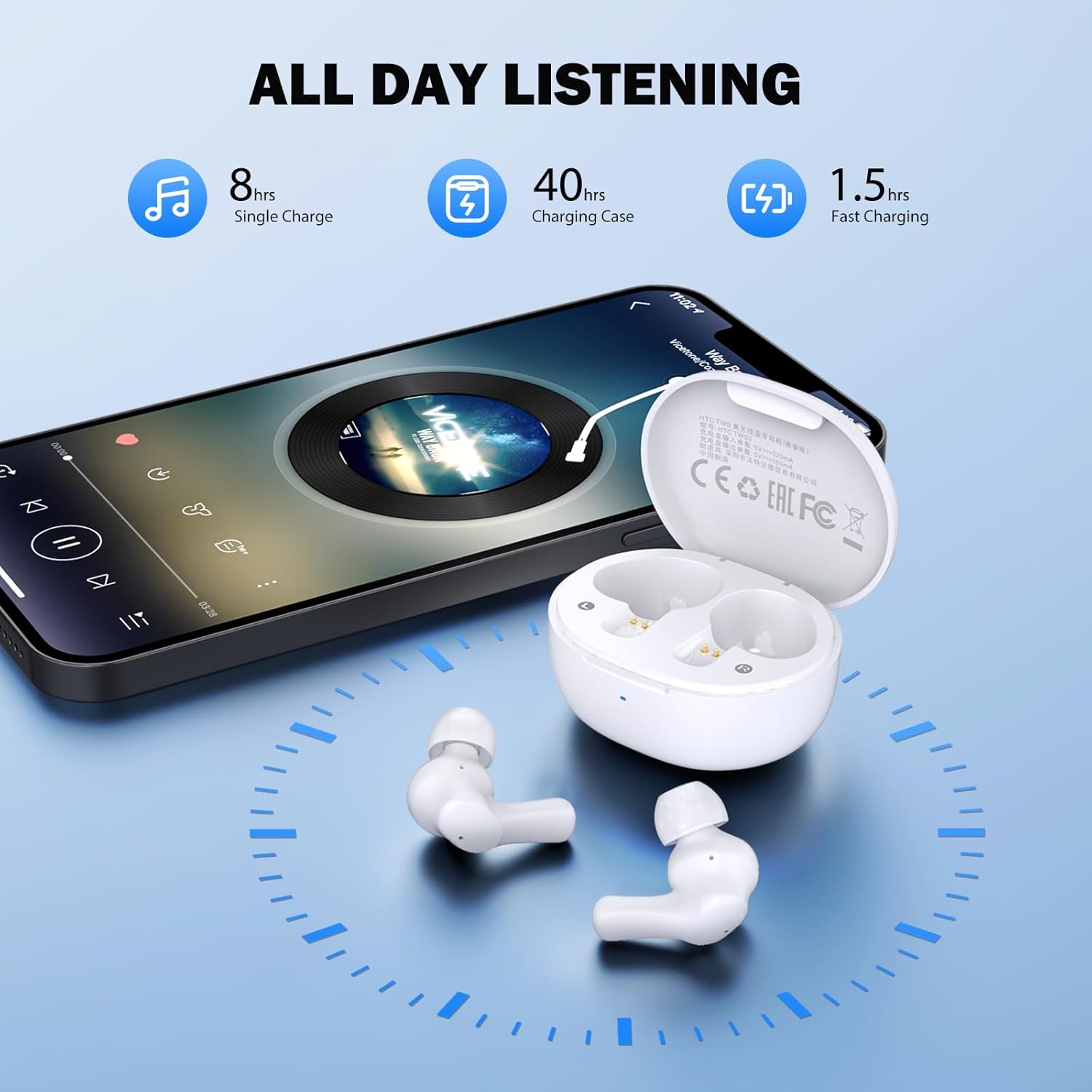
Image: Visual representation of 8 hours single charge, 40 hours with charging case, and 1.5 hours fast charging for the case.
6. וישאַלט און קער
געהעריגע זאָרג גאַראַנטירט די לאַנגלעבעדיקייט און פאָרשטעלונג פון אייערע אויערקנעפּלעך.
רייניקונג
- רייניקט רעגולער די אויערקנעפּלעך און די טשאַרדזשינג קעסטל מיט אַ ווייכן, טרוקענעם, לינט-פֿרייע שטאָף.
- אַראָפּנעמען די אויער־שפּיצן און רייניקן זיי מיט מילד זייף און וואַסער, און דערנאָך טרוקן זיי גוט איידער איר עס צוריק באַפעסטיקט.
- Ensure charging contacts on both earbuds and inside the case are clean and free of debris.
וואַסער קעגנשטעל
The earbuds are rated IPX4 וואַסער קעגנשטעליק, meaning they are protected against splashing water from any direction. They are suitable for exercise and light rain, but should not be submerged in water or exposed to heavy downpours.
סטאָרידזש
ווען נישט אין באַנוץ, לייגט די אויערן-קנעפּלעך אין זייער טשאַרדזשינג קעסטל צו באַשיצן זיי און האַלטן זיי טשאַרדזשד.
7. טראָובלעשאָאָטינג
אויב איר טרעפן ישוז, פּרובירן די פאלגענדע סאַלושאַנז:
- קיין קול: Ensure earbuds are charged, connected to your device, and volume is up on both the earbuds and your device.
- פּאָרינג ישוז: זייט זיכער אז בלועטוט איז איינגעשטעלט אויף אייער דעווייס און די אויערקנעפּלעך זענען אין פּערינג מאָדע. פרובירט אויסצושאַלטן און ווידער אנצושאַלטן בלועטוט אויף אייער דעווייס.
- איין עאַרבוד טוט נישט אַרבעטן: לייגט צוריק ביידע אויערן-קנעפּלעך אין דעם טשאַרדזשינג קעסטל, מאַכט צו דעם דעקל, וואַרט אַ פּאָר סעקונדעס, און נעמט זיי אַרויס ווידער. דאָס סינקראָניזירט זיי אָפט ווידער.
- ינטערמיטאַנט קשר: Ensure there are no obstructions between the earbuds and your device. Keep your device within the 10-meter Bluetooth range.
פאַבריק באַשטעטיק
If problems persist, a factory reset may resolve them:
- שטעלן ביידע עאַרבודז אין די טשאַרדזשינג פאַל.
- With the earbuds in the case, quickly tap each earbud 5 times.
- The LED on the earbuds will flash red, then turn off, indicating a successful reset.
- Close the charging case lid, then open it again to re-initiate pairing.

Image: Visual instructions for initial setup, wearing the earbuds, and performing a factory reset.
8. ספּעסאַפאַקיישאַנז
| שטריך | דעטאַל |
|---|---|
| מאָדעל נאָמען | HTC TWS2 |
| קאַנעקטיוויטי טעכנאָלאָגיע | ווירעלעס (בלוטוט 5.3) |
| בלועטאָאָטה קייט | אַרויף צו 10 מעטער (33 פֿיס) |
| אַודיאָ דרייווער טיפּ | 10 מם דינאַמיש דרייווער |
| אָפטקייַט ראַנגע | 20 הערץ - 20,000 הערץ |
| עאַרבוד באַטערי לעבן | ביז 8 שעה (איין אָפּצאָל) |
| גאַנץ שפּילצייט (מיט קעסטל) | אַרויף צו 40 שעה |
| טשאַרדזשינג צייט פֿאַר עאַרבוד | בעערעך 40 מינוט |
| וואַסער קעגנשטעל מדרגה | IPX4 (Sweatproof, Splash Resistant) |
| קאָנטראָל טיפּ | ריר קאָנטראָל |
| מיקראָפאָן | Built-in with Call Noise Cancellation |
| נידעריק לייטאַנס | 40ms (שפּיל מאָדע) |
| עאַרבוד ווייט | אומגעפער 3.8 גראַם פּער אויערקנעפּל |
| קאַמפּאַטאַבאַל דעוויסעס | iOS, אַנדרויד, ווינדאָוז דעוויסעס |

Image: Diagram illustrating the 10mm diameter loud speaker for HiFi stereo sound.

Image: Visual representation of Bluetooth 5.3 technology benefits: low consumption, faster transmission, lower latency, and built-in microphone.
9. וואָראַנטי און שטיצן
וואָראַנטי אינפֿאָרמאַציע
Your HTC True Wireless Earbuds 1 come with a warranty. Please refer to the included Warranty Card for detailed terms and conditions, including coverage period and what is covered.
קונה שטיצן
For any questions, technical assistance, or warranty claims, please contact HTC customer support. Refer to the contact information provided in your Quick Guide or on the official HTC webפּלאַץ.


