1. הקדמה
This manual provides essential information for the safe and efficient use of your new Hyundai 43-inch 4K Ultra HD Smart LED TV, model UHDHY43WSR4BYI5. Please read these instructions thoroughly before operating the television and retain them for future reference. This guide covers setup, operation, maintenance, and troubleshooting to ensure you get the best experience from your device.

Image: Hyundai 43-inch 4K Smart LED TV front view מיט WebOS צובינד.
2. זיכערקייַט אינפֿאָרמאַציע
כדי צו רעדוצירן דעם ריזיקע פון עלעקטרישן שאק, פייער, אדער שאדן צום טעלעוויזיע, פאלגט שטענדיג די גרונטלעכע זיכערהייט מיטלען:
- מאַכט מקור: פֿאַרבינדט דעם טעלעוויזאָר נאָר צו אַן AC מאַכט אַוטלעט מיט די ריכטיקע וואָלומעןtagE ווי אנגעוויזן אויף די פּראָדוקט פירמע.
- ווענטילאַטיאָן: Ensure adequate ventilation around the TV. Do not block ventilation openings or place the TV on soft surfaces that may block airflow.
- וואַסער און נעץ: שטעלט נישט אויס דעם טעלעוויזאר צו רעגן אדער פייכטקייט. שטעלט נישט קיין זאכן פול מיט פליסיקייטן, ווי למשל וואזאנעס, אויף דעם טעלעוויזאר.
- רייניקונג: נעמט ארויס דעם טעלעוויזאר פון שטעקער איידער איר רייניגט. ניצט א ווייכן, טרוקענעם טוך. ניצט נישט קיין פליסיגע רייניגער אדער אייראזאל רייניגער.
- אָרט: שטעלט דעם טעלעוויזאר אויף א סטאבילן, גלייכן אויבערפלאך. פארמיידט עס צו שטעלן אין דירעקטן זונשייַן אדער לעבן היץ-קוועלער.
- קינדער: Supervise children to ensure they do not climb on the TV or furniture it is placed on.
3. פּעקל אינהאַלט
באַשטעטיקן אַז אַלע זאכן זענען פאַראַן אין פּעקל:
- 1 x Hyundai 43-inch LED TV
- 1 x Remote Control (Magic Remote)
- 1 x באַניצער מאַנואַל
- 1 רענטגענ וואָראַנטי קאַרד
- 1 x Pair of Table Stand
- 1 רענטגענ וואנט בארג קיט
4. פיזישע אויפשטעל
4.1. מאָנטירן דעם טעלעוויזיע
Your TV supports both table-top placement and wall mounting. Choose the method that best suits your environment.
טיש שטאַנד אינסטאַלאַציע:
- לייגט פֿאָרזיכטיק דעם טעלעוויזאָר מיטן פּנים אַראָפּ אויף אַ ווייכער, ריינער ייבערפֿלאַך כּדי צו פֿאַרמייַדן שאָדן צום עקראַן.
- Attach the provided table stands to the designated slots on the bottom of the TV using the screws included in the kit. Ensure they are securely fastened.
- שטעלט דעם טעלעוויזאר אויף א סטאבילן, גלייכן אויבערפלאך.
וואַנט בארג ינסטאַלירונג:
Use the included wall mount kit. Follow the instructions provided with the wall mount kit for safe and secure installation. It is recommended to have professional assistance for wall mounting.

Image: Diagram illustrating the dimensions of the Hyundai 43-inch Smart LED TV, showing width, height, and depth with stand. Also indicates screen size and weights.
4.2. קאַנעקטינג קאַבלעס
Connect the power cord to the TV and then to a wall outlet. Connect your external devices (e.g., set-top box, gaming console, Blu-ray player) to the appropriate ports.
- הדמי: For high-definition audio and video. Your TV has multiple HDMI ports.
- וסב: For connecting USB storage devices for media playback. Your TV has 2 USB ports.
- RF אין: פֿאַר פֿאַרבינדן אַן אַנטענע אָדער קאַבל טעלעוויזיע.
- עטהערנעט (RJ45): פֿאַר אַ דראָטיקער אינטערנעט פֿאַרבינדונג.
- AV IN: פֿאַר פֿאַרבינדן עלטערע דעוויסעס ניצנדיק קאָמפּאָזיט ווידעאָ און סטערעאָ אַודיאָ קייבלס.
- אָפּטיש: פֿאַר דיגיטאַלער אַודיאָ אַרויסגאַנג צו אַ סאַונדבאַר אָדער היים טעאַטער סיסטעם.

בילד: הינטערשטע view of the Hyundai 43-inch Smart LED TV, showing the mounting points and general layout of the back panel.
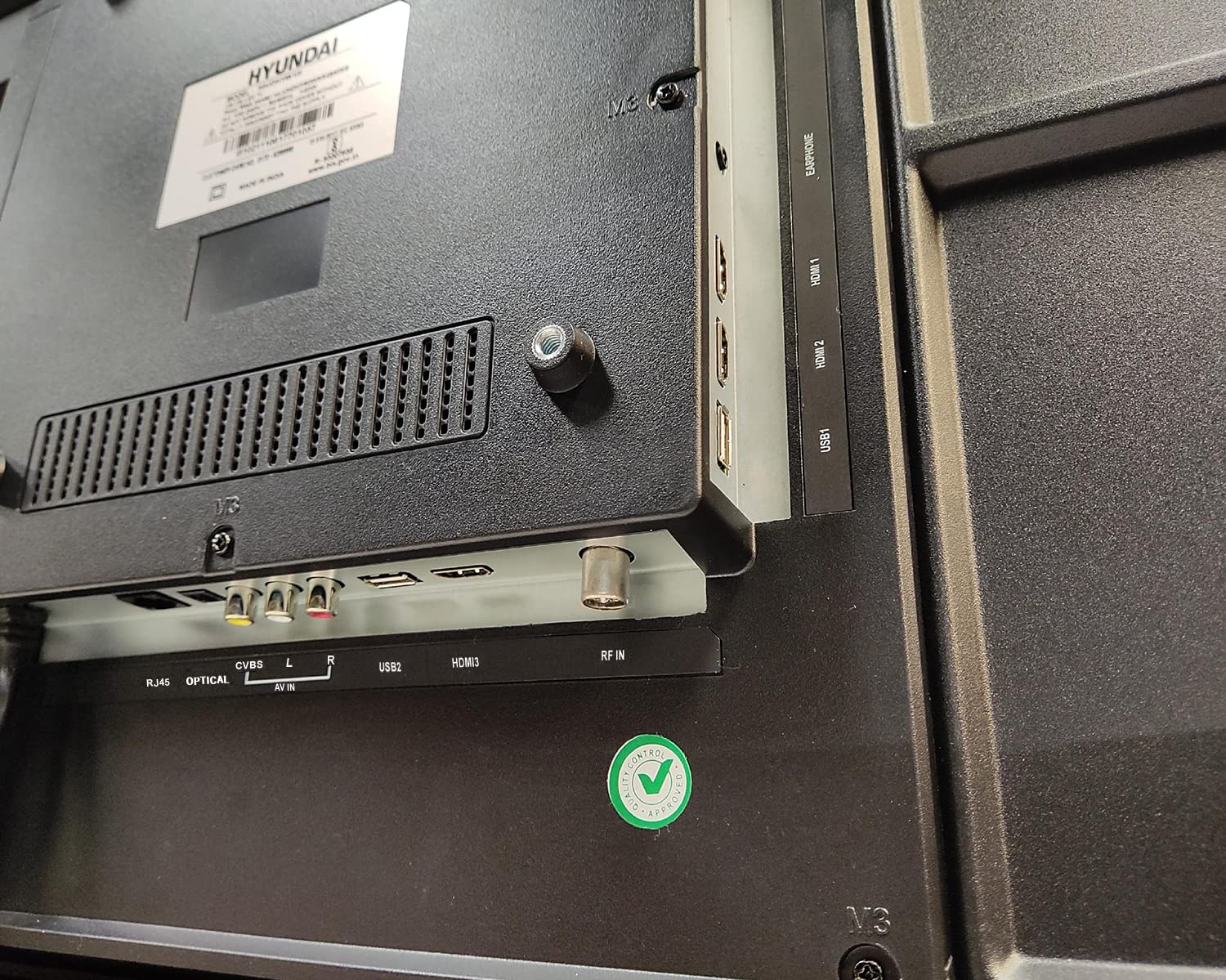
בילד: נאָענט-אַרויף view of the connectivity ports on the rear of the Hyundai 43-inch Smart LED TV, including HDMI, USB, RF IN, AV IN, Optical, and RJ45 Ethernet.
5. Initial Power On & Basic Operation
5.1. ערשטע מאָל אויפשטעלן
After connecting the power, press the power button on the remote control or the TV. The TV will guide you through the initial setup process, which includes:
- שפּראַך סעלעקציע
- לאַנד/געגנט אויסוואַל
- נעץ פֿאַרבינדונג (Wi-Fi אָדער עטהערנעט)
- Channel scanning (for antenna/cable TV)
- אַקצעפּטירן תּנאים און באַדינגונגען
5.2. ניצן די מאַדזשיק רימאָוט
Your Hyundai TV comes with a Magic Remote, offering intuitive control through pointing, clicking, scrolling, and voice commands.

Image: Diagram detailing the features of the Hyundai Magic Remote, including Air Mouse, Single Click Access, Scroll wheel, Voice Control, Universal Control, and Hot Keys for Netflix and Prime Video.
- לופט מאַוס: Point the remote at the screen to move the cursor.
- סקראָל ראָד: Use the wheel to scroll through menus and web pages, or zoom in/out.
- קול קאָנטראָל: Press the microphone button and speak your commands to search for content or control the TV.
- הייסע קיז: Dedicated buttons for popular streaming services like Netflix and Prime Video for quick access.
- וניווערסאַל קאָנטראָל: The Magic Remote can control compatible external devices such as set-top boxes and sound systems.

Image: Front and angled side view of the Hyundai Magic Remote, showcasinג זײַן ערגאָנאָמישן פּלאַן און קנעפּל אויסלייג.
6. סמאַרט טעלעוויזיע פֿעיִטשערז (WebOS)
Your Hyundai TV is powered by WebOS, offering a user-friendly interface and access to a wide range of smart features.
6.1. קאַנעקטינג צו די אינטערנעט
For smart features, connect your TV to the internet:
- ווי-פי: Go to Settings > Network > Wi-Fi Connection, select your network, and enter the password. The TV supports 5 GHz / 2.4 GHz Dual Band Wi-Fi.
- עטהערנעט: Connect an Ethernet cable from your router to the RJ45 port on the TV.
6.2. נאַוויגאַציע WebOS and Apps
די WebOS launcher bar provides quick access to installed applications, inputs, and settings. Use the Magic Remote to navigate.
- פאַר-אינסטאַלירן אַפּפּס: Enjoy popular streaming services like Netflix, Prime Video, Disney+ Hotstar, YouTube, ZEE5, SonyLIV, Voot, ALT Balaji, and Hungama.
- Content Store: Download additional applications from the WebOS Content Store.
- טהינקי קינסטלעכע אינטעליגענץ: Utilize AI features for personalized recommendations and smart home integration.
- מאַגישע מאָביל פֿאַרבינדונג: Easily connect your smartphone to the TV for content sharing.
- ייַנטיילן קאָנטראָל: טיילן אינהאַלט פֿון אייער מאָבילן מיטל צום טעלעוויזיע.
- מיראַקאַסט: Wirelessly mirror your compatible device's screen to the TV.

Image: Hyundai 43-inch Smart TV displaying WebOS home screen with various smart features like ThinQ AI, 4K Upscaling, HDR10, Magic Remote, MEMC, Miracast, Bezel-less design, Dual Band Wi-Fi, Dolby Audio, Bluetooth 5.0, Real Cinema Experience, and Alexa.

בילד: פון אויבן אַראָפּ view of the Hyundai 43-inch Smart TV screen showing popular streaming app logos including Netflix, Disney+ Hotstar, Prime Video, ZEE5, SonyLIV, Voot, YouTube, ALT Balaji, and Hungama.
7. וישאַלט
7.1. רייניקן דעם טעלעוויזאר
שטענדיק אויסשטעקן דעם טעלעוויזאר איידער איר רייניגט.
- פאַרשטעלן: ווישט אָפּ דעם עקראַן מיט אַ ווייכן, לינט-פֿרײַעם שטאָף. פֿאַר שווערע פֿלעקן, ווישט לײַכט.ampווישט דעם שטאָף מיט וואַסער אָדער אַ ספּעציאַליזירטן עקראַן רייניגער (מאַכט זיכער אַז עס איז זיכער פֿאַר LED סקרינז) און ווישט פֿאָרזיכטיק. שפּריצט נישט פֿליסיקייט גלייך אויף דעם עקראַן.
- גוף: ווישט אָפּ דעם טעלעוויזאָר ראַם און הינטערשטן פּאַנעל מיט אַ ווייכן, טרוקענעם שטאָף. פֿאַרמייַדט ניצן אַברייסיוו רייניגער אָדער סאָלווענטן.
7.2. ווייכווארג דערהייַנטיקונגען
Your TV may receive software updates to improve performance and add new features. It is recommended to keep your TV connected to the internet to receive these updates automatically or check for them manually in the settings menu.
8. טראָובלעשאָאָטינג
אויב איר טרעפט פּראָבלעמען מיט אייער טעלעוויזיע, זעט די פאלגענדע געוויינטלעכע פּראָבלעמען און לייזונגען:
| פּראָבלעם | מעגלעך לייזונג |
|---|---|
| קיין מאַכט | Check if the power cord is securely plugged into both the TV and the wall outlet. Ensure the outlet is working. Try a different power outlet. |
| קיין בילד אָדער געזונט | Verify that the correct input source is selected. Check all cable connections (HDMI, AV, etc.). Ensure external devices are powered on. |
| ווייַט קאָנטראָל נישט ארבעטן | Check the batteries and replace them if necessary. Ensure there are no obstructions between the remote and the TV. Re-pair the Magic Remote if it has become disconnected. |
| ווי-פי קשר ישוז | Restart your router and modem. Check the Wi-Fi password. Ensure the TV is within range of your Wi-Fi router. Try a wired Ethernet connection. |
| קלוגע פֿונקציעס רעאַגירן נישט | Check your internet connection. Restart the TV by unplugging it for a few minutes and plugging it back in. Ensure the TV's software is up to date. |
אויב די פראבלעם בלייבט נאך פרובירן די לייזונגען, ביטע קאנטאקטירט קאסטומער סופארט.
9. ספּעסאַפאַקיישאַנז
Key technical specifications for the Hyundai UHDHY43WSR4BYI5 TV:
- מאָדעל: UHDHY43WSR4BYI5
- פאַרשטעלן גרייס: 109 סענטימעטער (43 אינטשעס)
- רעזאלוציע: 4K אולטרא HD (3840 x 2160 פּיקסעלס)
- ווייַז טעכנאָלאָגיע: לעד, א+ דיספלעי טיפ
- אַפּערייטינג סיסטעם: WebOS
- פּראַסעסער: ARM CA55 1.1 GHz Quad Core Processor
- באַראַן: 1.5 גיגאבייט
- ראָם: 8 גיגאבייט
- דערפרישן קורס: 60 הז
- אַודיאָ רעזולטאַט: 20 Watts Box Speakers, Dolby Ultra Surround
- קאַנעקטיוויטי: Wi-Fi (Dual Band 5 GHz / 2.4 GHz), Bluetooth 5.0, HDMI (multiple), USB (2 ports), Ethernet (RJ45), Headphone, AV In, Optical
- ספּעציעלע פֿעיִקייטן: Simplink (HDMI CEC), Magic Mobile Connection, Share Control, ThinQ AI, Magic Remote with Voice Control and Air Mouse, HDR10, 4K Upscaling, MEMC, Miracast, Bezel-less design, Alexa built-in.
- פּראָדוקט דימענשאַנז (LxWxH): 96.2 X 56.7 X 9 סענטימעטער (אָן שטיין)
- נומער וואָג: 6.7 kg (without stand), 6.8 kg (with table stand)
- מאַכט מקור: AC 130 Volts, 108 Watts
- Viewאין ווינקל: 178 דיגריז
10. וואָראַנטי און שטיצן
Your Hyundai 43-inch 4K Ultra HD Smart LED TV comes with a 1-יאָר וואָראַנטי from the date of purchase. Please retain your purchase receipt and warranty card for any warranty claims.
For technical support, service requests, or further assistance, please contact Goldenarch Consumer Electronics Pvt. Ltd., the manufacturer, at שמייכלט@היונדאיסע.אין or call 0172 52-99-999.