1. הקדמה
This manual provides detailed instructions for the safe and efficient operation of your InFocus P120 INL412 Multimedia Projector (Model INL4128). Please read this manual thoroughly before using the projector and keep it for future reference. This projector is designed for high-quality image projection, suitable for various applications including presentations, home entertainment, and gaming.
2. זיכערקייַט אינפֿאָרמאַציע
באַמערקט די פאלגענדע זיכערהייט מיטלען צו פאַרמייַדן שעדיקן צו די פּראָיעקטאָר און ענשור באַניצער זיכערהייט:
- ווענטילאַטיאָן: Ensure adequate ventilation around the projector. Do not block ventilation openings. Maintain a minimum distance of 30 cm (12 inches) from walls or other objects.
- מאַכט מקור: ניצט נאָר די ספּעציפֿיצירטע מאַכט צושטעל און וואָלומעןtage. Connect the power cord securely.
- היץ: The projector generates heat during operation. Do not touch the projector's vents or exhaust areas directly after use.
- ליכט רעזולטאַט: קוק נישט גלייך אריין אין די פּראָיעקטאָר לינז ווען די לamp איז אָן, ווײַל די אינטענסיווע ליכט קען שאַטן די אויגן.
- אָרט: Place the projector on a stable, level surface. Avoid placing it in direct sunlight, near heat sources, or in areas with high humidity or dust.
- רייניקונג: טרענט אפ דעם עלעקטרישן שנור איידער איר רייניגט. ניצט א ווייכן, טרוקענעם טוך. ניצט נישט קיין פליסיקע אדער אייראזאל רייניגער.
- סערוויס: פרובירט נישט צו סערוויסן דעם פראיעקטאר אליין. לאָזט איבער אלע סערוויסינג צו קוואַליפֿיצירטע סערוויס פּערסאָנעל.
3. פּראָדוקט איבערview
3.1 Top Panel and Lens Area
The top panel features the control buttons for basic operation and the lens area with focus and zoom adjustments.

פיגורע 3.1: שפּיץ view of the InFocus P120 INL412 projector, highlighting the control panel on the right and the lens adjustment area on the left. The InFocus logo is visible on the top surface.
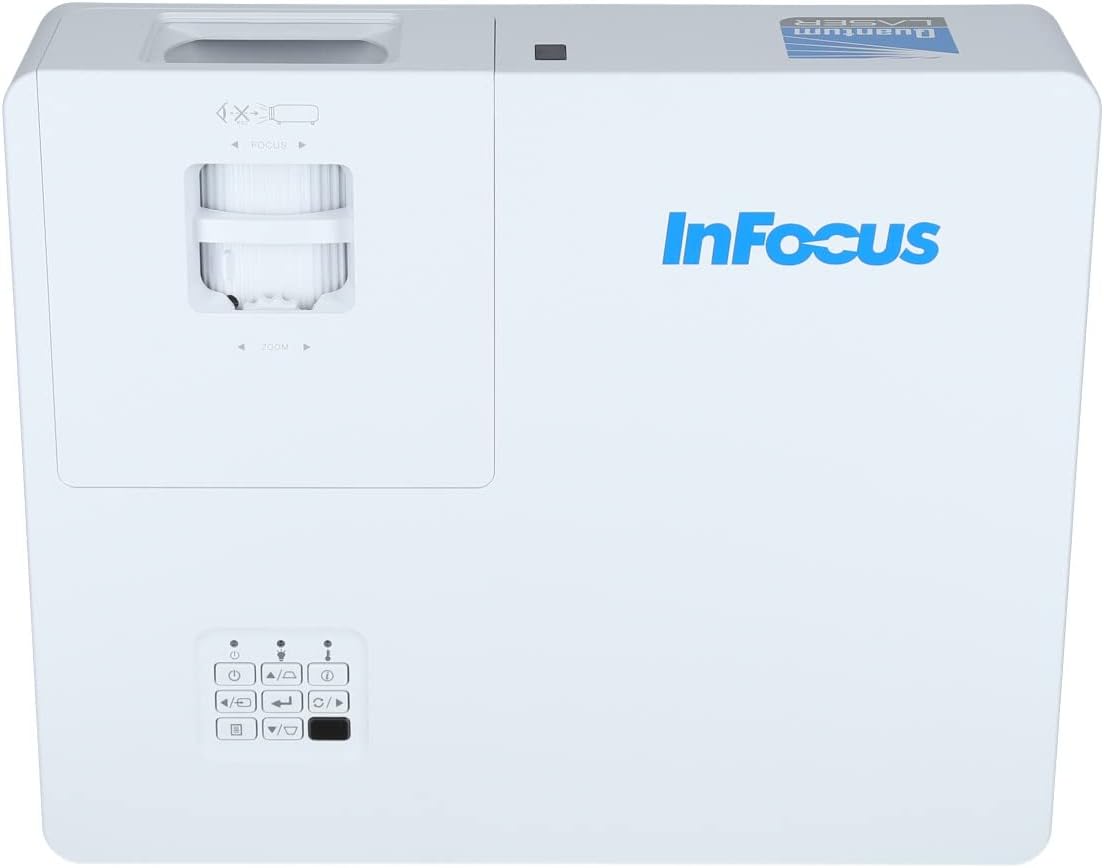
פיגור 3.2: א נענטער view of the projector's top panel, showing the focus and zoom rings near the lens opening and the array of control buttons for power, menu, source selection, and navigation.
3.2 דערציען פּאַנעל קאַנעקשאַנז
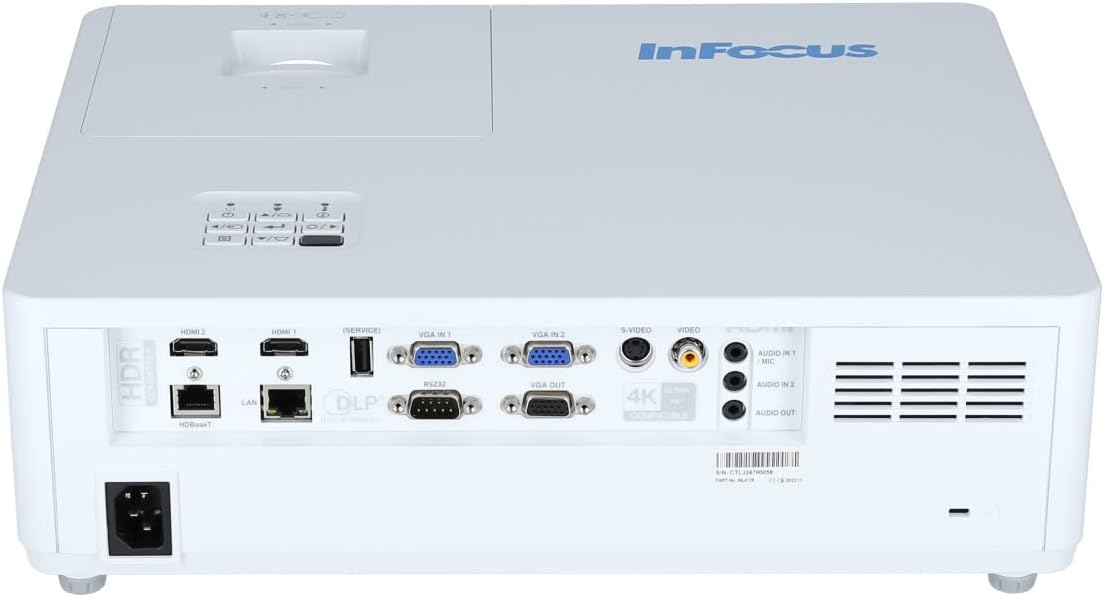
The rear panel provides various input and output ports for connecting external devices.

Figure 3.3: Rear panel of the InFocus P120 INL412 projector, displaying a comprehensive array of connectivity options including HDMI (x2), USB, S-Video, Ethernet (LAN), VGA In (x2), VGA Out, RS232, and Audio In/Out ports. The power input is located on the bottom left.
Key ports include:
- HDMI 1 און 2: For connecting high-definition digital video and audio sources.
- וסב: For connecting USB devices, potentially for media playback or firmware updates.
- S- ווידעא: For connecting older video sources.
- VGA IN 1 & 2: For connecting computers or other devices with VGA output.
- VGA ארויס: פֿאַר פֿאַרבינדן צו אַן עקסטערנעם מאָניטאָר.
- עטהערנעט (לאַן): For network connectivity and control.
- Audio IN 1 & 2 / Audio OUT: פֿאַר אַנאַלאָג אַודיאָ קאַנעקשאַנז.
- רס 232: פֿאַר סעריעל קאָנטראָל.
- מאַכט אַרייַנשרייַב: פֿאַר פֿאַרבינדן דעם AC מאַכט שנור.
3.3 Front and Side Panels
The front panel houses the projection lens and front ventilation, while the side panels feature additional ventilation grilles.

פיגורע 3.4: פראָנט view of the InFocus P120 INL412 projector, displaying the main projection lens on the right and the extensive front ventilation grille on the left, crucial for heat dissipation.
פיגורע 3.5: זייַט view of the InFocus P120 INL412 projector, illustrating the side ventilation grilles that contribute to maintaining optimal operating temperature.
4. סעטאַפּ
4.1 פּראָיעקטאָר פּלאַצירונג
Position the projector on a stable, flat surface or mount it securely. Ensure the projector is within the optimal projection distance for your screen size. Maintain clear space around the projector for proper ventilation.
4.2 קאַנעקטינג דעוויסעס
Before connecting any cables, ensure the projector and all source devices are powered off.
- HDMI קשר: Connect an HDMI cable from your source device (e.g., laptop, Blu-ray player, gaming console) to either the HDMI 1 or HDMI 2 port on the projector.
- VGA קשר: Connect a VGA cable from your computer to either VGA IN 1 or VGA IN 2. For audio, connect a separate audio cable from your computer's audio output to the corresponding Audio IN port on the projector.
- USB קשר: Insert a USB drive into the USB port for media playback (if supported by firmware) or service functions.
- עטערנעט (לאַן) פֿאַרבינדונג: Connect an Ethernet cable to the LAN port for network control or updates.
- אַודיאָ רעזולטאַט: If using external speakers, connect an audio cable from the Audio OUT port on the projector to your audio system.
4.3 מאַכט קאַנעקשאַן
Connect the power cord to the projector's power input and then plug the other end into a grounded electrical outlet.
5. אַפּערייטינג ינסטרוקטיאָנס
5.1 פּאַוערינג אויף / אַוועק
- מאַכט אויף: דרוק די מאַכט קנעפּל אויף דעם פּראָיעקטאָר'ס קאָנטראָל פּאַנעל אָדער די ווײַטקאָנטראָל. די מאַכט אינדיקאַטאָר ליכט וועט זיך טוישן.
- מאַכט אַוועק: דרוק די מאַכט button again. A confirmation message may appear. Press the button a second time to confirm shutdown. Allow the projector to cool down before unplugging it.
5.2 אַדזשאַסטירן פאָקוס און זום
דרייט דעם פאָקוס רינג אַרום דער לינז ביז דאָס בילד דערשיינט שאַרף און קלאָר. ניצט דעם זום רינג צו סטרויערן די בילד גרייס צו פּאַסן צו אייער עקראַן.
5.3 אויסקלייבן די איינגאבע מקור
דרוק די מקור button on the control panel or remote control to cycle through available input sources (HDMI 1, HDMI 2, VGA 1, VGA 2, S-Video, USB). Select the input corresponding to your connected device.
5.4 מעניו נאַוויגאַציע
ניצן די מעניו button to access the on-screen display (OSD) menu. Use the arrow buttons to navigate through menu options and the אַרייַן קנעפּל צו אויסקלייבן. דריק מעניו ווידער צו אַרויסגאַנג.
6. וישאַלט
6.1 רייניקן די לינז
Gently wipe the lens with a soft, lint-free cloth specifically designed for optical surfaces. Do not use abrasive cleaners or excessive force, as this can scratch the lens.
6.2 Cleaning the Projector Exterior
ניצט אַ ווייכע, טרוקענע שטאָף צו רייניקן דעם פּראָיעקטאָר'ס קasing. For stubborn dirt, dampen the cloth slightly with water, then wipe dry immediately. Avoid getting liquids into the projector's openings.
6.3 Ventilation Care
Regularly check the projector's ventilation grilles for dust accumulation. Use a soft brush or a vacuum cleaner with a brush attachment to gently remove dust from the vents to ensure proper airflow and prevent overheating.
7. טראָובלעשאָאָטינג
7.1 קיין בילד נישט געוויזן
- Ensure the projector is powered on and the power indicator light is solid.
- Verify that the video cable (HDMI, VGA, etc.) is securely connected to both the projector and the source device.
- קאָנטראָלירט אַז די ריכטיקע אַרייַנגאַנג מקור איז אויסגעקליבן אויף דעם פּראָיעקטאָר.
- Confirm that the source device (laptop, player) is powered on and outputting a signal.
7.2 בילד איז פארשוואומען אדער נישט אין פאקוס
- אַדזשאַסטירן דעם פאָקוס רינג אויף דער פּראָיעקטאָר לינזע ביז די בילד איז שאַרף.
- זיכער מאַכן אַז דער פּראָיעקטאָר איז אין דער ריכטיקער דיסטאַנץ פֿון דעם עקראַן.
- רייניקט די פּראָיעקטאָר לינז אויב עס קוקט אויס שמוציק.
7.3 קיין געזונט
- If using HDMI, ensure the source device's audio output is set to HDMI.
- If using VGA, ensure a separate audio cable is connected from the source to the projector's Audio IN port.
- קאָנטראָלירט די וואָלומען סעטטינגס אויף ביידע דעם פּראָיעקטאָר און דעם מקור מיטל.
- If using external speakers, ensure they are properly connected to the Audio OUT port and powered on.
8. ספּעסאַפאַקיישאַנז
| שטריך | דעטאַל |
|---|---|
| סאָרט | ינפאָקוס |
| פאַבריקאַנט | אין פאָקוס |
| מאָדעל נאָמען | P120 INL412 |
| מאָדעל נומער | INL4128 |
| יאָר | 2023 |
| ייַזנוואַרג צובינד | Ethernet, HDMI, S-Video, USB |
| נומער פון זאכן | 1 |
| אַספּעקט פאַרהעלטעניש | 16:9 |
| וואָסtage | 341 וואטס |
| באַטעריז אַרייַנגערעכנט | ניין |
| באַטעריז פארלאנגט | ניין |
| פאָרם פאַקטאָר | דעסקטאָפּ |
| מאַונטינג טיפּ | טיש בארג |
| רימאָוט קאָנטראָל ינקלודעד | יא |
| פּראָדוקט דימענשאַנז | 56.13 X 46.48 X 25.15 סענטימעטער |
| פּונקט וואָג | 5.5 קג |
| מאַקסימום בילד גרייס | 308.28 אינטשעס |
| מינימום בילד גרייס | 910.63 מילאַמיטערז |
| ערשטער בנימצא טאָג | 5 יאנואר 2022 |
9. וואָראַנטי און שטיצן
For warranty information and technical support, please refer to the documentation included with your purchase or visit the official InFocus webזייטל. האַלט דיין קויפן באַווייַז פֿאַר וואָראַנטי קליימז.


