הקדמה
This manual provides comprehensive instructions for setting up, operating, and maintaining your new Tecno Pop 5 LTE smartphone. Designed for seamless performance and a vibrant user experience, your device comes equipped with advanced features to keep you connected and entertained.

Figure 1: Tecno Pop 5 LTE - Front and Back View
פּראָדוקט איבערview ווידעא
Watch this official video for a quick overview of the Tecno Pop 5 LTE's main features and design.
Video 1: Tecno Pop 5 LTE Product Overview
פּעקל אינהאַלט
Upon unboxing your Tecno Pop 5 LTE, please ensure all the following items are present:
- Tecno Pop 5 LTE Smartphone
- מאַכט אַדאַפּטער
- מיקראָ וסב קאַבלע
- סים עדזשעקטאָר טול
סעטאַפּ גייד
SIM and SD Card Installation
Your Tecno Pop 5 LTE supports dual Nano SIM cards and expandable memory via a microSD card.
- געפינט די SIM טאַץ אויף דער זייט פון דעם מיטל.
- שטעקט אריין דעם סים קארטל ארויסווארפער געצייג אין דעם קליינעם לאך לעבן דעם טרעי און דריקט לײַכט ביז דער טרעי קומט ארויס.
- לייגט אריין אייער נאַנאָ סים קאַרטל(ס) און/אָדער מיקראָSD קאַרטל אין די באַשטימטע סלאָץ אויף דער טאַץ, און זאָרגט אַז די אָריענטאַציע איז ריכטיק.
- שטופּ פֿאָרזיכטיק צוריק דעם טאַץ אין דעם אַפּאַראַט ביז עס איז גלײַך מיט דער זײַט.
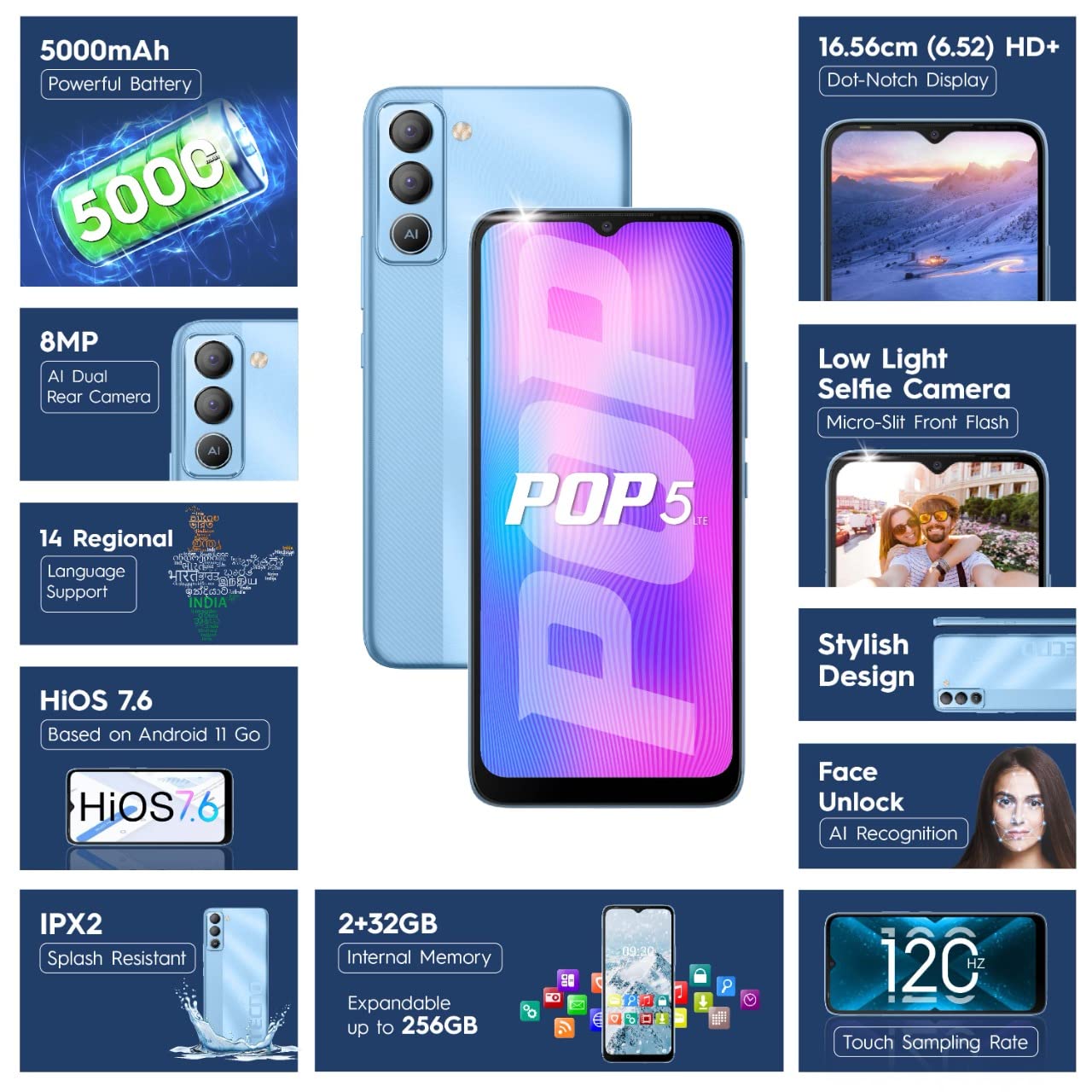
Figure 2: SIM Tray Insertion
ערשטע איינשטראָם און סעטאַפּ
Press and hold the power button located on the side of the device until the Tecno logo appears. Follow the on-screen prompts to select your language, connect to Wi-Fi, and set up your Google account.
שליסל פֿעיִקייטן איבערview
וויבראַנט ווייַז
The Tecno Pop 5 LTE features a vibrant 6.52-inch Dot Notch HD+ display with a 90% screen-to-body ratio, offering an immersive viewing experience. With up to 480 nits maximum brightness, content remains clear even in bright conditions.

Figure 3: Immersive Dot Notch Display
לאַנג-לאַסטינג באַטערי
יקוויפּט מיט אַ שטאַרק 5000 מאַה באַטאַרייע, the Tecno Pop 5 LTE provides extended usage times, including up to 48 hours of video playback and 31 days of standby time. The Ultra Power Saving Mode further optimizes battery life.
אַוואַנסירטע קאַמעראַ סיסטעם
Capture clear and detailed images with the 8MP Portrait Dual rear Camera, featuring excellent image processing and a dual flashlight for enhanced low-light photography. For selfies, the 5MP F2.0 Aperture Front Camera includes a Micro Slit Front Flash with adjustable brightness for brighter night selfies.

פיגור 4: הינטערשטע קאַמעראַ מאָדול
פאָרשטעלונג און סטאָרידזש
The device runs on a 2 גיגאבייט באַראַן and is powered by a MediaTek Helio A22 2GHz Quad-core processor, ensuring smooth daily operations. It comes with 32 גיגאבייט פון אינערלעכער סטאָרידזש, expandable up to 256GB, providing ample space for your apps and media.
ווייכווארג און זיכערהייט
Your smartphone operates on HiOS 7.6 based on Android 11, offering a user-friendly interface and various localized features. Security features include פּנים ופשליסן with closed eye protection for instant and secure access. Additional features like Kids Mode, Anti-Theft Alarm, Vault 2.0, and Voice Changer enhance usability and safety.
ענכאַנסט געווער
The Tecno Pop 5 LTE is Splash Resistant up to IPX2 rating, providing protection against water splashes.
אַפּערייטינג דיין מיטל
יקערדיק נאַוויגאַציע
Navigate your device using intuitive touch gestures. The 120 הערץ טאָוטש סampלינג קורס ensures a smoother and more responsive touch experience.
Using Face Unlock
To set up Face Unlock, go to סעטטינגס > זיכערהייט > פנים אויפשליסן and follow the instructions. Once set up, simply look at your phone to unlock it instantly.
אַפּאַראַט פאַנגקשאַנז
Open the Camera app to access various modes like AI Portrait, HDR, AI Beauty, and Filters. Tap the shutter button to capture photos or switch to video mode for 1080P video recording.
מאַכט שפּאָרן מאָדע
To extend battery life, activate Ultra Power Saving Mode via the quick settings panel or in Settings > Battery Lab.
Regional Language Support
The device supports 14 regional languages. To change your device language, go to Settings > System > Languages & input > Languages.
Phone Cloner
Easily migrate your data from an old device to your new Tecno Pop 5 LTE using the Phone Cloner feature, which allows one-tap data migration without using mobile data.
וישאַלט און זאָרג
באַטערי קער
To maximize battery lifespan, avoid extreme temperatures and try to keep the battery charge between 20% and 80%. Use only the provided adaptor and Micro USB cable for charging.
רייניקונג דיין מיטל
Use a soft, lint-free cloth to gently wipe the screen and body of your phone. Avoid using harsh chemicals or abrasive materials.
ווייכווארג דערהייַנטיקונגען
Regularly check for and install software updates to ensure your device has the latest features, security patches, and performance improvements. You can find updates in סעטטינגס > סיסטעם > סיסטעם דערהייַנטיקונג.
טראָובלעשאָאָטינג
פּראָסט ישוז און סאַלושאַנז
- מיטל נישט קער אויף: זיכער מאַכן אַז די באַטאַרייע איז אויפגעלאָדן. פֿאַרבינדט דעם טעלעפאָן צום טשאַרדזשער פֿאַר לפּחות 15 מינוט איידער איר פּרוּווט עס אָנצוצינדן.
- עקראַן רעאַגירט נישט: Try restarting the device by holding the power button for 10-15 seconds. If the issue persists, a factory reset might be necessary (באַמערקונג: דאָס וועט אויסמעקן אַלע דאַטן).
- שלעכט נעץ סיגנאַל: קאָנטראָלירט ווי אייער סים קאַרטל איז אריינגעשטעלט. גייט אריבער צו א געגנט מיט בעסערע נעץ קאַווערידזש.
- אַפּפּס קראַשן: אויסמעקן דעם קעש פון דער פראבלעמאטישער אפליקאציע (סעטטינגס > אַפּפּס און נאָוטאַפאַקיישאַנז > אַפּ אינפֿאָרמאַציע > [אַפּ נאָמען] > סטאָרידזש און קאַש > ויסמעקן קאַש). If the issue continues, reinstall the app.
טעכניש ספּעסאַפאַקיישאַנז
דיטיילד ספּעסאַפאַקיישאַנז
| שטריך | דעטאַל |
|---|---|
| מאָדעל נומער | BD4i |
| אָפּערייטינג סיסטעם | HiOS 7.6 based on Android 11 |
| באַראַן | 2 גיגאבייט |
| אינערלעכער סטאָרידזש | 32 GB (Expandable up to 256GB) |
| פּראַסעסער | MediaTek Helio A22, 2 GHz Quad-core |
| ווייַז | 6.52" Dot Notch HD+ (720p), 480 nits max. brightness, 120Hz Touch Sampלינג קורס |
| דערציען אַפּאַראַט | 8MP + AI Lens, Dual Flashlight, F2.0 Aperture, AI Portrait, HDR, AI Beauty, Filters, 16 AI Scene Detection, 4X Zoom, 1080P Video |
| פראָנט אַפּאַראַט | 5MP F2.0 Aperture, Micro Slit Front Flash |
| באַטערי | 5000 מאַה ליטהיום פּאָלימער |
| קאַנעקטיוויטי | Cellular (LTE), Bluetooth, Wi-Fi, USB, GPS/GNSS/BEIDOU/Galileo |
| אַודיאָ דזשאַק | 3.5 מם |
| דימענשאַנז | 16.5 X 7.6 X 0.9 סענטימעטער |
| וואָג | 195 ג |
| קאָליר | אייז בלו |
| ספּעציעלע פֿעיִקייטן | Enhanced Regional Language Supports (14 languages), Kids Mode, Anti Theft Alarm, Vault 2.0, Voice Changer, Splash Resistant (IPX2), Face Unlock (0.93 Sec Instant Unlock) |
וואָראַנטי און שטיצן
פּראָדוקט שטיצן
Your Tecno Pop 5 LTE comes with a 1 יאָר וואָראַנטי from the manufacturer, G Mobiles India.
For any technical assistance, service, or warranty claims, please contact Tecno customer support. You can find more information on their official website or visit one of their 950+ Service Centers across India.
Manufacturer: G Mobiles India, Ismartu India Private Limited, D-197 and 198, Sector 63, Noida, Gautam Buddha nagar, Uttar Pradesh 201301.
Importer: G-Mobile Devices Private Limited, Unit No. B 301, Third Floor Tower B Plot no 7, Sec - 142, Noida, Uttar Pradesh PIN - 201301.
For further information, you may also visit the product detail page on Amazon.in.


