הקדמה
The AOLION Stereo Headset Adapter is designed to enhance your gaming experience on Xbox One controllers. This adapter allows you to connect most wired stereo gaming headsets with a 3.5mm audio jack (CTIA plug standard) directly to your Xbox controller, providing convenient control over game sound and voice chat.
פּעקל אינהאַלט
- 1 × AOLION Stereo Headset Adapter
- 1 × באַניצער מאַנואַל
פּראָדוקט איבערview
The adapter features intuitive controls for managing your audio experience during gameplay.

פיגורע 1: פראָנט view of the headset adapter showing control buttons.
- Game Balance Button: Adjusts the balance towards game audio.
- Chat Balance Button: Adjusts the balance towards voice chat audio.
- מיקראָפאָן שטום קנעפּל: נעמט אָן/אויס דעם מיקראָפאָן.
- באַנד אַרויף קנעפּל: Increases overall volume.
- באַנד אַראָפּ קנעפּל: Decreases overall volume.
- 3.5 מם אַודיאָ דזשאַק: For connecting your stereo gaming headset.
- וסב קאַנעקטער: For connecting to the Xbox controller.
קאַמפּאַטאַבילאַטי
This headset adapter is compatible with a wide range of Xbox One controllers and stereo gaming headsets:
- Xbox Controllers: Xbox One, Xbox One S, Xbox One X, Xbox Elite Wireless Controller Series 1, Xbox Elite Wireless Controller Series 2, Xbox Series S, and Xbox Series X Controllers.
- העאַדסעץ: Most wired stereo gaming headsets featuring a 3.5mm audio jack (using the CTIA plug standard).

Figure 2: The adapter is compatible with multiple Xbox controller models.

Figure 3: The adapter supports standard 3.5mm CTIA headsets.
סעטאַפּ
Setting up your AOLION Stereo Headset Adapter is a simple plug-and-play process.
- Connect the Adapter to the Controller: Align the USB connector of the headset adapter with the expansion port at the bottom of your Xbox controller. Gently push until it clicks securely into place.
- פֿאַרבינדט אייער כעדסעט: Plug your wired stereo gaming headset's 3.5mm audio jack into the corresponding port on the bottom of the headset adapter.
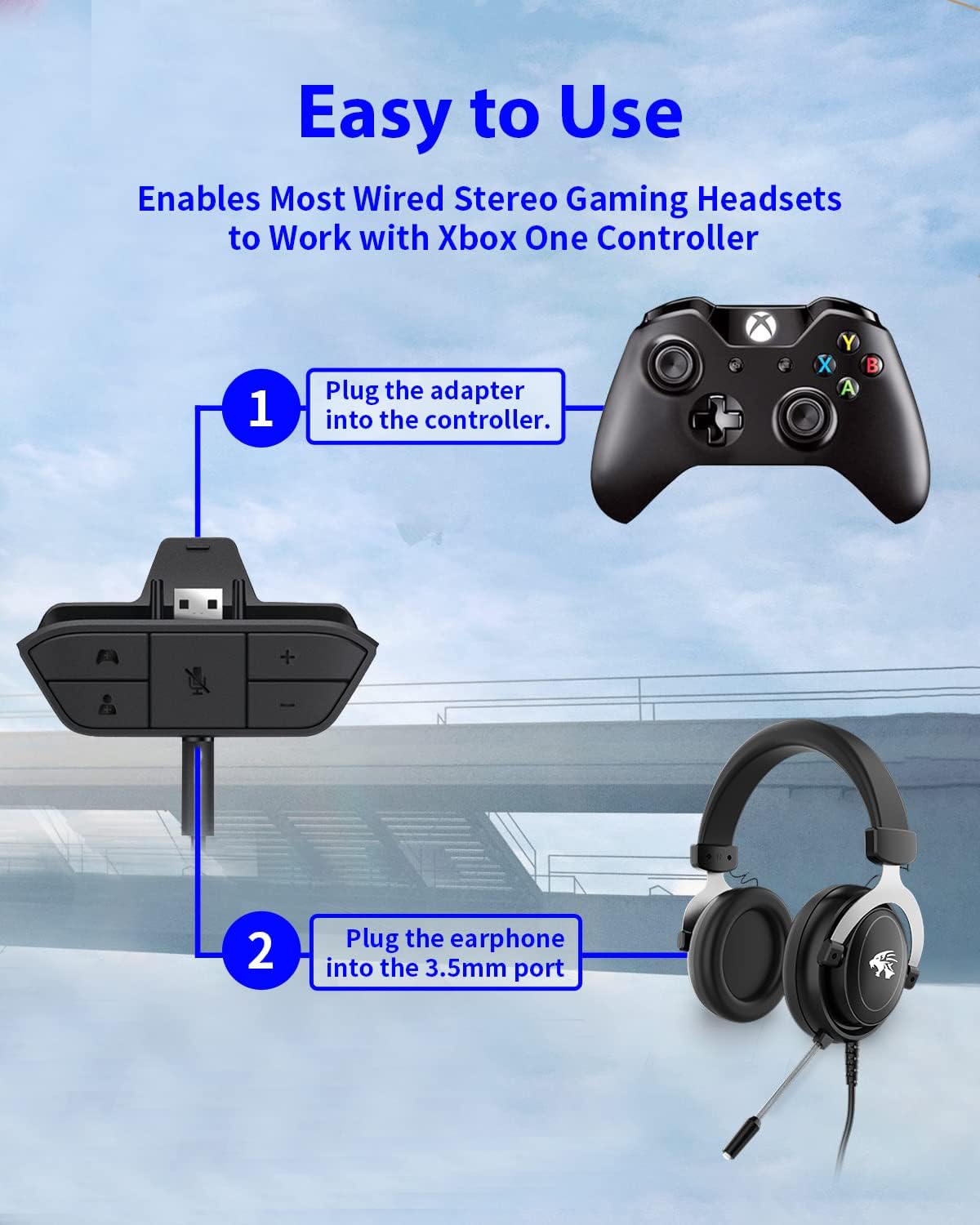
Figure 4: Step-by-step connection guide for the headset adapter.
Video 1: Demonstration of connecting the headset adapter to an Xbox controller.
וויכטיק באַמערקונג: For optimal performance and to resolve potential audio issues, it is recommended to update your Xbox controller's firmware after connecting the adapter. This can typically be done through your Xbox console's settings (Settings > Devices & connections > Accessories > Select your controller > ... > Controller settings > Update firmware).
אַפּערייטינג ינסטראַקשאַנז
Once connected, use the buttons on the adapter to control your audio:
- באַנד אַרויף / אַראָפּ (+/-): Press the '+' button to increase the overall volume of both game and chat audio. Press the '-' button to decrease it.
- Microphone Mute (Microphone Icon): Press this button to mute or unmute your microphone. An indicator light (if present) or on-screen notification may confirm the mute status.
- Game/Chat Balance (Controller Icon / Person Icon):
- דרוק די קאָנטראָללער יקאָן button to increase game audio volume and decrease chat audio volume.
- דרוק די מענטש יקאָן button to increase chat audio volume and decrease game audio volume.
פיגורע 5: דעטאַילעד view of the adapter's control buttons.
וישאַלט
To ensure the longevity and optimal performance of your headset adapter, follow these simple maintenance guidelines:
- האַלט דעם אַדאַפּטער ריין און פריי פון שטויב און שמוץ. ניצט אַ ווייכע, טרוקענע שטאָף פֿאַר רייניקונג.
- פֿאַרמײַדט אויסשטעלן דעם אַדאַפּטער צו עקסטרעמע טעמפּעראַטורן, פֿײַכטקייט, אָדער דירעקטער זון.
- פּרוּווט נישט צו צענעמען אָדער פאַרריכטן דעם אַדאַפּטער אַליין, ווײַל דאָס וועט בטל מאַכן די וואָראַנטי.
- האַלט דעם אַדאַפּטער אין אַ זיכערן אָרט ווען עס איז נישט אין באַנוץ, כּדי צו פאַרמייַדן גשמיותן שאָדן.
טראָובלעשאָאָטינג
If you encounter issues with your AOLION Stereo Headset Adapter, please refer to the following common solutions:
| פּראָבלעם | מעגלעך סיבה / לייזונג |
|---|---|
| No audio or poor audio quality (buzzing, peaking) |
|
| מיקראָפאָן טוט נישט אַרבעטן |
|
| Game/Chat balance not working |
|
אויב די פראבלעם בלייבט נאך פרובירן די שריט, ביטע קאנטאקטירט קאסטומער סופארט.
ספּעסאַפאַקיישאַנז
| שטריך | דעטאַל |
|---|---|
| מאָדעל נומער | WGXB004005 |
| סאָרט | אַאָליאָן |
| פּראָדוקט דימענשאַנז (L x W x H) | 3.15 X 1.57 X 0.79 אינטשעס (8 X 4 X 2 סענטימעטער) |
| קאָליר | שוואַרץ |
| קאַנעקטער טיפּ | Auxiliary (3.5mm CTIA standard) |
| קאַמפּאַטאַבאַל דעוויסעס | Xbox One, One S, One X, Elite 1, Elite 2, Series S, Series X Controllers; 3.5mm CTIA Stereo Headsets |
וואָראַנטי און שטיצן
AOLION stands behind the quality of its products. This Stereo Headset Adapter comes with:
- 60-טאָג געלט-צוריק גאַראַנטירן: If you are not entirely satisfied with your purchase within 60 days, you may be eligible for a full refund.
- 24-חודש וואָראַנטי: We provide a 24-month warranty against manufacturing defects from the date of purchase.
For any questions, concerns, or warranty claims, please contact us through Amazon. We are committed to responding to your inquiries within 12 hours to ensure your complete satisfaction.


