1. הקדמה
This manual provides comprehensive instructions for the installation, operation, and maintenance of your COUGAR Archon 2 RGB Mid Tower Case. Please read this manual carefully before beginning installation to ensure proper setup and to maximize the performance and longevity of your product.

פיגור 1.1: ווינקלדיק view of the COUGAR Archon 2 RGB Mid Tower Case, showcasing the tempered glass side panel and front RGB fans.
2. פּראָדוקט פֿעיִקייטן
The COUGAR Archon 2 RGB Mid Tower Case is designed for PC enthusiasts seeking a balance of aesthetics, airflow, and functionality. Key features include:
- Elegant Design with Tempered Glass: A sleek black finish combined with a tempered glass side panel allows for a clear view of internal components and RGB lighting.
- אָפּטימיזירטער לופטפלוס: Supports multiple fan configurations and includes three pre-installed 120mm ARGB fans at the front for efficient cooling.
- ברייט קאַמפּאַטאַבילאַטי: Accommodates Mini ITX, Micro ATX, and ATX motherboards.
- Ampסטאָרידזש אָפּציעס: Provides bays for both 3.5" HDDs and 2.5" SSDs.
- Convenient Front I/O: Features USB 3.0 and USB 2.0 ports for easy peripheral connectivity.
- RGB לייטינג קאָנטראָל: Integrated ARGB fans offer customizable lighting effects.

פיגורע 2.1: פראָנט view of the COUGAR Archon 2 RGB case, highlighting the three pre-installed ARGB fans.
3. סעטאַפּ גייד
Follow these steps to properly install your components into the COUGAR Archon 2 RGB case.
3.1. פאַר-ינסטאַלירונג טשעקליסט
- Ensure you have all necessary components: motherboard, CPU, RAM, GPU, power supply, storage drives, and appropriate tools (screwdriver, zip ties).
- ארבעט אויף א ריינער, סטאטיק-פרייער אויבערפלאך. באטראכט צו ניצן אן אנטי-סטאטישן האנטגעלענק-רימען.
3.2. עפענען דעם קעיס
- Carefully remove the tempered glass side panel by unscrewing the thumbscrews located at the rear of the case. Set the panel aside on a soft, flat surface to prevent scratches.
- Remove the opposite metal side panel by unscrewing its thumbscrews and sliding it backward.
3.3. מאָטהערבאָאַרד ינסטאַללאַטיאָן
- Install the I/O shield (if not pre-attached to your motherboard) into the rear opening of the case.
- גלייכט אויס אייער מאַדערבאָרד מיט די סטאַנדאָפס אינעווייניק פון דעם קעיס. מאַכט זיכער אַז אַלע סטאַנדאָפס פּאַסן צו די שרויף לעכער אויף אייער מאַדערבאָרד.
- באַפעסטיקט דאָס מאַדערבאָרד מיט די צוגעשטעלטע שרויפן. נישט צו שטאַרק אָנציִען.
3.4. מאַכט צושטעלן אַפּאַראַט (PSU) ינסטאַלירונג
- Locate the PSU mounting area at the bottom rear of the case.
- Slide your PSU into the designated bay from the rear of the case, ensuring the fan faces downwards for optimal cooling (if the case has a bottom vent).
- באַפֿעסטיקן די PSU מיט שרויפֿן פֿון דער הינטערשטער זײַט פֿון דער קעיס.
3.5. סטאָרידזש דרייוו אינסטאַלאַציע
The Archon 2 RGB supports both 3.5" HDDs and 2.5" SSDs.
- For 3.5" HDDs: Locate the drive cage usually beneath the PSU shroud. Slide the HDD into the drive bay and secure it with screws.
- For 2.5" SSDs: Mount SSDs to the designated mounting points on the back of the motherboard tray or within the drive cage, securing them with screws.
3.6. עקספּאַנשאַן קאַרטל (GPU) ינסטאַלירונג
- אַראָפּנעמען די נייטיקע PCIe סלאָט דעקל פון די הינטערשטע טייל פון די קעסטל.
- Insert your graphics card or other expansion cards into the appropriate PCIe slot on the motherboard.
- Secure the card with screws to the case.
3.7. Cable Management and Front Panel Connections
Route all power and data cables neatly behind the motherboard tray. Connect the front panel I/O cables (USB, audio, power switch, reset switch, LED indicators) to their respective headers on the motherboard according to your motherboard manual.

Figure 3.1: Dimensions of the COUGAR Archon 2 RGB case, useful for planning component fit and space.
4. אַפּערייטינג ינסטרוקטיאָנס
4.1. פּאַוערינג אויף
Once all components are installed and cables are connected, replace both side panels. Connect your monitor, keyboard, mouse, and power cable to the PSU. Press the power button on the top panel of the case to start your system.
4.2. RGB לייטינג קאָנטראָל
The pre-installed ARGB fans are typically controlled via a dedicated button on the case's front I/O panel or through your motherboard's RGB software (if connected to an ARGB header). Refer to your motherboard manual for software-based control options.
5. וישאַלט
רעגולערע אויפהאלטונג העלפט זיכער מאכן די בעסטע פאָרשטעלונג און לאַנגלעבעדיקייט פון אייערע פּיסי קאָמפּאָנענטן.
- שטויב רייניקונג: Periodically clean dust filters (if present) and internal components using compressed air. Ensure the system is powered off and unplugged before cleaning.
- קאַבלע פאַרוואַלטונג: Ensure cables are neatly routed to avoid obstructing airflow.
- פאָכער דורכקוק: Check fans for dust buildup or obstructions that could impede their operation.
6. טראָובלעשאָאָטינג
אויב איר טרעפט פּראָבלעמען, זעט די פאלגענדע געוויינטלעכע טראָובלעשווטינג טריט:
- סיסטעם גייט נישט אן:
- Check all power connections, including the PSU to the wall outlet, PSU to motherboard (24-pin and CPU 8-pin), and front panel power switch header.
- זיכער מאַכן אַז דער PSU סוויטש איז אין דער 'ON' פּאָזיציע.
- Fans Not Spinning / RGB Not Working:
- Verify fan power cables are securely connected to the motherboard or fan controller.
- Check ARGB headers for proper connection to the motherboard or RGB controller.
- Ensure RGB software or case button is correctly configured.
- קיין אַרויסווייַז רעזולטאַט:
- Confirm the monitor cable is connected to the graphics card (not the motherboard integrated graphics, unless no dedicated GPU is present).
- לייג צוריק די גראַפיקס קאַרטל און ראַם מאָדולן.
7. ספּעסאַפאַקיישאַנז
Detailed specifications for the COUGAR Archon 2 RGB Mid Tower Case:
| שטריך | דעטאַל |
|---|---|
| מאָדעל נאָמען | ARCHON 2 RGB |
| טיפּ פון קאַסטן | מיד טאַוער |
| מאָטהערבאָאַרד קאַמפּאַטאַבילאַטי | מיני ITX, מיקראָ ATX, ATX |
| דימענשאַנז (LxWxH) | 14.96 X 8.27 X 18.5 אינטשעס (380 X 210 X 470 מם) |
| פּונקט וואָג | 11.37 פונט (5.17 קג) |
| מאַטעריאַל | מעטאַל, געהאַרצטע גלאָז |
| קאָליר | שוואַרץ |
| פאַר-אינסטאַלירן פאַנס | 3 x 120mm ARGB fans (Front) |
| פען שטיצע (פראנט) | 3 X 120 מם אָדער 2 X 140 מם |
| איך / אָ פּאָרץ | 1 x USB 2.0, 2 x USB 3.0, Audio In/Out |
| מאַכט צושטעלן מאַונטינג טיפּ | דנאָ בארג |
| קאָאָלינג אופֿן | לופט |
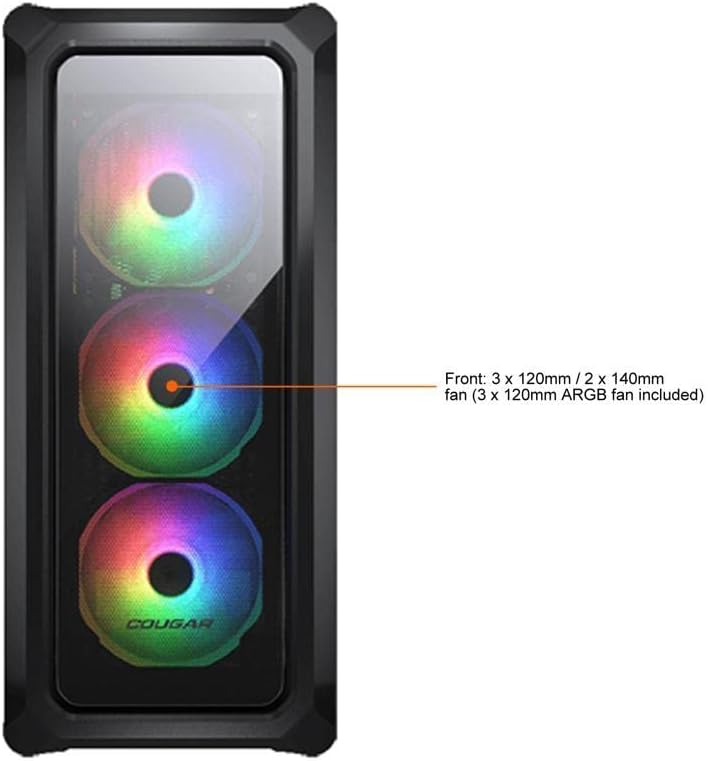
Figure 7.1: Front panel fan configuration and size options for the COUGAR Archon 2 RGB case.
8. וואָראַנטי און שטיצן
For warranty information and technical support, please refer to the official COUGAR webזייטל אדער קאנטאקט זייער קאסטומער סערוויס דעפארטמענט. האלט אייער באווייז פון קויפן פאר גאראנטיע טענות.
COUGAR Official Webפּלאַץ: cougargaming.com


