1. הקדמה
Thank you for choosing the BALLU Apollo Portable Convection Panel Space Heater. This manual provides essential information for the safe and efficient operation of your new heater. Please read all instructions carefully before use and retain this manual for future reference.
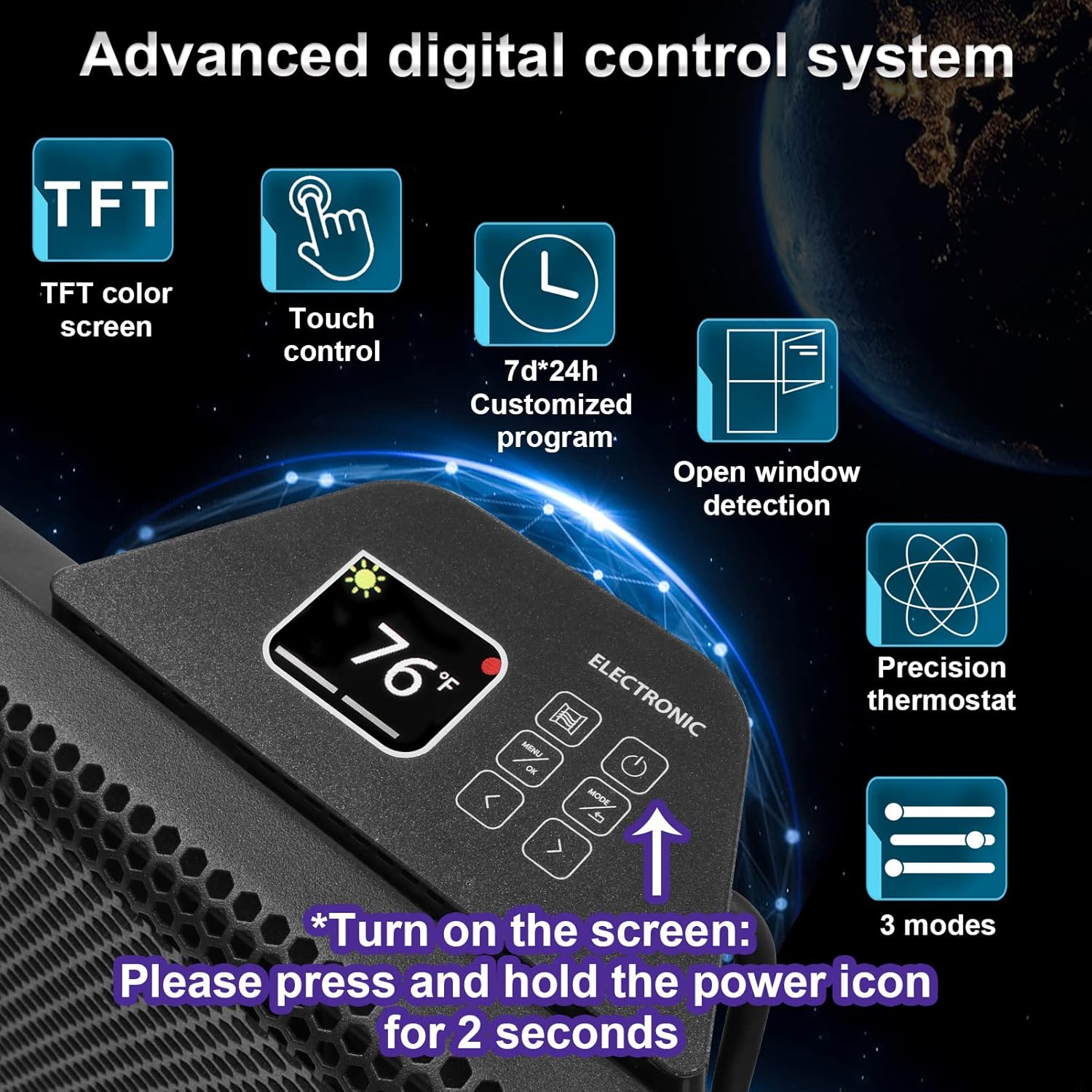
Image 1: The BALLU Apollo Portable Convection Panel Space Heater, shown in a room setting.
2. זיכערקייַט אינפֿאָרמאַציע
To prevent personal injury or property damage, always follow basic safety precautions when using electrical appliances. This heater is designed with several safety features:
- שפּיץ-איבער שוץ: The heater will automatically shut off if it is accidentally tipped over.
- אָוווערכיט שוץ: The unit will power down if it detects an internal overheating condition.
- קינד שלאָס: This feature prevents unintended changes to settings by children.
- V0 פלאַם-ריטאַרדאַנט מאַטעריאַלן: Constructed with a metal case and V0 flame-retardant power cord and plug for enhanced safety.
- עפֿענען פֿענצטער דעטעקטיאָן: The heater can detect an open window and will temporarily pause heating to conserve energy.
וויכטיק: Do not cover the heater. Ensure adequate clearance around the unit for proper airflow. Always plug the heater directly into a wall outlet; do not use extension cords.

Image 2: Visual representation of the heater's multiple safety protections, including tip-over, child lock, and overheat protection.
3. פּעקל אינהאַלט
באַשטעטיקן אַז אַלע זאכן זענען פאַראַן אין פּעקל:
- BALLU Apollo Convection Panel Space Heater Unit
- Removable Casters (for freestanding use)
- Wall-Mounted Accessories (brackets and screws)
- באַניצער מאַנואַל
4. אויפשטעלן און אינסטאַלירן
The BALLU Apollo heater offers both freestanding and wall-mounted installation options.
4.1 פרייַשטייענדיקע אינסטאַלאַציע
For freestanding use, attach the provided casters to the bottom of the heater. No additional tools are required for this step. Simply align the casters with the designated slots and secure them firmly.
Image 3: The heater shown in its freestanding configuration with casters attached.
4.2 וואנט בארג ינסטאַלירונג
To mount the heater on a wall, use the included wall-mounted accessories. Ensure the wall surface is suitable for supporting the heater's weight and heat output. Follow the detailed instructions in the full user manual for secure wall mounting. A drill may be required for this installation method.

Image 4: The back of the heater, illustrating the brackets for wall mounting.
5. אַפּערייטינג ינסטרוקטיאָנס
The BALLU Apollo heater features a user-friendly TFT digital display and touch control panel for easy operation.
5.1 פּאַוערינג אויף / אַוועק
To turn the heater on or off, press and hold the power icon on the control panel for 2 seconds.
5.2 Digital Display & Controls
The TFT digital display shows the current temperature and selected settings. Use the touch controls to navigate through menus and adjust parameters.

בילד 5: א דעטאלירטע view of the advanced digital control system with TFT color screen, touch control, and various setting options.
5.3 טעמפּעראַטור סעטטינגס
Adjust the desired temperature between 41°F and 95°F using the up/down arrows on the control panel.
5.4 היץ מאָדעס
Select from different heat modes to suit your needs:
- Comfort Mode: האַלט אַ קאָנסיסטענט, באַקוועם טעמפּעראַטור.
- סמאַרט עקאָ מאָדע: Optimizes energy consumption by automatically adjusting heat output.
- Anti-Freeze Mode: Prevents the room temperature from dropping below a certain point (e.g., 41°F) to protect against freezing.
5.5 טייַמער פֿונקציע
Program the heater to turn on or off at specific times using the 7*24h timer function. This allows for customized heating schedules throughout the week.
5.6 קינד לאַק
Activate the child lock feature to prevent accidental changes to settings. Refer to the full manual for specific instructions on how to engage and disengage the child lock.
6. שליסל פֿעיִקייטן
- 100% Energy Conversion: Features a patented hedgehog heating element made of aerospace aluminum, ensuring 100% conversion of electrical energy to thermal energy for faster heating and lower consumption.
- גיך באַהיצונג: Experience warmth within 30 seconds of activation. Heats a full room evenly within 1-2 hours, depending on room size and insulation.
- ענערגיע עפעקטיווקייַט: Direct air heating combined with an automatic thermostat system helps reduce energy bills.
- שטיל און באַקוועם: Operates silently (below 25dB) without a fan, preventing dry air and maintaining natural humidity. No dazzling light for undisturbed sleep.
- ווערסאַטאַל אָרט: Can be used as a freestanding unit with removable casters or mounted on a wall.

Image 6: Illustration demonstrating how the convection heater effectively warms an entire room.

Image 7: Diagram highlighting the higher heating efficiency due to patented hedgehog fins, leading to faster heating and energy saving.

Image 8: A comparison chart illustrating the benefits of convection heaters, such as full room heat, silent operation, and energy efficiency.
7. וישאַלט
רעגולערע אויפהאלטונג גאראנטירט אפטימאלע פאָרשטעלונג און לענגלעבעדיקייט פון אייער כיטער.
- רייניקונג: זיכער מאַכן אַז דער כיטער איז אַרויסגעצויגן און גאָר אָפּגעקילט איידער איר רייניקט. ניצט אַ ווייכן, טרוקןamp א שטאָף צו ווישן די אויסערלעכע זייט. ניצט נישט קיין שוואַרצע רייניקונגס־מיטלען און לאָזט נישט וואַסער טריפֿן אַרײַן אינעווייניק.
- סטאָרידזש: ווען נישט אין באַנוץ, זאָל מען האַלטן דעם כיטער אין אַ קיל, טרוקן אָרט, בעסער אין זיין אָריגינעלער פּאַקאַדזשינג.
- דורכקוק: קאָנטראָלירט פּעריִאָדיש דעם עלעקטרישן שנור און פּלאָג פֿאַר יעדע סימן פֿון שאָדן. אויב מען טרעפֿט אַ שאָדן, שטעלט אָפּ דעם באַניץ און קאָנטאַקטירט קונה שטיצע.
8. טראָובלעשאָאָטינג
If you encounter issues with your heater, refer to the following common solutions. For more complex problems, consult the full user manual or contact customer support.
- הייצער טוט זיך נישט אנצינדן: Ensure the power cord is securely plugged into a functional outlet. Check if the power button is pressed and held for 2 seconds. Verify that the circuit breaker has not tripped.
- קיין היץ ארויסגאַנג: Confirm the desired temperature setting is higher than the ambient room temperature. Check if any safety features (e.g., tip-over, overheat protection) have been activated.
- Unusual odors or sounds: A new heater may emit a slight odor during initial use; this is normal and should dissipate. If strong or persistent odors/sounds occur, unplug the unit and contact support.
9. ספּעסאַפאַקיישאַנז
| שטריך | דעטאַל |
|---|---|
| סאָרט | ballu |
| מאָדעל | אַפּאָללאָ |
| ספּעציעלע שטריך | Energy Efficient, Noiseless, Portable |
| קאָליר | שוואַרץ |
| פאָרם פאַקטאָר | פּעדעסטאַל |
| דרינענדיק / דרויסנדיק באַניץ | דרינענדיק |
| מאַונטינג טיפּ | וואנט בארג |
| אָרט טיפּ | שלאָפצימער, היים אָפיס, לערנען צימער |
| באַהיצונג קאַווערידזש | 300 קוואַדראַט פֿיס |
| בורנער טיפּ | שטראַלנדיק |
| היץ רעזולטאַט | 1500 וואטס |
| פּעקל דימענשאַנז | 30 X 19 X 6.8 אינטשעס |
| פּונקט וואָג | 14.57 פונט |
10. וואָראַנטי & שטיצן
For detailed warranty information and customer support, please refer to the warranty card included in your package or visit the official Ballu webפּלאַץ. האַלטן דיין קויפן קאַבאָלע פֿאַר וואָראַנטי קליימז.


