1. הקדמה
The WANLUTECH MT-8000 is a versatile, multi-functional testing device designed for fiber optic and CCTV surveillance system installations and maintenance. It integrates various testing capabilities including Optical Time Domain Reflectometer (OTDR), Optical Power Meter (OPM), Visual Fault Locator (VFL), Light Source (LS), Optical Loss Test (OLS), CCTV camera testing (IP, AHD, CVI, TVI, CVBS), cable testing (RJ45 TDR, length, tracer), network tools, Digital Multimeter (DMM), Power over Ethernet (PoE) functions, and WiFi analysis. This manual provides detailed instructions for the safe and effective use of the MT-8000 tester.
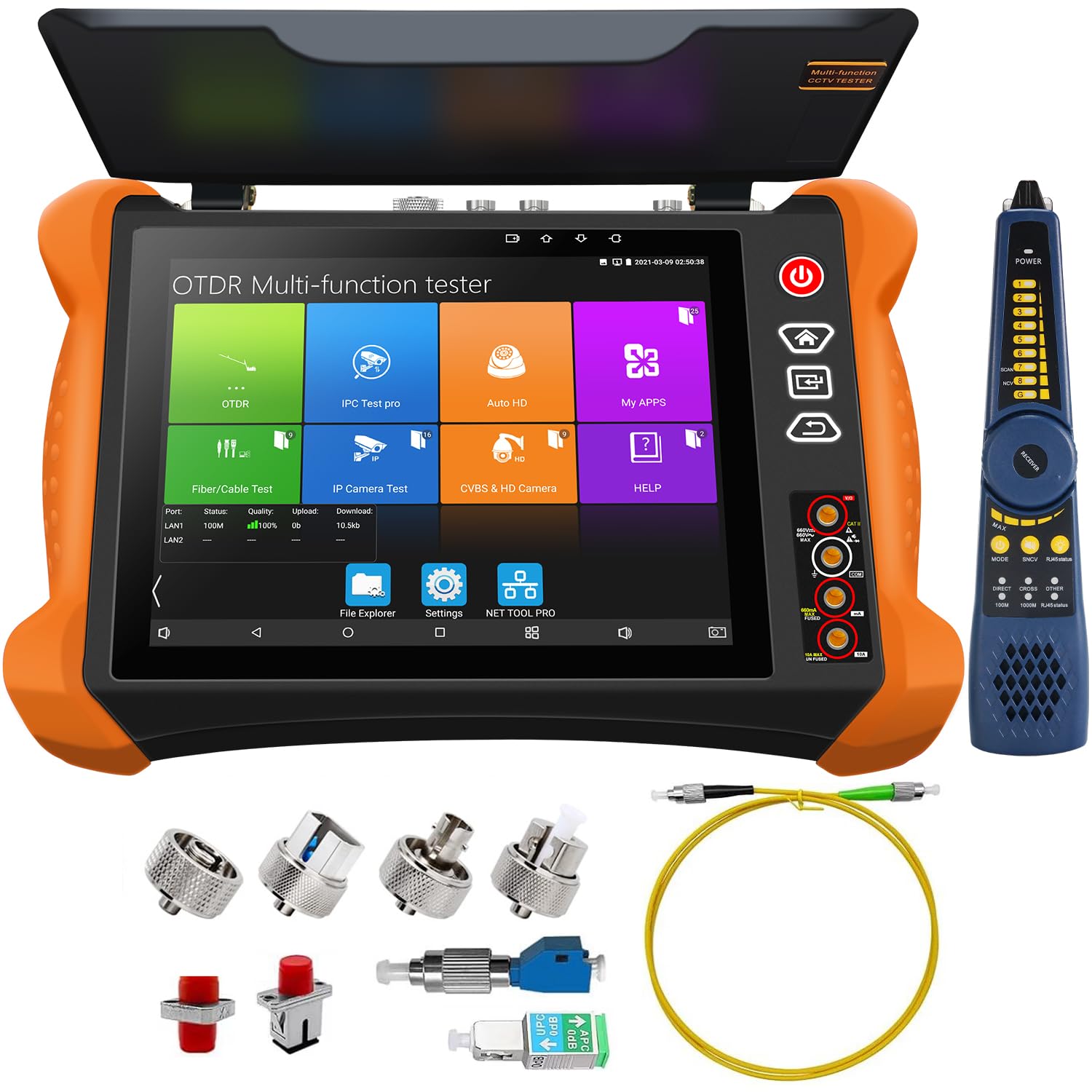
Figure 1.1: WANLUTECH MT-8000 OTDR CCTV Tester and included accessories.
2. זיכערקייַט אינפֿאָרמאַציע
Please read all safety warnings and instructions carefully before using the device to prevent injury or damage. Keep this manual for future reference.
- באַטערי זיכערקייַט: Ensure the battery is correctly installed. Remove the paper piece isolating the battery before first use.
- אָפּטישע זיכערהייט: Do not look directly into the optical output ports (VFL, LS) as visible or invisible laser radiation can cause eye damage.
- עלעקטריקאַל זיכערקייַט: Use only the provided charger and accessories. Avoid exposing the device to moisture or extreme temperatures.
- רייניקונג: Use alcohol cotton to clean fiber connectors to ensure accurate test results.
3. פּעקל אינהאַלט
באַשטעטיקט אַז אַלע זאכן וואָס זענען אויסגערעכנט אונטן זענען אַרייַנגערעכנט אין אייער פּעקל:
- OTDR MT-8000 Main Unit
- Digital Cable Tracer
- מכשירים באַג
- Lithium Battery (pre-installed)
- אַקסעססאָריעס באָקס
- זיכערקייַט שנור
- אַודיאָ טעסט קאַבל
- טשאַרדזשער
- רס 485 קאָנטראָל קאַבלע
- BNC קאַבלע
- Fiber Test Head
- מאַכט רעזולטאַט קאַבלע
- Digital Multi-meter Pen

Figure 3.1: Contents of the MT-8000 package.
4. פּראָדוקט איבערview
The MT-8000 features an 8-inch retina touchscreen display and a robust design for field use. Familiarize yourself with the various ports and controls.
4.1 פראָנט און זייט View

פיגורע 4.1: זייַט view highlighting the touchscreen pen, built-in speaker, and adjustable support frame.
4.2 דערציען פּאַנעל קאַנעקשאַנז

Figure 4.2: Rear panel with labeled ports including AHD/CVI/TVI/Video in, HDMI input, LAN ports, PoE, Visual Fault Locator, Optical Power Meter, DC power outputs, Audio in/out, RS485 port, TF card slot, and HD out.
5. ערשט סעטאַפּ
Before using the tester for the first time, perform the following steps:
- באַטערי אַקטאַוויישאַן: Open the battery cover and remove the paper piece isolating the battery. This ensures proper power connection.
- טשאַרדזשינג: Connect the provided charger to the device and a power outlet. Allow the device to fully charge before initial use.
- מאַכט אויף: דריקן און האַלטן די מאַכט קנעפּל ביז די מיטל מאַכט אויף.
6. אַפּערייטינג ינסטרוקטיאָנס
The MT-8000 offers a wide range of testing functionalities. This section details how to use each primary function.
6.1 OTDR (Optical Time Domain Reflectometer)
The OTDR function is used for testing fiber optic cables, identifying faults, and measuring length and loss.
6.1.1 Quick Setup and Parameters Set
The device offers two modes for OTDR testing: Quick Setup for rapid configuration and Parameters Set for advanced control.

Figure 6.1.1: OTDR Quick Setup and Parameters Set interfaces.
- שנעל סעטאַפּ: Allows quick setting of wavelength, distance range, pulse width, and measurement duration.
- Parameters Set: For professional technicians, this mode allows detailed configuration of wavelength, distance range, pulse width, measurement mode, IOR, non-reflection threshold, end threshold, and other parameters for more accurate curve results.
6.1.2 Multi-track Analysis
The MT-8000 can display up to four OTDR curves simultaneously for comprehensive analysis, aiding in the detection of short-distance nodes with small pulse widths and longer distances with large pulse widths.

Figure 6.1.2: Multi-track analysis for detailed fiber optic inspection.
6.1.3 Event Map and Threshold Setting
The Event Map visually represents the results of fiber optic link inspections, showing information such as link length, connector types, fusion points, and breakpoints. Threshold settings allow defining pass/fail criteria for events.

Figure 6.1.3: Event Map and Threshold Setting for fiber link analysis.
6.1.4 Test Report and File פאַרוואַלטונג
Test results can be saved as curves and event lists. The device supports saving reports in EXCEL and PDF formats. File management allows opening, viewing, and organizing saved test data.

Figure 6.1.4: Test Report generation and File פאַרוואַלטונג אָפּציעס.
6.2 Optical Power Meter (OPM)
The OPM measures optical power linearly or non-linearly and is used for relative measurement of fiber link loss. It supports calibrated wavelengths of 850/1300/1310/1490/1550/1625nm.

Figure 6.2: Optical Power Meter function and display.
6.3 וויזועלער שולד לאָקאַטאָר (VFL)
The VFL helps determine fiber continuity and locate faults using a 650nm wavelength laser. The maximum test range is 8KM.

Figure 6.3: Visual Fault Locator function and safety warning.
6.4 Light Source (LS)
The Light Source function provides a stable optical signal for engineering and maintenance of optical fiber communication and CATV. It supports CW/270 Hz/330 Hz/1 kHz/2 kHz modes.

Figure 6.4: Light Source function and control interface.
6.5 Optical Loss Test (OLS)
The OLS function is used to test the insertion loss of optical passive devices. Calibration is recommended before testing for accurate results.

Figure 6.5: Optical Loss Test setup and display.
6.6 CCTV Camera Testing
The MT-8000 supports testing various types of CCTV cameras.
6.6.1 IP Camera Test (IPC Test)
This integrated function allows testing IP cameras, including PoE power supply voltage and camera test tools. It provides network information, IP discovery, ONVIF functionality, and live video display.

Figure 6.6.1: IPC Test interface with various camera testing options.
6.6.2 IP Discovery and ONVIF
The device automatically searches for network segment IP addresses and can modify the tester's local IP address to match the camera's network segment. ONVIF allows automatic login, image display, live video, and test report creation. It supports viewing four camera images simultaneously.

Figure 6.6.2: IP Discovery and ONVIF interfaces.
6.6.3 HIK / DH Camera Test
The IP camera tester supports batch activation of DH and Hik cameras, along with modification of IP addresses and passwords. It also allows for custom channel names and factory resets.

Figure 6.6.3: HIK / DH Camera Test interface.
6.6.4 HD Coaxial 4.0 Test (AHD/CVI/TVI/CVBS)
Supports testing of max 8MP AHD/CVI/TVI/CVBS cameras. The "AUTO HD" app automatically recognizes camera types, displays resolution and frame rate, and supports UTC control, OSD menu, screenshot, video recording, and playback.

Figure 6.6.4: HD Coaxial 4.0 Test setup and resolution comparison.
6.6.5 Color Bar Generator
Outputs a single channel PAL/NTSC color bar video signal for display testing.

Figure 6.6.5: Color Bar Generator output.
6.7 קאַבל טעסטינג
The MT-8000 provides comprehensive cable testing functionalities.
6.7.1 RJ45 Cable TDR Test
Tests cable pair status, length (up to 180m), attenuation, reflectivity, impedance, and skew. Advanced tests are available for detailed analysis.

Figure 6.7.1: RJ45 Cable TDR Test interface and results.
6.7.2 קאַבל לענג טעסט
Measures the breakpoint position (open circuit status) for BNC, RJ45, and RJ11 cables, with a maximum test length of 3000 meters.

Figure 6.7.2: Cable Length Test interface.
6.7.3 Cable Tracer and UTP Cable Tester
The cable tracer helps locate BNC, network, and telephone cables in cluttered environments. The UTP cable tester displays connection status and detects near-end and far-end faults of RJ45 cables.

Figure 6.7.3: Cable Tracer and UTP Cable Tester functionalities.
6.7.4 Cable Tracer + Electroscope
This feature allows for non-contact detection of live wires and intelligent identification of neutral and live wires.

Figure 6.7.4: Cable Tracer with integrated electroscope.
6.8 נעץ מכשירים
The MT-8000 includes professional network testing tools such as Ping, IP scan, DHCP server, PPPOE, Trace Route, Port Flash, LLDP, and Link Monitor.

Figure 6.8: Network Tools interface.
6.9 Digital Multimeter (DMM)
The built-in DMM supports DC and AC voltage measurement, DC and AC current measurement, resistance measurement, continuity test, diode measurements, and capacitance measurement.

Figure 6.9: Digital Multimeter function and display.
6.10 PoE Functions
The device offers both PoE detection and power output capabilities.
6.10.1 PoE Detection and 12V Load Detection
Measures PoE switch or PSE power supply voltage and cable connection status. It supports IEEE802.3af/at. 12V load detection helps verify power stability.

Figure 6.10.1: PoE Detection and 12V Load Detection interfaces.
6.10.2 PoE Power Output and Power Management
Supports PoE IEEE802.3af/at with a maximum output of 48V and 25.5W. Power management allows checking real-time voltage and power of PoE, DC12V, DC24V, and PSE input.

Figure 6.10.2: PoE Power Output and Power Management interfaces.
6.11 WiFi Analyzer
The WiFi Analyzer supports 2.4G frequency band, WiFi connection, WiFi list, WiFi information, and signal strength detection. It can also create a WiFi hotspot.

Figure 6.11: WiFi Analyzer and FTP Server interfaces.
6.12 HDMI Input/Output
The device features HDMI input (max 4K 60 FPS) to display video from external sources like DVRs/NVRs, and HDMI output (max 4K 30 FPS) to display the tester's screen on an external monitor.

Figure 6.12: HDMI Input and Output functionalities.
7. וישאַלט
Proper maintenance ensures the longevity and accuracy of your WANLUTECH MT-8000 tester.
- רייניקונג: Regularly clean the screen with a soft, dry cloth. For optical connectors, use specialized fiber optic cleaning tools or alcohol cotton to remove dust and debris.
- סטאָרידזש: Store the device in its protective case in a cool, dry place away from direct sunlight and extreme temperatures.
- באַטערי זאָרגן: If the device will not be used for an extended period, charge the battery to approximately 50% and store it separately if possible. Recharge periodically to prevent deep discharge.
- ווייכווארג דערהייַנטיקונגען: קוק די פאַבריקאַנט ס website for any available software or firmware updates to ensure optimal performance and access to new features.
8. טראָובלעשאָאָטינג
This section addresses common issues you might encounter with the MT-8000 tester.
| פּראָבלעם | מעגלעך סיבה | לייזונג |
|---|---|---|
| די מיטל טוט נישט מאַכט אויף. | Battery not charged; Battery isolation paper not removed; Faulty battery. | Ensure battery isolation paper is removed. Charge the device fully. If problem persists, contact support. |
| Inaccurate OTDR/OPM readings. | Dirty fiber connectors; Incorrect test parameters. | Clean fiber connectors with alcohol cotton. Verify OTDR parameters (wavelength, range, IOR). |
| VFL light is dim or not visible. | Low battery; VFL port obstructed or damaged. | Charge the device. Check VFL port for obstructions. Avoid direct eye contact. |
| IP camera not detected. | Network configuration issues; Incorrect IP address; PoE not supplying power. | Check network cable connection. Use IP Discovery. Verify PoE power output if applicable. |
| טאָוטשסקרעען ניט ריספּאַנדאַבאַל. | Software glitch; Screen protector interference. | Restart the device. Remove and reapply screen protector if present. |
9. ספּעסאַפאַקיישאַנז
Key technical specifications for the WANLUTECH MT-8000 OTDR CCTV Tester:
| שטריך | באַשרייַבונג |
|---|---|
| מאָדעל נומער | מט-8000 |
| ווייַז | 8-inch Retina Touchscreen, 2048x1536 resolution |
| OTDR Wavelengths | 1310 נם / 1550 נם |
| OTDR Dynamic Range | קסנומקסדב / קסנומקסדב |
| OPM Calibrated Wavelengths | 850/1300/1310/1490/1550/1625nm |
| VFL Wavelength | 650nm (max test range 8KM) |
| CCTV קאַמעראַ שטיצע | Max 4K 12MP IP, 8MP AHD/TVI/CVI, CVBS |
| פּאָוט רעזולטאַט | IEEE802.3af/at, max 48V, 30W |
| מאַכט רעזולטאַט | DC24V/2A, DC12V/3A, DC5V/2A |
| הדמי ינפּוט | Max 4K 60 FPS |
| HDMI רעזולטאַט | Max 4K 30 FPS |
| באַטערי | 1 ליטהיום יאָן באַטאַרייע (אַרייַנגערעכנט) |
| דימענשאַנז | 13.58 X 12.05 X 4.02 אינטשעס |
| וואָג | 5.82 פונט |
10. וואָראַנטי און שטיצן
WANLUTECH stands behind the quality of its products. For any questions, technical assistance, or warranty inquiries, please contact our support team. We aim to respond within 12 hours.
You can reach us through your Amazon account by finding your order, viewing details, and clicking 'get product support'. Alternatively, search for 'WANGLU TESTER' on the product detail page and message us directly.


