1. הקדמה
Thank you for choosing the Dalton 2000VA Uninterruptible Power Supply (UPS). This device is designed to provide reliable power backup and protection for your electronic equipment against power outages, surges, and fluctuations. Please read this manual thoroughly before installation and operation to ensure optimal performance and safety.
2. וויכטיק סאַפעטי אינסטרוקציעס
שטענדיק פֿאָלגן די גרונטלעכע זיכערהייט מיטלען צו רעדוצירן דעם ריזיקאָ פֿון פֿײַער, עלעקטרישן קלאַפּ און שאָדן:
- עפֿנט נישט די UPS casinז. עס זענען נישטאָ קיין טיילן וואָס דער באַניצער קען סערוויסן אינעווייניק. לאָזט איבער די סערוויסינג צו קוואַליפֿיצירטע סערוויס פּערסאָנעל.
- Do not use the UPS in environments with excessive dust, humidity, or extreme temperatures.
- זיכער מאַכן אַז די UPS איז פארבונדן צו אַ געערדטע עלעקטרישע ווענטיל.
- Do not connect non-computer related items like medical equipment, life support equipment, or household appliances to the UPS.
- שטעלט די UPS אין א גוט-ווענטילירטע געגנט, ווייט פון דירעקטע זונשייַן אדער היץ-קוועלער.
- In case of emergency, press the power button to turn off the UPS and disconnect it from the AC power source.
3. פּעקל אינהאַלט
באַשטעטיקן אַז אַלע זאכן זענען פאַראַן אין דיין פּעקל:
- Dalton 2000VA UPS Unit
- מאַכט שנור
- USB Communication Cable (if applicable)
- באַניצער מאַנואַל (דעם דאָקומענט)

פיגורע 3.1: פראָנט view of the Dalton 2000VA UPS unit, showing the display screen and power button.
4. סעטאַפּ און ייַנמאָנטירונג
Follow these steps to set up your UPS:
- אויספּאַקן: נעמט פֿאָרזיכטיק אַרויס די UPS פֿון איר פֿאַרפּאַקונג. קאָנטראָלירט צי עס זענען פֿאַראַן שאָדנס בײַם שיפּינג.
- אָרט: Place the UPS on a flat, stable surface in a cool, dry, and well-ventilated area. Ensure there is adequate space around the unit for airflow.
- ערשט אָפּצאָל: Before connecting any devices, plug the UPS power cord into a grounded wall outlet. Allow the unit to charge for at least 8 hours to ensure the battery is fully charged. The display will indicate charging status.
- קאַנעקטינג דעוויסעס:
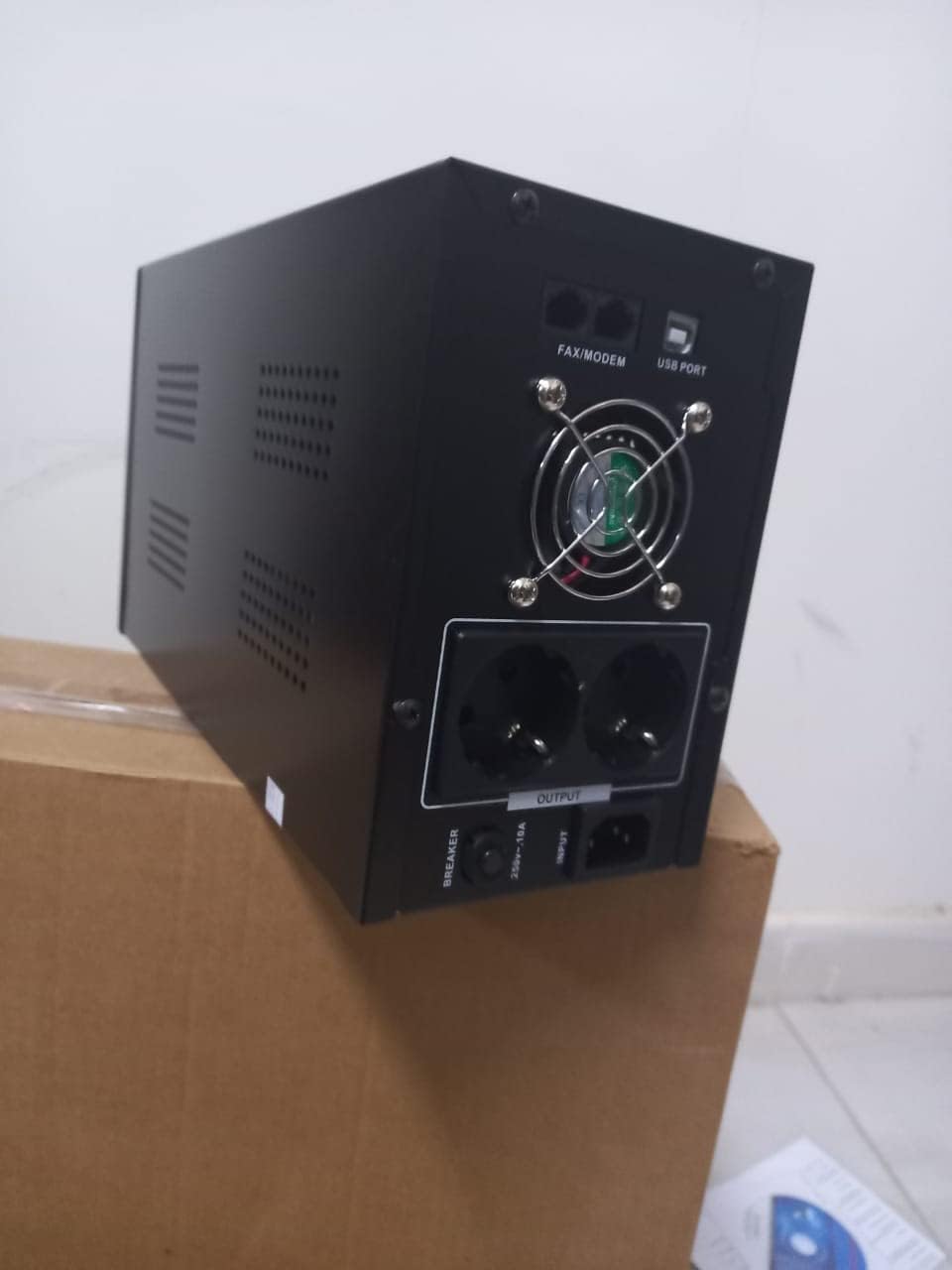
פיגורע 4.1: דערציען view of the Dalton 2000VA UPS, highlighting the input power port, output sockets, and USB/Modem ports.
- Once the battery is charged, connect your computer, monitor, and other critical electronic devices to the UPS output sockets.
- Do not overload the UPS. Refer to the specifications section for maximum load capacity.
- If applicable, connect the USB communication cable from the UPS to your computer for monitoring software (software not included, check manufacturer's webפּלאַץ).
5. אפערירן די UPS
5.1 פּאַוערינג אויף / אַוועק
- צו מאַכט אויף: After connecting to AC power and charging, press and hold the power button on the front panel for approximately 3 seconds until you hear a beep and the display illuminates.
- צו מאַכט אַוועק: Press and hold the power button for approximately 3 seconds until you hear a beep and the display turns off. If the UPS is running on battery, it will shut down immediately. If connected to AC, it will switch to bypass mode before shutting down.
5.2 פֿאַרשטיין די ווייַז
The front panel LCD display provides real-time status information:
- אין: דיספּלייז די אַרייַנשרייַב וואָלtagע פון די נוצן-מאַכט.
- אויס: דיספּלייז די רעזולטאַט וואָלtage provided by the UPS to connected devices.
- נאָרמאַל: Indicates the UPS is operating on utility power.
- פלעדערמויז: ווײַזט דעם איצטיקן באַטעריע טשאַרדזש לעוועל.
- לאָדן: ינדיקייץ די פּראָצענטtage פון די UPS'ס קאַפּאַציטעט וואָס ווערט גענוצט דורך פֿאַרבונדענע דעוויסעס.
- Battery Mode Icon: Appears when the UPS is running on battery power during an outage.

פיגורע 5.1: זייַט view of the UPS, showing the illuminated display with power status indicators.
5.3 Battery Backup Function
אין די געשעעניש פון אַ מאַכט אָtage, the UPS will automatically switch to battery power, providing continuous power to your connected devices. The duration of backup power depends on the load connected and the battery's charge level. The UPS will emit an audible alarm during battery operation.
When utility power returns, the UPS will automatically switch back to AC power and begin recharging its battery.
6. וישאַלט
- באַטערי זאָרגן: To maximize battery life, ensure the UPS is always connected to an AC outlet to keep the battery charged. If the UPS is stored for an extended period, recharge it every three months for at least 8 hours.
- רייניקונג: Disconnect the UPS from all power sources before cleaning. Use a soft, dry cloth to wipe the exterior. Do not use liquid or aerosol cleaners.
- ווענטילאַטיאָן: Regularly check that the ventilation openings are not blocked by dust or debris to prevent overheating.
7. טראָובלעשאָאָטינג
זעט די טאבעלע אונטן פאר אלגעמיינע פראבלעמען און זייערע לייזונגען:
| פּראָבלעם | מעגלעך סיבה | לייזונג |
|---|---|---|
| די UPS טוט זיך נישט אן. | Battery not charged or power cord disconnected. | Ensure power cord is securely plugged in and allow battery to charge for 8 hours. |
| די UPS ביפּט קעסיידער אין נאָרמאַלן מאָדע. | אָווערלאָאַד צושטאַנד. | Disconnect non-essential equipment until the alarm stops. Check total load. |
| קורצע באַקאַפּ צייט. | Battery not fully charged or battery nearing end of life. | Allow UPS to charge for 8 hours. If issue persists, battery may need replacement (contact service center). |
| UPS does not provide power during outage. | Battery discharged or internal fault. | Ensure UPS was fully charged. If problem persists, contact authorized service center. |
8. טעכניש ספּעסאַפאַקיישאַנז
| שטריך | דעטאַל |
|---|---|
| פּראָדוקט דימענשאַנז | 12.5 X 22.5 X 38 סענטימעטער |
| פאַבריקאַנט | דאַלטאָן |
| סאָרט נאָמען | גענעריק |
| קאָליר | שוואַרץ |
| מאַטעריאַל | מעטאַל |
| קראַנט | 5 Ampער |
| פאָרם פאַקטאָר | געשטעל |
| אָפטקייַט ראַנגע | 50-60 הז |
| רעזולטאַט חלקtage | 220 וואלטס |
| קאַנעקטער טיפּ | AC |
9. וואָראַנטי און שטיצן
Dalton provides an authorized maintenance center for all Uninterruptible Power Supply units. For warranty claims, technical support, or service inquiries, please contact your local Dalton authorized distributor or service center. Keep your purchase receipt as proof of purchase for warranty validation.
For further assistance, please visit the official Dalton webפּלאַץ אָדער קאָנטאַקט קונה שטיצן.


