1. הקדמה
This manual provides essential instructions for the safe and efficient operation of your Crosley CR6252A-YS Portfolio 3-Speed Bluetooth Turntable. Please read this manual thoroughly before using the product and retain it for future reference.
The Crosley Portfolio turntable is designed to play vinyl records at three speeds and features built-in speakers, Bluetooth connectivity for wireless audio streaming, and a moving magnetic cartridge for audio reproduction.

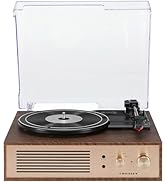
Figure 1.1: Crosley CR6252A-YS Portfolio Turntable (Open View)
2. זיכערקייַט אינסטרוקציעס
- לייענען אַלע ינסטראַקשאַנז איידער נוצן.
- האַלטן די פּראָדוקט אַוועק פון וואַסער אָדער נעץ.
- Do not place near heat sources such as radiators, heat registers, stoves, or other apparatus that produce heat.
- ריין בלויז מיט אַ טרוקן שטאָף.
- נאָר נוצן אַטאַטשמאַנץ / אַקסעסעריז ספּעסיפיעד דורך דער פאַבריקאַנט.
- אָפּשטויסן דעם אַפּאַראַט בעשאַס בליץ סטאָרמז אָדער ווען אַניוזד פֿאַר לאַנג פּיריאַדז.
- אָפּשיקן אַלע סערוויסעס צו קוואַלאַפייד סערוויס פּערסאַנעל. סערוויס איז פארלאנגט ווען דער אַפּאַראַט איז דאַמידזשד אין קיין וועג, אַזאַ ווי מאַכט צושטעלן שנור אָדער צאַפּן איז דאַמידזשד, פליסיק איז ספּילד אָדער אַבדזשעקץ זענען געפאלן אין די אַפּאַראַט, דער אַפּאַראַט איז יקספּאָוזד צו רעגן אָדער נעץ, אַרבעט נישט נאָרמאַלי , אָדער האט שוין דראַפּט.
3. פּעקל אינהאַלט
באַשטעטיקט אַז אַלע זאכן וואָס זענען אויסגערעכנט אונטן זענען אַרייַנגערעכנט אין אייער פּעקל:
- Crosley CR6252A-YS Portfolio Turntable
- מאַכט אַדאַפּטער
- באַניצער מאַנואַל (דעם דאָקומענט)
4. פּראָדוקט פֿעיִקייטן און קאָמפּאָנענטן
The Crosley CR6252A-YS Portfolio Turntable includes the following key features and components:
- 3-גיך דריי-טיש: שטיצט 33 1/3, 45, און 78 RPM רעקאָרדס.
- איינגעבויטער בלועטוט ריסיווער: ערמעגליכט וויירלעס סטרימינג פון קאָמפּאַטיבלע דעוויסעס.
- Adjustable Pitch Control: Fine-tune record speed.
- Moving Magnetic Cartridge: Pre-mounted for optimal sound.
- אַגזיליערי אַרייַנשרייַב: פֿאַרבינדן עקסטערנע אַודיאָ קוועלער.
- USB Enabled: פֿאַר פּיסי פֿאַרבינדונג.
- געבויט-אין ספּיקערז: אינטעגרירטע אַודיאָ אַרויסגאַנג.

Figure 4.1: Turntable Mechanism and Controls
פיגור 4.2: קאָנטראָל פּאַנעל דעטאַל

פיגור 4.3: הינטערשטע פּאַנעל קאַנעקשאַנז
5. סעטאַפּ
5.1 ערשטע פּלאַצירונג
Place the turntable on a flat, stable surface away from direct sunlight, heat sources, and excessive dust or vibrations.
5.2 מאַכט קאַנעקשאַן
- Connect the power adapter to the DC 12V input jack on the rear of the turntable.
- שטעקט אריין דעם מאַכט אַדאַפּטער אין אַ פּאַסיק וואַנט ווענטיל.
5.3 Turntable Preparation
- Carefully remove any protective packaging materials from the turntable platter and tonearm.
- Ensure the tonearm is unlocked from its rest.
6. אַפּערייטינג ינסטרוקטיאָנס
6.1 Playing Records
- קער די ON/OFF knob clockwise to power on the unit.
- Select the desired speed (33 1/3, 45, or 78 RPM) using the speed selector switch. Note: A 78 RPM stylus (not included) is required for 78 RPM records.
- Place a record on the turntable platter. If playing a 45 RPM single, place the 45 RPM adapter (if included) over the spindle.
- Lift the tonearm using the cueing lever and position it over the desired track on the record.
- לאָזט אַראָפּ דעם טאָנאַרם לאַנגזאַם אויף דער פּלאַטע מיטן קיו-הייבל. די פּלאַטע וועט אָנהייבן שפּילן.
- סטרויערן די באַנד ניצן די באַנד קנופּ.
- ניצן די פּעך control knob to fine-tune the playback speed if necessary.
- To stop playing, lift the tonearm, return it to its rest, and turn the ON/OFF קנופּ קעגן די קלאַקווייז.
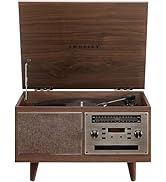
Figure 6.1: Stylus on Record
6.2 בלועטאָאָטה אָפּעראַציע
- קער די ON/OFF knob clockwise to power on the unit.
- Slide the function switch to the בלועטאָאָטה position. The indicator light will flash, indicating pairing mode.
- Enable Bluetooth on your external device (e.g., smartphone, tablet) and search for "Crosley Portfolio".
- Select "Crosley Portfolio" from the list of available devices to pair. Once paired, the indicator light will stop flashing and remain solid.
- You can now stream audio wirelessly from your device to the turntable's built-in speakers.
- סטרויערן די באַנד ניצן די באַנד knob on the turntable and/or your external device.
6.3 הילפס־איינגאנג (AUX IN)
- קער די ON/OFF knob clockwise to power on the unit.
- Connect an external audio device (e.g., MP3 player, CD player) to the AUX IN port using a 3.5mm audio cable (not included).
- דער טערנטייבאַל וועט אויטאָמאַטיש באַשטימען צו AUX IN מאָדע.
- סטרויערן די באַנד ניצן די באַנד knob on the turntable and/or your external device.
6.4 וסב קאַנעקטיוויטי
The turntable features a PC-USB port for connecting to a computer. This allows for digital conversion of your vinyl records using appropriate software (not included). Refer to your chosen software's instructions for recording procedures.
7. וישאַלט
7.1 רייניקן דעם דריי־טיש
- Always unplug the turntable from the power outlet before cleaning.
- Use a soft, dry cloth to wipe the exterior surfaces. Do not use abrasive cleaners or solvents.
- Gently brush the stylus with a soft brush designed for stylus cleaning, moving from back to front.
7.2 Stylus Replacement
The stylus (needle) is a consumable part and will wear out over time. A worn stylus can damage your records and degrade sound quality. Replace the stylus after approximately 200-300 hours of playback. Consult your retailer or Crosley support for compatible replacement styli.
8. טראָובלעשאָאָטינג
| פּראָבלעם | מעגלעך סיבה | לייזונג |
|---|---|---|
| קיין מאַכט | שטראָם אַדאַפּטער נישט פארבונדן אדער אַ דעפעקטיווע אַוטלעט. | זיכער מאַכן אַז דער מאַכט אַדאַפּטער איז זיכער פארבונדן און די אַוטלעט אַרבעט. |
| קיין געזונט פון ספּיקערז | Volume too low; function switch in wrong position; Bluetooth not paired. | Increase volume; ensure function switch is set to PHONO or Bluetooth is correctly paired. |
| רעקאָרד איבערשפּרינגען | Record is dirty or damaged; stylus is worn; turntable not level. | Clean record; replace stylus; ensure turntable is on a level surface. |
| בלועטוט דעווייס וועט נישט פארבינדן | Turntable not in pairing mode; device too far; device already paired to another unit. | Ensure turntable is in Bluetooth pairing mode; move device closer; disconnect from other Bluetooth devices. |
9. ספּעסאַפאַקיישאַנז
- פּראָדוקט דימענשאַנז: 12.4 X 15.28 X 6.5 אינטשעס
- נומער וואָג: 13 פונט
- נומער מאָדעל נומער: CR6252A-YS
- סאָרט: קראָסליי
- אַרייַנגערעכנט קאַמפּאָונאַנץ: CR6252A-YS Portfolio Turntable
- סטייל: וויןtage
- קאָליר: Yellow Submarine
- סיגנאַל פֿאָרמאַטירונג: אַנאַלאָג
- מאַכט מקור: קאָרדעד עלעקטריק
- UPC: 710244246569
10. וואָראַנטי און שטיצן
For warranty information and technical support, please refer to the warranty card included with your product or visit the official Crosley webזייטל. האַלט אייער קויף קוויטל ווי אַ באַווייַז פון קויפן פֿאַר קיין וואָראַנטי קליימז.
פאַבריקאַנט: קראָסליי
ערשטער דאַטע בנימצא: 30 נאוועמבער 2021


