1. הקדמה
This manual provides detailed instructions for the setup, operation, and maintenance of your Mars Gaming MKULTRA mechanical keyboard. The MKULTRA is a compact 96% mechanical keyboard designed for performance and durability, featuring PBT pudding keycaps, full RGB Chroma lighting, and Outemu SQ mechanical switches.

Figure 1: Mars Gaming MKULTRA Mechanical Keyboard (Pink RGB, Portuguese-US Layout)
2. פּעקל אינהאַלט
באַשטעטיקן אַז אַלע זאכן זענען פאַראַן אין פּעקל:
- Mars Gaming MKULTRA Mechanical Keyboard
- אָפּנעמבאַרער USB-C צו USB-A קאַבל
- באַניצער מאַנואַל (דעם דאָקומענט)
3. סעטאַפּ אינסטרוקציעס
3.1 פֿאַרבינדן די קלאַוויאַטור
- Locate the detachable USB-C to USB-A cable.
- Connect the USB-C end of the cable to the port on the keyboard.
- Connect the USB-A end of the cable to an available USB port on your computer (PC, Mac, PS4, PS5, Xbox One, Xbox Series S-X).
- די קלאַוויאַטור וועט ווערן אויטאָמאַטיש דערקענט דורך דיין אָפּערייטינג סיסטעם.
3.2 ווייכווארג אינסטאַלאַציע (אפציאָנעל)
For advanced customization of RGB lighting and macro settings, download the dedicated control software from the official Mars Gaming website. Refer to the software's documentation for installation and usage details.
ווידעא 1: איבערview of the Mars Gaming MKULTRA keyboard, demonstrating its compact design and RGB lighting. This video highlights the keyboard's features and aesthetic appeal.
4. אַפּערייטינג ינסטרוקטיאָנס
4.1 Keyboard Layout and Form Factor
The MKULTRA features a 96% compact layout, which includes a full set of keys, including a numeric keypad, in a space-saving design. It supports a dual Portuguese + US layout.

Figure 2: The 96% compact format of the Mars Gaming MKULTRA keyboard, illustrating its space-saving design while retaining essential keys.
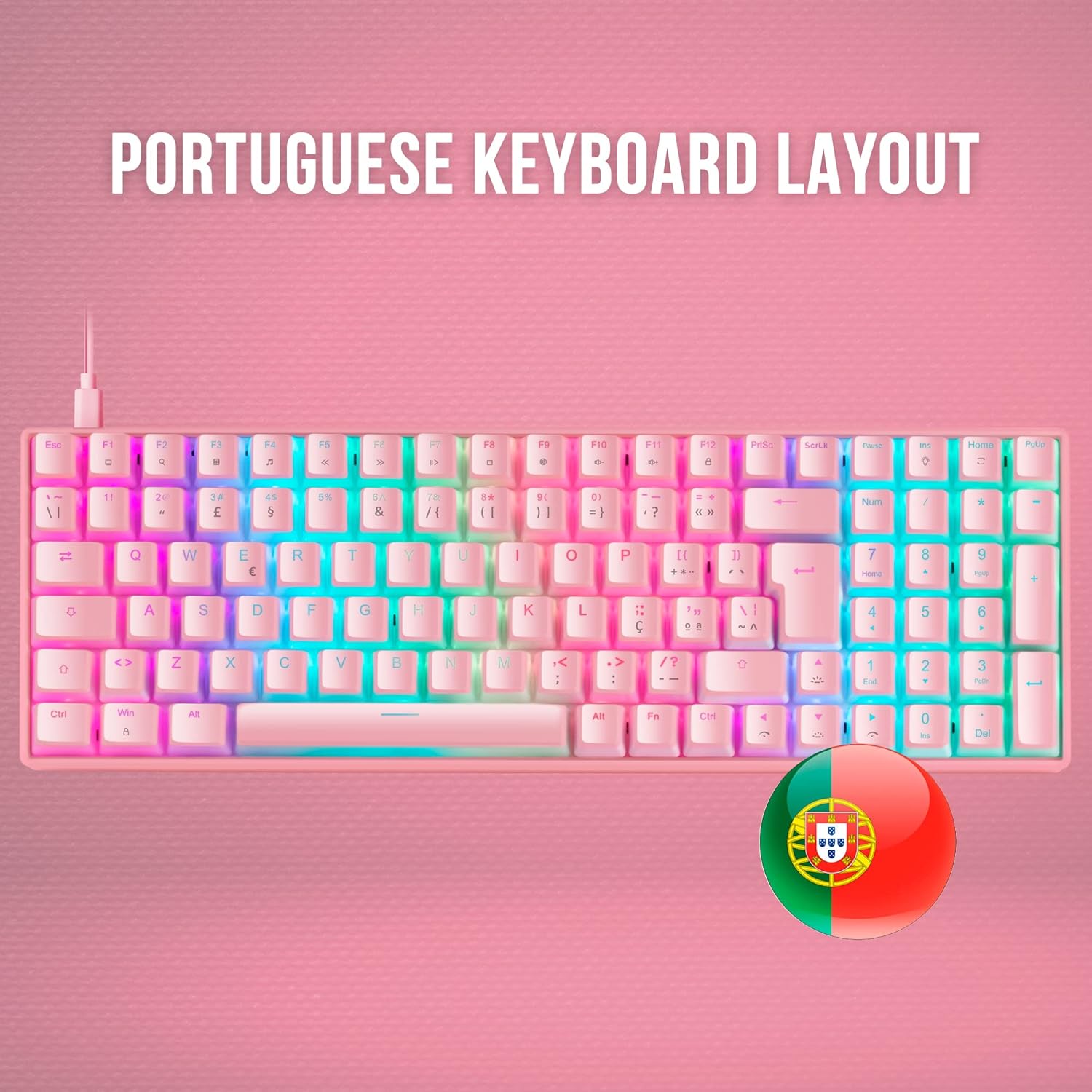
Figure 3: The Portuguese keyboard layout of the Mars Gaming MKULTRA, showing specific key placements for this regional standard.
4.2 PBT Pudding Keycaps
The keyboard is equipped with double-injected PBT pudding keycaps. These keycaps are highly durable and designed to enhance the RGB lighting effects, creating a 'floating' light appearance.

פיגורע 4: נאָענט-אַרויף view of the PBT pudding keycaps on the Mars Gaming MKULTRA, highlighting their translucent sides for enhanced RGB illumination.
4.3 RGB Chroma Lighting
The MKULTRA features a customizable RGB LED lighting system with 16.8 million colors. You can select from various special effects and create custom profiles using the control software. The lighting enhances both aesthetics and visibility.

Figure 5: The full RGB illumination of the Mars Gaming MKULTRA keyboard, showcasing the vibrant and customizable lighting effects.
4.4 Outemu SQ Mechanical Switches
The keyboard utilizes Outemu SQ mechanical switches, which provide precise and reliable key actuation. These switches are designed with dust protection to ensure longevity and consistent performance. The specific model features Outemu SQ Brown switches, known for their tactile feedback without an audible click.

Figure 6: A close-up of the Outemu SQ mechanical switches on the Mars Gaming MKULTRA, highlighting their design for durability and dust protection.
4.5 Anti-Ghosting and Polling Rate
The MKULTRA supports full anti-ghosting, ensuring that every keypress is registered accurately, even during rapid simultaneous inputs. It also features a 1000Hz polling rate for professional-grade response without lag.
5. וישאַלט
5.1 רייניקן די קלאַוויאַטור
- אָפּשטעקן די קלאַוויאַטור פֿון אייער קאָמפּיוטער איידער איר רייניקט.
- ניצן אַ ווייך, לינט-פֿרייַ שטאָף אַ ביסל דampאָפּגעווישט מיט וואַסער אָדער אַ מילדער רייניקונג לייזונג צו ווישן די קלאַוויאַטורן און שאַסי.
- פֿאַר שטויב און שמוץ צווישן שליסלען, ניצט קאָמפּרעסירטע לופט.
- פֿאַרמײַדט די נוצן פֿון שאַרפֿע כעמיקאַלן, אַברייזיווע רייניגער, צי איבעריקע פֿײַכטקייט, ווײַל די קענען שאַטן די קלאַוויאַטור.
5.2 Keycap Removal (Advanced)
If you need to remove keycaps for deeper cleaning or replacement, use a keycap puller. Gently pull the keycap straight up to avoid damaging the switch. Realign the keycap and press down firmly to reattach.
6. טראָובלעשאָאָטינג
6.1 קלאַוויאַטור רעאַגירט נישט
- זיכער מאַכן אַז דער USB קאַבל איז זיכער פארבונדן צו ביידע די קלאַוויאַטור און דעם קאָמפּיוטער.
- פרובירט צו קאנעקטן די קלאַוויאַטור צו אַן אַנדער USB פּאָרט אויף אייער קאָמפּיוטער.
- פּרובירט די קלאַוויאַטור אויף אַן אַנדער קאָמפּיוטער צו אויסשליסן סיסטעם-ספּעציפֿישע פּראָבלעמען.
- ריסטאַרט דיין קאָמפּיוטער.
6.2 RGB לייטינג פראבלעמען
- Check the keyboard's control software for lighting settings and ensure they are configured correctly.
- זיכער מאַכן אַז די ווייכווארג איז אַרויף צו דאַטע.
- If using onboard controls, refer to the software documentation for key combinations to adjust lighting.
6.3 Incorrect Key Input
- Verify that the correct keyboard layout is selected in your operating system settings.
- If specific keys are not working, try removing and reattaching their keycaps to ensure proper seating.
- Consider performing a factory reset via the control software if available.
7. ספּעסאַפאַקיישאַנז
| שטריך | דעטאַל |
|---|---|
| סאָרט | מאַרס גיימינג |
| מאָדעל נומער | MKULTRAPBRPT |
| קלאַוויאַטור באַשרייַבונג | מעטשאַניקאַל |
| קאַנעקטיוויטי טעכנאָלאָגיע | וסב-C |
| קאַמפּאַטאַבאַל דעוויסעס | PC |
| ספּעציעלע שטריך | הינטער-באַלויכטע (RGB) |
| קלאַוויאַטור באַקלייטינג קאָליר סופּפּאָרט | RGB |
| מאַטעריאַל | פּאָליבוטילענע טערעפטהאַלאַטע (PBT) |
| פּראָדוקט דימענשאַנז | 14.57 X 4.84 X 1.57 אינטשעס |
| פּונקט וואָג | 1.62 פונט |
| פאַבריקאַנט | מאַרס גיימינג |
| ASIN | B09MJ8WCD2 |
| ערשטער דאַטע בנימצא | 9 יאנואר 2025 |
8. וואָראַנטי און שטיצן
For warranty information and technical support, please refer to the documentation provided with your purchase or visit the official Mars Gaming webזייטל. האַלט דיין קויפן באַווייַז פֿאַר וואָראַנטי קליימז.


