הקדמה
This manual provides comprehensive instructions for the safe and efficient use of your Coby True Wireless Earbuds (Model CETW535). Please read this manual thoroughly before using the product and retain it for future reference.
The Coby True Wireless Earbuds offer a seamless audio experience with Bluetooth 5.3 technology, a smart battery display, and intuitive controls for music and calls. They are designed for comfort and convenience, featuring a built-in microphone for hands-free communication.
פּעקל אינהאַלט
- Coby True Wireless Earbuds (Left and Right)
- טשאַרדזשינג קעסטל מיט קלוגער באַטעריע אַרויסווייַזונג
- וסב טשאַרדזשינג קאַבלע
- באַניצער מאַנואַל (דעם דאָקומענט)
סעטאַפּ
1. ערשטע אויפלאָדונג
Before first use, fully charge the earbuds and the charging case. Connect the charging case to a USB power source using the provided USB cable. The digital display on the case will indicate the charging status and battery level.

Image: The Coby True Wireless Earbuds are shown inside their open charging case, which displays "100%" on its digital screen, indicating a full charge. The earbuds are black and fit snugly into their respective slots.
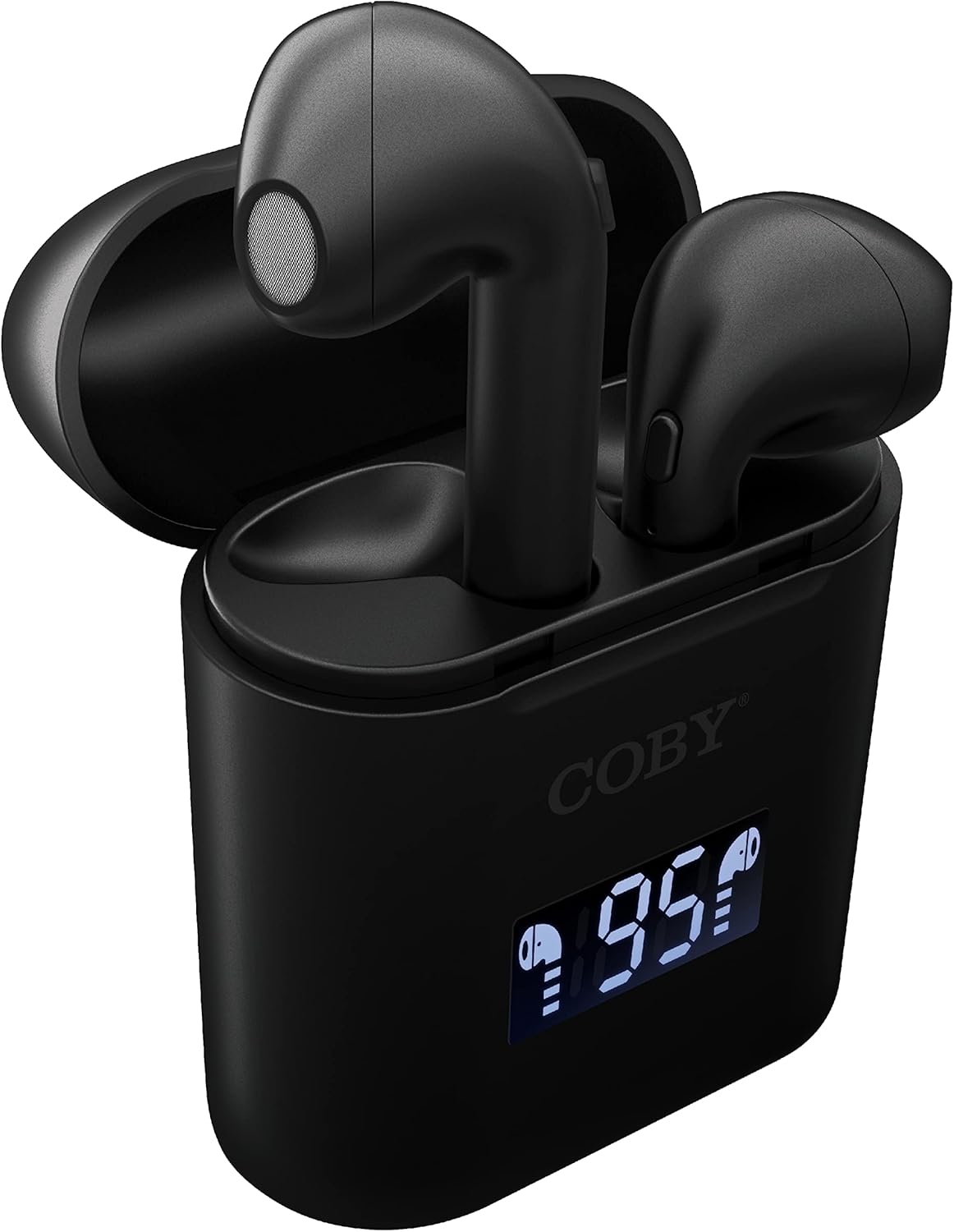
בילד: א נאָענטע בילד view of the Coby True Wireless Earbuds resting in their open charging case. The case features a digital display showing "95%", indicating the current battery level of the case. The black earbuds are visible, with their microphones facing upwards.
2. פּערינג מיט אַ בלועטאָאָטה דיווייס
- זיכער מאַכן אַז די אויערקנעפּלעך זענען אויפגעלאָדן און אין דער אויפלאָדן קעסטל.
- עפֿנט דעם טשאַרדזשינג קעסטל. די אויערקנעפּלעך וועלן זיך אויטאָמאַטיש אָנצינדן און אַרײַן אין פּערינג מאָדע.
- אויף אייער דעווייס (סמאַרטפאָן, טאַבלעט, אאז"וו), אַקטיווירט בלועטוט.
- זוכן פֿאַר "CETW535" or "Coby Earbuds" in the list of available Bluetooth devices.
- Select the device name to connect. Once connected, you will hear a confirmation tone.
- The earbuds will automatically re-pair with the last connected device when removed from the case, if Bluetooth is enabled on the device.
3. צופּאַסן די אויערקנעפּלעך
Gently insert each earbud into the corresponding ear (L for left, R for right). Adjust them slightly until they feel secure and comfortable. A proper fit ensures optimal sound quality and comfort.

Image: A woman is shown smiling while wearing a black Coby True Wireless Earbud in her right ear, demonstrating a comfortable and secure fit.
אַפּערייטינג ינסטראַקשאַנז
מאַכט אויף / אַוועק
- מאַכט אויף: Open the charging case, or press and hold the touch control area on each earbud for 3 seconds.
- מאַכט אַוועק: Place the earbuds back into the charging case and close the lid, or press and hold the touch control area on each earbud for 5 seconds.
מוזיק קאָנטראָלס
The earbuds feature touch-sensitive controls for easy management of your audio playback.
- שפּיל / פּויזע: צאַפּן איין עאַרבוד אַמאָל.
- ווייַטער שפּור: טאָפּל צאַפּן אויף די רעכט עאַרבוד.
- פֿריִערדיקע שפּור: טאָפּל צאַפּן אויף די לינקס עאַרבוד.
- באַנד אַרויף: דריי מאָל צאַפּן אויף די רעכט עאַרבוד.
- באַנד אַראָפּ: דריי מאָל צאַפּן אויף די לינקס עאַרבוד.

Image: A man is shown wearing a Coby True Wireless Earbud in his right ear, taking a drink from a water bottle, illustrating the earbuds' use during active moments.
רוף קאָנטראָלס
Manage your calls effortlessly with the built-in microphone and touch controls.
- ענטפֿערן / סוף רופן: צאַפּן איין עאַרבוד אַמאָל.
- אָפּוואַרפן רופן: דריקן און האַלטן יעדער עאַרבוד פֿאַר 2 סעקונדעס.

Image: A man is depicted wearing a Coby True Wireless Earbud in his left ear while concentrating on a laptop screen, highlighting the earbuds' suitability for work or study environments.
אַקטאַוויישאַן פון קול אַססיסטאַנט
Activate your device's voice assistant (Siri or Google Assistant) for hands-free commands.
- אַקטאַווייט קול אַססיסטאַנט: Press and hold either earbud for 3 seconds (after powering on, before powering off gesture).
Intelligent Digital Battery Display
The charging case features a digital display that shows the remaining battery percentagפון די קעיס און יחיד טשאַרדזשינג סטאַטוס פון די אויערקנעפּלעך.
- The large number indicates the charging case's battery percentage.
- Small icons next to the percentage indicate the charging status of the left and right earbuds.

Image: The Coby True Wireless Earbuds are shown in their open charging case, with the digital display indicating "95%" battery life for the case. The black earbuds are visible, ready for use or charging.
וישאַלט
- רייניקונג: ניצט אַ ווייכע, טרוקענע, לינט-פֿרייע שטאָף צו רייניקן די אויערקנעפּלעך און די טשאַרדזשינג קעסטל. ניצט נישט קיין שאַרפע כעמיקאַלן אָדער אַברייסיוו מאַטעריאַלן.
- סטאָרידזש: ווען נישט אין באַנוץ, לייגט די אויערקנעפּלעך אין זייער טשאַרדזשינג קעסטל צו באַשיצן זיי און האַלטן זיי טשאַרדזשד. לייגט זיי אין אַ קיל, טרוקן אָרט אַוועק פון עקסטרעמע טעמפּעראַטורן.
- טשאַרדזשינג: To prolong battery life, avoid fully discharging the battery frequently. Charge the case and earbuds regularly, even if not in constant use.
טראָובלעשאָאָטינג
| פּראָבלעם | מעגלעך לייזונג |
|---|---|
| די אויערקנעפּלעך פאַרבינדן זיך נישט מיטן אַפּאַראַט. |
|
| נאָר איין אויערקנעפּל שפּילט קול. |
|
| די טשאַרדזשינג קעיס טשאַרדזשט זיך נישט. |
|
| שלעכטע געזונט קוואַליטעט אָדער דיסקאַנעקשאַנז. |
|
ספּעסאַפאַקיישאַנז
| שטריך | דעטאַל |
|---|---|
| סאָרט | קאָבי |
| מאָדעל נאָמען | אמת ווירעלעסס עאַרבודז |
| מאָדעל נומער | CETW535 |
| קאַנעקטיוויטי טעכנאָלאָגיע | בלועטאָאָטה 5.3 |
| קאָליר | שוואַרץ |
| עאַרבוד פּלייַטיים | ביז 6.5 שעה (אויף א פולער אָפּצאָל) |
| גאַנץ שפּילצייט (מיט קעסטל) | אַרויף צו 22 שעה |
| מיקראָפאָן | געבויט-אין |
| שטימע אַססיסטאַנט שטיצן | סירי, Google אַססיסטאַנט |
| דימענסיעס (L X W X H) | 0.99 x 1.85 x 2.44 אינטשעס (אויפֿלאָדנדיקער קעסטל) |
| פּונקט וואָג | 6.1 אונסעס |
| UPC | 643620020982 |
| פאַבריקאַנט | Summit Electronics, LLC |
וואָראַנטי און שטיצן
Specific warranty information for the Coby True Wireless Earbuds (Model CETW535) is not provided within this manual. For details regarding warranty coverage, terms, and conditions, please refer to the warranty card included with your product packaging or visit the official Coby webפּלאַץ.
For technical support or further assistance, please contact Coby customer service through the contact information provided on their official webזייטל אדער פּראָדוקט פּאַקאַדזשינג.


