הקדמה
Thank you for choosing the Mistral MSF1650R 16-inch Stand Fan. This manual provides important information regarding the assembly, operation, maintenance, and troubleshooting of your new fan. Please read it thoroughly before use and retain it for future reference.
וויכטיק סאַפעטי אינסטרוקציעס
- Always ensure the fan is placed on a stable, level surface to prevent it from tipping over.
- ניצט נישט דעם ווענטילאַטאָר מיט אַ צעבראָכענעם שנור אָדער פּלאָג. אויב דער שנור איז צעבראָכן, מוז ער ווערן אויסגעטוישט דורך דעם פאַבריקאַנט, זיין סערוויס אַגענט, אָדער ענלעך קוואַליפֿיצירטע פּערזאָנען צו פֿאַרמייַדן אַ געפֿאַר.
- Unplug the fan from the power outlet before cleaning, assembling, or disassembling parts.
- Keep fingers, pencils, or any other objects out of the fan guard when it is operating.
- ניצט נישט דעם ווענטילאַטאָר לעבן וואַסער אדער אין צו פֿײַכטע סביבות.
- דער אַפּפּליאַנסע איז נישט בדעה פֿאַר נוצן דורך מענטשן (אַרייַנגערעכנט קינדער) מיט רידוסט גשמיות, סענסערי אָדער גייַסטיק קייפּאַבילאַטיז, אָדער פעלן פון דערפאַרונג און וויסן, סייַדן זיי האָבן באקומען השגחה אָדער לימעד וועגן די נוצן פון דעם אַפּפּליאַנסע דורך אַ מענטש פאַראַנטוואָרטלעך פֿאַר זייער זיכערקייַט.
- קינדער זאָל זיין סופּערווייזד צו ענשור אַז זיי טאָן ניט שפּילן מיט די אַפּפּליאַנסע.
פּראָדוקט קאַמפּאָונאַנץ
Familiarize yourself with the main parts of your Mistral MSF1650R stand fan.
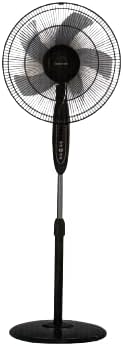
פיגורע 1: פראָנט view of the Mistral MSF1650R 16-inch Stand Fan, showing the fan head, control panel, adjustable stand, and round base.

Figure 2: The Mistral MSF1650R stand fan accompanied by its remote control, illustrating the convenience of remote operation.
- פראָנט גאַרד
- Fan Blade (5 ABS blades)
- דערציען גאַרד
- מאָטאָר האָוסינג
- קאָנטראָל פּאַנעל
- אַדזשאַסטאַבאַל שטאַנד פּאָל
- באַזע
- ווייַט קאָנטראָל
אַסעמבלי אינסטרוקציעס
Follow these steps to assemble your stand fan:
- צוטשעפּען די באַזע: Place the stand pole onto the base and secure it using the provided screw and washer from underneath the base.
- Install the Rear Guard: Position the rear guard onto the motor housing, ensuring it aligns with the locating pins. Secure it with the guard nut.
- Mount the Fan Blade: Slide the fan blade onto the motor shaft, aligning the notch on the blade with the pin on the shaft. Secure it with the blade cap, turning it counter-clockwise.
- Attach the Front Guard: Place the front guard onto the rear guard, aligning the clips. Secure the guards together using the guard ring and clip, ensuring it is tightly fastened around the perimeter.
- סטרויערן די הייך: Loosen the height adjustment knob on the stand pole, extend or retract the pole to the desired height, and then tighten the knob securely.
אַפּערייטינג ינסטראַקשאַנז
Your Mistral MSF1650R fan can be operated via the control panel on the fan body or the remote control.
קאָנטראָל פּאַנעל פאַנגקשאַנז:
- ON/OFF קנעפּל: דרוק צו קער די פאָכער אויף אָדער אַוועק.
- SPEED קנעפּל: Press repeatedly to cycle through fan speeds: Low, Medium, High.
- מאָדע קנעפּל: Press to select between Normal, Natural, and Sleep modes.
- TIMER קנעפּל: Press to set the operating timer (up to 7.5 hours). Each press adds 0.5 hours.
- OSC (Oscillation) Button: Press to start or stop the fan head oscillating horizontally.
רימאָוט קאָנטראָל פאַנגקשאַנז:
The remote control duplicates all functions available on the fan's control panel for convenient operation from a distance.
- זיכער מאַכן אַז די באַטעריעס זענען ריכטיק אַרײַנגעשטעלט אין דער ווײַטקאָנטראָל.
- Point the remote control towards the fan's receiver when operating.
- Buttons on the remote correspond to the functions described above (ON/OFF, SPEED, MODE, TIMER, OSC).
וישאַלט און רייניקונג
רעגולערע רייניקונג וועט העלפן אויפהאלטן די פען'ס פאָרשטעלונג און פארלענגערן זיין לעבנסדויער.
- אָפּשטעקן איידער רייניקונג: Always disconnect the fan from the power supply before attempting any cleaning or maintenance.
- רייניקן אויסערלעכע סערפאַסיז: Wipe the fan's exterior surfaces with a soft, damp שטאָף. דו זאלסט נישט נוצן אַברייסיוו קלינערז אָדער סאָלוואַנץ.
- Clean Fan Blades and Guards: To clean the fan blades and inside the guards, you may need to carefully remove the front guard. Use a soft cloth or a vacuum cleaner with a brush attachment to remove dust. Ensure all parts are dry before reassembling.
- סטאָרידזש: If storing the fan for an extended period, cover it to protect it from dust and store it in a dry, cool place.
טראָובלעשאָאָטינג
זעט די טאבעלע אונטן פאר אלגעמיינע פראבלעמען און זייערע לייזונגען.
| פּראָבלעם | מעגלעך סיבה | לייזונג |
|---|---|---|
| דער ווענטילאַטאָר צינדט זיך נישט אָן. | קיין מאַכט צושטעלן. פען נישט איינגעשטאכן. מאַכט קנעפּל נישט געדריקט. | קוק די מאַכט ווענטיל. זיכער מאַכן אַז דער פּלאָג איז גאָר אַרײַנגעשטעקט. דרוק דעם ON/OFF קנעפּל. |
| שוואַך לופט לויפן. | די ווענטילאַטאָר גיכקייט איז צו נידעריק געשטעלט. Dust accumulation on blades/guards. | פאַרגרעסערן פאָכער גיכקייַט. Clean fan blades and guards as per maintenance instructions. |
| דער ווענטילאַטאָר מאַכט אַ נישט־געוויינטלעכן גערויש. | פרייַ טיילן. שטערונג אין פאָכער בליידז. | Ensure all assembly screws and nuts are tight. Unplug and check for any foreign objects. |
| ווייַט קאָנטראָל נישט ארבעטן. | טויט באַטעריז. שטערונג צווישן ווײַטקאָנטראָל און ווענטילאַטאָר. | פאַרבייַטן באַטעריז. זיכער מאַכן אַ קלאָרע זיכט־ליניע צום ווענטילאַטאָר'ס ופנעמער. |
ספּעסאַפאַקיישאַנז
Technical details for the Mistral MSF1650R 16-inch Stand Fan.

Figure 3: Detailed specifications of the Mistral MSF1650R stand fan, including dimensions, power, and features.
| מאָדעל | MSF1650R |
| פאַן בלאַדע | 5 ABS Fan Blade |
| Voltage | 220-240 וו ~ 50 הז |
| מאַכט | 55 וו |
| לופט באנד | 66.49 מ³/מין |
| מאַקסימום לופט לויפן | 3.45 עם / s |
| פּראָדוקט דימענשאַנז | 45 x 15 x 57 ס״מ (ד x ב x ה) |
| מאַקס הייך | 1.3m (Adjustable) |
| נעץ וואָג | 5.85 קג |
| ספּעציעלע פֿעיִקייטן | Adjustable Height, Remote Controlled, 7.5 Hours Timer, 3 Speed Selection, Normal/Natural/Sleep Modes |
וואָראַנטי און שטיצן
For warranty information or technical support, please refer to the warranty card included with your purchase or contact Mistral customer service. Keep your proof of purchase for warranty claims.
For further assistance, please visit the official Mistral webזייטל אדער קאָנטאַקט זייערע אָטערייזד סערוויס צענטערס.


