פּראָדוקט איבערview

Image: The LTC SS-503 TWS Wireless Earbuds shown with their charging case, highlighting the sleek white design and RGB lighting on the case.
The LTC SS-503 TWS Wireless Earbuds are designed for an immersive audio experience, featuring Bluetooth 5.1 connectivity, dual music and gaming modes, and a distinctive RGB light charging case. They are built for comfort and durability, with an IPX4 waterproof rating suitable for various activities.
שליסל פֿעיִקייטן:
- Cool RGB Light: Customizable lighting modes on the charging case.
- IPX4 וואָטערפּרוף: Resistant to splashes and sweat, ideal for workouts.
- Quick Charging & Long Playtime: Fast charging via USB-C or wireless, with extended battery life.
- Bluetooth 5.1 & Low Latency: Stable connection and minimal audio delay.
- Dual Mode (Music & Gaming): אָפּטימיזעד געזונט פּראָfiles for different uses.
- הי-פיי סטערעאָ געזונט: Delivers clear audio with deep bass and crisp treble.
- Simply Pairing & Touch Controls: Easy device connection and intuitive touch-sensitive controls.
סעטאַפּ
1. וואָס איז אין דער קעסטל
Upon unboxing, ensure the following components are present:
- LTC SS-503 TWS Wireless Earbuds (Left and Right)
- ווירעלעסס טשאַרדזשינג קאַסע
- וסב-C טשאַרדזשינג קאַבלע
- באַניצער מאַנואַל (דעם דאָקומענט)
2. ערשטע אויפלאָדונג
פארן ערשטן באַנוץ, לאָדן די אויערקנעפּלעך און די טשאַרדזשינג קעסטל גאָר אויף.

Image: The charging case demonstrating both USB-C cable charging and wireless charging capabilities.
- דורך USB-C קאַבל: Connect the provided USB-C cable to the charging case and a power source. The charging case will indicate charging status.
- ווירעלעסס טשאַרדזשינג: שטעלט דעם טשאַרדזשינג קעסטל אויף אַ קאָמפּאַטיבלן וויירלעסן טשאַרדזשינג פּאַד. מאַכט זיכער אַז דער קעסטל איז ריכטיק אויסגעשטעלט פֿאַר עפֿעקטיוו טשאַרדזשינג.
- טשאַרדזשינג צייט: The charging case takes approximately 1.5 hours to fully charge. Earbuds charge when placed inside the case.
Note: Wireless charging devices with fast charging functions may adversely affect the charging case. Avoid using such devices to charge the case.
3. פּערינג מיט דיין מיטל
The earbuds support hassle-free pairing with iOS/Android phones, Mac, or Windows laptops.

Image: A smartphone displaying Bluetooth settings, showing the "SS-503" earbuds available for connection, with the charging case open beside it.
- ערשטער מאָל פּערינג:
- עפֿנט דעם טשאַרדזשינג קעסטל. די אויערקנעפּלעך וועלן זיך אויטאָמאַטיש אָנצינדן און אַרײַן אין פּערינג מאָדע.
- אויף אייער דעווייס (סמאַרטפאָן, טאַבלעט, לאַפּטאָפּ), אַקטיווירט בלועטוט און זוכט פֿאַר פֿאַראַן דעווייסעס.
- Select "SS-503" from the list of found devices to connect.
- אַמאָל פארבונדן, וועט אַ קול פּראָמפּט באַשטעטיקן די געראָטן פּאָרינג.
- קאַנעקטינג צו אנדערע דעוויסעס:
- To connect to a new device or reset pairing, open the earbud compartment without removing the earbuds.
- Press and hold the function key (MFB) in the middle of the charging case for approximately 5 seconds until both earbud indicators light up simultaneously. This indicates a successful reset.
- When the earbud indicators begin single blinking, the headset is in pairing state and ready to connect to a new device.
אַפּערייטינג ינסטראַקשאַנז
1. מאַכט אויף / אויסגעלאשן
- מאַכט אויף: עפֿנט דעם טשאַרדזשינג קעסטל, און די אויערקנעפּלעך וועלן זיך אויטאָמאַטיש אָנצינדן און זיך פֿאַרבינדן צום לעצטן פֿאַרבונדענעם אַפּאַראַט.
- מאַכט אַוועק: לייגט די אויערקנעפּלעך צוריק אין די טשאַרדזשינג קעסטל און מאַכט צו דעם דעקל. זיי וועלן זיך אויטאָמאַטיש אויסלעשן און אָנהייבן טשאַרדזשינג.
2. ריר קאָנטראָלס
The earbuds feature intuitive touch controls on both the left and right earbuds (MFB - Multi-Function Button).
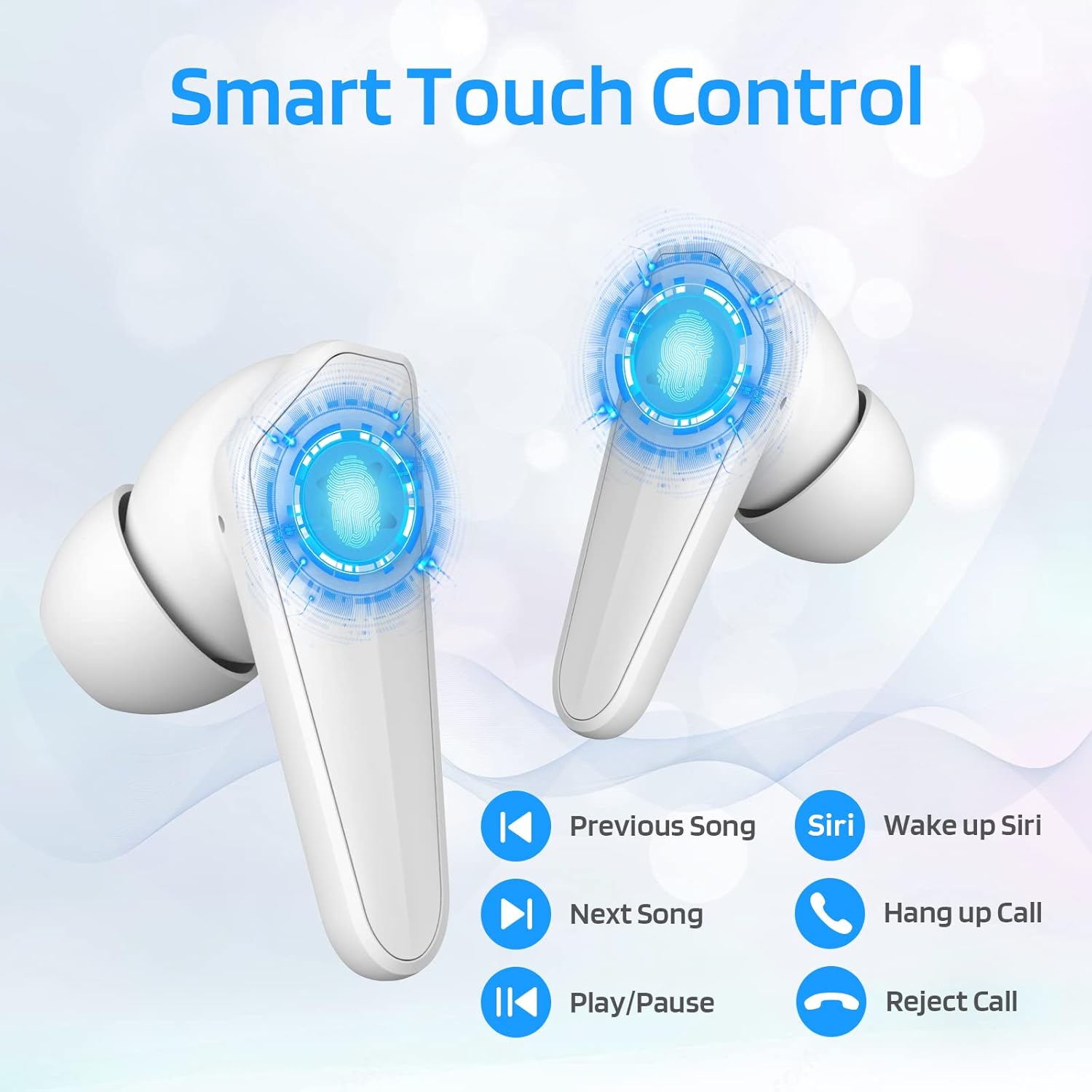
Image: Diagram illustrating the touch control functions on the earbuds, including play/pause, track navigation, call management, and voice assistant activation.
| פֿונקציע | קאַמף |
|---|---|
| שפּיל / פּויזע | איין צאַפּן אויף יעדער עאַרבוד. |
| ווייַטער ליד | צאַפּ צוויי מאָל אויף די רעכטע אויערקנעפּל. |
| פרייַערדיק ליד | צאַפּ צוויי מאָל אויף די לינקע אויערקנעפּל. |
| ענטפֿערן / סוף רופן | איין צאַפּן אויף יעדער עאַרבוד. |
| אָפּוואַרפן רופן | דריקן און האַלטן יעדער עאַרבוד פֿאַר 2 סעקונדעס. |
| Activate Voice Assistant (Siri/Google) | טרייפאַך צאַפּן אויף די לינקע אויערקנעפּל. |
3. Dual Mode Switching (Music/Gaming)
The LTC SS-503 earbuds offer two distinct audio modes for optimized performance.

Image: A smartphone screen displaying both music playback and a gaming interface, with icons indicating "Music Mode" and "Gaming Mode" for the earbuds.
- באַשטימען מאָדעס: Press the right earbud's MFB for 3 seconds to switch between modes.
- גיימינג מאָדע: This mode is designed to weaken ambient sound and strengthen specific in-game audio cues, such as footsteps, providing a low-latency experience for immersive gaming.
- מוזיק מאָדע: This mode produces high-fidelity stereo sound with deep bass and clear treble, optimized for general music listening.
4. RGB Light Control (Charging Case)
The charging case features customizable RGB lighting.

Image: The charging case illuminated with vibrant RGB lights, emphasizing its colorful and fashionable design.
- באַשטימען ליכט מאָדעס: Short press the MFB (Multi-Function Button) in the middle of the charging box to cycle through 9 different light modes.
- Turning Lights On/Off: Double-press the MFB in the middle of the charging box to turn the RGB lights on or off.
וישאַלט
געהעריקע אויפהאלטונג גאראנטירט די לאנגעוויטי און אפטימאלע פאָרשטעלונג פון אייערע אויערן-קנעפּלעך.
- רייניקונג: Regularly wipe the earbuds and charging case with a soft, dry, lint-free cloth. Avoid using abrasive materials or harsh chemicals. For ear tips, remove them and clean with mild soap and water, then dry thoroughly before reattaching.
- וואַסער קעגנשטעל (IPX4): The earbuds are IPX4 waterproof, meaning they are resistant to splashing water from any direction. This makes them suitable for workouts and light rain. However, they are not designed for submersion in water, swimming, or showering. Do not expose them to pressurized water or high-velocity water.
- סטאָרידזש: ווען נישט אין באַנוץ, לייגט די אויערן-קנעפּלעך אין זייער טשאַרדזשינג קעסטל צו באַשיצן זיי און האַלטן זיי טשאַרדזשד. לייגט זיי אין אַ קיל, טרוקן אָרט אַוועק פון עקסטרעמע טעמפּעראַטורן און דירעקט זונשייַן.
- באַטערי זאָרגן: כדי צו שפּאָרן דעם באַטעריע לעבן, זאָלט איר נישט אָפט גאָר אויסלאָדן די אויערקנעפּלעך און די טשאַרדזשינג קעסטל. טשאַרדזשט זיי רעגולער, אפילו אויב זיי ווערן נישט גענוצט פֿאַר לענגערע צייטן.

Image: The earbuds and charging case shown with water droplets, illustrating their IPX4 waterproof capability.
טראָובלעשאָאָטינג
If you encounter issues with your LTC SS-503 earbuds, refer to the following common problems and solutions:
Issue 1: Only one earbud has sound.
This product supports a dual-host function, allowing use of a single earbud. If only one earbud has sound when both are in use, it may require a reset.
- לייזונג: Place both earbuds back into the charging case. Close the lid, then open it again. This will reset and re-pair the earbuds. If the issue persists, perform a full reset as described in the "Connecting to Other Devices" section under Setup.
Issue 2: Occasional disconnection or unstable connection.
Bluetooth 5.1 technology provides a stable connection, but environmental factors can affect performance.
- לייזונג:
- Ensure the effective connection distance (less than 10 meters) is maintained between the earbuds and your device.
- Avoid signal-blocking objects such as thick walls or large metal structures between your device and the earbuds.
- Ensure there is no significant electromagnetic interference from other electronic devices nearby.
- Try resetting the earbuds and re-pairing them with your device.
Issue 3: Earbuds or charging case not charging.
If your device is not charging as expected, check the following:
- לייזונג:
- Verify that the USB-C cable is securely connected to both the charging case and the power adapter.
- Ensure the power adapter is functioning correctly and plugged into a live outlet.
- If using wireless charging, ensure the charging case is correctly positioned on the wireless charging pad and the pad is powered.
- Try using a different USB-C cable or power adapter to rule out faulty accessories.
- Clean the charging contacts on both the earbuds and inside the charging case with a dry cotton swab to ensure good connection.
ספּעסאַפאַקיישאַנז
Detailed technical specifications for the LTC SS-503 TWS Wireless Earbuds:
| שטריך | דעטאַל |
|---|---|
| מאָדעל נאָמען | Sound Slave (SS-503) |
| קאַנעקטיוויטי טעכנאָלאָגיע | ווירעלעס (בלוטוט 5.1) |
| בלועטאָאָטה קייט | אַרויף צו 10 מעטער |
| וואַסער קעגנשטעל מדרגה | IPX4 (וואַסער קעגנשטעליק) |
| עאַרבוד באַטערי לעבן | אַרויף צו 5 שעה |
| גאַנץ שפּילצייט (מיט טשאַרדזשינג קעסטל) | אַרויף צו 20 שעה |
| טשאַרדזשינג צייט (קאַסע) | 1.5 שעה |
| קאָנטראָל טיפּ | Touch Control (Media Control) |
| אַודיאָ דרייווער טיפּ | דינאַמיש דרייווער |
| אָפטקייַט ראַנגע | 20 הערץ - 20,000 הערץ |
| מאַטעריאַל | פּלאַסטיק |
| פּונקט וואָג | 5 אונסעס (גאַנץ פּאַקעט) |
| קאָליר | ווייַס |
וואָראַנטי און שטיצן
LTC products are manufactured with high standards of quality. For specific warranty details, please refer to the warranty card included with your product or visit the official LTC webזייטל. האַלט אייער קויף קוויטל ווי אַ באַווייַז פון קויפן פֿאַר קיין וואָראַנטי קליימז.
For further assistance, technical support, or inquiries, please refer to the official user manual PDF available online or contact LTC customer service through their official channels. The user manual PDF can be accessed via this link: LTC SS-503 User Manual (PDF).


