הקדמה
דאנק איר פֿאַר דיין ברירה Amplicomms BigTel 1582 Cordless Big Button Phone. This system is designed to provide clear and accessible communication, especially for users with hearing or visual impairments, or those who prefer simplified operation. It features large buttons, a loud ringer, amplified audio, and an integrated answering machine. This manual provides detailed instructions for setting up, operating, and maintaining your new telephone system.

בילד: די Amplicomms BigTel 1582 system, showing the main base station with one handset and an additional charging cradle with a second handset.
זיכערקייַט אינפֿאָרמאַציע
- Use only the power adapter and batteries supplied with the product.
- שטעלט נישט אויס דעם טעלעפאָן צו וואַסער אָדער פייכטקייט.
- Avoid placing the base station or charging cradle near heat sources or direct sunlight.
- האַלט דעם טעלעפאָן אַוועק פון שטאַרקע עלעקטראָמאַגנעטישע פעלדער.
- פרובירט נישט צו עפענען אדער פאררעכטן דעם איינהייט אליין. לאָזט איבער אלע סערוויסעס צו קוואַליפֿיצירטע פּערסאָנעל.
- אַוועקוואַרפן באַטעריעס פאַראַנטוואָרטלעך לויט די לאָקאַלע רעגולאַציעס.
פּעקל אינהאַלט
ביטע קאָנטראָלירט אַז אַלע זאכן זענען פאַראַן אין אייער פּעקל:
- 1 x BigTel 1580 Base Station with integrated answering machine
- 2 x Cordless Handsets (one for the base, one for the additional charging cradle)
- 2 x Handset Charging Cradles (one integrated with base, one separate)
- 2 x Power Adapters (for base and additional cradle)
- 1 x טעלעפאָן ליניע שנור
- 4 x AAA Rechargeable Batteries (2 per handset)
- 1 x באַניצער מאַנואַל (דאָס דאָקומענט)
פּראָדוקט איבערview
כאַנדסעט פֿעיִקייטן

בילד: דעטאַלירט view of the handset highlighting the large backlit display, M1/M2/M3 direct memory buttons, and indicators for increased ring volume and audio ampליפיקאַטיאָן.
- גרויס באַקלייט ווייַז: Provides clear visibility of caller ID and menu options.
- גרויס קנעפּלעך: Large, easy-to-read keypad for effortless dialing.
- M1, M2, M3 Direct Memory Buttons: For quick dialing of frequently called numbers.
- Volume Boost Button: Increases in-call audio volume by up to +35dB.
- געהער אַיד קאַמפּאַטאַבאַל: Reduces interference for hearing aid users.
- Visual Ring Indicator: A light on the handset flashes when there's an incoming call.
באַזע סטאַנציע פֿעיִקייטן

Image: The base station, showing the integrated answering machine controls and the M1/M2/M3 direct call buttons, allowing calls directly from the base.
- ינטעגראַטעד אַנסווער מאַשין: Records up to 30 minutes of messages.
- הענט-פריי ספּיקערז: Allows calls directly from the base unit.
- Direct Call Buttons (M1, M2, M3): Initiate calls to pre-programmed numbers directly from the base.
- מעסעדזש ציילער: Digital display shows the number of new messages.
סעטאַפּ
1. קאַנעקטינג די באַזע סטאַנציע
- Connect one end of the telephone line cord to the "LINE" socket on the back of the base station.
- Connect the other end of the telephone line cord to your telephone wall socket or router/hub.
- Connect the power adapter to the "POWER" socket on the back of the base station.
- שטעקט אריין דעם מאַכט אַדאַפּטער אין אַ הויפּט עלעקטרישער ווענטיל.
2. אינסטאַלירן האַנדסעט באַטעריעס
- עפֿנט דעם דעקל פֿונעם באַטעריע־אָפּטייל אויף דער הינטערשטער זײַט פֿון יעדן האַנטסעט.
- Insert the 2 AAA rechargeable batteries, observing the correct polarity (+ and -).
- פאַרמאַכן די באַטאַרייע אָפּטייל דעקן סיקיורלי.
3. אויפלאָדן די הענטסעטס
- Place each handset onto its respective charging cradle (one on the base station, one on the additional cradle).
- Ensure the "Charge" indicator on the handset or base lights up, indicating proper charging.
- For first-time use, charge the handsets for at least 15 hours to ensure full battery capacity.
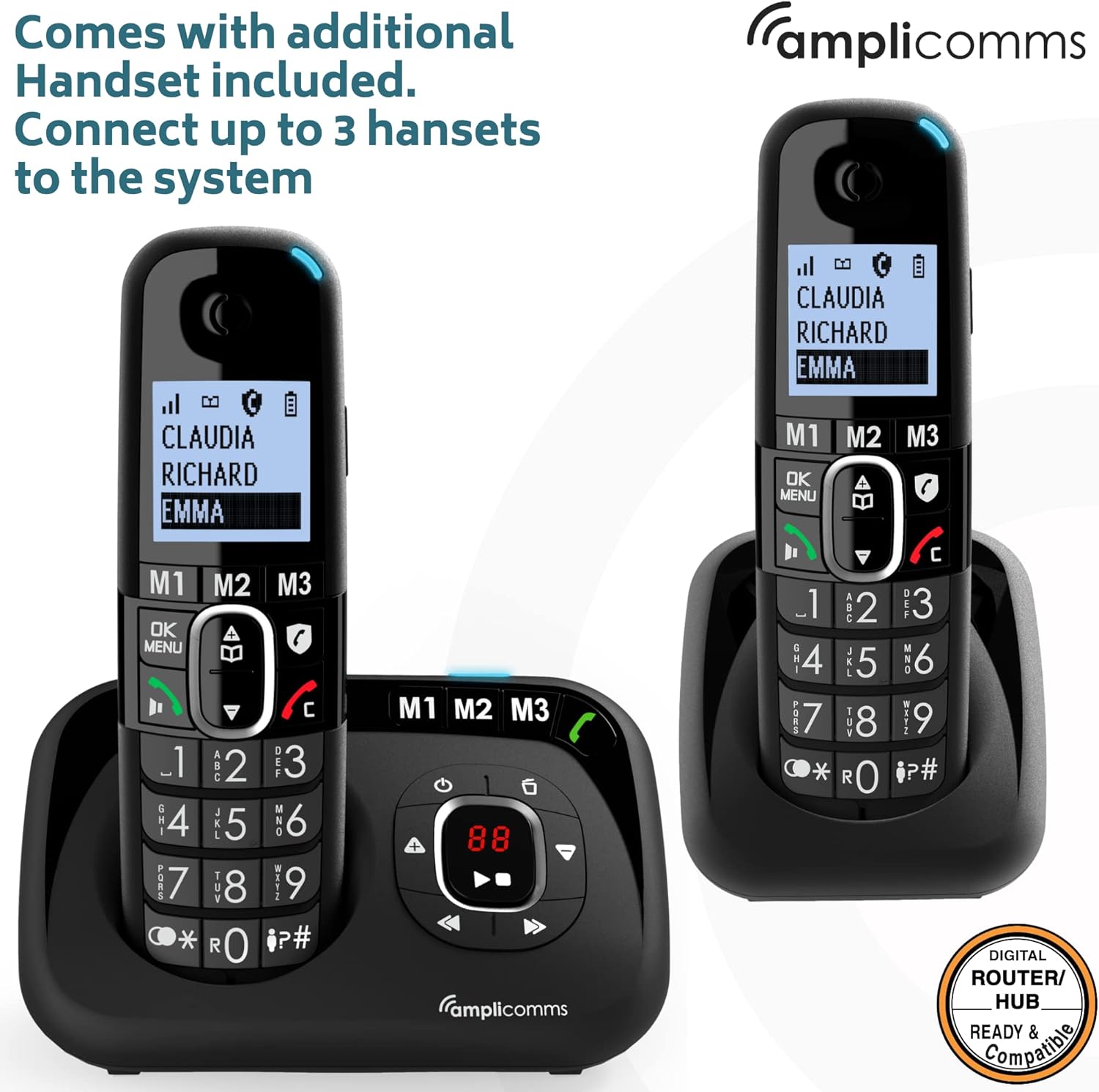
בילד: די Amplicomms BigTel 1582 system with both the main base and the additional charging cradle, demonstrating the multi-handset capability.
4. Registering Additional Handsets (if necessary)
Your additional handset(s) should be pre-registered. If not, or if you purchase additional handsets (up to 3 total), follow these steps:
- אויף די באַזע סטאַנציע, דריקן און האַלטן די PAGE button (usually located on the side or back) until the registration indicator on the base starts flashing.
- אויף די כאַנדסעט, דריקן מעניו / גוט, then navigate to "Register Handset" (or similar option) and press מעניו / גוט ווידער.
- אַרייַן די סיסטעם פּין (דיפאָלט איז 0000) און דריקן מעניו / גוט.
- The handset will display "Registering..." and then "Handset Registered" once successful.
אַפּערייטינג ינסטראַקשאַנז
מאכן קאַללס
- From Handset:
- Dial the desired phone number using the large keypad.
- דרוק די GREEN (Call) קנעפּל צו אָנהייבן דעם רוף.
- צו ענדיקן דעם רוף, דריקן די RED (End Call) קנעפּל.
- Using Direct Memory Buttons (M1, M2, M3):
- To program: Press and hold M1/M2/M3, enter the number, then press מעניו / גוט צו ראַטעווען.
- To call: Simply press the desired M1, M2, or M3 button on the handset or base. The phone will automatically dial the stored number.
ריסיווינג קאַללס
- When the phone rings, the visual ring indicator on the handset will flash.
- דרוק די GREEN (Call) button on the handset or the ספּיקערז button on the base to answer.
אַדזשאַסטינג באַנד
- Earpiece Volume (during a call): ניצן די אַרויף / אַראָפּ navigation buttons on the handset.
- רינגער באַנד: Navigate through the handset menu to "Settings" > "Ringer Volume" to adjust. The ringer can be increased up to 90dB.
- אַודיאָ בוסט: בעת א רוף, דריק די באזונדערע קנעפל בוסט button (often marked with an ear icon) on the handset to amplify the incoming audio by up to +35dB. Press again to deactivate.
Answering Machine Functions
די אינטעגרירטע ענטפֿער מאַשין קען רעקאָרדירן ביז 30 מינוט פון מעסעדזשעס.
- קערן אויף / אַוועק: דרוק די ON/OFF קנעפּל אויף דער באַזע סטאַנציע.
- שפּילן מעסעדזשעס: דרוק די שפּיל button on the base station. The message counter will display the number of new messages.
- Skipping/Deleting Messages: ניצן די SKIP און ויסמעקן buttons on the base during message playback.
- אויפנעמען ארויסגייענדיקע מעסעדזש (OGM): Access the answering machine settings via the handset menu or base controls to record your personalized greeting.
אינטערקאם (פֿאַר קייפל הענטסעטס)
- To call another handset: Press the INT (Intercom) button on your handset, then dial the number of the desired handset (e.g., 2 for handset 2).
- To transfer a call: During an external call, press INT, dial the handset number, wait for them to answer, then hang up to transfer.
וישאַלט
- רייניקונג: ווישט אָפּ דעם טעלעפאָן און באַזע סטאַנציע מיט אַ ווייכן, דamp שטאָף. דו זאלסט נישט נוצן אַברייסיוו קלינערז אָדער סאָלוואַנץ.
- באַטערי זאָרגן:
- Always use the supplied rechargeable AAA batteries.
- אויב דער טעלעפאָן וועט נישט ווערן גענוצט פֿאַר אַ לענגערע צייט, נעמט אַרויס די באַטעריעס צו פאַרמייַדן ליקאַדזש.
- Replace batteries when they no longer hold a charge effectively.
- אָרט: Place the base station in a central location to maximize cordless range. Avoid placing it near large metal objects or other electronic devices that may cause interference.
טראָובלעשאָאָטינג
| פּראָבלעם | מעגלעך סיבה | לייזונג |
|---|---|---|
| קיין רעדל טאָן. | טעלעפאָן ליניע שנור נישט פארבונדן אדער דעפעקטיוו. | Check connections. Try another phone in the same socket. |
| האַנדסעט לאָדט זיך נישט אויף. | Handset not correctly seated in cradle; dirty charging contacts; batteries not inserted or faulty. | Ensure handset is properly seated. Clean contacts with a dry cloth. Check battery insertion and condition. |
| No display on handset. | Batteries flat or not inserted. | Charge handset for 15 hours. Check battery insertion. |
| Poor sound quality / static. | Out of range; interference from other electronic devices. | Move closer to the base station. Relocate base station away from other electronics. |
| קען נישט מאַכן אָדער באַקומען רופן. | Handset not registered; base station not powered. | Register handset (see Setup section). Check base station power connection. |
| ענטפֿער מאַשין רעקאָרדירט נישט. | Answering machine is off; memory full. | Ensure answering machine is turned on. Delete old messages to free up space. |
ספּעסאַפאַקיישאַנז
- מאָדעל: Amplicomms BigTel 1582 (1580 + Additional Handset)
- טעלעפאָן טיפּ: שנורלאָזער DECT טעלעפאָן
- ענטפער סיסטעם טיפּ: דיגיטאַל, ביז 30 מינוט רעקאָרדינג צייט
- רינגער באַנד: אַרויף צו 90 דב
- אַודיאָ בוסט: אַרויף צו +35 דב
- באַטעריז: 4 x AAA ריטשאַרדזשאַבאַל באַטעריעס (אַרייַנגערעכנט)
- קאָליר: שוואַרץ
- מאַטעריאַל: פּלאַסטיק
- נומער וואָג: 0.8 קילאָגראַם (גאַנץ פּעקל)
- פּעקל דימענשאַנז: 21.2 X 17.3 X 9.1 סענטימעטער
- פאַבריקאַנט: Atlinks
- לאַנד פון אָריגין: האָנג קאָנג
- קאַמפּאַטאַבאַל דעוויסעס: Digital home networks (e.g., routers, home hubs)
וואָראַנטי און שטיצן
Amplicomms products are designed for reliability and performance. For warranty information, please refer to the warranty card included in your product packaging or visit the official Ampליקאָמס website. For technical support or service inquiries, please contact your retailer or the Amplicomms customer service department.
פאַבריקאַנט: Atlinks
סאָרט: Ampליקאָמס
Webפּלאַץ: וווווו.amplicomms.com (נאטיץ: דאס איז א פלאצהאלטער URL, please refer to your product documentation for the correct support contact information.)


