הקדמה
This manual provides detailed instructions for the installation, operation, and maintenance of your IEI DM-F12A/R-R30 12-inch XGA LCD Monitor. This industrial-grade monitor features a 600 cd/m² brightness, an aluminum front panel, and a USB R-touch screen, designed for robust performance in various environments. It supports a wide 9~36VDC input range.
פּעקל אינהאַלט
Please verify that all items are present and in good condition upon unpacking. If any items are missing or damaged, contact your vendor immediately.
- IEI DM-F12A/R-R30 LCD Monitor
- מאַכט אַדאַפּטער (אויב אַרייַנגערעכנט מיט ספּעציפֿיש מאָדעל וואַריאַנט)
- USB Cable for Touch Function
- VGA/HDMI Cable (depending on model configuration)
- מאָנטירונג האַרדווער (אויב אָנווענדלעך)
- Documentation (Quick Start Guide, Driver CD if applicable)
סעטאַפּ
1. מאָונטינג די מאָניטאָר
The DM-F12A/R-R30 monitor is designed for various mounting options, including panel mount or VESA mount. Refer to the specific mounting instructions provided with your mounting kit.
2. קאַנעקטינג קאַבלעס
- ווידעא ינפּוט: Connect a VGA or HDMI cable (depending on your system and monitor's available ports) from your computer's video output to the corresponding input port on the monitor.
- USB Touch: Connect the supplied USB cable from your computer's USB port to the USB port on the monitor. This enables the R-touch screen functionality.
- מאַכט: Connect the 9~36VDC power input to the monitor. Ensure the power source matches the specified voltage קייט.
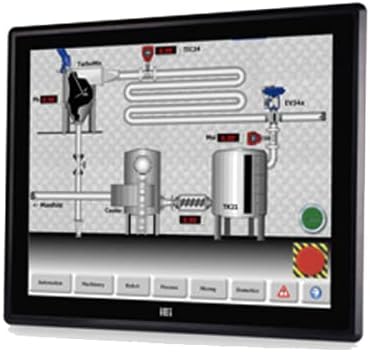
Figure 1: The IEI DM-F12A/R-R30 monitor, showcasing its display and industrial design. This image illustrates the monitor's appearance and typical use in a control system interface.
3. פּאַוערינג אויף
After all cables are securely connected, power on your computer and then the monitor. The monitor should automatically detect the input signal.
אַפּערייטינג
Basic Display Functions
The monitor will display the video output from your connected computer. Adjust display settings such as resolution and refresh rate through your computer's operating system display settings for optimal performance.
Using the R-Touch Screen
The R-touch screen functions as a standard mouse input. Once the USB cable is connected and recognized by your operating system, you can interact with the display by touching the screen directly. Calibration may be required for precise touch input, typically accessible through your operating system's tablet PC or touch screen settings.
- איין טאַפּ: Equivalent to a left-click.
- טאַפּ און האַלטן: Equivalent to a right-click (may vary by OS settings).
- שלעפּן: Touch and move your finger across the screen to move items or scroll.
וישאַלט
רייניקונג די מאָניטאָר
- שטענדיק אויסלעשן און ארויסציען דעם מאָניטאָר איידער איר רייניגט.
- ניצן אַ ווייך, לינט-פֿרייַ שטאָף אַ ביסל דampened with water or a non-abrasive LCD screen cleaner.
- Do not use alcohol, ammonia-based cleaners, or abrasive materials, as these can damage the screen surface or casing.
- ווישט אָפּ דעם עקראַן און גasing. Avoid spraying liquid directly onto the screen.
ענוויראָנמענטאַל קאָנסידעראַטיאָנס
Ensure the monitor is operated within its specified temperature and humidity ranges. Avoid exposing the monitor to direct sunlight, excessive dust, or extreme temperatures.
טראָובלעשאָאָטינג
| פּראָבלעם | מעגלעך סיבה | לייזונג |
|---|---|---|
| ניט קיין אַרויסווייַזן אויף פאַרשטעלן |
|
|
| ריר פאַרשטעלן ניט ריספּאַנדינג |
|
|
| בילד איז פארשוואומען אדער פארדרייט |
|
|
ספּעסאַפאַקיישאַנז
| שטריך | דעטאַל |
|---|---|
| מאָדעל | DM-F12A/R-R30 |
| סאָרט | IEI |
| פאַרשטעלן גרייס | 12 אינטשעס |
| האַכלאָטע | קסגאַ |
| ברייטנאַס | 600 סי / מ² |
| פראָנט פּאַנעל מאַטעריאַל | אַלומינום |
| ריר סקרין טיפּ | USB R-Touch |
| אַרייַנשרייַב וואָלtage | 9~36VDC |
| פאַרשטעלן ייבערפלאַך | גלאָסי |
| ספּעציעלע שטריך | טאָוטשסקרעען |
| פאַבריקאַנט | IEI Technology |
וואָראַנטי און שטיצן
For warranty information and technical support, please refer to the documentation included with your product or visit the official IEI Technology webזייטל. קאָנטאַקט דעטאַלן פֿאַר קונה סערוויס זענען טיפּיש בנימצא אויף דער פאַבריקאַנט ס שטיצע בלאַט.
פאַבריקאַנט Webפּלאַץ: www.ieiworld.com


