הקדמה
The Tunturi Fitcross 50i Rear Driven Crosstrainer is designed for effective fitness training. Its rear-driven mechanism provides a shorter, more active motion compared to front-driven ellipticals, engaging various muscle groups for a comprehensive workout. The device includes a tablet holder, allowing integration with fitness applications like Fit Hi Way, iConsole, Tunturi Routes, and Kinomap for expanded training programs and virtual routes. It offers 20 pre-defined programs and 32 resistance levels for varied workout intensity. Transport wheels facilitate easy relocation and storage after use. The console features a 5.5-inch color LCD with backlight, displaying essential workout data. Heart rate monitoring is available via hand pulse sensors and an integrated telemetric HR receiver.

An individual performing an elliptical workout on the Tunturi Fitcross 50i Crosstrainer, illustrating the natural movement path provided by the rear-driven system.
סעטאַפּ אינסטרוקציעס
1. אַנפּאַקינג און אַסעמבלי
Carefully remove all components from the packaging. It is recommended to assemble the crosstrainer in the area where it will be used. Follow the detailed assembly instructions provided in the separate assembly guide. Ensure all bolts, nuts, and washers are securely fastened.
קסנומקס. פּלאַסעמענט
Place the crosstrainer on a flat, stable surface. Ensure there is adequate space around the unit for safe operation and movement. A minimum of 0.6 meters (2 feet) of clear space is recommended around the equipment.
3. מאַכט קאַנעקשאַן
Connect the provided 9V/1A power adapter to the crosstrainer's power input port and then plug it into a standard electrical outlet.
4. לעוועלינג
Adjust the leveling feet located on the stabilizer bars to ensure the crosstrainer is stable and does not rock during use.

Sturdy transport wheels integrated into the front stabilizer bar of the crosstrainer, designed for easy relocation and storage.
אַפּערייטינג ינסטראַקשאַנז
1. קאנסאל איבערview
The Tunturi Fitcross 50i features a 5.5-inch color LCD console with backlight. This display shows key workout metrics including Time, Speed, Distance, Watt, and Calories.

The 5.5-inch color LCD console of the crosstrainer, displaying workout metrics and control buttons.
2. יקערדיק אָפּעראַציע
- מאַכט אויף: Plug in the adapter. The console will light up.
- אָנהייב / האַלטן: Press to begin or pause your workout.
- DIRECTIONS: Use to navigate through different display modes or confirm selections.
- אַרויף אַראָפּ: Adjust resistance levels (32 levels available) or navigate menu options.
- באַשטעטיק: Clear current workout data.
3. טרענירונג פראגראמען
The crosstrainer offers 20 pre-defined programs to suit various fitness levels and goals:
- 1 מאַנועלע פּראָגראַם
- 4 Beginner Programs
- 4 Advanced Programs
- 4 Sporty Programs
- 4 Heart Rate Programs (requires heart rate monitoring)
- 1 Watt Program (10-350W, adjustable in 5W increments)
- 1 רעקאָווערי פּראָגראַם
- 1 Body Fat Program
Select your desired program using the MODE and UP/DOWN buttons.
4. האַרץ רייט מאָניטאָרינג
The Fitcross 50i includes hand pulse sensors on the handlebars and an integrated telemetric HR receiver. To use hand pulse sensors, grip the sensors firmly during your workout. For telemetric monitoring, use a compatible chest strap (not included) which will automatically connect to the integrated receiver.
5. App Connectivity (Bluetooth)
The crosstrainer is equipped with Bluetooth for connecting to various fitness applications on your tablet or smartphone.
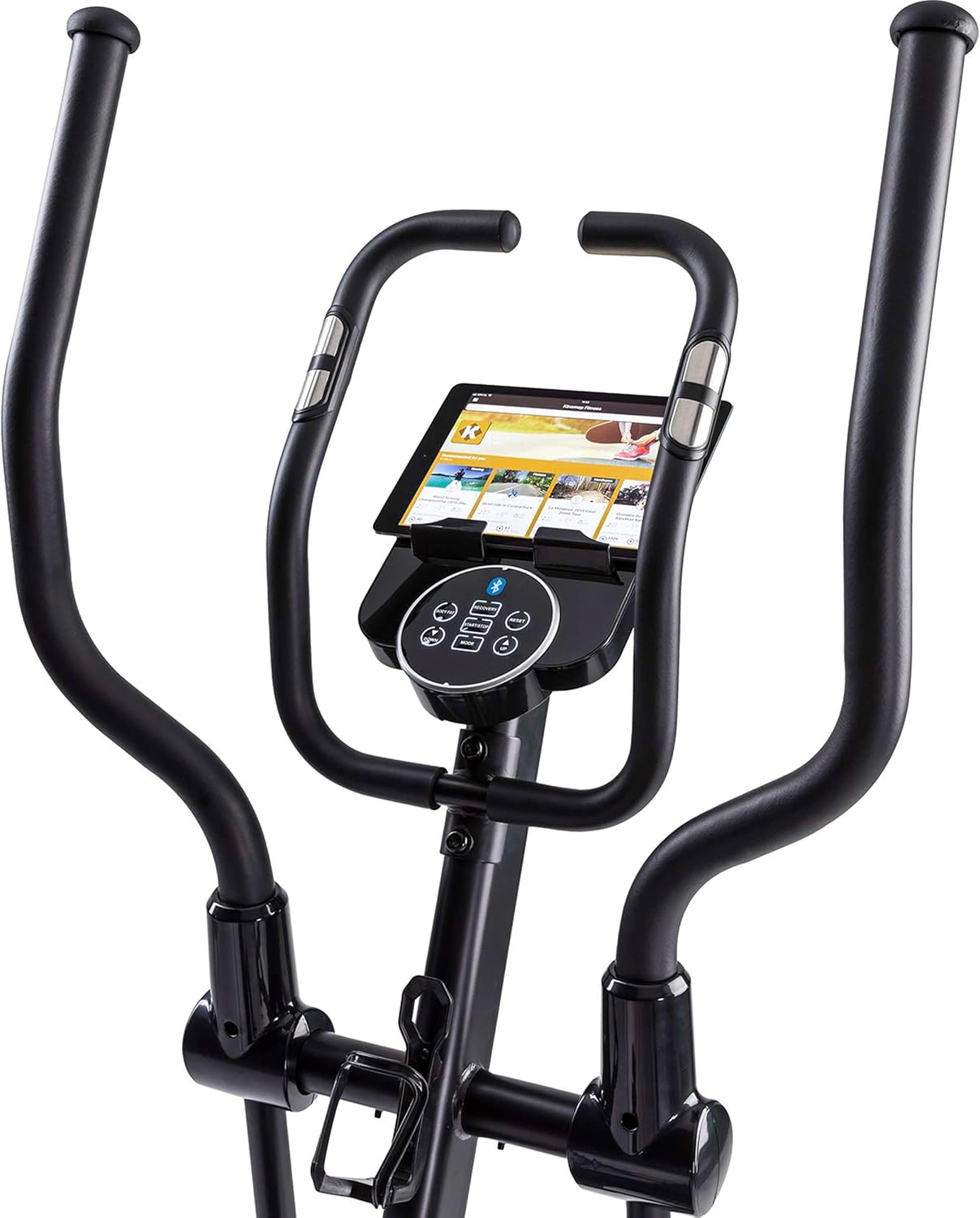
A tablet positioned in the dedicated holder on the crosstrainer, ready for use with fitness applications.
Compatible applications include:
- Tunturi Routes: Offers virtual routes and training programs.
- iConsole+Training: Provides additional workout programs and features.
- Kinomap: Allows you to train on real-world video routes.
- Fit Hi Way: Another application for enhanced training experiences.
To connect, enable Bluetooth on your tablet/smartphone, open the desired app, and follow the app's instructions to pair with the Fitcross 50i.
וישאַלט
1. רייניקונג
ווישט רעגולער אָפּ דעם קראָס-טריינער מיט אַדווערטייזמענטamp טוך נאך יעדן באניץ צו באזייטיגן שווייס און שטויב. פארמיידט צו ניצן שווארצע רייניגער אדער סאָלווענטן וואָס קענען שאַטן די ענדיקונג אדער עלעקטראָנישע קאָמפּאָנענטן.
2. דורכקוק
Periodically inspect all moving parts, bolts, and connections to ensure they are secure. Tighten any loose fasteners. Check for any signs of wear or damage on cables, pedals, and handlebars.
3. לובריקיישאַן
Consult the separate assembly guide for specific lubrication requirements. Generally, moving joints may require occasional lubrication with silicone-based lubricant to ensure smooth operation and prevent squeaking.
4. סטאָרידזש
ווען נישט אין באַנוץ, לייגט דעם קראָס-טריינער אין אַ טרוקענעם, קילן אָרט אַוועק פון דירעקטער זון און עקסטרעמע טעמפּעראַטורן. ניצט די טראַנספּאָרט רעדער צו באַוועגן דעם אַפּאַראַט לייכט.

A detailed shot of the rear section of the crosstrainer, highlighting the drive mechanism and branding. Regular inspection of this area is recommended.
טראָובלעשאָאָטינג
| פּראָבלעם | מעגלעך סיבה | לייזונג |
|---|---|---|
| Console not powering on. | מאַכט אַדאַפּטער נישט פארבונדן אָדער דעפעקטיוו. | Ensure the power adapter is securely plugged into both the crosstrainer and a working electrical outlet. Check the adapter for damage. |
| No resistance change. | Loose connection to resistance motor or console issue. | Check all cable connections to the console and resistance mechanism. If the issue persists, contact customer support. |
| נישט פּינקטלעכע האַרץ ראַטע לייענען. | Improper hand placement or chest strap issue. | Ensure hands are firmly and fully gripping the pulse sensors. If using a chest strap, ensure it is worn correctly and has a fresh battery. |
| קוויטשענדיק אדער קרײַענדיק גערויש. | Loose parts or lack of lubrication. | Inspect all bolts and connections and tighten if necessary. Apply lubricant to moving joints as per the assembly guide. |
| בלועטאָאָטה קאַנעקטיוויטי ישוז. | Bluetooth not enabled or app issues. | Ensure Bluetooth is enabled on your device. Restart the app and the crosstrainer. Try pairing again. Ensure the app is up to date. |
ספּעסאַפאַקיישאַנז
| מאָדעל נאָמען | Fitcross 50i |
| סאָרט | Tunturi |
| קעגנשטעל מעקאַניזאַם | מאַגנעטיק |
| נומער פון קעגנשטעל לעוועלס | 32 |
| ווייַז טיפּ | 5.5-אינטש קאָליר LCD מיט באַקלייטונג |
| מגילה | 20 (1 Manual, 4 Beginner, 4 Advanced, 4 Sporty, 4 Heart Rate, 1 Watt, 1 Recovery, 1 Body Fat) |
| Watt Program Range | 10-350 W (adjustable by 5 W) |
| האַרץ קורס מאָניטאָרינג | Hand pulse sensors, Integrated telemetric HR receiver |
| קאַנעקטיוויטי | Bluetooth (Tunturi Routes, iConsole+Training, Kinomap, Fit Hi Way) |
| מאַטעריאַל | אַללוי סטיל |
| מאַקסימום באַניצער וואָג | 150 קג (330 לבס) |
| פּראָדוקט דימענשאַנז (L x W x H) | 145 X 60 X 171 סענטימעטער (57.1 X 23.6 X 67.3 אינטשעס) |
| פּראָדוקט וואָג | 48 קג (105.8 לבס) |
| מאַכט צושטעלן | 9 וו / 1 אַ אַדאַפּטער |
| אַריבערפירן ווהעעלס | יא |
| טאַבלעט האָלדער | יא |
וואָראַנטי אינפֿאָרמאַציע
Tunturi products are manufactured to high quality standards. For specific warranty details regarding your Fitcross 50i Crosstrainer, please refer to the warranty card included with your product or visit the official Tunturi webזייטל. האַלט דיין קויפן באַווייַז פֿאַר קיין וואָראַנטי קליימז.
קונה שטיצן
Should you encounter any issues or have questions not covered in this manual, please contact Tunturi customer support.
- אָנליין שטיצן: Visit the official Tunturi webזייטל פֿאַר אָפֿט געשטעלטע פֿראַגעס, שטיצע אַרטיקלען, און קאָנטאַקט פֿאָרמען.
- קאָנטאַקט אינפֿאָרמאַציע: Refer to your product packaging or the Tunturi website for regional customer service phone numbers and email addresses.