1. זיכערקייַט אינסטרוקציעס
Please read these safety instructions carefully before using the product. Keep this manual for future reference.
- דאס פּראָדוקט איז בלויז דיזיינד פֿאַר אינעווייניק נוצן. נישט אויסשטעלן צו נעץ אָדער עקסטרעמע טעמפּעראַטורן.
- Do not attempt to open or modify the device. This may void the warranty and pose a safety risk.
- האַלטן די מיטל אַוועק פון קינדער.
- Use only the provided micro-USB cable for charging.
- דו זאלסט נישט קוקן גלייַך אין די געפירט ליכט מקור.
2. פּעקל אינהאַלט
זיכער מאַכן אַז אַלע זאכן זענען פאַראַן אין פּעקל:
- ANSMANN Under-Cabinet Light M
- מיקראָ-וסב טשאַרדזשינג קאַבלע
- ינסטראַקשאַנז מאַנואַל
3. פּראָדוקט איבערview
The ANSMANN Under-Cabinet Light M is a versatile, rechargeable LED lamp designed for various indoor applications. It features a motion sensor, adjustable color temperatures, and a slim design for discreet placement.

Image 1: The ANSMANN Under-Cabinet Light M, showcasing its sleek, white design and integrated motion sensor.
שליסל פֿעיִקייטן:
- PIR באַוועגונג סענסאָר: Automatically activates the light when motion is detected in low-light conditions.
- טוויילייט סענסאר: Ensures the light only activates in dark environments, conserving battery life.
- אַדזשאַסטאַבאַל קאָליר טעמפּעראַטור: Choose between 3 color temperatures (cool white, neutral white, warm white) or activate all LEDs for maximum brightness.
- סטעפּלעסס דימינג: Adjust brightness by holding down the control button.
- קריקאָנלאָדלעך באַטערי: Integrated battery for cordless operation, charged via micro-USB.
- מאַגנעטיק מאַונטינג: Easy installation and removal with a magnetic strip.

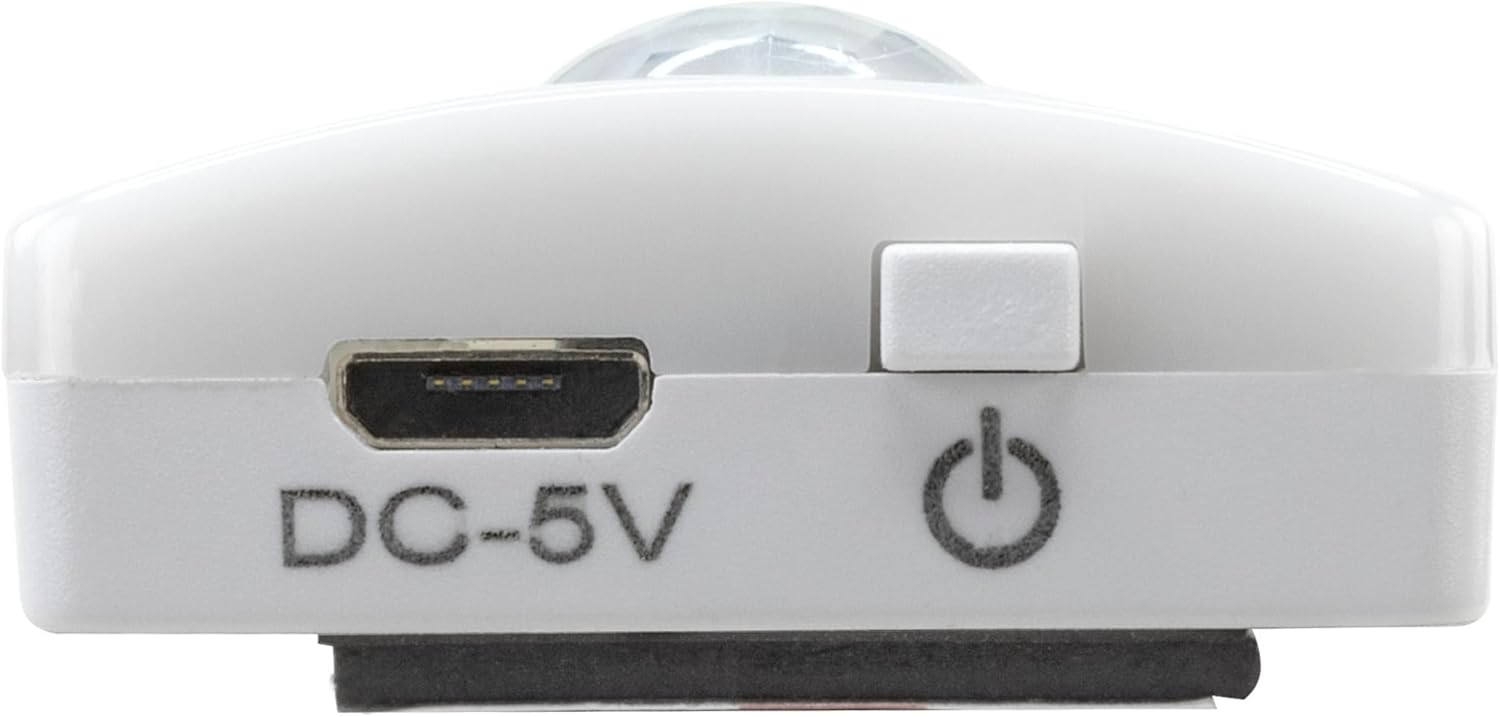
Image 2: Diagram illustrating the Micro-USB Port, On/Off button, and PIR motion sensor on the device.
4. סעטאַפּ און ייַנמאָנטירונג
The Under-Cabinet Light M offers flexible installation options using its integrated magnetic strip.
מאַגנעטיק מאַונטינג:
- Identify a suitable, clean, and dry surface for installation (e.g., inside a cabinet, under a shelf).
- The light comes with a fixed magnetic strip on its back. For non-metallic surfaces, use the included adhesive strip.
- Peel off the protective film from the adhesive strip and firmly press it onto the desired surface.
- Attach the Under-Cabinet Light M to the adhesive strip. The magnetic connection will hold it in place.
בילד 3: נאָענט־אַרויף view of the magnetic strip and the removable adhesive strip, demonstrating the mounting mechanism.

בילד 4: עקס.ample of the under-cabinet light installed in a modern kitchen setting, providing illumination over a countertop.
5. אָפּעראַציע
The Under-Cabinet Light M offers intuitive control for its lighting functions.
מאַכט אויף / אַוועק:
- Locate the On/Off button (refer to Image 2).
- Press the button once to turn the light on or off.
אַדזשאַסטינג קאָליר טעמפּעראַטור:
- With the light on, short press the control button repeatedly to cycle through the 3 available color temperatures: cool white, neutral white, and warm white.
- A fourth press will activate all LEDs for maximum brightness.
דימינג פֿונקציע:
- To adjust the brightness, press and hold the control button. The light will gradually dim or brighten. Release the button when the desired brightness level is reached.
Motion and Twilight Sensor:
- When the light is in motion sensor mode, it will automatically turn on when movement is detected within its range.
- The integrated twilight sensor ensures that the motion sensor only activates the light in dark environments, preventing unnecessary illumination during daylight hours.
6. טשאַרדזשינג
The Under-Cabinet Light M is equipped with a rechargeable battery for convenient cordless use.
- When the battery is low, the light output may decrease or the light may not turn on.
- Gently detach the light from its magnetic mounting surface.
- Connect the provided micro-USB cable to the micro-USB port on the light (refer to Image 2).
- Connect the other end of the micro-USB cable to a suitable USB power source (e.g., USB wall adapter, computer USB port).
- An indicator light will show the charging status (e.g., red for charging, green for fully charged).
- Once fully charged, disconnect the cable and reattach the light to its mounting surface.

בילד 5: דעטאַלירט view of the Micro-USB charging port and the On/Off button, essential for charging and operation.
7. וישאַלט
To ensure the longevity and optimal performance of your Under-Cabinet Light M, follow these simple maintenance guidelines:
- Clean the light regularly with a soft, dry cloth. Do not use abrasive cleaners or solvents.
- Ensure the motion sensor lens is kept clean and free from obstructions for proper function.
- Store the light in a cool, dry place if not in use for extended periods.
8. טראָובלעשאָאָטינג
If you encounter issues with your Under-Cabinet Light M, refer to the following common problems and solutions:
| פּראָבלעם | מעגלעך סיבה | לייזונג |
|---|---|---|
| ליכט טוט נישט קער אויף. | באַטערי איז דיפּליטיד. | Charge the light using the micro-USB cable. |
| באַוועגונג סענסאָר דעטעקטירט נישט באַוועגונג. | Ensure the sensor is clean and unobstructed. Check if the environment is dark enough for the twilight sensor to activate. | |
| ליכט טוט נישט אָפּצאָל. | דעפעקטיווער קאַבל אָדער מאַכט מקור. | Try a different micro-USB cable or USB power adapter. |
| די טשאַרדזשינג פּאָרט איז שמוציק. | Gently clean the micro-USB port with a dry, soft brush. | |
| ליכט פליקערט אדער איז שוואַך. | נידעריק באַטאַרייע. | ריטשאַרדזש די מיטל. |
אויב די פראבלעם בלייבט נאך פרובירן די לייזונגען, ביטע קאנטאקטירט קאסטומער סופארט.
9. ספּעסאַפאַקיישאַנז
| שטריך | דעטאַל |
|---|---|
| מאָדעל נומער | 1600-0438 |
| פּראָדוקט דימענשאַנז | 25L x 3.5W x 1.3H cm (9.84L x 1.38W x 0.51H אינטשעס) |
| פּונקט וואָג | 112 גראַמז (0.25 לבס) |
| מאַכט מקור | באַטאַרייע פּאַוערד |
| טשאַרדזשינג פּאָרט | Micro-USB (DC-5V) |
| מאַטעריאַל | פּלאַסטיק |
| קאָליר | ווייַס |
| ייַנמאָנטירונג טיפּ | וואַנט מאָונט (מאַגנעטיש) |
| אָרט טיפּ | Dining Room, Kitchen, Wardrobe, Hallway, etc. |
10. וואָראַנטי און שטיצן
ANSMANN products are manufactured with high-quality standards. For information regarding warranty terms and conditions, please refer to the documentation provided with your purchase or visit the official ANSMANN webפּלאַץ.
For technical support or inquiries, please contact ANSMANN customer service through their official channels.


