1. הקדמה
This manual provides detailed instructions for the ANBERNIC RG351MP Handheld Game Console. Please read this manual thoroughly before using the device to ensure proper operation and to maximize your gaming experience. Keep this manual for future reference.
2. זיכערקייַט אינפֿאָרמאַציע
- שטעלט נישט אויס דעם אפאראט צו עקסטרעמע טעמפעראטורן, דירעקטע זונשייַן, אדער הויכע הומידיטי.
- ויסמיידן דראַפּינג אָדער אונטערטעניק די מיטל צו שטאַרק ימפּאַקץ.
- האַלטן די מיטל אַוועק פון וואַסער און אנדערע ליקווידס.
- פרובירט נישט צו צענעמען אדער פאררעכטן דאס אפאראט אליין. קאנטאקטירט בארעכטיגטע סערוויס פערסאנעל פאר הילף.
- ניצט נאָר דעם צוגעשטעלטן טשאַרדזשינג קאַבל און אַדאַפּטער.
- זיכער מאַכן אַז עס איז גענוג ווענטילאַציע בעת נוצן און אויפלאָדן.
- This product contains a Lithium Polymer battery. Dispose of batteries responsibly according to local regulations.
3. פּעקל אינהאַלט
באַשטעטיקן אַז אַלע זאכן זענען פאַראַן אין פּעקל:
- 1 x RG351MP Game Console
- 1 x WIFI Module
- 1 x 64G SD Card
- 1 x וסב טשאַרדזשינג קאַבלע
- 1 x באַניצער מאַנואַל
- 1 x סקרין פּראָטעקטאָר
- 1 x Wipes
4. פּראָדוקט איבערview
Familiarize yourself with the various components and controls of your ANBERNIC RG351MP console.
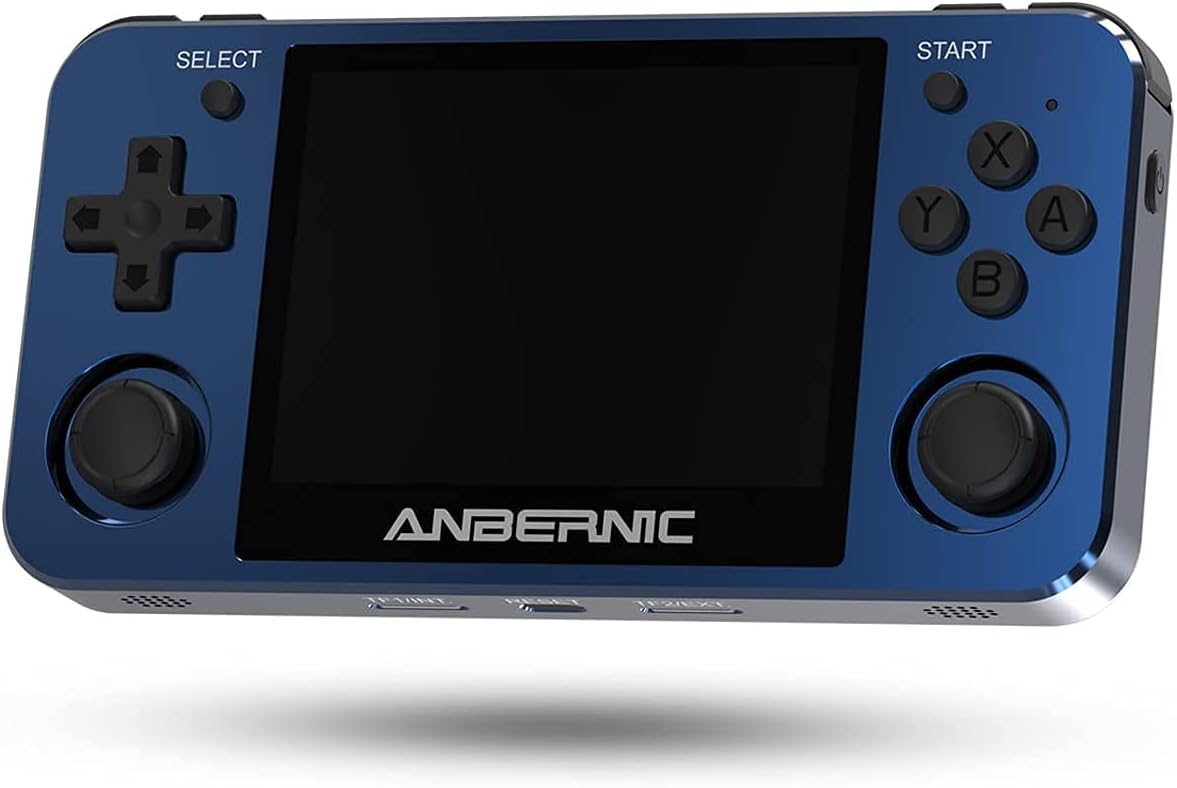
פיגורע 4.1: פראָנט View. This image displays the front of the ANBERNIC RG351MP console, featuring the 3.5-inch IPS screen, D-pad, action buttons (X, Y, A, B), SELECT and START buttons, and dual analog joysticks.

Figure 4.2: Console Layout. This image provides various angles of the console, highlighting the L1/L2/R1/R2 shoulder buttons, OTG and DC ports on the top, volume controls on the side, and TF/EXT, Reset, and TF2/EXT slots on the bottom.

פיגורע 4.3: צוריק View. The rear of the console is shown, displaying the ANBERNIC logo, model number RG351MP, and regulatory markings. This view also indicates the location of the internal Li-Po battery.

Figure 4.4: Screen Display. This image emphasizes the console's 3.5-inch IPS screen with OCA full lamination and 640x480 resolution, providing a clear visual experience.
5. סעטאַפּ
5.1 טשאַרדזשינג די מיטל
Before initial use, fully charge the console. Connect the provided USB charging cable to the DC port on the top of the console and the other end to a compatible USB power adapter (maximum load 2A). A full charge typically takes approximately 4 hours.
5.2 אריינשטעלן די TF קארטל
The console supports dual TF card slots. The primary TF1/EXT slot is for the operating system and pre-installed games. The TF2/EXT slot can be used to expand storage up to 256GB for additional games.
- Locate the TF1/EXT slot on the bottom of the console.
- Gently insert the pre-installed 64GB TF card into the slot until it clicks into place.
- If using an additional TF card for games, insert it into the TF2/EXT slot.

Figure 5.1: TF Card Insertion. This image illustrates the process of inserting a TF card into the console's expansion slot, demonstrating how to properly seat the card.
5.3 פּאַוערינג אויף / אַוועק
- צו מאַכט אויף: Press and hold the Power button (located on the side) for a few seconds until the screen illuminates.
- צו מאַכט אַוועק: Press and hold the Power button until the power-off menu appears, then select "Shutdown" or "Power Off". Alternatively, a quick press of the Power button may put the device into sleep mode, depending on system settings.
5.4 Connecting the WIFI Module
The console supports an external WIFI module for network connectivity. Insert the provided WIFI module into one of the OTG USB ports (located on the top of the console). Once connected, you can configure network settings within the system menu.
6. אַפּערייטינג ינסטרוקטיאָנס
6.1 יקערדיק נאַוויגאַציע
- D-pad / Analog Joysticks: Use these to navigate through menus and control in-game characters.
- א קנעפּל: Confirm selection or perform primary action.
- ב קנעפּל: Go back or perform secondary action.
- X / Y Buttons: Perform specific in-game actions as defined by the game.
- אָנהייב קנעפּל: Pause game, open in-game menus, or confirm selections.
- SELECT קנעפּל: Access system menus or perform specific in-game functions.
- L1/L2/R1/R2 קנעפּלעך: Shoulder buttons for various in-game controls.
6.2 Game Selection and Launching
From the main menu, navigate to the desired game system (e.g., PS1, GBA, NES). Select a game from the list using the D-pad or analog stick and press the A button to launch it.
6.3 Saving and Loading Game States
Most emulators support "save states" which allow you to save your progress at any point in a game, independent of the game's internal save system. Refer to the specific emulator's hotkey combinations (often a combination of SELECT + L1/R1 or similar) for saving and loading states.
6.4 סיסטעם סעטטינגס
Access the system settings menu (usually via the SELECT button or a dedicated menu option) to adjust:
- שפּראַך: ענדערן די סיסטעם שפּראַך.
- ווייַז: Adjust screen brightness, aspect ratio, and video filters.
- געזונט: Control volume levels and audio output.
- נעץ: Configure Wi-Fi settings (requires external Wi-Fi module).
- קאָנטראָללער סעטטינגס: Map buttons or calibrate joysticks.
6.5 Adding New Games
To add new games, you will need to transfer game ROMs to the TF2/EXT card. Ensure the ROMs are in a format supported by the console's emulators. Connect the TF2/EXT card to a computer using a card reader and copy the game files to the appropriate system folders on the card. After reinserting the card into the console, refresh the game list in the system menu.
7. וישאַלט
7.1 רייניקונג די מיטל
Use a soft, dry, lint-free cloth to clean the console's exterior. For the screen, use a screen-specific cleaning solution and a microfiber cloth. Do not use abrasive cleaners or solvents.
7.2 באַטערי קער
- פֿאַרמײַדט אָפֿט פֿולשטענדיק אויסצולאָדן די באַטעריע.
- האַלט דעם אַפּאַראַט אין אַ קיל, טרוקן אָרט ווען נישט אין באַנוץ פֿאַר לענגערע פּעריאָדן.
- If the device will not be used for a long time, charge it to about 50% before storing.
7.3 ווייכווארג דערהייַנטיקונגען
Periodically check the official ANBERNIC website or community forums for firmware updates. Updates can improve performance, add features, or fix bugs. Follow the provided instructions carefully when performing any software updates.
8. טראָובלעשאָאָטינג
| פּראָבלעם | מעגלעך סיבה | לייזונג |
|---|---|---|
| די מיטל טוט נישט מאַכט אויף. | Low battery; TF card not properly inserted; System crash. | Charge the device for at least 30 minutes. Ensure TF1/EXT card is correctly inserted. Press the Reset button (located on the bottom of the console) with a thin object. |
| Games are not loading or crashing. | Corrupt game file; Incorrect emulator settings; TF card issue. | Verify game file integrity. Check emulator settings (e.g., core, video driver). Reinsert or try a different TF card. |
| דער עקראַן איז ליידיק אָדער פליקערט. | ווייכווארג פראבלעם; הארדווער מאספעלונג. | Restart the device. If the problem persists, contact customer support. |
| קיין געזונט. | Volume too low; Muted; Headphone jack issue. | Increase volume using the side buttons. Check system sound settings. Ensure no headphones are partially inserted. |
9. ספּעסאַפאַקיישאַנז
| שטריך | דעטאַל |
|---|---|
| מאָדעל | RG351MP |
| מאַטעריאַל | Aluminum alloy shell, CNC process |
| סקרין | 3.5 inch IPS screen, OCA full lamination, 640*480 resolution |
| קפּו | RK3326 quad core 1.5 GHz |
| גפּו | Mali-G31 MP2 |
| באַראַן | DDR3L 1GB |
| אינערלעכער זכּרון | 16GB (for system) |
| סיסטעם | Open source Linux system |
| Game Support | Vibrating motor, supports 20+ game formats. Users can download relevant game formats. |
| רעדנער | High quality double horn stereo speaker |
| באַטערי | Li-polymer 3500 mAh, lasting approximately 6 hours |
| טשאַרדזשינג | 1.3A charging, matching maximum load 2A, USB charging cable, 4 hours for full charge |
| TF קאַרטל שטיצע | Supports TF card max to 256GB (dual TF card slots) |
| אנדערע פאַנגקשאַנז | Support external network card WIFI, Double OTG, Double 3D rocker, Support 3.5mm stereo earphones. |
| דימענשאַנז | 6.6 רענטגענ 3.8 X 1.9 אינטשעס (פּאַקע דימענשאַנז) |
| פּונקט וואָג | 15.2 אונסעס |
10. וואָראַנטי און שטיצן
10.1 וואָראַנטי אינפֿאָרמאַציע
ANBERNIC products are covered by a limited warranty. Please refer to the warranty card included in your package or visit the official ANBERNIC webזייטל פֿאַר דעטאַלירטע וואָראַנטי טערמינען און באַדינגונגען. האַלט דיין באַווייַז פון קויפן פֿאַר וואָראַנטי קליימז.
10.2 קונה שטיצן
If you encounter any issues or have questions not covered in this manual, please contact ANBERNIC customer support. You can usually find contact information on the official ANBERNIC webוועבזייטל אדער דורך דעם פארקויפער וואו איר האט געקויפט דעם פראדוקט.


