1. הקדמה
א דאנק פארן קויפןasing the CAME-TV Boltzen Perseus RGBDT 55W Lighting Screen. This professional-grade LED light is designed for various photography and videography applications, offering versatile color control and powerful illumination. Please read this manual thoroughly before operating the device to ensure proper use and maintenance.
This manual provides essential information on setting up, operating, maintaining, and troubleshooting your lighting screen. Keep this manual for future reference.
2. זיכערקייַט פּריקאָשאַנז
- שטעלט נישט אויס דעם אפאראט צו רעגן אדער פייכטקייט כדי צו פארמיידן עלעקטרישע שאק אדער פייער.
- נעמט נישט אויס אדער מאדיפיצירט נישט דאס אפאראט. רעפארן זאלן נאר דורכגעפירט ווערן דורך קוואַליפֿיצירטע פּערסאָנעל.
- Ensure the power source matches the device's requirements (Electric, 55W).
- פֿאַרמײַדט דירעקטע אויגן-אויסשטעל צו דער ליכט-מקור, ווײַל דאָס קען שאַטן די אויגן.
- Keep the device away from flammable materials and ensure proper ventilation during operation.
- שעפּן די מיטל מיט זאָרג צו פאַרמייַדן גשמיות שעדיקן.
3. פּעקל אינהאַלט
ביים עפענען דעם פעקל, ביטע זיכער מאכן אז אלע קאמפאנענטן זענען דא און אין גוטן צושטאנד:
- CAME-TV Boltzen Perseus RGBDT 55W Lighting Screen (Model: P-1200R)
- מאַכט אַדאַפּטער/קאַבל
- קעריינג באַג
- באַניצער מאַנואַל (דעם דאָקומענט)

Image: The CAME-TV Boltzen Perseus RGBDT 55W Lighting Screen (displaying blue light) shown alongside its dedicated carrying bag, illustrating the main product and its portable storage solution.
4. סעטאַפּ גייד
4.1 אויפשטעלן די ליכט
The Boltzen Perseus P-1200R is designed to be mounted on a standard light stand. Locate the mounting bracket on the light and attach it securely to your light stand's spigot.
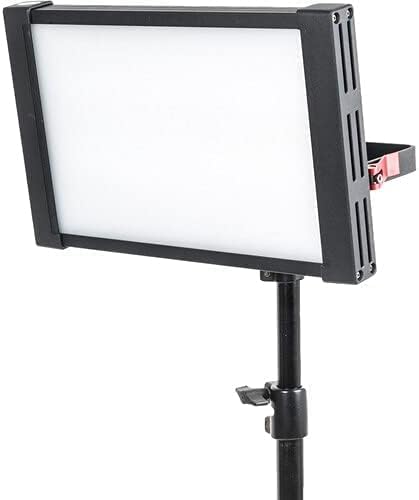
Image: The CAME-TV Boltzen Perseus RGBDT 55W Lighting Screen, emitting a white light, securely mounted on a professional light stand, demonstrating its typical setup for studio or location use.
4.2 מאַכט קאַנעקשאַן
- Connect the power adapter to the DC input port on the back of the light panel.
- צאַפּן די מאַכט אַדאַפּטער אין אַ פּאַסיק עלעקטריקאַל ווענטיל.
- Alternatively, if using a compatible battery (not included), attach it to the battery plate on the rear of the unit.

בילד: א דעטאַלירטע view of the rear panel of the CAME-TV Boltzen Perseus RGBDT 55W Lighting Screen, highlighting the control knobs, buttons, and the battery mounting plate, essential for operation and power management.
5. אַפּערייטינג ינסטרוקטיאָנס
5.1 פּאַוערינג אויף / אַוועק
Locate the power switch on the rear panel of the light. Flip the switch to the 'ON' position to power on the device. Flip it to the 'OFF' position to power off.
5.2 Adjusting Brightness (Dimmer)
ניצן די דיממער knob on the control panel to adjust the light's intensity. Rotate clockwise to increase brightness and counter-clockwise to decrease it.
5.3 Color Temperature and Hue Control
The Boltzen Perseus P-1200R features RGBDT color space control, allowing for a wide range of color temperatures and hues.
- CCT מאָדע: ניצן די קקט knob to adjust the color temperature from 2000K to 10000K.
- RGB מאָדע: דרוק די קאָליר button to switch to RGB mode. Use the corresponding knobs or buttons to adjust Red, Green, and Blue values to achieve desired colors.
- ספּעציעלע ווירקונג: The light may include pre-programmed special effects. Refer to the on-screen display and control buttons for navigation and selection of these effects.
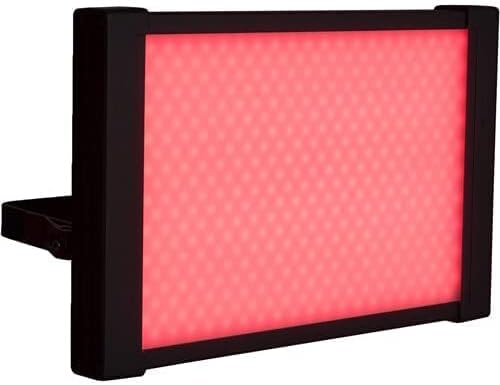
Image: The CAME-TV Boltzen Perseus RGBDT 55W Lighting Screen illuminated with a vibrant red light, showcasing its ability to produce various colors for creative lighting setups.
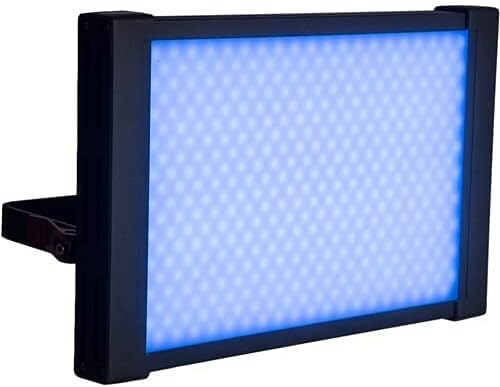
Image: The CAME-TV Boltzen Perseus RGBDT 55W Lighting Screen illuminated with a bright blue light, demonstrating another color option available through its RGBDT color control system.

Image: The CAME-TV Boltzen Perseus RGBDT 55W Lighting Screen illuminated with a rich purple light, further illustrating the extensive color palette achievable with this versatile lighting unit.
6. וישאַלט
- רייניקונג: Use a soft, dry cloth to clean the light panel and housing. Do not use abrasive cleaners or solvents.
- סטאָרידזש: When not in use, store the light in its carrying bag in a cool, dry place, away from direct sunlight and extreme temperatures.
- דורכקוק: Regularly inspect the power cable and connections for any signs of damage. If damage is found, discontinue use and contact customer support.
7. טראָובלעשאָאָטינג
| פּראָבלעם | מעגלעך סיבה | לייזונג |
|---|---|---|
| ליכט טוט נישט קער אויף. | קיין מאַכט צושטעל; פרייַ פֿאַרבינדונג; דעפעקטיווער מאַכט אַדאַפּטער. | Check power cable connection; ensure outlet is working; try a different power adapter if available. |
| ליכט פליקערט אדער פארשוואכט אומגעריכט. | Unstable power supply; overheating; faulty internal component. | Ensure stable power source; allow light to cool down; contact customer support if problem persists. |
| Color or brightness controls are unresponsive. | Software glitch; control panel issue. | Power cycle the device (turn off, wait 10 seconds, turn on); contact customer support. |
8. ספּעסאַפאַקיישאַנז
| שטריך | דעטאַל |
|---|---|
| מאָדעל | פּ-1200ר |
| סאָרט | CAME-TV |
| מאַכט רעזולטאַט | 55W (Note: Some specifications may list 9W, but the primary output is 55W) |
| קאָליר טעמפּעראַטור ראַנגע | 2000K - 10000K (RGBDT) |
| מאַכט מקור | עלעקטריק |
| דימענסיעס (שיפּינג) | 37.2 X 31.2 X 9.6 סענטימעטער |
| וואָג (שיפּינג) | 1 קג |
| אַרייַנגערעכנט קאַמפּאָונאַנץ | Lighting Screen, Power Adapter, Carrying Bag |
| ערשטער בנימצא טאָג | 14 סעפטעמבער 2021 |
9. וואָראַנטי און שטיצן
For warranty information and technical support, please refer to the official CAME-TV webזייטל אדער קאָנטאַקט אייער לאקאלן דיסטריביאַטאָר. האַלט אייער קויף קוויטל ווי אַ באַווייַז פון קויפן פֿאַר וואָראַנטי קליימז.
Manufacturer: CAME-TV Boltzen Perseus RGBDT 55W - P-1200R-1
ASIN: B09G3JLCSQ


