1. הקדמה
א דאנק פארן קויפןasing the YABER V5 Mini Projector. This manual provides detailed instructions for setting up, operating, and maintaining your projector to ensure optimal performance and longevity. Please read this manual thoroughly before use and keep it for future reference.

Image: The YABER V5 Mini Projector, shown with its included carrying bag and mini tripod, highlighting its portability and accessories.
2. וואָס איז אין דער קעסטל
Upon opening your YABER V5 Mini Projector package, please verify that all the following items are included:
- YABER V5 Mini Projector
- קעריינג באַג
- מיני טריפּאָד
- רימאָוט קאָנטראָל (באַטעריז ניט אַרייַנגערעכנט)
- מאַכט קאַבלע
- HDMI קאַבלע
- אב קאַבלע
- באַניצער מאַנואַל
- אָביעקטיוו קאַפּ

Image: The retail packaging for the YABER V5 Mini Projector, indicating the product and its branding.
3. פּראָדוקט פֿעיִקייטן
- Dual-Band WiFi Connectivity (5G/2.4G): The V5 supports both 5GHz and 2.4GHz WiFi bands, providing faster and more stable wireless screen mirroring for smoother video and image transmission from your smartphone or tablet.
- בלועטאָאָטה 5.0: Equipped with Bluetooth 5.0, allowing seamless connection to external Bluetooth speakers, headphones, or AirPods for enhanced audio experience.
- Enhanced Brightness & 1080P Full HD Support: Features enhanced German jade glass lenses and increased brightness for clearer and more vibrant images. Supports Full HD 1080P resolution for a high-quality viewינג דערפאַרונג.
- Giant Screen & Zoom Function: Capable of projecting images from 45 to 200 inches. The digital zoom function allows you to reduce the image size from 100% to 50% using the remote control without moving the projector.
- ברייט קאַמפּאַטאַבילאַטי: Multiple input ports including HDMI, USB, VGA, AV, Audio, and TF card ensure compatibility with a wide range of devices such as TV boxes, Fire Stick TV, Chromecast, PCs, laptops, tablets, and smartphones.
- לאנג לamp לעבן: Utilizes SmarEco technology to minimize power consumption, extending the lamp's lifespan up to 100,000 hours.

Image: Illustration of the projector's dual-band (2.4GHz and 5GHz) WiFi capability, emphasizing faster transmission speeds for a smoother experience.

Image: The projector wirelessly connected to various Bluetooth audio devices like headphones and speakers, demonstrating its Bluetooth 5.0 capability.
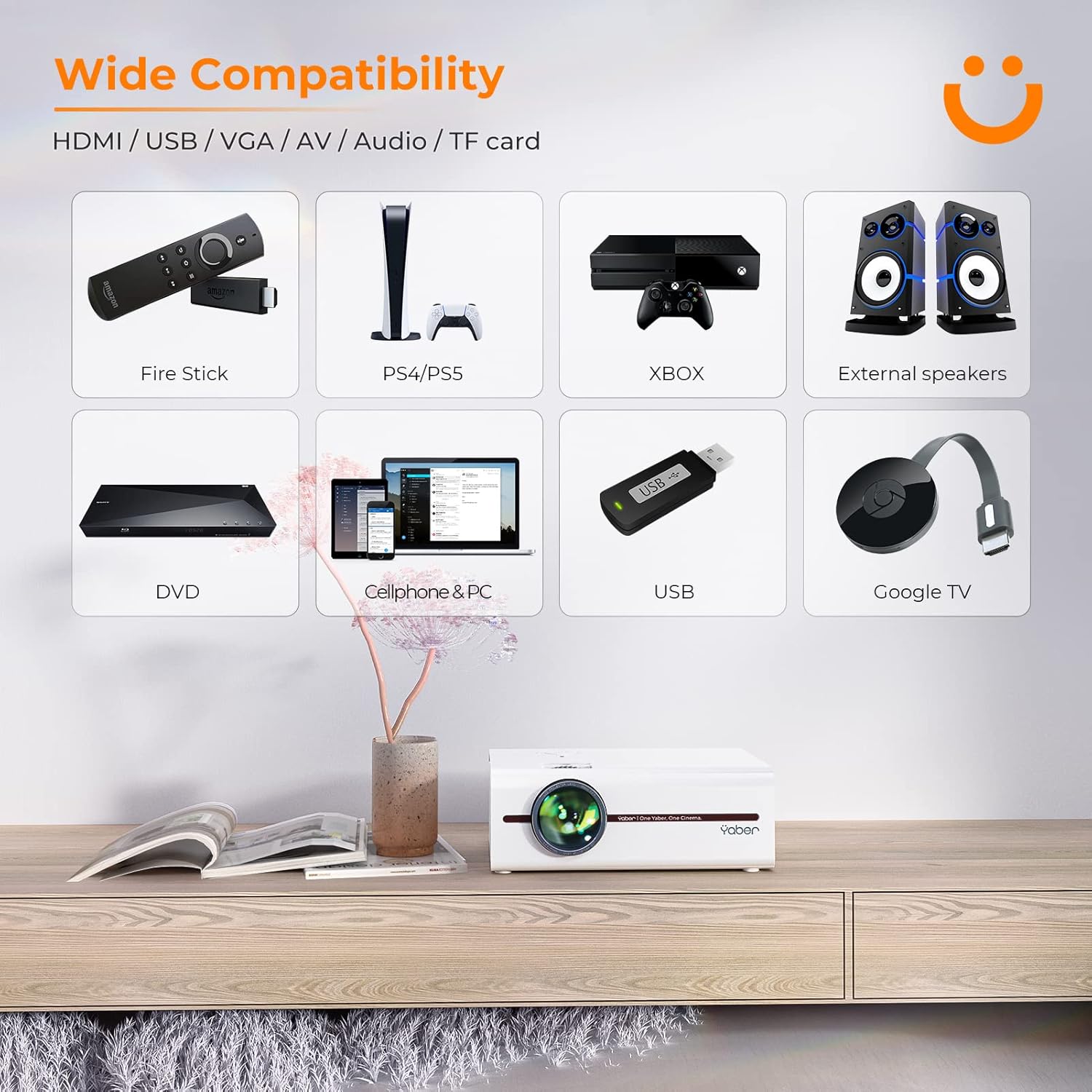
Image: A visual representation of the projector's wide range of compatible devices, including Fire Stick, PS4/PS5, Xbox, external speakers, DVD players, cellphones, PCs, USB drives, and Google TV, connected via various ports.
4. סעטאַפּ
4.1 ערשטע פּלאַצירונג און מאַכט
- Place the projector on a stable, flat surface or mount it using a compatible tripod. Ensure proper ventilation around the unit.
- פֿאַרבינדט דעם מאַכט קאַבל צום פּראָיעקטאָר'ס מאַכט אַרייַנגאַנג און דערנאָך צו אַ מאַכט ווענטיל.
- דריק דעם מאַכט קנעפּל אויף דעם פּראָיעקטאָר אָדער ווײַטקאָנטראָל צו עס אנצינדן.
4.2 Adjusting Image Focus and Keystone
After powering on, adjust the focus and keystone correction for a clear, rectangular image.
- פאָקוס: דרייט דעם פאָקוס רינג אויף דער פּראָיעקטאָר לינז ביז די בילד דערשיינט שאַרף און קלאָר.
- Keystone Correction: Use the keystone adjustment dial or the remote control to correct any trapezoidal distortion, ensuring the image is perfectly rectangular. The V5 supports both mechanical and digital keystone correction.

Image: A hand holding the projector's remote control, illustrating the ease of adjusting the projected image, including focus and keystone correction.
4.3 קאַנעקטינג דעוויסעס
The YABER V5 offers various connectivity options:
- הדמי: Connect your laptop, game console, or streaming device via an HDMI cable.
- וסב: אַרײַנשטעלן אַ USB דרייוו צו שפּילן מעדיע files גלייַך.
- פון: Use the AV cable for older devices like DVD players.
- ווגאַ: פאַרבינדן צו קאָמפּיוטערס מיט אַ VGA אַרויסגאַנג.
- TF קאָרט: אַרײַנשטעלן אַ TF קאַרטל פֿאַר מעדיע ווידערשפּיל.
4.4 וויירלעס סקרין שפּיגלונג (WiFi)
צו שפּיגלען דיין סמאַרטפאָון אָדער טאַבלעט פאַרשטעלן אָן דראָטן:
- Ensure your projector and mobile device are connected to the same WiFi network.
- On the projector, select the 'Screen Mirroring' input source.
- For iOS devices, open Control Center and tap 'Screen Mirroring' or 'AirPlay Mirroring', then select the projector from the list.
- פֿאַר אַנדרויד דעוויסעס, אַקטיווירן 'Wireless Display', 'Smart View', 'Multi-screen', or similar function in your device settings, then select the projector.

Image: A visual comparison demonstrating the faster loading and transmission speed of 5GHz WiFi compared to 2.4GHz, highlighting the benefit for screen mirroring.
4.5 בלועטוט אודיאָ פֿאַרבינדונג
To connect to a Bluetooth audio device:
- אַקטיווירן בלועטוט אויף אייער פונדרויסנדיק רעדנער אָדער כעדפאָונז און שטעלן עס צו פּערינג מאָדע.
- אויף דעם פּראָיעקטאָר, נאַוויגירט צו די בלועטוט סעטטינגס מעניו.
- אויסקלייבן אייער דעווייס פון דער ליסטע פון פאראן דעווייסעס צו פארבינדן.

Image: The YABER V5 projector wirelessly connected to an external Bluetooth speaker, illustrating the enhanced audio experience possible.
5. אַפּערייטינג ינסטרוקטיאָנס
5.1 מאַכט אויף / אַוועק
- To power on, press the power button on the projector or remote.
- צו אויסלעשן, דריק נאכאמאל דעם פאוער קנעפל. באשטעטיגט אויסלעשן אויב געבעטן.
5.2 אויסוואל פון איינגאבע מקור
Use the 'Source' button on the remote or projector to cycle through available input sources (HDMI, USB, AV, VGA, TF Card, Screen Mirroring).
5.3 מעניו נאַוויגאַציע
Use the arrow keys on the remote or projector to navigate through the on-screen menu. Press 'OK' or 'Enter' to confirm selections. Use 'Return' or 'Exit' to go back or close the menu.
5.4 Adjusting Projection Size (Zoom Function)
To adjust the projection size without moving the projector, use the digital zoom function via the remote control. This allows you to shrink the image from 100% down to 50%.

Image: An illustration showing the digital zoom function, allowing the projected image size to be adjusted from 100% down to 50% without physically moving the projector.
6. וישאַלט
6.1 רייניקן די לינז
ניצט אַ ווייכע, לינט-פֿרייע שטאָף ספּעציעל דיזיינד פֿאַר אָפּטישע לענסעס צו פֿאָרזיכטיק ווישן די פּראָיעקטאָר לענס. פֿאַרמייַדט ניצן אַברייסיוו רייניגער אָדער צו שטאַרקן דרוק.
6.2 רייניקן דעם פּראָיעקטאָר קערפּער
ווישט אָפּ די אויסערלעכע זייט פון פּראָיעקטאָר מיט אַ ווייכן, טרוקענעם שטאָף. ניצט נישט קיין פליסיקע רייניגער אָדער סאָלווענטן.
6.3 ווענטאַליישאַן
Ensure the projector's ventilation vents are clear and unobstructed to prevent overheating. Do not block the vents during operation.
6.4 לamp לעבן
The YABER V5 projector lamp has an estimated lifespan of up to 100,000 hours. No user replacement is typically required for the lamp.
7. טראָובלעשאָאָטינג
If you encounter issues with your YABER V5 Mini Projector, please refer to the following common problems and solutions:
| פּראָבלעם | מעגלעך סיבה | לייזונג |
|---|---|---|
| No image/No signal | אומרעכטע אינפוט מקור אויסגעקליבן; לויזע קאַבל פֿאַרבינדונג; מיטל נישט אנגעצונדן. | Select the correct input source. Check all cable connections. Ensure connected device is powered on. |
| בלערד בילד | Focus not adjusted; Keystone not corrected. | Adjust the focus ring on the lens. Use keystone correction to square the image. |
| קיין געזונט | קול צו נידעריג; שטיל געמאכט; עקסטערנע אודיאָ דעווייס נישט פארבונדן/פארבינדן. | Increase volume. Unmute the projector. Ensure Bluetooth device is paired or external speakers are properly connected. |
| Screen mirroring issues (freezing/disconnection) | Weak WiFi signal; Network congestion; Device compatibility. | Ensure strong WiFi signal (preferably 5G). Reduce network traffic. Try a wired connection if wireless is unstable. |
| ווייַט קאָנטראָל נישט ארבעטן | טויטע באַטעריעס; שטערונג צווישן ווייַטקאָנטראָל און פּראָיעקטאָר. | Replace batteries. Ensure no objects are blocking the IR receiver on the projector. |
If the problem persists after trying these solutions, please contact YABER customer support for assistance.
8. ספּעסאַפאַקיישאַנז
| שטריך | דעטאַל |
|---|---|
| מאָדעל נומער | YABER-V5-MINI |
| ווייַז האַכלאָטע | 1920 x 1080 (Full HD Supported) |
| קאַנעקטיוויטי טעכנאָלאָגיע | Bluetooth, Wi-Fi (5G/2.4G), USB, HDMI, VGA, AV, TF Card |
| ספּעציעלע פֿעיִקייטן | Portable, Built-in Wi-Fi, Bluetooth, Digital Zoom, Hi-Fi Stereo Speaker |
| רעקאַמענדיד נוצן | היים סינעמאַ |
| פּראָדוקט דימענשאַנז | 8.19 X 6.63 X 3.07 אינטשעס |
| פּונקט וואָג | 2.2 פונט |
| Lamp לעבן | אַרויף צו 100,000 שעה |
9. וואָראַנטי און שטיצן
YABER provides comprehensive support for your V5 Mini Projector:
- 6-Month Return Policy: Enjoy a 6-month return period from the date of purchase.
- 3 יאָר וואָראַנטי: The projector is covered by a 3-year warranty for repairs.
- Lifetime Professional Technical Support: YABER offers professional technical assistance for the lifetime of the product.
For any inquiries or support needs, please contact YABER customer service through their official channels or the retailer where you purchased the product.


