1. הקדמה
Thank you for choosing the WantJoin WZ-9003 Commercial Soundproof Blender. This manual provides essential information for the safe and efficient operation, maintenance, and troubleshooting of your new appliance. Please read it thoroughly before first use and keep it for future reference.
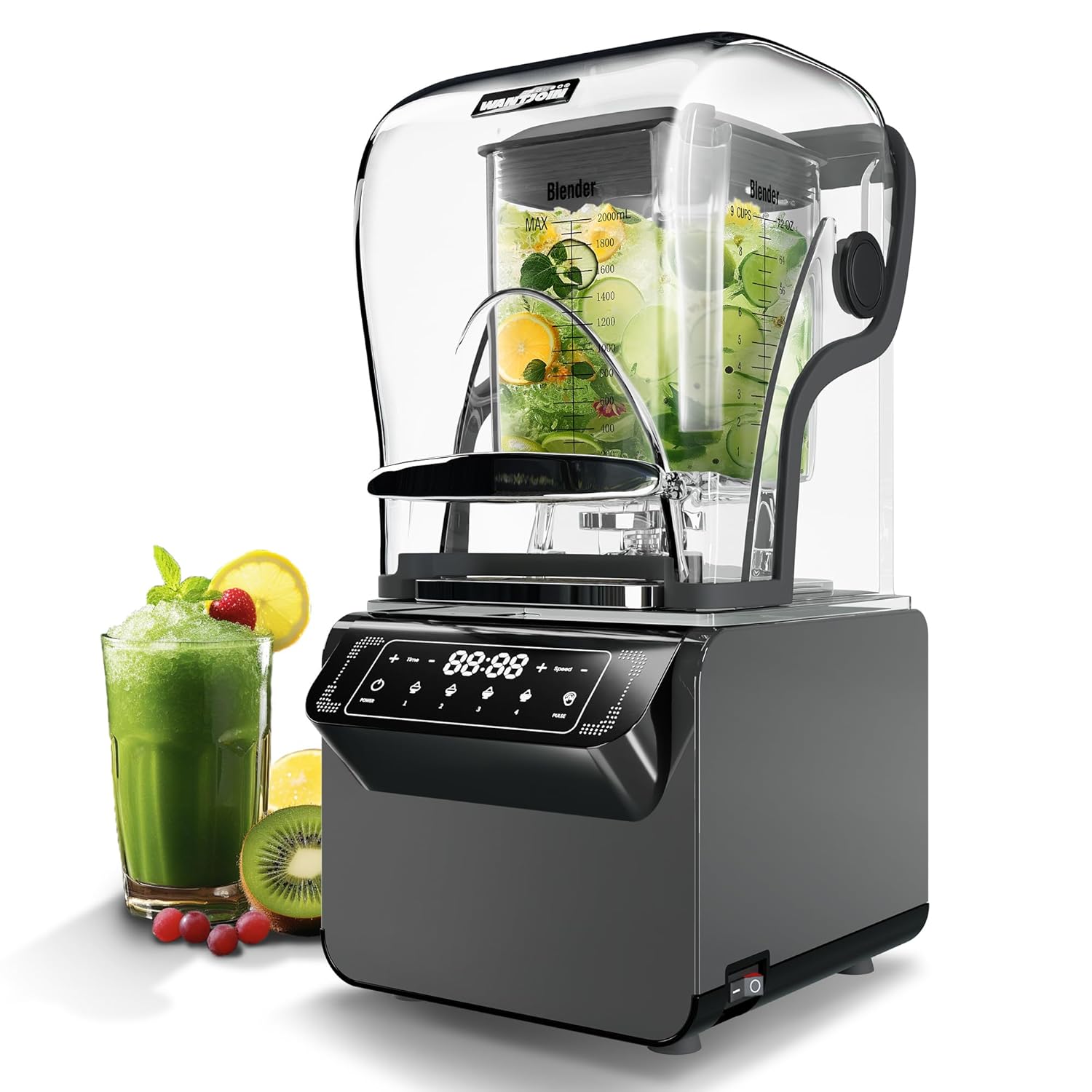
Figure 1: The WantJoin WZ-9003 Commercial Soundproof Blender.
2. זיכערקייַט פּריקאָשאַנז
To prevent injury or damage, always follow basic safety precautions when using electrical appliances, including:
- לייענט אַלע אינסטרוקציעס איידער איר ניצט דעם בלענדער.
- דו זאלסט נישט ייַנטונקען די מאָטאָר באַזע אין וואַסער אָדער אנדערע ליקווידס.
- Keep hands and utensils out of the container while blending to reduce the risk of severe personal injury and/or damage to the blender. A scraper may be used but only when the blender is not running.
- די בלעטער זענען שאַרף. באהאנדל מיט אבאכט.
- זייט זיכער אז דער דעקל איז זיכער אין פלאץ איידער איר ארבעט מיטן בלענדער.
- אָפּשטויסן פון די ווענטיל ווען ניט אין נוצן, איידער שטעלן אויף אָדער נעמען אַוועק טיילן, און איידער רייניקונג.
- דו זאלסט נישט אַרבעטן קיין אַפּפּליאַנסע מיט אַ דאַמידזשד שנור אָדער צאַפּן, אָדער נאָך די אַפּפּליאַנסע מאַלפאַנגקשאַנז אָדער איז דראַפּט אָדער דאַמידזשד אין קיין וועג.
- This blender features a triple safety protection mechanism to prevent accidental operation, especially by children.
3. פּראָדוקט איבערview
The WantJoin WZ-9003 is a high-performance commercial blender designed for efficiency and quiet operation. Key features include:
- Soundproof Cover: A high-grade streamlined soundproof cover isolates over 60% of noise, ensuring a quieter blending experience.
- דוראַבאַל קאַנסטראַקשאַן: Made with high-density, high-quality carbon steel, ensuring toughness and rust-proof longevity.
- קלוגע קאָנטראָל פּאַנעל: Features an LED display with smart buttons for easy operation, automatic rotation, and automatic timing with a countdown safety prompt.
- שטאַרק בלענדינג: Ultra-high-speed motor and double-speed pulse function for excellent mixing, instantly breaking cell walls to retain nutrients.
- טריפּל זיכערהייט שוץ: Enhanced safety features for secure operation.

Figure 2: Noise Reduction Features.
קאַמפּאָונאַנץ:
- מאָטאָר באַזע מיט קאָנטראָל פּאַנעל
- Blender Container (Pitcher) with Blades
- דעקל
- Soundproof Cover

Figure 3: Soundproof Design.
4. סעטאַפּ
- אַנפּאַק: קערפאַלי באַזייַטיקן אַלע קאַמפּאָונאַנץ פון די פּאַקקאַגינג.
- ריין: Before first use, wash the blender container, lid, and soundproof cover with warm, soapy water. Rinse thoroughly and dry. The motor base should be wiped with a damp שטאָף.
- אָרט: Place the motor base on a stable, flat, and dry surface. Ensure adequate ventilation around the unit.
- אַסעמבאַל: Place the blender container onto the motor base, ensuring it is seated correctly. Place the lid securely on the container. Position the soundproof cover over the container.
- מאַכט קשר: צאַפּן די מאַכט שנור אין אַ גראָונדעד עלעקטריקאַל ווענטיל.
5. אַפּערייטינג ינסטרוקטיאָנס
The WantJoin WZ-9003 blender features an intuitive control panel with preset modes and a pulse function.

פיגור 4: קאנטראל פאנעל.
- קער אויף: Locate the main power switch on the right side of the machine and flip it to the 'ON' position. The LED display will illuminate.
- לייג ינגרידיאַנץ: Place your desired ingredients into the blender container. Ensure the lid is properly secured and the soundproof cover is closed.
- אויסקלייַבן מאָדע: Press the 'Power' button on the control panel to activate the display. Then, select one of the four preset modes or the 'Pulse' function based on your blending needs.
- אָנהייבן צו מישן: After selecting a mode, press the 'Power' button again to start the blending process. The blender will automatically run for the preset time for the selected mode.
- אויפהערן צו מישן: To stop blending at any time, press the 'Power' button.
Mode Explanations:
- Mode 1 (Fruits): Total blending time is 45 seconds. Recommended for blending fruits.
- Mode 2 (Ice Crushing/Ice Cream): Total blending time is 35 seconds. The machine is set with high and low speed gears, particularly good at ice crushing and ice cream.
- Mode 3 (Smoothie Making): Total blending time is 60 seconds. The machine is equipped with high and low speed gears, which can be used for smoothie making.
- Mode 4 (High-Fiber/Grains): Total grinding time is 90 seconds. Suitable for high-fiber fruits, vegetables, or grains. You can stop blending at any time as per your need.
- דויפעק: This mode provides instantaneous maximum horsepower to smash food in an instant or can be used to clean the pitcher.
Video 1: Demonstration of the WantJoin WZ-9003 blender's features, including unboxing, soundproof cover, control panel operation, and blending various ingredients like fruits for smoothies and ice for ice cream. It also shows the pulse function for cleaning.

Figure 5: Versatile Applications of the Blender.
6. רייניקונג און וישאַלט
Regular cleaning and maintenance will ensure the longevity and optimal performance of your WantJoin blender.
- נאָך יעדער נוצן: Unplug the blender. Remove the container from the motor base. Wash the container, lid, and soundproof cover immediately after use to prevent food from drying and sticking.
- אויטאָ-ריין פונקציע: For quick cleaning, add warm water and a drop of dish soap to the container. Secure the lid and soundproof cover. Select the 'Pulse' mode and run for a few seconds. Rinse thoroughly.
- מאָטאָר באַזע: ווישן די מאָטאָר באַזע מיט אַדamp שטאָף. דו זאלסט נישט ייַנטונקען עס אין וואַסער.
- סטאָרידזש: האַלט דעם בלענדער אין אַ ריינעם, טרוקענעם אָרט.
7. טראָובלעשאָאָטינג
If you encounter any issues with your blender, refer to the following common problems and solutions:
- Blender Not Turning On: Ensure the power cord is securely plugged into a working outlet and the main power switch on the side is in the 'ON' position. Check if the container and lid are correctly assembled and the soundproof cover is closed, as the triple safety protection may prevent operation if not.
- ינגרידיאַנץ נישט מישן גלאַט: Ensure you are using the appropriate mode for your ingredients (e.g., Mode 2 for ice crushing, Mode 3 for smoothies). Add more liquid if the mixture is too thick.
- אומגעוויינטלעכע גערויש/ווייבראציע: Stop the blender immediately. Check for any foreign objects in the container or if the blades are obstructed. Ensure the container is properly seated on the motor base.
- איבערהייצונג: If the blender stops unexpectedly, it may be due to overheating. Unplug the unit and let it cool down for at least 15-20 minutes before attempting to use it again. Reduce the load or blending time for future use.
אויב די פראבלעם בלייבט, ביטע קאנטאקטירט קאסטומער סופארט.
8. ספּעסאַפאַקיישאַנז
| שטריך | באַשרייַבונג |
|---|---|
| סאָרט | WantJoin |
| מאָדעל נומער | WZ-9003 |
| פּראָדוקט דימענשאַנז | 12.6"ד רענטגענ 11.22"וו רענטגענ 20.67"ה |
| וואָג | 20.35 פונט |
| קאַפּאַציטעט | 4.5 Pounds (approx. 72 oz / 2000 ml) |
| מאַכט | 1800 וו |
| ספּעציעלע שטריך | Multiple Speeds, Soundproof Cover |

פיגור 6: פּראָדוקט דימענסיעס.
9. וואָראַנטי און שטיצן
WantJoin is committed to providing high-quality products and customer satisfaction. While specific warranty details are not provided in this manual, WantJoin offers 24/7 customer support for any inquiries or assistance you may need.
For support, please refer to the contact information provided with your purchase or visit the official WantJoin store online.

Figure 7: WantJoin Customer Support.


