1. הקדמה
Thank you for choosing the Living Needs Wireless HD Video Doorbell. This manual provides detailed instructions for the installation, operation, and maintenance of your new video doorbell. Please read this manual thoroughly before use to ensure proper functionality and safety.
2. פּראָדוקט איבערview
2.1 פּעקל אינהאַלט
דער פּעקל טיפּיקלי כולל:
- Living Needs Wireless HD Video Doorbell
- Indoor Chime (if included in specific package)
- מאַונטינג בראַקאַץ און סקרוז
- USB Charging Cable (for battery charging)
- באַניצער מאַנואַל
2.2 שליסל פֿעיִקייטן
- HD Video Resolution (720p)
- Wireless Wi-Fi Connectivity
- Motion Detection with Push Notifications
- צוויי-וועג אַודיאָ קאָמוניקאַציע
- נאַכט זעאונג קאַפּאַביליטי
- באַטאַרייע פּאַוערד (קריקאָנלאָדלעך)
- Free Cloud Service
- Compatible with Android & iOS App
- Supports SD Card for local storage
- וואַנט בארג ינסטאַלירונג
2.3 פּראָדוקט קאַמפּאָונאַנץ
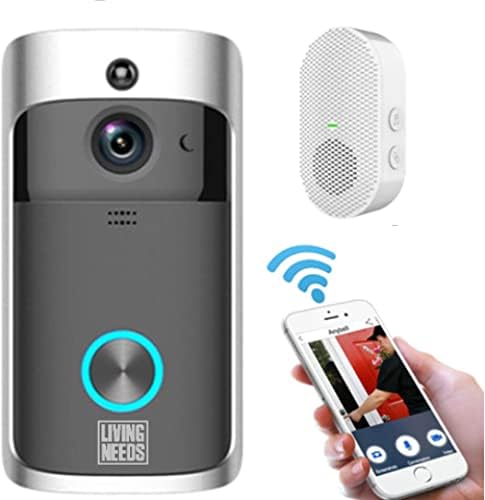
בילד 2.3.1: The Living Needs Wireless HD Video Doorbell unit, an accompanying wireless chime, and a smartphone displaying the doorbell's live view and control options. This image illustrates the complete system setup.

בילד 2.3.2: A close-up of the doorbell unit and a smartphone screen showing a live feed from the doorbell camera. The text overlay indicates the ability to monitor your home at all times.

בילד 2.3.3: This image highlights the doorbell's features like Wi-Fi, HD, app control, sensor, live viewing, SD card support, 166-degree angle, 2-way audio, standby, and night vision. It also shows three blue batteries and a crucial instruction: "Remove green stickers from batteries" before use.
3. סעטאַפּ און ייַנמאָנטירונג
3.1 טשאַרדזשינג די באַטעריז
- Open the battery compartment of the doorbell unit.
- Insert the provided rechargeable batteries. Ensure to remove any protective stickers (e.g., green stickers) from the battery terminals before insertion.
- Connect the doorbell to a power source using the USB charging cable. A full charge is recommended before initial use.
- The doorbell can also be charged via a transformer for wired power connection.
3.2 אַפּ אינסטאַלאַציע און דעווייס פּערינג
- Download the official Living Needs app from the App Store (iOS) or Google Play Store (Android).
- רעגיסטרירט זיך פֿאַר אַ נײַעם אַקאַונט אָדער לאָגט זיך אײַן אויב איר האָט שוין אײנס.
- Follow the in-app instructions to add your new video doorbell. This typically involves scanning a QR code on the device or manually entering its ID.
- Ensure your smartphone is connected to a 2.4GHz Wi-Fi network during the pairing process.
- Pair the indoor chime with the doorbell according to its specific instructions (usually a button press sequence).
3.3 מאָנטירן די טיר-גלאָק

בילד 3.3.1: An illustration showing the video doorbell mounted next to a front door on a house, with Wi-Fi signals indicating connectivity. This image emphasizes the doorbell's function in monitoring visitors and providing security.
- Choose a suitable location next to your front door, ensuring a clear view and good Wi-Fi signal strength.
- Use the provided mounting bracket as a template to mark drill holes on the wall.
- Drill the holes and insert wall anchors if necessary.
- Secure the mounting bracket to the wall with the screws.
- Attach the doorbell unit to the mounting bracket, ensuring it clicks securely into place.
4. אַפּערייטינג ינסטרוקטיאָנס
4.1 לעבן View און צוויי-וועג אַודיאָ
- Open the Living Needs app on your smartphone or tablet.
- Select your doorbell from the device list to access the live video feed.
- To speak with a visitor, tap the microphone icon in the app. To hear them, ensure the speaker icon is enabled.
4.2 באַוועגונג דעטעקציע און נאָוטאַפאַקיישאַנז
- The doorbell is equipped with a motion sensor. When motion is detected, you will receive a push notification on your paired device.
- Adjust motion detection sensitivity and zones within the app settings to minimize false alerts.
- Recorded motion events are stored in the cloud or on the SD card (if installed).
4.3 נאַכט זעאונג
- די טיר-גלאָק טוישט זיך אויטאָמאַטיש צו נאַכט-וויזשאַן מאָדע אין נידעריק-ליכט באדינגונגען, צושטעלנדיק קלאָר שוואַרץ-און-ווייס ווידעא.
- Infrared LEDs enable visibility up to a certain distance in the dark.
4.4 קייפל באַניצער אַקסעס
- You can share access to your doorbell's live feed and features with family members or trusted individuals through the app.
- Refer to the app's sharing settings for detailed instructions.

בילד 4.4.1: This image demonstrates the global usability of the Living Needs video doorbell, showing individuals monitoring their front door via smartphone while on vacation, at work, on a business trip, or in a restaurant. It highlights the remote access feature and push notifications.
5. וישאַלט
- רייניקונג: Gently wipe the camera lens and doorbell surface with a soft, damp שטאָף. ויסמיידן אַברייסיוו קלינערז.
- באַטאַרייע לעבן: Monitor battery levels via the app. Recharge the batteries when prompted to ensure continuous operation.
- Firmware דערהייַנטיקונגען: קאָנטראָלירט רעגולער די אַפּ פֿאַר פֿאַראַן פירמווער דערהייַנטיקונגען צו ענשור אָפּטימאַלע פאָרשטעלונג און זיכערהייט.
- Wi-Fi קאַנעקשאַן: Ensure a stable Wi-Fi connection for uninterrupted service.
6. טראָובלעשאָאָטינג
6.1 פּראָסט ישוז און סאַלושאַנז
- טיר-גלאָק פֿאַרבינדט זיך נישט צו Wi-Fi:
- זייט זיכער אז אייער Wi-Fi נעץ איז 2.4GHz.
- קאָנטראָלירט די Wi-Fi סיגנאַל שטאַרקייט ביים אָרט פון דער טיר-גלאָק.
- ריסטאַרט דיין ראַוטער און די טיר-גלאָק.
- Re-attempt the pairing process in the app.
- No push notifications:
- Verify app notification settings on your smartphone.
- Check motion detection settings in the doorbell app.
- Ensure the doorbell has a stable internet connection.
- נעבעך ווידעא קוואַליטעט:
- ריין די אַפּאַראַט אָביעקטיוו.
- Ensure adequate Wi-Fi signal strength.
- Check app settings for video quality options.
- קורץ באַטאַרייע לעבן:
- Reduce motion detection sensitivity or frequency of recordings.
- פאַרזיכערן אַז די דאָרבעל איז גאָר באפוילן.
- Consider a wired power connection if frequent recharging is inconvenient.
- די קלאנג קלינגט נישט:
- Ensure the chime is powered on and within range of the doorbell.
- פֿאַרבינדט ווידער דעם קלינג מיטן טיר־גלאָק.
7. ספּעסאַפאַקיישאַנז
| שטריך | דעטאַל |
|---|---|
| סאָרט | לעבעדיק נידז |
| מאָדעל | B09FR19KTY |
| קאַנעקטיוויטי טעכנאָלאָגיע | Wireless (Wi-Fi), Wired (for power) |
| ווירעלעסס קאָמוניקאַציע טעכנאָלאָגיע | ווי-פי |
| מאַכט מקור | Battery Powered (rechargeable), Transformer compatible |
| באַטעריז אַרייַנגערעכנט | יא |
| ווידעא רעקאָרדינג האַכלאָטע | 720 פּ |
| ספּעציעלע פֿעיִקייטן | Motion Sensor, Night Vision (Infrared) |
| קאַמפּאַטאַבאַל דעוויסעס | Smartphone, Tablet (Android & iOS) |
| מאַונטינג טיפּ | וואנט בארג |
| מאַטעריאַל | פּלאַסטיק |
| קאָליר | גרוי |
| רעקאָממענדעד ניצט | Motion Detection, Home Security |
8. וואָראַנטי און שטיצן
For warranty information and technical support, please refer to the documentation included with your product or visit the official Living Needs website. If you encounter any issues not covered in this manual, please contact Living Needs customer service for assistance.
צוריקקער פּאָליטיק: The product typically comes with a 31-day return/replacement policy. Please check your purchase details for specific terms.


