הקדמה
This manual provides detailed instructions for the assembly, operation, and maintenance of your FLEXISPOT E4 Classic Electric Standing Desk. Please read this manual thoroughly before use to ensure proper function and longevity of your product.

Figure 1: The FLEXISPOT E4 Classic Electric Standing Desk, featuring a bamboo contour desktop and silver frame, set up with dual monitors in an office environment.
זיכערקייַט אינפֿאָרמאַציע
- פאַרזיכערן אַלע קאַמפּאָונאַנץ זענען סיקיורלי פאַסאַנד איידער נוצן.
- האַלט קינדער און חיות אַוועק פון דעם טיש בעת אָפּעראַציע.
- Do not overload the desk beyond its specified weight capacity (220 lbs).
- פֿאַרמײַדן צו שטעלן פֿליסיקייטן גלייך אויף דער קאָנטראָל פּאַנעל אָדער מאָטאָר קאָמפּאָנענטן.
- דיסקאַנעקט מאַכט איידער רייניקונג אָדער וישאַלט.
- נאָר נוצן די צוגעשטעלט מאַכט אַדאַפּטער.
פּעקל אינהאַלט
ביטע איבערצייגן אז אלע טיילן זענען דא איידער איר הייבט אן צוזאמענשטעלן. אויב עפעס טיילן פעלן אדער זענען געשעדיגט, קאנטאקטירט קאסטומער סופארט.
- Bamboo Contour Whole-Piece Desktop (55"x28")
- Silver Frame Legs (Dual Motor)
- קאָנטראָל פּאַנעל
- מאַכט אַדאַפּטער און קאַבלע
- פֿאַרזאַמלונג האַרדווער (שרויף, מכשירים, אאז"ו ו)
- ינסטרוקטיאָן מאַנואַל (דעם דאָקומענט)
סעטאַפּ און אַסעמבלי
Assembly is required for this product. Please follow these steps carefully.
- אָפּלייגן קאַמפּאָונאַנץ: פֿאָרזיכטיק אַרויסנעמען אַלע טיילן פֿון דער פֿאַרפּאַקונג און לייגן זיי אויס אויף אַ ריינער, ווייכער ייבערפֿלאַך כּדי צו פֿאַרמייַדן קראַצן.
- צוטשעפּען די פֿיס צום דעסקטאַפּ: Position the desktop upside down. Align the leg frames with the pre-drilled holes on the underside of the desktop. Secure them using the provided screws and tools.
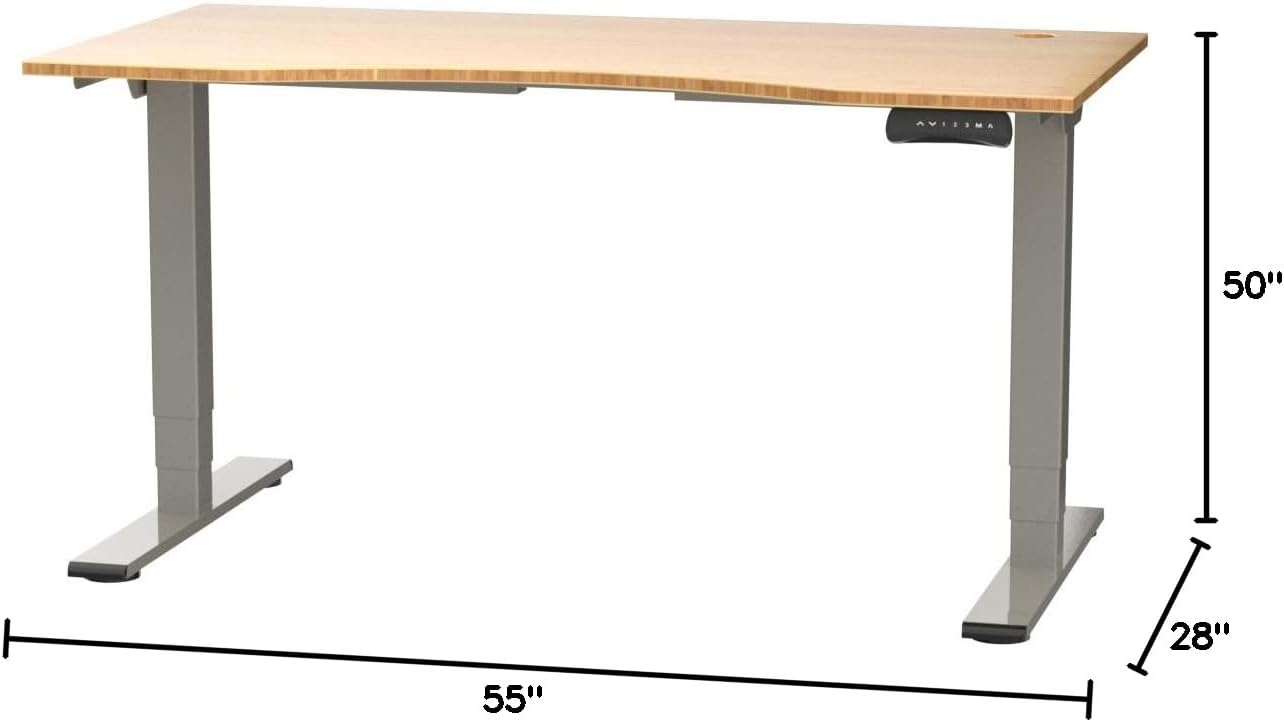
Figure 2: Desk dimensions indicating 55 inches width, 28 inches depth, and adjustable height up to 50 inches.
- אינסטאַלירן קאָנטראָל פּאַנעל: Mount the control panel to the desired location on the underside of the desktop, typically on the front edge for easy access. Connect the control panel cable to the motor control box.

Figure 3: The programmable control panel with LED display, up/down buttons, and memory presets (1, 2, 3, M, A).
- פאַרבינדן מאַכט: Plug the power adapter into the control box, and then plug the power cable into a standard electrical outlet.
- קאַבלע פאַרוואַלטונג: Utilize the two cable management holes on the desktop to route and organize your cables, preventing clutter.

Figure 4: Detail showing the integrated cable management holes and the water-resistant surface of the bamboo desktop.
- ערשט קאַלאַבריישאַן: After assembly and power connection, the desk may require an initial calibration. Refer to the "Operating Instructions" section for details on resetting or calibrating the desk.
אַפּערייטינג ינסטראַקשאַנז
הייך אַדזשאַסטמאַנט
The FLEXISPOT E4 Classic desk features a dual-motor lift system for smooth and quiet height adjustments.
- הייבן דעם טיש: דריקן און האַלטן די אַרויף עראָו button (▲) on the control panel. The desk will move upwards.
- נידעריקער טיש: דריקן און האַלטן די אַראָפּ עראָו button (▼) on the control panel. The desk will move downwards.
- Release the button at your desired height. The desk can adjust from 24.4 inches to 50 inches.
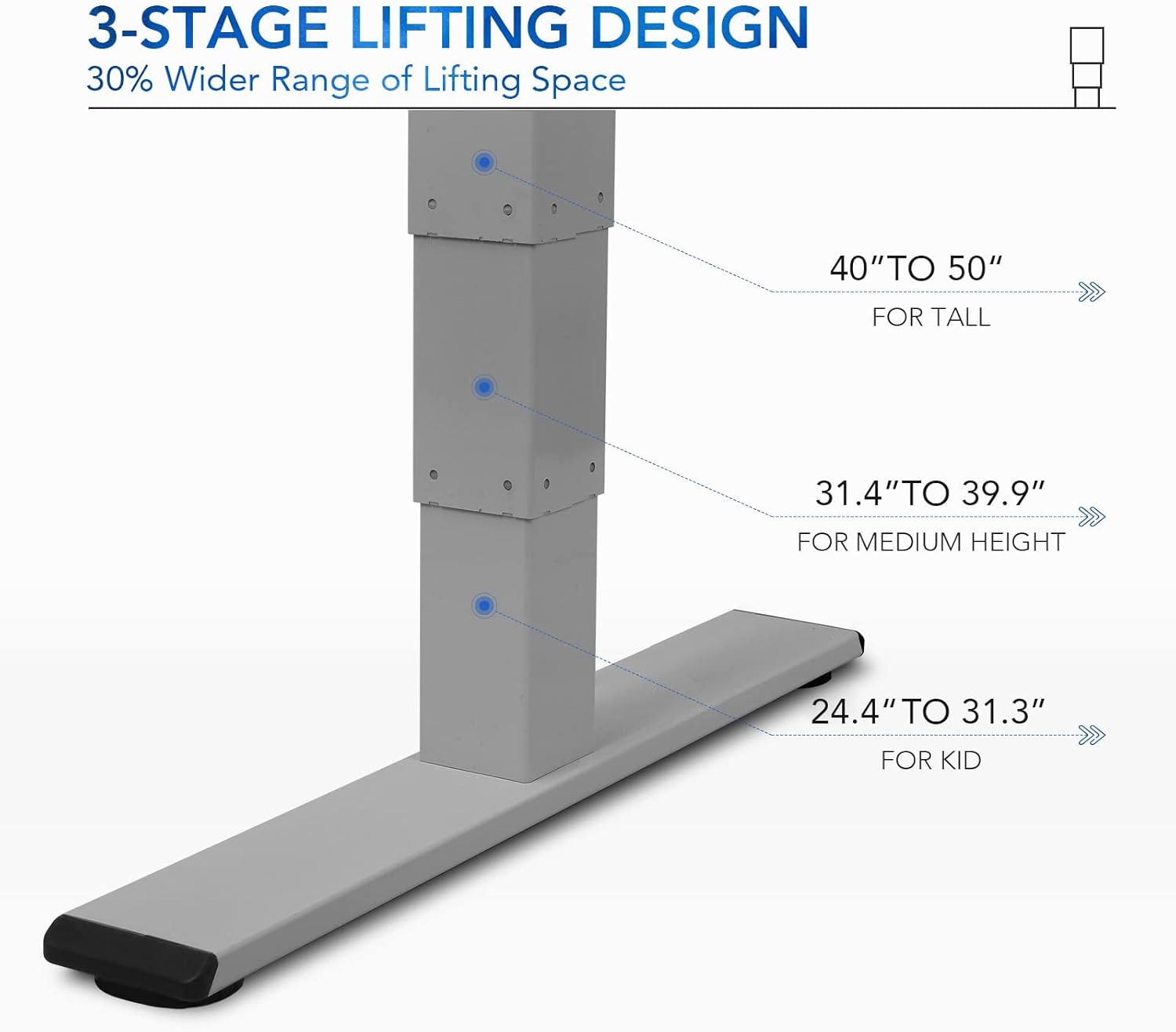
פיגור 5: די 3-סtage lifting design provides a wide range of height adjustments, suitable for various user heights, from 24.4" (kid) to 50" (tall).
Programmable Memory Presets
The control panel allows you to save up to three preferred height settings for quick adjustments.
- שטעלן א זכּרון פּאָזיציע:
- שטעל דעם טיש צו אייער געוואונטשענע הייך מיט די אַרויף/אַראָפּ קנעפּלעך.
- דרוק די "מ" button. The LED display will show "S-".
- אינערהאלב 3 סעקונדעס, דריק איינע פון די נומער קנעפלעך ("1", "2", אָדער "3") צו ראַטעווען די איצטיקע הייך צו יענעם פּרעסעט. דער עקראַן וועט ווייַזן "S-1", "S-2", אָדער "S-3" צו באַשטעטיקן.
- צוריקרופן א זכרון פאזיציע: פשוט דריקן דעם קאָרעספּאָנדירנדיקן נומער קנעפּל ("1", "2", אָדער "3"דער טיש וועט זיך אויטאָמאַטיש באַוועגן צו דער געראַטעוועטער הייך.
זיץ/שטיי דערמאָנונג
The "A" button can be used to set a reminder to switch between sitting and standing positions.
- Consult the full manual for detailed instructions on setting and customizing the sit/stand reminder function.
Ergonomic Curved Design
The 55"x28" desktop features an ergonomic curved design for enhanced comfort and efficiency during work or study.

Figure 6: The ergonomic curved edge of the desktop, designed to provide a more comfortable and natural working posture.
וישאַלט
- רייניקונג: ווישט אָפּ די טיש־איבערפֿלאַך און ראַם מיט אַ ווייכן, דamp cloth. Avoid abrasive cleaners or harsh chemicals. The bamboo surface is designed to be water-resistant, making it easy to clean.
- מאָטאָר קער: The dual-motor system is designed for low noise and durability. No specific user maintenance is required for the motors.
- קאַבלע פאַרוואַלטונג: Periodically check that all cables are neatly routed through the cable management holes and are not pinched or tangled.
- פאַסטענער טשעק: קאָנטראָלירט פון צייט צו צייט אַלע שרויפן און פֿאַרשטאַרקער צו זיכער מאַכן אַז זיי בלייבן פֿעסט. פֿעסטשטײַערט ווידער אויב נייטיק.
טראָובלעשאָאָטינג
| פּראָבלעם | מעגלעך סיבה | לייזונג |
|---|---|---|
| דער טיש רירט זיך נישט. | שטראָם קאַבל אָפּגעטיילט; איבערלאַסט שוץ אַקטיוויזירט; מאָטאָר טעות. | Check power connections. Reduce weight on desk. Unplug and replug power after 10 minutes. Perform a reset (see below). |
| דער טיש באוועגט זיך נישט גלייך אדער מאכט אומגעווענליכע גערוישן. | Loose fasteners; obstruction; motor synchronization issue. | Check and tighten all assembly screws. Ensure no obstructions under the desk. Perform a reset. |
| LED display shows an error code (e.g., "E01", "RST"). | System error; need for reset. | באַשטעטיק פּראָצעדור: Press and hold the Down Arrow button until the desk reaches its lowest position and then slightly rises. Release the button. If the error persists, unplug the desk for 10 minutes and try again. |
| זכּרון פּרעסעטס אַרבעטן נישט. | פאָרגעשטעלטע סעטס נישט ריכטיק געהיט. | Re-save your desired memory positions following the "Programmable Memory Presets" instructions. |
If the issue persists after attempting these solutions, please contact FLEXISPOT customer support.
ספּעסאַפאַקיישאַנז
| שטריך | דעטאַל |
|---|---|
| מאָדעל | E4 Classic |
| סאָרט | FLEXISPOT |
| דעסקטאָפּ מאַטעריאַל | Bamboo Contour Whole-Piece Board |
| ראַם מאַטעריאַל | Alloy Steel (Silver Frame) |
| פּראָדוקט דימענשאַנז (ד רענטגענ וו רענטגענ ה) | 28"ד x 55"ברייט x 50"ה (מאקסימום הייך) |
| הייך אַדדזשוסטמענט ראַנגע | 24.4" ביז 50" |
| ליפטינג סיסטעם | דואַל מאָטאָר, 3-Stage Lifting |
| וואָג קאַפּאַסיטי | אַרויף צו 220 לבס |
| ספּעציעלע פֿעיִקייטן | Electric Height Adjustment, Programmable Memory Presets, Sit/Stand Reminder, Curved Ergonomic Design, Cable Management Holes, Waterproof Surface |
| אַסעמבלי פארלאנגט | יא |
וואָראַנטי און שטיצן
FLEXISPOT products are designed for durability and performance. For specific warranty details regarding your E4 Classic Electric Standing Desk, please refer to the warranty card included with your purchase or visit the official FLEXISPOT webפּלאַץ.
For technical support, troubleshooting assistance, or to inquire about replacement parts, please contact FLEXISPOT customer service:
- Webפּלאַץ: www.flexispot.com
- בליצפּאָסט: support@flexispot.com
- טעלעפֿאָן: אָפּשיקן צו דער באַאַמטער webפּלאַץ פֿאַר רעגיאָנאַל קאָנטאַקט נומערן.
When contacting support, please have your product model (E4 Classic) and purchase information ready.


