הקדמה
This manual provides detailed instructions for the assembly, operation, and maintenance of your FLEXISPOT EC5 Pro Electric Standing Desk Frame. Please read this manual thoroughly before use to ensure proper function and safety. The EC5 Pro is designed to offer a robust and stable height-adjustable solution for your workspace, promoting a healthier work-life balance.
זיכערקייַט וואָרנינגז
- This product features safety mechanisms such as collision protection and overload protection.
- דו זאלסט נישט יקסיד די מאַקסימום מאַסע קאַפּאַציטעט פון 160 קג.
- Ensure the desk is correctly installed and used in an appropriate environment.
- האַלט קינדער און חיות אַוועק פון דעם טיש בעת אָפּעראַציע.
- Ensure no obstacles are in the path of the desk's movement (up or down) to prevent collisions.
- Do not open or attempt to repair the motor or control box. Contact qualified service personnel for assistance.
- דיסקאַנעקט מאַכט איידער רייניקונג אָדער וישאַלט.
פּראָדוקט איבערview
The FLEXISPOT EC5 Pro is an electric height-adjustable desk frame designed for durability and smooth operation. It features a dual-motor system for powerful and stable lifting.

Image: The FLEXISPOT EC5 Pro Electric Standing Desk Frame in white, showcasing its robust structure without a tabletop.
שליסל פֿעיִקייטן:
- Powerful Dual Motor System: Equipped with two motors for enhanced stability and a maximum load capacity of 160 kg.
- Fast and Smooth Adjustment: Lifting speed up to 3.5 cm/s.
- ברייט הייך קייט: Adjustable from 62 cm to 127 cm, suitable for various user heights.
- Advanced Control Panel: Features 3 memory height presets, a time reminder function, and an anti-collision system.
- ענערגיע עפעקטיוו: Consumes less than 0.5 watts in standby mode.
- ראָבוסט און סטאַביל קאַנסטראַקשאַן: Designed for long-term reliability with over 20,000 fatigue tests.

Image: The FLEXISPOT EC5 desk frame, available in white, black, and grey, highlighting its robust and stable construction. Certifications like CE, TUV, GS, and UKCA are visible.

Image: An illustration detailing the benefits of the dual motor system, including a maximum load capacity of 160 kg, energy consumption below 0.5 W, a speed of 35 mm/s, and low noise operation under 50 dB.

Image: This diagram highlights the stability and durability of the desk frame, featuring 3 lifting columns, a height adjustment range of 62-127 cm, validation through over 20,000 fatigue tests, and removable foot caps for optional casters.
אינסטרוקציעס פֿאַר אויפֿשטעלן און פֿאַרזאַמלען
The FLEXISPOT EC5 Pro desk frame is designed for easy assembly, typically taking 20-25 minutes. All necessary assembly tools are included in the package. Follow the detailed instructions provided in the separate assembly guide for step-by-step installation.
אַלגעמיינע פֿאַרזאַמלונג טריט:
- אויספּאַקן אַלע קאָמפּאָנענטן און קאָנטראָלירן קעגן דער טיילן־ליסטע.
- Attach the lifting columns to the foot bases.
- Connect the crossbars between the lifting columns.
- Install the control box and connect the motor cables.
- Mount the control panel to a convenient location.
- Secure your chosen tabletop to the assembled frame using the provided screws.
- Plug in the power cord and test the desk's functionality.
Ensure all connections are secure before operating the desk. The frame is suitable for tabletops with a length of 120-180 cm and a width of 60-80 cm.

Image: An exploded diagram illustrating the various components of the EC5 Pro desk frame, including the legs, crossbars, control box, control panel, and assembly tools, emphasizing ease of assembly.
אַפּערייטינג ינסטראַקשאַנז
The EC5 Pro features an advanced control panel for easy height adjustment and personalized settings.

בילד: א דעטאַלירטע view of the advanced control panel, showing the digital height display, up/down adjustment buttons, three memory preset buttons (1, 2, 3), and a reminder function button (A).
קאָנטראָל פּאַנעל פאַנגקשאַנז:
- אַרויף/אַראָפּ פײַלן (▲ / ▼): דריק און האלט צו מאַנועל אַדזשאַסטירן די טיש הייך. לאָזט לאָז צו האַלטן ביי דער געוואונטשענער הייך.
- זכּרון פאָרגעשטעלטע סעטטינגס (1, 2, 3): אויפֿהיטן און דערמאָנען די בילכערדיקע טיש-הייך.
- Reminder Function (A): Set a timer to remind you to switch between sitting and standing positions.
באַשטעטיקן זכּרון פּרעסעטס:
- שטעל דעם טיש צו אייער געוואונטשענע הייך מיט די ארויף/אראפ פײַלן.
- Press the "M" button (or similar 'Set' button if present). The display will show "S-".
- Immediately press one of the number buttons (1, 2, or 3) to save the current height to that preset. The display will confirm with "S-1", "S-2", or "S-3".
ניצן זכּרון פּרעסעטס:
Simply press the corresponding number button (1, 2, or 3) to automatically move the desk to the saved height.
דערמאָנונג פֿונקציע:
Press the "A" button to activate or deactivate the reminder function. This feature helps you maintain a healthy work routine by prompting you to change positions at regular intervals.
אַנטי-קאליזיע סיסטעם:
The desk is equipped with an anti-collision system. If the desk encounters an obstacle during movement, it will automatically stop and reverse slightly to prevent damage. Ensure the area around the desk is clear to allow this feature to function effectively.
וישאַלט
- רייניקונג: Disconnect the power supply before cleaning. Use a soft, damp cloth to wipe down the desk frame. Avoid abrasive cleaners or solvents.
- דורכקוק: קאָנטראָלירט פּעריִאָדיש אַלע שרויפֿן און פֿאַרבינדונגען צו זיכער מאַכן אַז זיי זענען פֿעסט. פֿעסטשטײַערט ווידער אויב נייטיק.
- קאַבלע פאַרוואַלטונג: Ensure all cables are neatly managed and not pinched or tangled, especially during height adjustments.
- שמירן: The lifting columns are designed for maintenance-free operation and do not require lubrication.
טראָובלעשאָאָטינג
| פּראָבלעם | מעגלעך סיבה | לייזונג |
|---|---|---|
| דער טיש רירט זיך נישט. | Power cord disconnected; control box or motor cable loose; overload. | Check power connection; ensure all cables are securely plugged in; reduce weight on the desk. |
| דער טיש באוועגט זיך נישט גלייך אדער מאכט אומגעווענליכע גערוישן. | Uneven load; loose connections; damaged component. | Distribute weight evenly; check and tighten all screws; contact support if problem persists. |
| אַנטי-קאַלישאַן סיסטעם טריגערט צו אָפט. | Obstacles in the path; sensitivity setting too high (if adjustable). | Clear the area around the desk; refer to the full manual for anti-collision sensitivity adjustment if available. |
| זכּרון פּרעסעטס אַרבעטן נישט. | פאָרסעטן נישט ריכטיק געהיט. | Re-save the desired heights following the "Setting Memory Presets" instructions. |
ספּעסאַפאַקיישאַנז
| מאָדעל נומער | E5-1 |
| סאָרט | FLEXISPOT |
| קאָליר | ווייַס |
| מאַטעריאַל | שטאָל |
| הייך אַדדזשוסטמענט ראַנגע | 62 ס״מ - 127 ס״מ |
| ליפטינג שפאלטן | 3-stage |
| מאָטאָר טיפּ | צווייענדיק מאָטאָר |
| מאַקסימום מאַסע קאַפּאַציטעט | 160 קג |
| ליפטינג ספּיד | 3.5 סענטימעטער / s |
| ראַש מדרגה | < 50 דב |
| סטאַנדביי מאַכט קאַנסאַמשאַן | < 0.5 וו |
| Recommended Tabletop Dimensions | Length: 120-180 cm, Width: 60-80 cm |
| ספּעציעלע פֿעיִקייטן | Advanced control panel with memory and reminder function, anti-collision system. |

Image: An illustration demonstrating the adjustable frame width (110-170 cm) and the recommended tabletop dimensions (120-200 cm length x 60-80 cm depth) for compatibility.
וואָראַנטי און שטיצן
FLEXISPOT products are designed with a focus on ergonomics and durability, backed by extensive testing and certifications.
- The EC5 Pro desk frame has passed over 20,000 fatigue tests, ensuring long-term reliability.
- It holds various European certifications, including IGR, CE, and TÜV, confirming its quality and safety standards.
- The constant current power system prevents motor overheating and spontaneous combustion, enhancing safety and lifespan.
For specific warranty details, claims, or technical support, please refer to the official FLEXISPOT webזייטל אדער קאנטאקט זייער קאסטומער סערוויס גלייך. האלט אייער קויף קוויטל פאר גאראנטיע באשטעטיקונג.
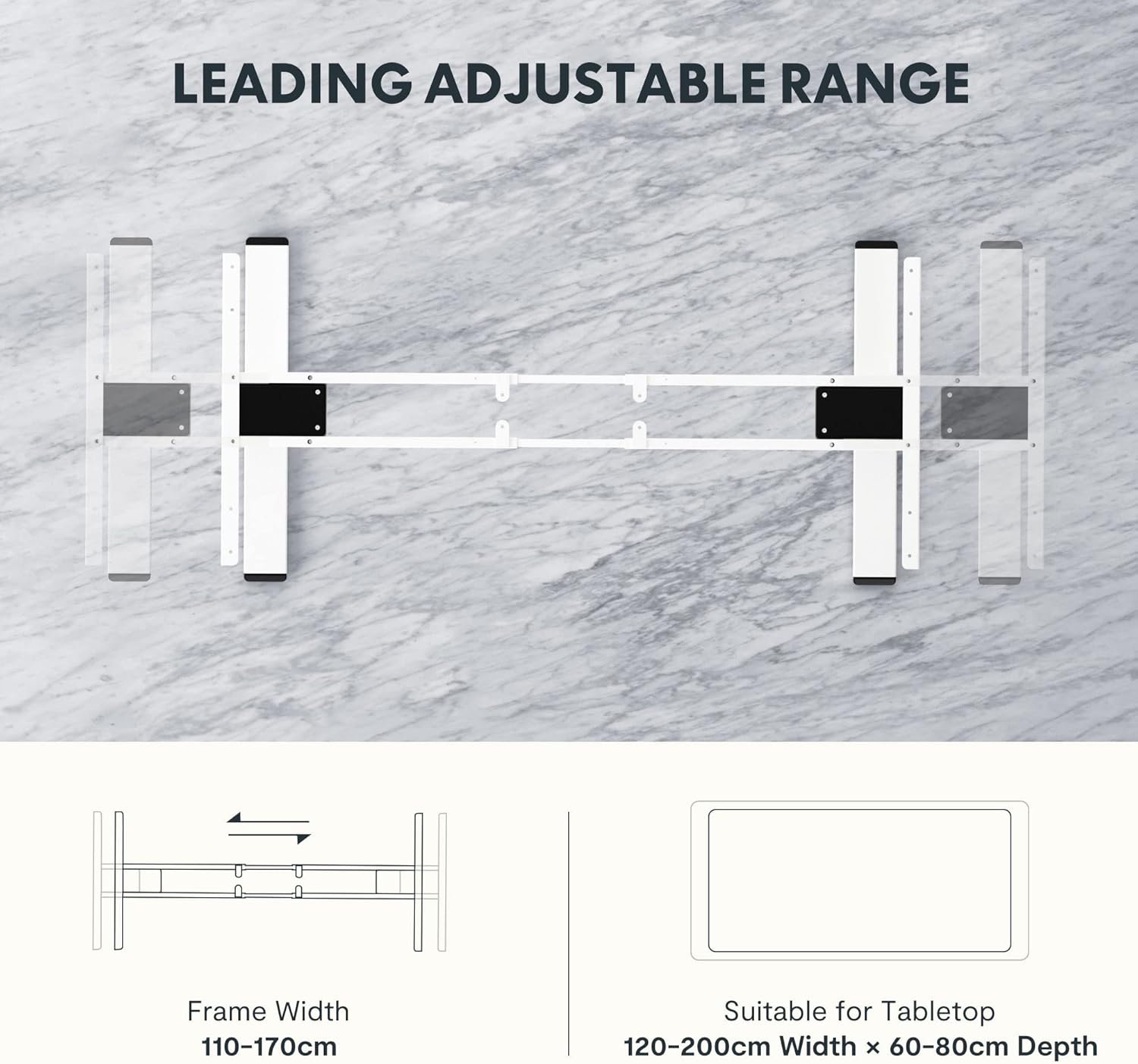
Image: Certificates from the IGR Institute and the Deutscher Gesundheitspreis (German Health Award), demonstrating FLEXISPOT's commitment to ergonomic design and product quality.


