הקדמה
The BYTECH 3-in-1 Charging Cable (Model BYOPCA103BK) is a versatile USB cable designed for charging and syncing a wide range of electronic devices. It features a standard USB Type-A connector on one end and a multi-connector head on the other, providing Lightning, USB Type-C, and Micro USB compatibility. This cable offers a convenient solution for users with multiple device types, ensuring high-speed charging and data transfer.
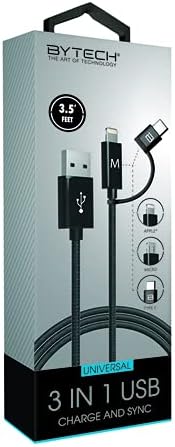
Image: The BYTECH 3-in-1 Charging Cable, showcasing its universal compatibility with various device types.
סעטאַפּ און קאַנעקשאַן
Using the BYTECH 3-in-1 Charging Cable is straightforward. Follow these steps to connect your devices:
- Identify the USB-A End: Locate the standard USB Type-A connector. This end typically connects to a power adapter (wall charger), a computer's USB port, or a power bank.
- פאַרבינדן צו מאַכט מקור / קאָמפּיוטער: Insert the USB Type-A end firmly into a compatible USB port on your charging device or computer.
- Select the Appropriate Device Connector: The other end of the cable features three integrated connectors:
- בליץ: For Apple iPhone, iPad, and iPod devices.
- וסב טיפּ-C: For newer Android smartphones, tablets, laptops, and other USB-C enabled devices.
- מיקראָ וסב: For older Android smartphones, tablets, power banks, and various other electronic gadgets.
- פאַרבינדן צו דיין מיטל: Carefully insert the chosen connector into the charging/data port of your electronic device. Ensure it is inserted correctly to avoid damage.
- באַשטעטיקן קשר: Your device should indicate that it is charging or connected for data transfer.
אַפּערייטינג ינסטראַקשאַנז
This cable supports both charging and data synchronization, depending on the connected device and power source.
טשאַרדזשינג
- Connect the USB-A end to a compatible USB wall adapter, car charger, or power bank.
- Connect the appropriate device connector (Lightning, USB-C, or Micro USB) to your smartphone, tablet, or other compatible device.
- The cable is designed for high-speed charging, ensuring efficient power delivery to your device.
דאַטאַ סינגקראַנאַזיישאַן
- Connect the USB-A end to a USB port on your computer (PC or Mac).
- Connect the appropriate device connector to your smartphone or tablet.
- Your computer should recognize the connected device, allowing you to transfer files, photos, videos, and other data. Follow your device's specific instructions for data transfer.
וישאַלט און זאָרג
To ensure the longevity and optimal performance of your BYTECH 3-in-1 Charging Cable, please follow these maintenance guidelines:
- ויסמיידן בענדינג: Do not excessively bend or crimp the cable, especially near the connectors, as this can damage internal wires.
- געהעריק דיסקאַנעקשאַן: Always pull from the connector head, not the cable itself, when unplugging from a device or power source.
- האַלטן טרוקן: Protect the cable from moisture and liquids. Do not use it in wet environments.
- ריין דזשענטלי: If necessary, wipe the cable and connectors with a soft, dry cloth. Avoid using harsh chemicals or abrasive materials.
- סטאָרידזש: Store the cable in a cool, dry place, away from direct sunlight and extreme temperatures. Coiling it loosely can prevent tangles and damage.
- קאָנטראָלירן קעסיידער: קאָנטראָלירט פּעריִאָדיש דעם קאַבל און די קאַנעקטאָרן פֿאַר יעדע סימן פֿון טראָגן, אָפּגעריבן אָדער שאָדן. שטעלט אָפּ דעם באַניץ אויב מען באַמערקט שאָדן.
טראָובלעשאָאָטינג
If you encounter issues with your BYTECH 3-in-1 Charging Cable, try the following solutions:
- מיטל ניט טשאַרדזשינג:
- מאַכן זיכער אַז ביידע ענדס פון די קאַבלע זענען סיקיורלי פארבונדן.
- פּרוּווט אַ אַנדערש מאַכט אַדאַפּטער אָדער וסב פּאָרט.
- Test the cable with a different device to rule out a device-specific issue.
- Check if the correct connector (Lightning, USB-C, Micro USB) is being used for your device.
- פּאַמעלעך טשאַרדזשינג:
- Ensure your power adapter provides sufficient output (e.g., 5V/2A or higher for faster charging).
- פֿאַרמײַדט צו נוצן דאָס אַפּאַראַט שווער בשעתן אויפֿלאָדן.
- שליסט הינטערגרונט אַפּליקאַציעס אויף דיין מיטל.
- דאַטן אַריבערפירן ישוז:
- Ensure the USB-A end is connected to a computer's data-enabled USB port, not just a charging port.
- Check your device's settings to ensure it's set to "File Transfer" or "MTP" mode, not just "Charging."
- Try restarting both your device and computer.
- קאַבלע שעדיקן: If the cable appears frayed, bent, or damaged, discontinue use immediately and replace it.
ספּעסאַפאַקיישאַנז
| שטריך | דעטאַל |
|---|---|
| סאָרט | בייטעק |
| מאָדעל נאָמען | 3 אין 1 |
| נומער מאָדעל נומער | BYOPCA103BK |
| קאַנעקטער טיפּ | USB Type-A, USB Type-C, Lightning |
| טיפּ קאַבלע | וסב |
| קאַמפּאַטאַבאַל דעוויסעס | לאַפּטאַפּ, פערזענלעכע קאָמפּיוטער, טאַבלעט, סמאַרטפאָנע |
| ספּעציעלע שטריך | הויך ספּיד |
| רעקאָממענדעד ניצט | טשאַרדזשינג עלעקטראָניש דעוויסעס |
| קאָליר | שוואַרץ |
| קאַנעקטער דזשענדער | זכר צו זכר |
| פאָרעם | פלאַך |
| נומער פון פּינס | 8 |
| דרינענדיק / דרויסנדיק באַניץ | דרינענדיק |
| נומער פון זאכן | 1 |
| קונה פּעקל טיפּ | coiled in protective tubing |
| מאַקסימום וואָלtage | 5 וואלטס |
| ויסווייניקסט מאַטעריאַל | פּלאַסטיק/גומע |
| פאַבריקאַנט | BYTECH |
| UPC | 805112034765 |
| פּעקל דימענשאַנז | 7 X 5 X 3 אינטשעס |
| פּונקט וואָג | 1 פונט |
| ASIN | B09BBK4X64 |
| ערשטער דאַטע בנימצא | יולי 27, 2021 |
וואָראַנטי און שטיצן
For warranty information or technical support regarding your BYTECH 3-in-1 Charging Cable, please refer to the manufacturer's official webזייטל אדער קאנטאקט זייער קאסטומער סערוויס דעפארטמענט. האלט אייער קויף קוויטל אלס באווייז פון קויפן פאר יעדע גאראנטיע טענות.
Manufacturer: BYTECH
פֿאַר ווייַטער הילף, באַזוכן www.bytechintl.com (למשלample link, actual link not provided in input).


