הקדמה
Thank you for choosing the Bytech BYMSWR104BK 3 Button Gaming Mouse. This manual provides essential information for setting up, operating, and maintaining your new gaming mouse. Please read this manual thoroughly before use to ensure optimal performance and longevity of your device.
פֿעיִקייטן
- Precision Mouse: Designed for accurate tracking and responsive control.
- אַדזשאַסטאַבאַל דפּי: Customize sensitivity for various gaming and productivity needs.
- Three Responsive Buttons: Includes left-click, right-click, and scroll wheel/middle-click for efficient operation.
- קאָלירפול באַקלייט: Features multi-color LED lighting with 7 distinct color modes for an enhanced aesthetic experience.
- ערגאָנאָמיק פּלאַן: Shaped to fit comfortably in your palm, reducing fatigue during extended use.
ספּעסאַפאַקיישאַנז
| סאָרט | בייטעק |
| מאָדעל נומער | BYMSWR104BK |
| נומער פון קנעפּלעך | 3 |
| באַוועגונג רעסאָלוטיאָן | 1,000 דפּי |
| קאָליר מאָדעס | 7 Colors (Multi-color Backlight) |
| קאַבלע לענג | 5 פֿיס |
| באַשטימען רייטינג | 1 מיליאָן קליקס |
| פּונקט וואָג | 4.9 אונסעס |
| פּעקל דימענשאַנז | 7.17 X 4.06 X 2.68 אינטשעס |
| קאָליר | שוואַרץ |
| מאַכט מקור | קאָרד עלעקטריק (וסב) |
| ייַזנוואַרג פּלאַטפאָרמע | PC |
פּעקל אינהאַלט
- 1 x Bytech BYMSWR104BK Wired Gaming Mouse
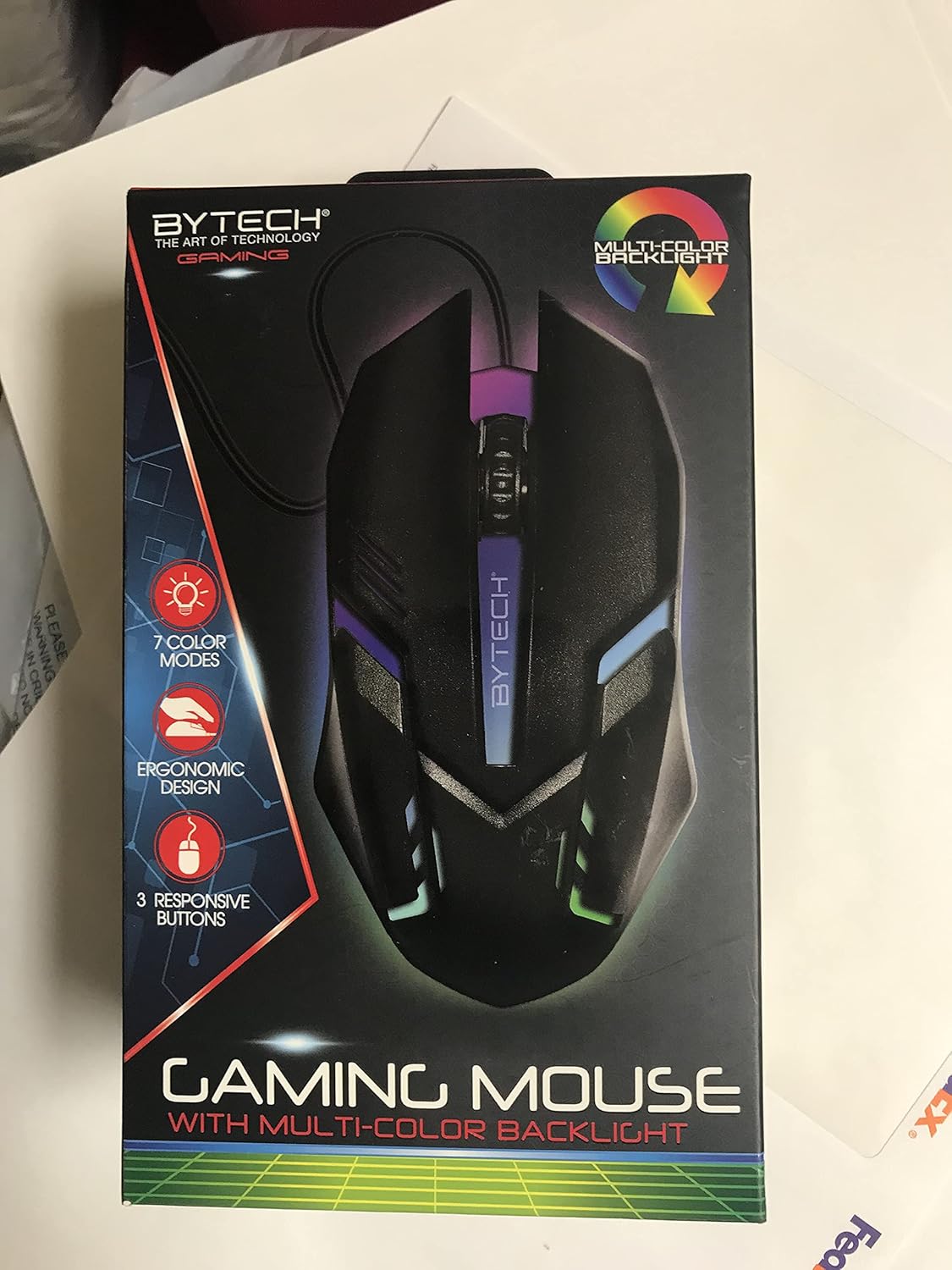
בילד: פראָנט view of the Bytech BYMSWR104BK Gaming Mouse in its retail packaging, highlighting its multi-color backlight and ergonomic design.
סעטאַפּ
- אַנפּאַק: Carefully remove the gaming mouse from its packaging.
- פאַרבינדן: Locate an available USB port on your computer (PC, laptop, etc.). Insert the USB connector of the Bytech BYMSWR104BK Gaming Mouse firmly into the USB port.
- דרייווער ינסטאַלירונג: The mouse is plug-and-play. Your operating system should automatically detect and install the necessary drivers. This process may take a few moments.
- גרייט צו נוצן: Once the drivers are installed, the mouse will be ready for immediate use. The multi-color backlight will illuminate.

בילד: הינטערשטע view of the Bytech BYMSWR104BK Gaming Mouse retail packaging, detailing features, specifications, and universal compatibility.
אַפּערייטינג ינסטראַקשאַנז
יקערדיק אָפּעראַציע
- לינקס קנעפּל: Primary click function, typically used for selecting items, opening files, or interacting with software.
- רעכט קנעפּל: Secondary click function, usually opens context menus or provides additional options.
- Scroll Wheel (Middle Button): Scroll up or down to navigate documents and web pages. Pressing the scroll wheel acts as a middle-click button, often used for opening links in new tabs or auto-scrolling.
דפּי אַדזשאַסטמאַנט
The Bytech BYMSWR104BK Gaming Mouse features adjustable DPI settings. While specific buttons for DPI adjustment are not explicitly listed on the packaging, many gaming mice allow DPI changes through a dedicated button (often located near the scroll wheel) or through software. Refer to your computer's mouse settings or Bytech's official website for advanced customization options if available.
געפירט באַקלייט
The mouse features a dynamic multi-color LED backlight with 7 different color modes. These lights will automatically cycle through the modes once the mouse is connected and powered on. There is no manual control for changing modes on the mouse itself.
וישאַלט
- רייניקונג: ניצט אַ ווייכע, טרוקענע שטאָף צו ווישן די ייבערפלאַך פון דער מויז. פֿאַר שווערע שמוץ, אַ ביסל ווייכער מאַכןampווישט דעם שטאָף מיט וואַסער אָדער אַ מילדער רייניקונג לייזונג. פֿאַרמייַדט ניצן שטרענגע כעמיקאַלן אָדער אַברייסיוו מאַטעריאַלן.
- סענסאָר זאָרגן: האַלט דעם אָפּטישן סענסאָר אויף דער אונטערשטער טייל פון דער מויז ריין און פריי פון שטויב אָדער דעבריס צו ענשור פּינקטלעכע טראַקינג.
- קאַבלע פאַרוואַלטונג: פֿאַרמײַדט שאַרפֿע בייגן אָדער איבערגעטריבענעם ציען דעם USB קאַבל כּדי צו פֿאַרמײַדן שאָדן.
- סטאָרידזש: ווען נישט אין באַנוץ, האַלט די מויז אין אַ ריינער, טרוקענער סביבה אַוועק פון עקסטרעמע טעמפּעראַטורן.

בילד: זייט view of the Bytech BYMSWR104BK Gaming Mouse retail packaging, showcasing the multi-color backlight effect.
טראָובלעשאָאָטינג
| פּראָבלעם | מעגלעך לייזונג |
|---|---|
| מויז ניט ריספּאַנדינג |
|
| קורסאָר איז נישט גלאַט אָדער באַוועגט זיך נישט גלאַט |
|
| LED באַקלייט אַרבעט נישט |
|
וואָראַנטי און שטיצן
וואָראַנטי: This Bytech product comes with a 12-month warranty from the date of purchase. Please retain your proof of purchase for warranty claims.
קאָנטאַקט אינפֿאָרמאַציע:
- אַדרעס: 2585 West 13th Street, Brooklyn, NY 11223, USA
- Webפּלאַץ: www.bytechintl.com
⚠ ווארענונג: דער פּראָדוקט קענען ויסשטעלן איר צו קעמיקאַלז, אַרייַנגערעכנט DEHP, וואָס איז באַוווסט צו די שטאַט פון קאַליפאָרניאַ צו פאַרשאַפן ראַק, געבורט חסרונות אָדער אנדערע רעפּראָדוקטיווע שאָדן. פֿאַר מער אינפֿאָרמאַציע גיין צו www.P65Warnings.ca.gov.

בילד: אונטן view of the Bytech BYMSWR104BK Gaming Mouse retail packaging, showing contact information, warranty details, and California Proposition 65 warning.


