1. הקדמה
א דאנק פארן קויפןasing the Kimwood Bluetooth Headset. This manual provides detailed instructions on how to set up, operate, and maintain your headset. Please read this manual carefully before use to ensure optimal performance and longevity of your device.

Figure 1.1: Kimwood Bluetooth Headset with its charging case.
2. זיכערקייַט אינפֿאָרמאַציע
- שטעלט נישט אויס דעם כעדסעט צו עקסטרעמע טעמפּעראַטורן, הומידיטי, אדער קאָראָזיווע סאַבסטאַנצן.
- פֿאַרמײַדט צו לאָזן פאַלן אָדער אויסשטעלן דעם כעדסעט צו שטאַרקע קלאַפּן.
- Do not disassemble or modify the headset. This will void the warranty and may cause damage.
- האַלט די כעדסעט אַוועק פון קינדער און חיות.
- ניצט נאָר דעם צוגעשטעלטן טשאַרדזשינג קאַבל און אַ קאָמפּאַטיבלע מאַכט אַדאַפּטער.
3. פּעקל אינהאַלט
ביטע טשעק די פּאַקעט פֿאַר די פאלגענדע זאכן:
- Kimwood Bluetooth Headset
- טשאַרדזשינג קאַסע
- וסב טיפּע- C טשאַרדזשינג קאַבלע
- באַניצער מאַנואַל

פיגור 3.1: איינגעשלאסענע זאכן אין פעקל.
4. פּראָדוקט איבערview
Familiarize yourself with the components of your Kimwood Bluetooth Headset:
| ניין. | קאָמפּאָנענט | פֿונקציע |
|---|---|---|
| 1 | מאַכט / מולטי-פונקציע קנעפּל | Power On/Off, Play/Pause, Answer/End Call, Voice Assistant |
| 2 | באנד אַרויף/ווייַטער שפּירט | Increase volume, skip to next track (long press) |
| 3 | באַנד אַראָפּ/פרייַערדיק שפּירט | Decrease volume, go to previous track (long press) |
| 4 | מיקראָפאָן | Picks up your voice for calls |
| 5 | טשאַרדזשינג פּאָרט (טיפּ-C) | Connects to charging cable |
| 6 | געפירט ינדיקאַטאָר | Shows power, pairing, and charging status |
5. סעטאַפּ
5.1 אויפלאָדן דעם כעדסעט און קעסטל
פארן ערשטן באַנוץ, זאָלט איר גאָר אויפלאָדן דעם כעדסעט און זײַן אויפלאָדן-קעסטל.
- Connect the USB Type-C cable to the charging port on the case.
- פאַרבינדן די אנדערע סוף פון די קאַבלע צו אַ וסב מאַכט מקור (למשל, קאָמפּיוטער, וואַנט אַדאַפּטער).
- דער דיגיטאַלער אַרויסווייַז אויף דער טשאַרדזשינג קעסטל וועט ווייַזן די באַטאַרייע פּראָצענטtage. When fully charged, it will display "100".
- Place the headset into the charging case. The headset will automatically begin charging.
The charging case has a 500mAh battery, and the earphone has a 100mAh battery. A full charge takes approximately 1.5 hours.

Figure 5.1: Charging the headset and case.
5.2 פּאָרן מיט אַ בלועטוט מיטל
The headset supports Bluetooth 5.1 for stable and automatic connections.
- Take the headset out of the charging case. It will automatically power on and enter pairing mode (LED indicator will flash blue).
- אויף אייער דעווייס (סמאַרטפאָן, טאַבלעט, פּיסי), אַקטיווירט בלועטוט.
- זוכן פֿאַר available Bluetooth devices and select "VYK-B26" from the list.
- Once connected, the LED indicator on the headset will stop flashing and remain solid blue. A voice prompt will confirm the connection.
After the initial pairing, the headset will automatically connect to the last paired device when taken out of the case.

Figure 5.2: Automatic pairing process.
5.3 טראָגן די כעדסעט
The ear-hook design allows for comfortable wear on either the left or right ear. The microphone and ear hook can be rotated to fit your preference.
- Adjust the ear hook to fit securely around your ear.
- Rotate the microphone arm up to 180 degrees and the ear hook up to 360 degrees to find the optimal position for comfort and clear voice pickup.

Figure 5.3: Adjusting the headset for left or right ear use.
6. אַפּערייטינג ינסטרוקטיאָנס
6.1 מאַכט אויף / אַוועק
- מאַכט אויף: Take the headset out of the charging case, or long-press the Multi-function Button for 3 seconds.
- מאַכט אַוועק: Place the headset back into the charging case, or long-press the Multi-function Button for 5 seconds.
6.2 רופן פאַנגקשאַנז
- ענטפֿערן / סוף רופן: קורץ דריקן די מולטי-פונקציע קנעפּל.
- אָפּוואַרפן רופן: לאַנג דריקן די מולטי-פונקציע קנעפּל פֿאַר 2 סעקונדעס.
- שטום / ונמוט מיקראָפאָן: During a call, long press the Volume Up or Volume Down button for approximately 3 seconds.

Figure 6.1: Mute function and unidirectional microphone for clear calls.
6.3 מוזיק פּלייבאַק
- שפּיל / פּויזע: קורץ דריקן די מולטי-פונקציע קנעפּל.
- ווייַטער שפּור: דריק קורץ דעם "Volume Up" קנעפל.
- פֿריִערדיקע שפּור: דריק קורץ דעם באַנד אַראָפּ קנעפּל.
6.4 באַנד קאָנטראָל
- פאַרגרעסערן באַנד: דריק קורץ דעם "Volume Up" קנעפל.
- פאַרמינערן באנד: דריק קורץ דעם באַנד אַראָפּ קנעפּל.
6.5 ווויס אַססיסטאַנט
Activate your device's voice assistant (Siri, Google Assistant, etc.) directly from the headset.
- אַקטאַווייט קול אַססיסטאַנט: While the headset is connected and in standby mode, long press the Multi-function Button for 2 seconds.
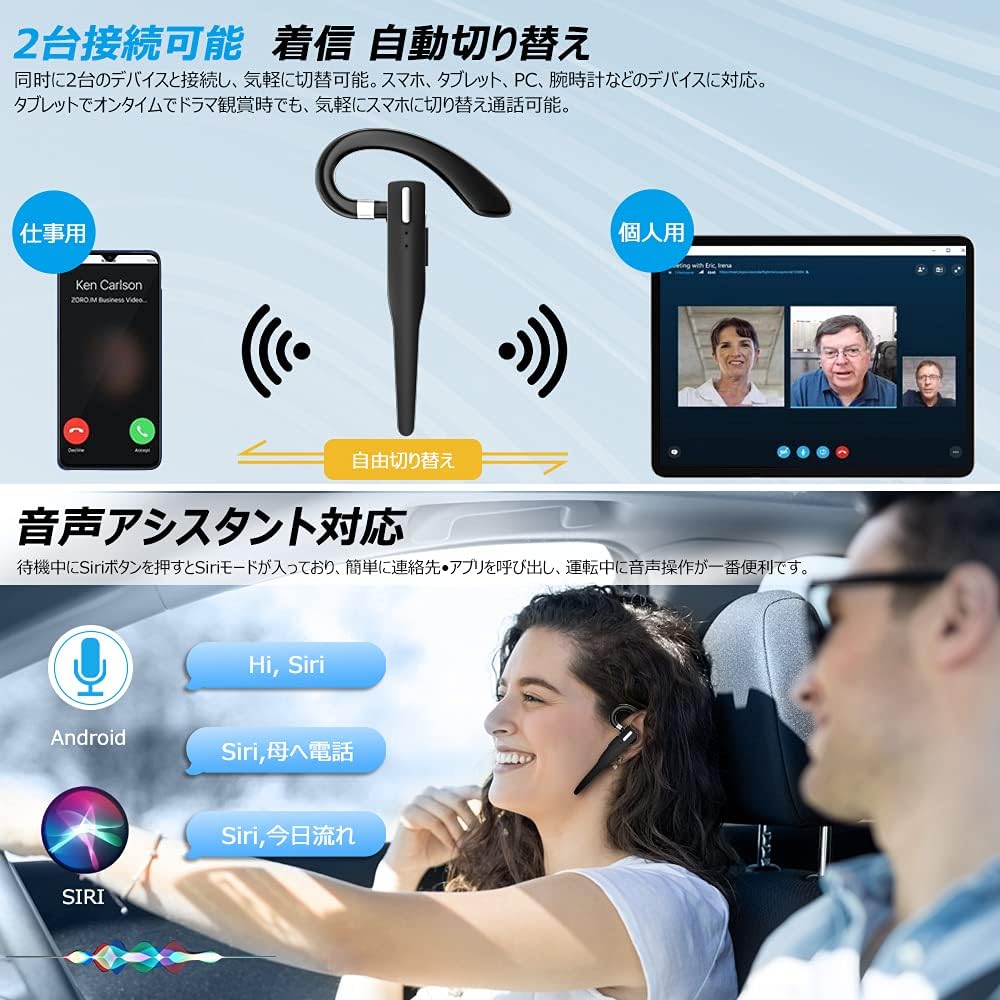
Figure 6.2: Multi-device connectivity and voice assistant features.
6.6 פֿאַרבינדונג צווישן פֿאַרשידענע דעווייסעס
די כעדסעט קען זיך פֿאַרבינדן צו צוויי בלועטוט דעוויסעס סיימאַלטייניאַסלי, אַלאַוינג פֿאַר סימלאַס סוויטשינג צווישן זיי.
- Pair the headset with the first device as described in Section 5.2.
- Turn off Bluetooth on the first device. The headset will re-enter pairing mode.
- פֿאַרבינדט דעם כעדסעט מיטן צווייטן דעווייס.
- Turn on Bluetooth on the first device. The headset should now be connected to both devices.
- The headset will automatically switch audio output to the device that is actively playing media or receiving a call.
7. וישאַלט
7.1 רייניקונג
- Wipe the headset and charging case with a soft, dry, lint-free cloth.
- דו זאלסט נישט נוצן האַרב קעמיקאַלז, רייניקונג סאָלוואַנץ אָדער שטאַרק דיטערדזשאַנץ.
7.2 סטאָרידזש
- When not in use, store the headset in its charging case to protect it from dust and damage.
- האַלט דעם אַפּאַראַט אין אַ קיל, טרוקן אָרט, אַוועק פון דירעקט זונשייַן און עקסטרעמע טעמפּעראַטורן.

Figure 7.1: The compact charging case provides convenient storage.
8. טראָובלעשאָאָטינג
אויב איר טרעפט פּראָבלעמען מיט אייער כעדסעט, זעט די פאלגענדע געוויינטלעכע פּראָבלעמען און לייזונגען:
| פּראָבלעם | מעגלעך סיבה | לייזונג |
|---|---|---|
| כעדסעט גייט נישט אן. | נידעריק באַטאַרייע. | Charge the headset and charging case. |
| קען נישט צופּאַסן מיטן דעווייס. | Bluetooth is off on device; headset not in pairing mode; too far from device. | Ensure Bluetooth is on; take headset out of case to enter pairing mode; keep within 10 meters. |
| קיין קלאַנג אָדער נידעריקע וואָלומען. | Volume too low; headset not connected; sound output set to another device. | Increase volume on headset and device; re-pair headset; check device's audio output settings. |
| מיקראָפאָן טוט נישט אַרבעטן. | Microphone muted; incorrect audio input settings on device. | Unmute microphone (long press Volume Up/Down); check device's audio input settings. |
| Connection unstable or drops. | אריינמישונג; צו ווייט פון אפאראט; נידריגע באטעריע. | Move closer to device; avoid strong electromagnetic interference; charge headset. |
9. ספּעסאַפאַקיישאַנז
| שטריך | דעטאַל |
|---|---|
| מאָדעל | VYK-B26 |
| בלועטאָאָטה ווערסיע | 5.1 |
| ראַש קאַנסאַליישאַן | CVC8.0 |
| כעדסעט באַטערי קאַפּאַציטעט | 100 מאַה |
| טשאַרדזשינג קאַסע באַטאַרייע קאַפּאַציטעט | 500 מאַה |
| רעדן צייט | אַרויף צו 12 שעה |
| מוזיק פּלייַבאַקק צייט | אַרויף צו 12 שעה |
| גאַנץ באַניץ צייט (מיט קעסטל) | אַרויף צו 72 שעה |
| סטאַנדביי צייט | אַרויף צו 400 שעה |
| טשאַרדזשינג צייט | בעערעך. 1.5 שעה |
| טשאַרדזשינג פּאָרט | וסב טיפּ-C |
| וואָטערפּרוף רייטינג | IPX7 (שווייספּרוף) |
| קאַמפּאַטאַבילאַטי | iOS, Android, Windows (Bluetooth-enabled devices) |

Figure 9.1: Advanced Bluetooth 5.1 and CVC8.0 Noise Cancelling features.
10. וואָראַנטי און שטיצן
Kimwood products are designed for reliability and performance. For warranty information and technical support, please refer to the contact details provided on the product packaging or visit the official Kimwood webזייטל. ביטע באַהאַלטן אייער קויפן באַווייַז פֿאַר וואָראַנטי קליימז.


