הקדמה
This user manual provides comprehensive instructions for the PHILIPS 43PUS7556/12 4K UHD LED Smart TV. Please read this manual carefully before using your television to ensure proper setup, operation, and maintenance. Keep this manual for future reference.
וויכטיק סאַפעטי אינפֿאָרמאַציע
שטענדיק פֿאָלגן די גרונטלעכע זיכערהייט מיטלען ווען איר ניצט דעם טעלעוויזיע צו רעדוצירן דעם ריזיקאָ פֿון פֿײַער, עלעקטרישן קלאַפּ און שאָדן.
- שטעלט נישט אויס דעם טעלעוויזאר צו רעגן אדער פייכטקייט.
- דו זאלסט נישט פאַרשפּאַרן ווענטאַליישאַן אָופּאַנינגז.
- פאַרזיכערן געהעריק גראַונדינג.
- נעמט ארויס דעם טעלעוויזאר בעת בליץ-שטורעמס אדער ווען מען ניצט עס נישט פאר לאנגע צייטן.
- אָפּשיקן אַלע סערוויסעס צו קוואַלאַפייד סערוויס פּערסאַנעל.
פּעקל אינהאַלט
באַשטעטיקן אַז אַלע זאכן זענען פאַראַן אין פּעקל:
- PHILIPS 43PUS7556/12 4K UHD LED Smart TV
- ווייַט קאָנטראָל
- מאַכט שנור
- טיש שטאַנד (אויב אָנווענדלעך)
- שנעל אָנהייב גייד
- Safety and Legal Leaflet
- באַטעריז פֿאַר רימאָוט קאָנטראָל
סעטאַפּ
1. אנשטעלן דעם שטאנד
If you are not wall-mounting the television, attach the tabletop stand as follows:
- Carefully place the television face down on a soft, flat surface to prevent screen damage.
- Align the stand with the mounting holes on the bottom of the television.
- באַפעסטיקט דעם שטאַנד מיט די צוגעשטעלטע שרויפן. מאַכט זיכער אַז דער שטאַנד איז פעסט באַפעסטיקט.

בילד: הינטערשטע view of the television, illustrating the stand attachment points and various input/output ports. This image helps in identifying where to connect the stand and external devices.
2. קאַנעקטינג פונדרויסנדיק דעוויסעס
The PHILIPS 43PUS7556/12 TV offers multiple connectivity options. Refer to the image below for port locations.
- הדמי: פֿאַרבינדט בלו-רэй שפּילערס, שפּיל קאָנסאָלן, אָדער סעט-טאָפּ באָקסעס. דאָס מאָדעל פֿאַרמאָגט 3 HDMI פּאָרץ.
- וסב: Connect USB storage devices for media playback. This model features 2 USB ports.
- אַנטענע / קאַבלע: פֿאַרבינדט אייער אַנטענע אָדער קאַבלע טעלעוויזיע אַרייַנגאַנג.
- עטהערנעט: פֿאַר אַ דראָטיקער אינטערנעט פֿאַרבינדונג. Wi-Fi איז אויך פֿאַראַן.

בילד: דעטאַלירט view of the television's rear panel, highlighting the HDMI, USB, and other connectivity ports. This visual aid assists users in correctly identifying and connecting their external devices.
3. פּאַוערינג אויף
- Connect the power cord to the television and then to a wall outlet.
- Press the power button on the remote control or on the television itself.
- Follow the on-screen instructions for initial setup, including language selection, network connection (Wi-Fi or Ethernet), and channel scanning.
אַפּערייטינג ינסטראַקשאַנז
ווייַט קאָנטראָל פאַנגקשאַנז
מאַכט זיך באַקאַנט מיט די ווײַטקאָנטראָל קנעפּלעך פֿאַר גרינגע נאַוויגאַציע.
- מאַכט: טורנס די טעלעוויזיע אויף אָדער אַוועק.
- מקור: אויסקלייבט איינגאבע קוועלער (HDMI 1, HDMI 2, טעלעוויזיע, אאז"וו).
- נאַוויגאַציע קנעפּלעך (אַרויף/אַראָפּ/לינקס/רעכטס): נאַוויגירן מעניוז און אָפּציעס.
- אקעי: קאַנפערמז סאַלעקשאַנז.
- צוריק / אַרויסגאַנג: גייט צוריק צום פריערדיקן מעניו אדער גייט ארויס פונעם איצטיקן מעניו.
- באנד +/-: אַדזשאַסץ די באַנד מדרגה.
- קאַנאַל +/-: טוישט טעלעוויזיע קאַנאַלן.
- קלוגע טעלעוויזיע/היים: Accesses the Smart TV interface (SAPHI OS).
Smart TV Features (SAPHI OS)
The PHILIPS 43PUS7556/12 runs on the SAPHI operating system, providing access to various apps and streaming services.

Image: Screenshot of the Philips Smart TV home screen, displaying the SAPHI OS interface with icons for popular streaming applications such as YouTube, Netflix, and Prime Video. This illustrates the user interface for accessing smart features.
- דרוק די סמאַרט טעלעוויזיע or היים קנעפּל אויף דיין ווייַט.
- Use the navigation buttons to browse through available applications.
- Select an app (e.g., Netflix, YouTube, Amazon Prime Video) and press OK צו קאַטער עס.
- Ensure your TV is connected to the internet for optimal Smart TV functionality.

בילד: נאך איינס view of the Philips Smart TV interface, specifically highlighting the logos of popular streaming services like Netflix, Rakuten TV, YouTube, and Amazon Prime Video. This confirms the availability of these services on the TV.
בילד און סאָונד סעטטינגס
קאַסטאַמייז דיין viewהערן און הערן דערפאַרונג:
- בילד מאָדעס: Access settings to adjust brightness, contrast, color, and sharpness. Pre-set modes like Standard, Vivid, Movie, and Game are available.
- געזונט מאָדעס: Adjust audio settings, including bass, treble, and balance. This TV supports Dolby Atmos for immersive sound.
- Dolby Vision: The TV supports Dolby Vision for enhanced HDR content. Ensure your content source also supports Dolby Vision for the best experience.

Image: The Philips 43PUS7556/12 television screen displaying a dynamic, colorful image, accompanied by icons indicating key features such as LED display technology, Dolby Vision Atmos, and UltraHD HDR. This visually represents the TV's display capabilities.
וישאַלט
Cleaning the Television
- שטענדיק אויסשטעקן דעם טעלעוויזאר איידער איר רייניגט.
- ניצט אַ ווייכן, לינט-פֿרייע שטאָף צו זאַכט ווישן דעם עקראַן און קאַבינעט.
- פֿאַר שווערע מאַרקן, דampווישט דעם שטאָף מיט אַ קליינער מאָס וואַסער אָדער אַ מילדן, נישט-אַבראַוויזיוון עקראַן רייניגער. שפּריצט נישט רייניגער גלייך אויף דעם עקראַן.
- Avoid using alcohol, solvents, or ammonia-based cleaners, as these can damage the screen.
רימאָוט קאָנטראָל באַטערי פאַרבייַט
When the remote control's performance decreases, replace the batteries:
- עפענען די באַטאַרייע אָפּטייל דעקן אויף די צוריק פון די ווייַט קאָנטראָל.
- אַראָפּנעמען די אַלט באַטעריז.
- Insert new batteries, ensuring correct polarity (+ and -).
- נאָענט די דעקן פון די באַטאַרייע אָפּטייל.
טראָובלעשאָאָטינג
אויב איר טרעפט פּראָבלעמען מיט אייער טעלעוויזיע, באַזירט זיך אויף די פאלגענדע געוויינטלעכע לייזונגען:
קיין מאַכט
- זיכער מאַכן אַז די מאַכט שנור איז זיכער פארבונדן צו ביידע די טעלעוויזיע און די וואַנט אַוטלעט.
- קאָנטראָלירט צי די וואַנט אַוטלעט אַרבעט דורך אַרײַנשטעקן אַן אַנדער דעוויס.
- פרובירט צו דריקן דעם פּאַוער קנעפּל אויף דער טעלעוויזיע אַליין, נישט נאָר די ווײַטקאָנטראָל.
קיין בילד נישט, אבער סאונד איז דא
- באַשטעטיקט אַז די ריכטיקע אַרייַנגאַנג מקור איז אויסגעקליבן (למשל, HDMI 1, טעלעוויזיע).
- Check the cable connections between the TV and external devices.
- Adjust picture settings (brightness, contrast).
קיין קלאַנג, אָבער בילד איז דאָ
- זיכער מאַכן אַז די וואָלומען איז נישט שטיל אָדער געשטעלט צו נול.
- קאָנטראָלירן אַודיאָ קאַבלע קאַנעקשאַנז.
- Verify sound output settings on the TV (e.g., internal speakers, external audio system).
ווייַט קאָנטראָל איז נישט ארבעטן
- פאַרבייַטן די באַטעריז אין די ווייַט קאָנטראָל.
- זיכער מאַכן אַז עס זענען נישטאָ קיין שטערונגען צווישן דעם ווײַטקאָנטראָל און דעם טעלעוויזיע'ס IR סענסאָר.
- ריכט די ווײַטקאָנטראָל גלייך אויפן טעלעוויזאָר.
Smart TV Apps Not Loading or Slow
- קאָנטראָלירט אייער אינטערנעט פֿאַרבינדונג (Wi-Fi אָדער עטהערנעט).
- ריסטאַרט דעם טעלעוויזיע דורך עס אַרויסצוציען פֿון דער עלעקטרישער אַוטלעט אויף אַ פּאָר מינוט, און דערנאָך עס צוריק אַרײַנשטעקן.
- זיכער מאַכן אַז די טעלעוויזיע'ס ווייכווארג איז אַרויף צו דאַטע.
ספּעסאַפאַקיישאַנז
The following table outlines the key technical specifications for the PHILIPS 43PUS7556/12 TV.
| שטריך | באַשרייַבונג |
|---|---|
| סאָרט | פיליפס |
| מאָדעל נומער | 43PUS7556/12 |
| פאַרשטעלן גרייס | 43 אינטשעס |
| ווייַז טעכנאָלאָגיע | געפירט |
| האַכלאָטע | 4K (3840 X 2160) |
| דערפרישן קורס | 60 הז |
| אָפּערייטינג סיסטעם | SAPHI |
| קאַנעקטיוויטי | בלועטאָאָטה, ווי-פי |
| HDMI פּאָרץ | 3 |
| וסב פּאָרץ | 2 |
| אַודיאָ רעזולטאַט | 20 וו |
| ספּעציעלע פֿעיִקייטן | Dolby Vision, Dolby Atmos, Freeview HD |
| קאָליר | שוואַרץ |
| דימענסיעס (אָן שטיין) | 82.1 מם (טיפקייַט) |
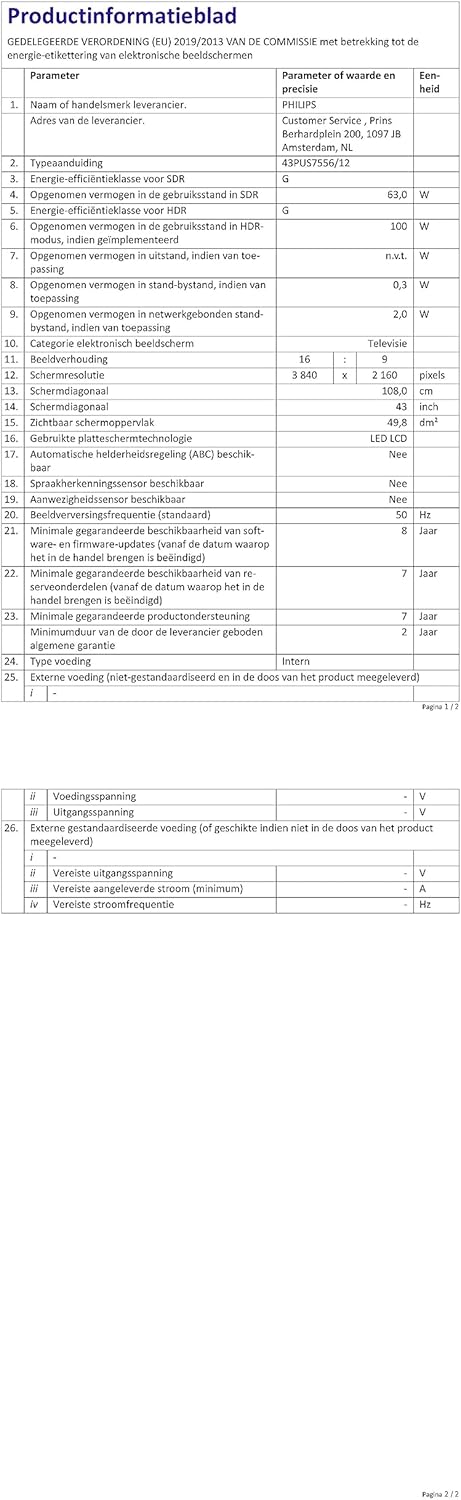
Image: A technical specification sheet for the Philips 43PUS7556/12 television, detailing various parameters and values. This document provides comprehensive technical data for the product.

Image: Another technical specification sheet for the Philips 43PUS7556/12 television, presented in Dutch, listing detailed product information and performance metrics. This provides additional technical context.

Image: A diagram illustrating the physical dimensions of the 43-inch Philips 43PUS7556/12 television, including width, height, and depth measurements. This helps users understand the TV's physical footprint.
וואָראַנטי און שטיצן
וואָראַנטי אינפֿאָרמאַציע
This product comes with a manufacturer's warranty. Please refer to the warranty card included in your package for specific terms and conditions. The typical warranty period for consumer electronics is 2 years from the date of purchase.
- מינימום גאַראַנטירטע אַוויילאַביליטי פון רעזערוו טיילן: 7 יאָר
- מינימום גאַראַנטירטע פּראָדוקט שטיצע: 7 יאָר
קונה שטיצן
For further assistance, technical support, or service inquiries, please contact PHILIPS customer support. You can find contact details on the official PHILIPS webוועבזייטל אדער אין דער דאקומענטאציע וואס איז צוגעשטעלט געווארן מיט אייער טעלעוויזיע.
When contacting support, please have your model number (43PUS7556/12) and serial number ready.


