הקדמה
א דאנק פארן קויפןasing the Hoco BS40 Sports Wireless Bluetooth Speaker. This manual provides detailed instructions for the proper setup, operation, and maintenance of your device. Please read this manual thoroughly before use to ensure optimal performance and longevity of your speaker.
זיכערקייַט אינפֿאָרמאַציע
- שטעלט נישט אויס דעם רעדנער צו עקסטרעמע טעמפּעראַטורן, דירעקטע זונשייַן, אדער הויכע פֿײַכטקייט.
- ויסמיידן דראַפּינג אָדער ונטערטעניק די רעדנער צו שטאַרק ימפּאַקץ.
- Keep the speaker away from water and liquids, despite its water-resistant rating, to prevent damage.
- Do not attempt to disassemble or repair the speaker yourself. Contact qualified service personnel for assistance.
- ניצט נאָר דעם צוגעשטעלטן טשאַרדזשינג קאַבל אָדער אַ סערטיפיצירטן עקוויוואַלענט.
- האַלטן אויס פון דערגרייכן פון קינדער.
פּעקל אינהאַלט
ביטע טשעק די פּאַקעט פֿאַר די פאלגענדע זאכן:
- Hoco BS40 Wireless Speaker
- טשאַרדזשינג קאַבלע
- באַניצער מאַנואַל
פּראָדוקט איבערview
מאַכט זיך באַקאַנט מיט די רעדנער'ס קאָמפּאָנענטן און קאָנטראָלס.

Image: Hoco BS40 speaker, top-down view, highlighting the control panel and overall design.

Image: Hoco BS40 speaker in an upright position, displaying the side control buttons and the Hoco branding.
קאָנטראָל קנעפּלעך און פּאָרטן:
- מאַכט קנעפּל: דריקן און האַלטן צו קער די רעדנער אויף / אַוועק.
- מאָדע קנעפּל (M): Press to switch between Bluetooth, FM Radio, TF Card, USB, and AUX modes.
- שפּיל / פּויזע קנעפּל: Press to play or pause audio. In call mode, press to answer/end calls.
- קול העכער (+)/נעקסטע ליד: קורץ דריקן צו פארגרעסערן די קול, לאנג דריקן פארן נעקסטן ליד.
- באַנד אַראָפּ (-)/פֿריִערדיקע ליד: קורץ דריקן צו פארמינערן די קול, לאנג דריקן פארן פריערדיגן ליד.
- טף קאַרד שפּעלטל: אַרײַנשטעלן אַ TF (MicroSD) קאַרטל צו שפּילן מוזיק.
- וסב פּאָרט: אַרײַנשטעלן אַ USB פלאַש דרייוו צו שפּילן מוזיק.
- AUX פּאָרט: פֿאַרבינדט עקסטערנע אַודיאָ דעוויסעס דורך אַ 3.5 מם אַודיאָ קאַבל.
- טשאַרדזשינג פּאָרט: Connect the charging cable to power the speaker.
סעטאַפּ
טשאַרדזשינג די רעדנער
- Connect the charging cable to the speaker's charging port.
- פֿאַרבינדט דעם אַנדערן עק פֿונעם קאַבל צו אַ USB מאַכט אַדאַפּטער (נישט אַרייַנגערעכנט) אָדער אַ קאָמפּיוטער'ס USB פּאָרט.
- די טשאַרדזשינג אינדיקאַטאָר ליכט וועט זיך אָנצינדן בעת טשאַרדזשינג.
- Charging typically takes approximately 1.5 hours. The indicator light will change or turn off once fully charged.
מאַכט אויף / אַוועק
- צו מאַכט אויף: Press and hold the Power Button for a few seconds until you hear an audible prompt or see the indicator light.
- צו מאַכט אַוועק: Press and hold the Power Button again for a few seconds until you hear an audible prompt or the indicator light turns off.
אַפּערייטינג ינסטראַקשאַנז
בלועטאָאָטה פּערינג
- Ensure the speaker is powered on and in Bluetooth mode (indicated by a flashing blue light or an audible prompt). If not, press the 'M' (Mode) button to switch to Bluetooth mode.
- אַקטיווירן בלועטוט אויף אייער מאָביל מיטל (סמאַרטפאָן, טאַבלעט, אאז"וו).
- זוכן פֿאַר available Bluetooth devices. You should find "Hoco BS40" in the list.
- Select "Hoco BS40" to connect. Once paired, the speaker will emit an audible confirmation, and the indicator light will stop flashing.
- איר קענט איצט שפּילן אַודיאָ פֿון אייער דעווייס דורך דעם רעדנער.
עפעם ראַדיאָ מאָדע
- Press the 'M' (Mode) button repeatedly until you enter FM Radio mode.
- To auto-scan for stations, press the Play/Pause button once. The speaker will scan and save available FM stations.
- Use the Volume Up (+) and Volume Down (-) buttons to navigate between saved stations.
TF Card / USB Playback
- Insert a TF (MicroSD) card or a USB flash drive containing MP3 audio files into the respective slot/port.
- The speaker should automatically switch to TF Card or USB mode and begin playback. If not, press the 'M' (Mode) button to select the correct mode.
- Use the Play/Pause, Volume Up (+), and Volume Down (-) buttons to control playback.
AUX מאָדע
- פֿאַרבינדט איין עק פֿון אַ 3.5 מ״מ אַודיאָ קאַבל (נישט אַרייַנגערעכנט) צום AUX פּאָרט אויף דעם רעדנער.
- פֿאַרבינדט דעם אַנדערן עק פֿונעם אַודיאָ קאַבל צום אַודיאָ אַרויסגאַנג דזשעק פֿון אייער עקסטערנעם מיטל.
- דריק דעם 'M' (מאָדוס) קנעפּל צו באַשטימען צו AUX מאָדע.
- Audio will now play from your external device through the speaker. Control playback from your external device.
באַנד קאָנטראָל און טראַק נאַוויגאַציע
- באַנד אַרויף: דריק קורץ דעם '+' קנעפל.
- באַנד אַראָפּ: דריק קורץ דעם '-' קנעפל.
- ווייַטער שפּור: לאַנג דריקן די '+' קנעפּל.
- פֿריִערדיקע שפּור: לאַנג דריקן דעם '-' קנעפּל.

Image: Hoco BS40 speaker highlighting its versatile connectivity options including Bluetooth, FM, TF card, USB, and AUX.
וישאַלט
- רייניקונג: ניצט אַ ווייכע, טרוקענע שטאָף צו רייניקן די רעדנער'ס ייבערפלאַך. ניצט נישט קיין שרײַבנדיקע רייניגער אָדער סאָלווענטן.
- סטאָרידזש: האַלט דעם רעדנער אין אַ קיל, טרוקן אָרט ווען עס איז נישט אין באַנוץ פֿאַר לענגערע פּעריאָדן.
- באַטערי זאָרגן: כדי צו פארלענגערן די לעבן פון די באַטעריע, זאָל מען גאָר אויפלאָדן דעם רעדנער איידער מען ניצט עס צום ערשטן מאָל, און אויפלאָדן עס כאָטש איין מאָל יעדע דריי חדשים אויב מען ניצט עס נישט רעגולער.
טראָובלעשאָאָטינג
| פּראָבלעם | מעגלעך סיבה | לייזונג |
|---|---|---|
| דער רעדנער לאָזט זיך נישט אָנ. | באַטערי איז דיפּליטיד. | לאָדט אויף דעם רעדנער פֿאַר מינדעסטנס 30 מינוט. |
| קען נישט פארבינדן דורך בלוטוט. | דער רעדנער איז נישט אין פּערינג מאָדע אדער צו ווייט פונעם דעווייס. | Ensure speaker is in Bluetooth mode and within 10 meters of your device. Restart both devices. |
| קיין געזונט. | די באַנד איז צו נידעריק אָדער די אומרעכטע מאָדע איז אויסגעקליבן. | Increase volume on both speaker and connected device. Press 'M' to ensure correct input mode (Bluetooth, AUX, etc.). |
| די FM ראַדיאָ אָפּנאַם איז שוואַך. | שוואַך סיגנאַל. | Move the speaker to an open area or adjust its position for better reception. |
ספּעסאַפאַקיישאַנז
| שטריך | באַשרייַבונג |
|---|---|
| מאָדעל נאָמען | BS40 |
| בלועטאָאָטה ווערסיע | 5.0 |
| רעדנער טיפּ | דרויסנדיק |
| קאַנעקטיוויטי טעכנאָלאָגיע | Bluetooth, FM, TF, USB, AUX |
| מאַקסימום רעדנער אַרויסגאַנג מאַכט | 14 וואטס |
| רייטאַד רעזולטאַט מאַכט | 7 וואטס |
| באַטאַרייע קאַפּאַציטעט | 2400 מאַה |
| Music Playback/Call Time | 4 שעה אָדער מער |
| טשאַרדזשינג צייט | בעערעך 1.5 שעה |
| דימענסיעס (L X W X H) | 230 X 98 X 94 מם (9.06 X 3.86 X 3.7 אינטשעס) |
| פּונקט וואָג | 775 גראַמז (1.71 לבס) |
| וואַסער קעגנשטעליק | Yes (IPX5 rating implied by image) |
| מאַטעריאַל | טערמאַפּלאַסטיק פּאַליוראַטיין |
| קאָליר | בלוי |
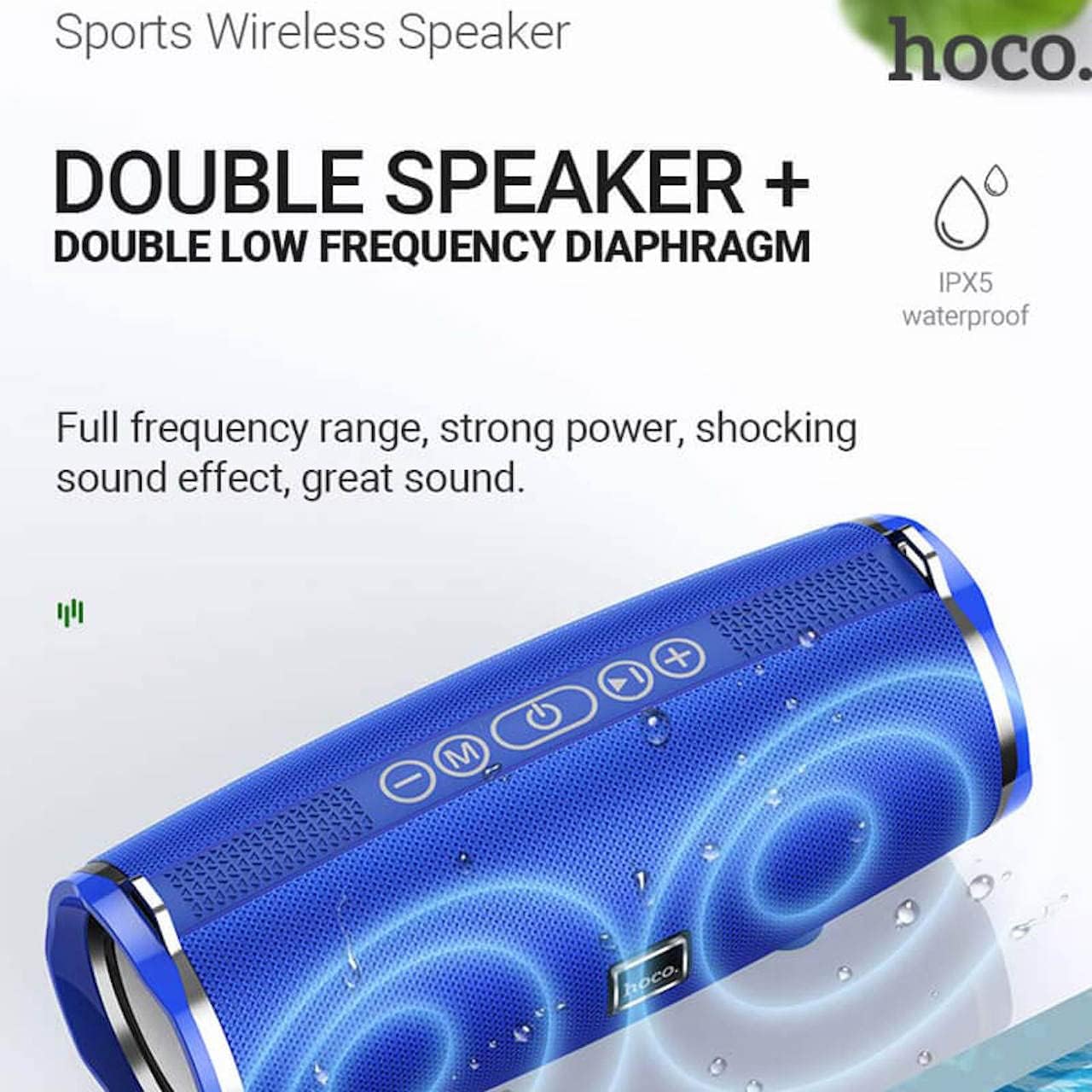
Image: Hoco BS40 speaker highlighting its IPX5 waterproof rating and dual speaker design for enhanced sound.
וואָראַנטי און שטיצן
Hoco products are designed and manufactured to the highest quality standards. For warranty information and customer support, please refer to the warranty card included with your product or visit the official Hoco webפּלאַץ.
Official Hoco Webפּלאַץ: http://www.hocotech.com
ביטע האַלטן דיין דערווייַז פון קויפן פֿאַר וואָראַנטי קליימז.


