1. פּראָדוקט איבערview
The PCE-423N Air Flow Meter is a versatile instrument designed for precise measurement of air speed, volume flow, and temperature. Its compact design and extendable telescopic probe allow for measurements in various environments, including hard-to-reach areas. Equipped with a data memory for 10,000 measuring points and a Micro-USB interface, it facilitates efficient data collection and transfer.

Figure 1: PCE-423N Air Flow Meter with its telescopic probe fully extended, showcasing its compact display unit and sensor tip.
שליסל פֿעיִקייטן:
- Measuring range up to 30 m/s (98 ft/s) for air speed.
- Integrated rechargeable battery for portable use.
- Data memory for up to 10,000 measuring points.
- Data export in CSV format via Micro-USB.
- Extendable telescopic probe (210 ... 426 mm / 8.2 ... 16.7") for flexible application.
- 2" LCD display (176 x 220 pixels) for clear readings.
2. אויפשטעלן און ערשטע באנוץ
2.1 אַנפּאַקינג און דורכקוק
Carefully unpack the PCE-423N Air Flow Meter and all included accessories. Verify that the following items are present:
- 1 x Air Flow Meter PCE-423N
- 1 רענטגענ מיקראָ-וסב קאַבלע
- 1 x Instruction manual (this document)
Inspect the device for any visible damage. If any components are missing or damaged, contact PCE Instruments support immediately.
2.2 טשאַרדזשינג די באַטאַרייע
Before first use, fully charge the internal 1000 mAh battery. Connect the supplied Micro-USB cable to the device's Micro-USB port and the other end to a compatible 5V DC, 1A power source (e.g., a computer USB port or a USB wall adapter).
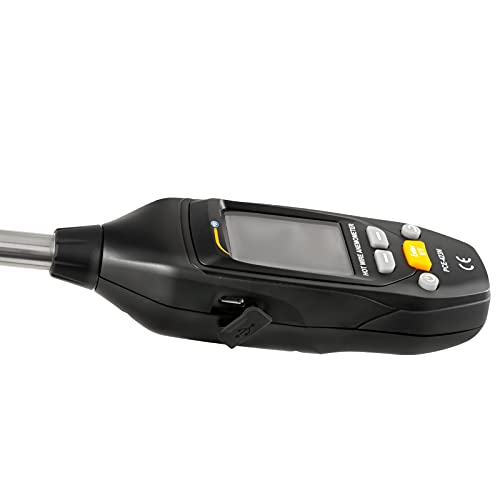
פיגורע 2: זייַט view of the PCE-423N displaying the Micro-USB port, used for charging and data transfer.
The charging indicator on the display will show the charging status. A full charge typically takes several hours.
2.3 Extending the Telescopic Probe
The PCE-423N features an extendable telescopic probe. To extend, gently pull the probe away from the main unit until it reaches the desired length. The probe can extend from 210 mm (8.2 inches) to 426 mm (16.7 inches). Ensure the probe is securely locked at the desired length before taking measurements.
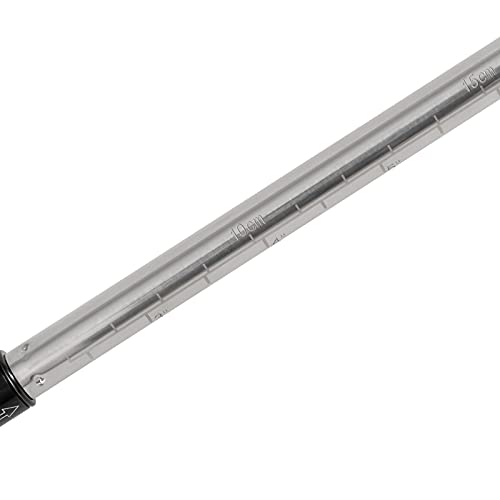
פיגורע 3: נאָענט-אַרויף view of the telescopic probe, showing measurement markings for precise extension.
2.4 פּאַוערינג אויף / אַוועק
Press and hold the power button (usually marked with a power symbol) to turn the device on or off. The 2" LCD display will illuminate upon startup.
3. אַפּערייטינג ינסטרוקטיאָנס
3.1 ווייַז איבערview
The LCD display provides real-time measurement data and device status. Key information displayed includes:
- Current measurement value (e.g., air speed, volume flow, temperature).
- Measurement units (e.g., m/s, ft/min, m³/h, CFM, °C, °F).
- באַטערי מדרגה גראדן.
- Date and time (if applicable).
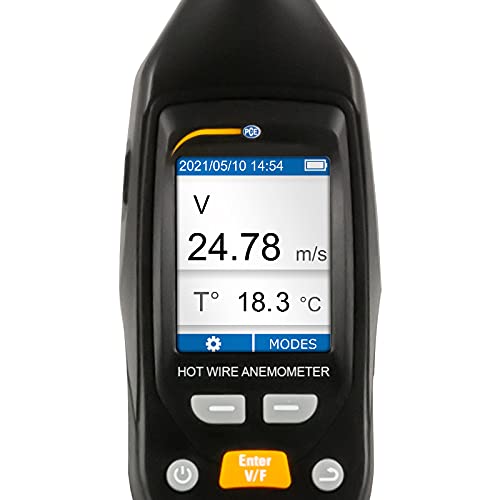
פיגורע 4: דעטאַילעד view of the PCE-423N's LCD display, showing real-time air speed (V) and temperature (T) readings.
3.2 מעזשערמאַנט מאָדעס
The PCE-423N supports various measurement modes. Use the mode selection buttons (refer to the device's button layout) to switch between:
- לופט גיכקייַט: Measures air velocity in m/s or ft/min.
- Volume Flow: Calculates air volume flow in m³/h or CFM. Ensure correct duct area input if required by the device.
- טעמפּעראַטור: Measures air temperature in °C or °F.
For accurate air speed and volume flow measurements, ensure the sensor tip is positioned correctly within the airflow. The sensor tip is located at the end of the telescopic probe.
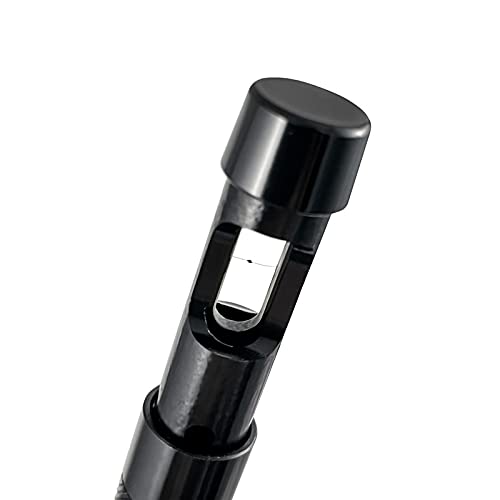
Figure 5: Close-up of the hot-wire sensor tip, which is crucial for accurate air flow measurements.
3.3 Data Memory and Transfer
The device can store up to 10,000 measuring points. Refer to the on-screen menu for options to save data manually or configure automatic logging intervals. Saved data can be exported in CSV format.
To transfer data to a computer:
- Connect the PCE-423N to your computer using the Micro-USB cable.
- The device should appear as a removable storage device.
- געפֿינען די CSV files containing your measurement data and copy them to your computer.
3.4 Using the Tripod Bracket
The PCE-423N is equipped with a 3/8" tripod bracket on its back, allowing for stable, hands-free measurements, especially useful for long-term monitoring or in specific setups.
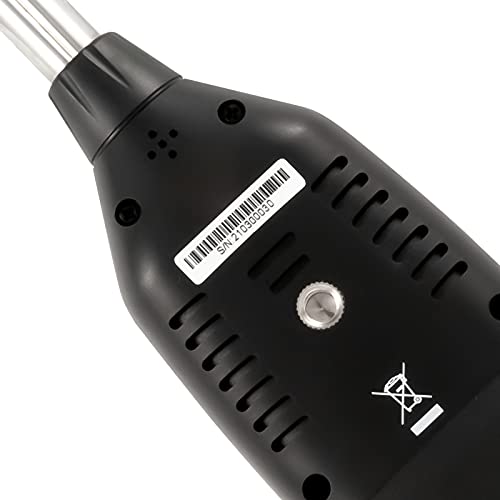
פיגורע 6: דערציען view of the PCE-423N, highlighting the 3/8" tripod bracket for stable positioning during measurements.
4. וישאַלט און קער
4.1 רייניקונג
צו רייניקן דעם אפאראט, ניצט א ווייכן, טרוקענעם טוך. פאר שווערן שמוץ, ניצט א לייכט טרוקענעם טוך.amp cloth with mild detergent can be used, ensuring no liquid enters the device openings. Do not use abrasive cleaners, solvents, or strong chemicals, as these can damage the casinג אדער אַרויסווייַז.
The sensor tip is delicate. Clean it gently with a soft brush or compressed air to remove dust or debris. Avoid touching the sensor element directly.
4.2 סטאָרידזש
When not in use, store the PCE-423N in a dry, cool place, away from direct sunlight and extreme temperatures. The recommended storage conditions are -10 ... 60 °C (14 ... 140 °F) with less than 85% relative humidity, non-condensing. Retract the telescopic probe fully before storage to prevent damage.
4.3 באַטערי קער
To prolong battery life, avoid fully discharging the battery frequently. If storing the device for an extended period, charge the battery to approximately 50% and recharge every few months to prevent deep discharge.
5. טראָובלעשאָאָטינג
5.1 דיווייס גייט נישט אן
- קאָנטראָלירן די באַטאַרייע: Ensure the battery is sufficiently charged. Connect the device to a power source using the Micro-USB cable and allow it to charge for at least 30 minutes before attempting to power on again.
- מאַכט קנעפּל: Ensure the power button is pressed firmly and held for a few seconds.
5.2 אומגענויע מעסטונגען
- סענסאָר ריינקייט: Ensure the sensor tip is clean and free from dust or debris. A dirty sensor can lead to incorrect readings.
- Probe Position: Verify that the telescopic probe and sensor tip are correctly positioned within the airflow and not obstructed.
- ינווייראַנמענאַל טנאָים: Ensure operating conditions are within the specified range (0 ... 50 °C / 32 ... 122 °F, <85 % RH, non-condensing).
- קאליבראציע: If readings remain consistently inaccurate, the device may require recalibration. Contact PCE Instruments support for calibration services.
5.3 פראבלעמען מיט דאטן איבערפירן
- קאַבלע קשר: Ensure the Micro-USB cable is securely connected to both the device and the computer. Try a different USB port on your computer.
- קאַבלע אָרנטלעכקייַט: Try a different Micro-USB cable to rule out a faulty cable.
- קאָמפּיוטער דערקענונג: Check your computer's device manager to see if the PCE-423N is recognized. You may need to update USB drivers on your computer.
6. טעכניש ספּעסאַפאַקיישאַנז
| פּאַראַמעטער | באַשרייַבונג |
|---|---|
| גיכקייט מעסטן קייט | 0.00 ... 30.00 m/s 0.0 ... 5905.5 ft/min |
| ספּיד רעסאָלוטיאָן | 0.01 עם / s 0.1 ft/min |
| ספּיד אַקקוראַסי | ±0.10 m/s or ±5% of full scale at 0 ... 5 m/s ±0.30 m/s or ±5% of full scale at 5 ... 30 m/s (וועלכער איז גרעסער) |
| Volume Flow Measuring Range | 0.0 ... 339120.0 m³/h 0.0 ... 99598.0 CFM |
| Volume Flow Resolution | 0.1 מ³/ה 0.1 קפם |
| טעמפּעראַטור מעאַסורינג ראַנגע | 0 ... 50 °C 32 ... 122 °F |
| טעמפּעראַטור רעסאָלוטיאָן | 0.1 °C 0.1 °F |
| טעמפּעראַטור אַקקוראַסי | ±1 °C ±1.8 °F |
| Telescopic Probe Length | 210 ... 426 mm / 8.2 ... 16.7" |
| Telescopic Probe Diameter | 12 מ״מ / 0.47" |
| זכּרון | 10,000 מעסטן פונקטן |
| File פֿאָרמאַט | CSV |
| צובינד | מיקראָ-וסב |
| קלאַמער | 3/8" tripod bracket |
| ווייַז | 2" LCD display, 176 x 220 pixels |
| מעאַסורינג קורס | 1 הז |
| מאַכט צושטעלן (באַטערי) | Internal 1000 mAh battery |
| מאַכט צושטעלן (עקסטערנאַל) | 5 וו דק, 1 א |
| אַפּערייטינג טנאָים | 0 ... 50 °C (32 ... 122 °F), <85 % RH, non-condensing |
| סטאָרידזש טנאָים | -10 ... 60 °C (14 ... 140 °F), <85 % RH, non-condensing |
| Dimensions (without probe) | 145 x 50 x 35 mm / 5.7 x 1.9 x 1.3" |
| וואָג | 156 ג / 5.5 אַז |
7. וואָראַנטי און שטיצן
PCE Instruments provides a standard warranty for the PCE-423N Air Flow Meter against defects in materials and workmanship under normal use. The specific terms and duration of the warranty may vary by region. Please refer to the warranty card included with your product or visit the official PCE Instruments webפּלאַץ פֿאַר דיטיילד וואָראַנטי אינפֿאָרמאַציע.
For technical support, troubleshooting assistance, or warranty claims, please contact PCE Instruments customer service. You can find contact information on the official PCE Instruments webוועבזייטל אדער דורך אייער קויפן-פונקט.
PCE Instruments US: Visit their Amazon Store