הקדמה
Thank you for choosing the DR-HO'S MotionCiser. This innovative foot massager combines vibration and heat functions to provide a soothing and relaxing experience. This manual provides important information on how to set up, operate, and maintain your MotionCiser for optimal performance and longevity. Please read it thoroughly before first use.

Image: The DR-HO'S MotionCiser foot massager unit with its accompanying remote control, showcasing its compact design and user-friendly interface.
פּעקל אינהאַלט
זיכער מאַכן אַז אַלע זאכן זענען פאַראַן אין פּעקל:
- 1 x DR-HO'S MotionCiser Main Unit
- 1 x מאַכט אַדאַפּטער
- 1 x רימאָוט קאָנטראָל
- 1 x באַניצער מאַנואַל (דאָס דאָקומענט)

Image: A visual representation of the MotionCiser package contents, including the main unit, power adapter, and remote control.
סעטאַפּ
- אויספּאַקן: נעמט פֿאָרזיכטיק אַרויס אַלע קאָמפּאָנענטן פֿון דער פּאַקאַדזשינג. האַלט די פּאַקאַדזשינג פֿאַר צוקונפֿטיקע סטאָרידזש אָדער טראַנספּאָרט.
- אָרט: Place the MotionCiser on a flat, stable surface in a comfortable seating area. Ensure there is enough space around the unit for proper ventilation.
- מאַכט קשר: Insert the power adapter cable into the DC input port located on the side of the MotionCiser unit. Plug the other end of the power adapter into a standard electrical outlet.
- ווייַט קאָנטראָל: Ensure the remote control has batteries installed (if not pre-installed, refer to the battery compartment on the back of the remote).
אַפּערייטינג ינסטראַקשאַנז
געטינג סטאַרטעד
Once the unit is plugged in, you can begin using your MotionCiser.
- Sit comfortably in a chair with your feet placed flat on the footpads of the MotionCiser.
- דרוק די ON/OFF button on the remote control or the main unit to power on the device. The display will illuminate.
ניצן די רימאָוט קאָנטראָל
The remote control allows for convenient adjustment of settings:
- ווייבריישאַן גיכקייַט: ניצן די + און - buttons under "Speed" to increase or decrease the vibration intensity. There are 10 speed levels available.
- היץ פֿונקציע: ניצן די + און - buttons under "Degree of heat" to activate and adjust the heat therapy. The heat function operates between 30°C and 50°C.
- צו קער אַוועק די מיטל, דריקן די ON/OFF קנעפּל ווידער.

Image: A user's feet resting on the MotionCiser footpads, demonstrating the proper usage position for the device.
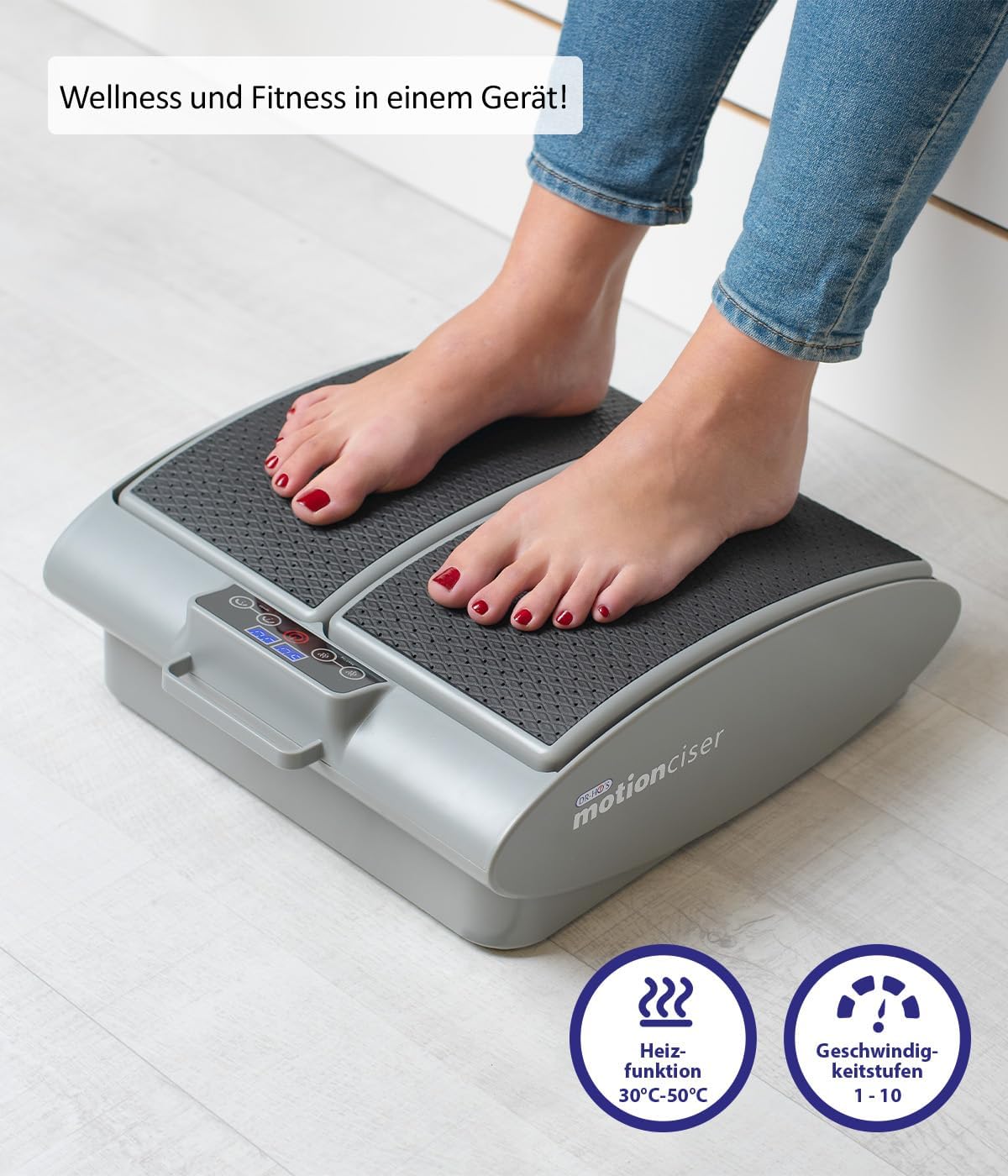
בילד: א נאָענטע בילד view of the MotionCiser's control panel and footpads, highlighting the heat function (30°C-50°C) and speed levels (1-10).

בילד: דעטאַלירט view of the MotionCiser's control interface, showing the digital display and buttons for adjusting heat and speed settings.
וישאַלט
רייניקונג
- Always unplug the MotionCiser from the power outlet before cleaning.
- ווישן די ייבערפלאַך פון די אַפּאַראַט מיט אַ ווייך, דamp שטאָף. דו זאלסט נישט נוצן אַברייסיוו קלינערז אָדער האַרב קעמיקאַלז.
- דו זאלסט נישט ייַנטונקען די אַפּאַראַט אין וואַסער אָדער קיין אנדערע פליסיק.
סטאָרידזש
- Store the MotionCiser in a cool, dry place, away from direct sunlight and extreme temperatures.
- If storing for an extended period, it is recommended to place the unit back in its original packaging to protect it from dust and damage.
טראָובלעשאָאָטינג
| פּראָבלעם | מעגלעך סיבה | לייזונג |
|---|---|---|
| די מיטל איז נישט קער אויף. | Not plugged in correctly; Power outlet issue; Remote control batteries low. | Ensure power adapter is securely plugged into the unit and outlet. Test the outlet with another device. Replace remote control batteries. |
| קיין וויבראַציע. | Speed setting is too low or off; Internal malfunction. | Increase the vibration speed using the remote control. If the issue persists, contact customer support. |
| קיין היץ. | Heat function is off; Internal malfunction. | Activate and increase the heat setting using the remote control. If the issue persists, contact customer support. |
| די ווײַטקאָנטראָל רעאַגירט נישט. | באַטעריעס זענען טויט אָדער נישט ריכטיק אַרײַנגעשטעלט; אַ שטערונג צווישן דער ווײַטקאָנטראָלירער און דער אַפּאַראַט. | Replace batteries, ensuring correct polarity. Remove any obstructions. Point remote directly at the unit. |
ספּעסאַפאַקיישאַנז
| שטריך | דעטאַל |
|---|---|
| מאָדעל נומער | A17179 |
| סאָרט | זשעני |
| דימענסיעס (L X W X H) | 41 X 18 X 38 סענטימעטער (16.1 X 7.1 X 15 אינטשעס) |
| וואָג | 3.75 קג (8.27 לבס) |
| מאַכט מקור | עלעקטריק |
| מאַטעריאַל | מעטאַל |
| קאָליר | White (as per product image, though spec says Blanc.) |
| ספּעציעלע שטריך | Easy to use, remote temperature adjustment |
| Heat Function Range | 30°C - 50°C |
| Vibration Speed Levels | 1-10 |

Image: Diagram illustrating the dimensions of the MotionCiser unit: 36 cm length, 33 cm width, and 12.5 cm height.
וואָראַנטי און שטיצן
For warranty information and customer support, please refer to the contact details provided with your purchase documentation or visit the official Genius product webזייטל. האַלט דיין קויפן באַווייַז פֿאַר קיין וואָראַנטי קליימז.
If you encounter any issues not covered in the troubleshooting section, please contact our customer service team for assistance.


