הקדמה
This manual provides detailed instructions for the installation, operation, maintenance, and troubleshooting of your GIGABYTE GeForce RTX 3080 Vision OC 10G graphics card. This high-performance graphics card is designed for demanding visual tasks, powered by NVIDIA's Ampere architecture, featuring 2nd Generation RT Cores, 3rd Generation Tensor Cores, and 10GB GDDR6X memory. It incorporates the WINDFORCE 3X Cooling System for efficient thermal management and RGB Fusion 2.0 for customizable lighting.
סעטאַפּ און ינסטאַלירונג
1. סיסטעם רעקווירעמענץ
- פּהי עקספּרעסס-געהאָרכיק מאָטהערבאָאַרד מיט איין צווייענדיק-ברייט קס 16 גראַפיקס שפּעלטל.
- מינימום 750 וואט מאַכט צושטעלן מיט צוויי 8-פּין PCIe מאַכט קאַנעקטערז.
- מייקראָסאָפֿט ווינדאָוז 10 64-ביט אָדער לינוקס 64-ביט אָפּערירן סיסטעם.
- 32GB system memory recommended for optimal performance.
- אינטערנעט פֿאַרבינדונג פֿאַר דרייווער דאַונלאָוד.
2. פּעקל אינהאַלט
- GIGABYTE GeForce RTX 3080 Vision OC 10G Graphics Card
- באַניצער מאַנואַל (דעם דאָקומענט)
3. גשמיות ייַנמאָנטירונג
- צוגרייטן אייער סיסטעם: מאַכט אויס דעם קאָמפּיוטער און אָפּשטעקן אַלע קייבלס. עפֿנט דעם קאָמפּיוטער קעסטל.
- געפינט דעם PCIe סלאָט: אידענטיפיצירט אַ פאַראַן PCI Express x16 סלאָט אויף אייער מוטערבאָרד.
- אַראָפּנעמען די דעקל פון די שפּאַלטן: Remove the necessary expansion slot covers from the back of your computer case to accommodate the graphics card.
- אַרײַנשטעלן די גראַפיקס קאַרטל: פֿאָרזיכטיק גלייכט אויס די גראַפיקס קאַרטל מיטן PCIe סלאָט און דריקט עס פעסט ביז עס איז זיכער אײַנגעזעצט. מאַכט זיכער אַז די ריטענשאַן קלעמערל אויפן PCIe סלאָט פֿאַרשליסט זיך אין פּלאַץ.

בילד: פראָנט view of the GIGABYTE GeForce RTX 3080 Vision OC 10G Graphics Card, showcasing the triple WINDFORCE fans and the white/silver shroud design.
- זיכער מאַכן די קאַרטל: Fasten the graphics card to the computer case using screws.
- פאַרבינדן מאַכט קאַבלעס: Connect the two 8-pin PCIe power connectors from your power supply to the corresponding ports on the graphics card. Ensure a firm connection.
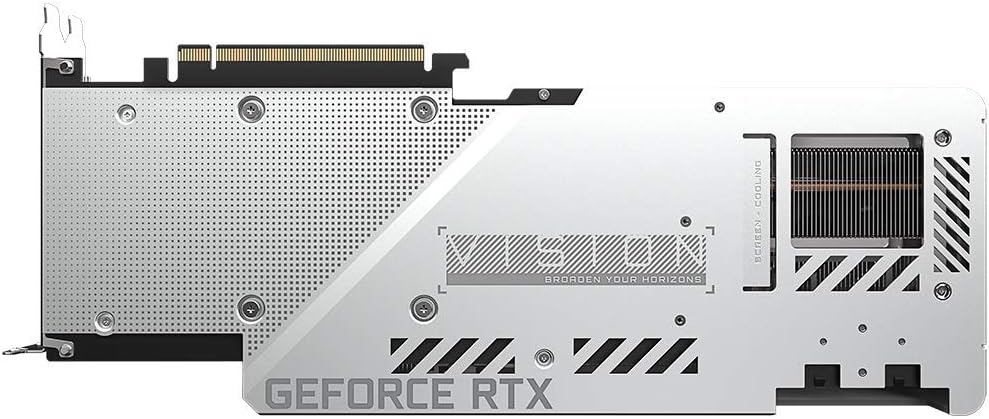
בילד: הינטערשטע view of the GIGABYTE GeForce RTX 3080 Vision OC 10G Graphics Card, highlighting the protective metal backplate with ventilation cutouts and the GeForce RTX branding.
- פאַרמאַכן דעם פאַל: צוריקשטעלן דעם קאָמפּיוטער קעסטל דעקל און ווידער צובינדן אלע קייבלס.
- פֿאַרבינדן דיספּליי: Connect your monitor to one of the display outputs (HDMI or DisplayPort) on the graphics card.
אַפּערייטינג ינסטראַקשאַנז
1. דרייווער ינסטאַלירונג
- מאַכט אויף: Turn on your computer. The system may boot into a lower resolution or use a generic display driver.
- אראפקאפיע דריווערס: באַזוכט די אָפֿיציעלע גיגאַבייט webפּלאַץ (www.gigabyte.com) אדער NVIDIA'ס אפיציעלע webפּלאַץ (www.nvidia.com/drivers).
- Select product: Navigate to the support section and locate the drivers for the GeForce RTX 3080 series.
- אינסטאַלירן דרייווערס: Download the latest recommended drivers and follow the on-screen instructions to complete the installation. A system restart may be required.
2. ווייכווארג קאָנפיגוראַטיאָן
- GIGABYTE Control Center / AORUS Engine: For advanced control over your graphics card, including fan speed adjustment, overclocking profiles, and RGB Fusion 2.0 lighting customization, download and install the GIGABYTE Control Center or AORUS Engine software from the GIGABYTE webפּלאַץ.
- NVIDIA GeForce עקספּיריענס: Install NVIDIA GeForce Experience for optimal game settings, driver updates, and access to features like ShadowPlay.
וישאַלט
- באַזייַטיקונג פון שטויב: Regularly clean dust from the graphics card fans and heatsink using compressed air. Ensure the system is powered off and unplugged before cleaning.
- פאָכער דורכקוק: Periodically check the fans for any obstructions or unusual noises.
- דרייווער דערהייַנטיקונגען: Keep your graphics drivers updated to ensure optimal performance and stability.
טראָובלעשאָאָטינג
קיין ווייַז רעזולטאַט
- זיכער מאַכן אַז דער מאָניטאָר קאַבל איז זיכער פארבונדן צו דער גראַפיקס קאַרטל און דעם מאָניטאָר.
- איבערצייגט אז די גראַפיקס קאַרטל איז גאָר אײַנגעזעצט אין די PCIe סלאָט.
- Check that all required PCIe power connectors are securely attached to the graphics card.
- פּרובירט מיט אַן אַנדערן דיספּליי קאַבל אָדער מאָניטאָר אויב מעגלעך.
סיסטעם אינסטאביליטעט אדער קראַשיז
- זיכער מאַכן אַז אייער מאַכט צושטעלן טרעפט די מינימום וואַטtagע פארלאנג (750 וואט).
- דערהייַנטיקט אייערע גראַפיקס דרייווערס צו די לעצטע ווערסיע.
- Monitor GPU temperatures using software like GIGABYTE Control Center to check for overheating.
- Check for conflicts with other installed drivers or software.
נעבעך פאָרשטעלונג
- זיכער מאַכן אַז דרייווערס זענען ריכטיק אינסטאַלירט און אַרויף-צו-דאַטע.
- Verify that the graphics card is running at its intended clock speeds (can be checked with monitoring software).
- קוק הינטערגרונט אַפּליקאַציעס וואָס קען פֿאַרנוצן סיסטעם רעסורסן.
- Ensure your system's BIOS/UEFI is updated.
ספּעסאַפאַקיישאַנז
| גראַפיקס פּראַסעסינג אַפּאַראַט | NVIDIA GeForce RTX 3080 |
| ווידעא זכּרון | 10GB GDDR6X |
| זכּרון צובינד | 320-ביסל |
| בוסט זייגער | 1800 מהז |
| זכּרון ספּיד | 19000 מהז |
| רעזולטאַט פּאָרץ | DisplayPort, HDMI |
| מאַקסימום דיגיטאַל רעזאָלוציע | 7680x4320 (via DisplayPort 1.4a) |
| מולטי-view | 4 |
| Card Dimensions (LxWxH) | 12.6 X 4.96 X 2.17 אינטשעס (320 X 126 X 55 מם) |
| רעקאַמענדיד פּסו | 750 וו |
| מאַכט קאַנעקטערז | 2x 8-שפּילקע |
| PCI Express | 4.0 קס 16 |
| מאָדעל נומער | GV-N3080VISION OC-10GD 2.0 |
וואָראַנטי אינפֿאָרמאַציע
GIGABYTE products are covered by a limited warranty. The specific terms and duration of the warranty may vary by region and product. Please refer to the official GIGABYTE website or your product's packaging for detailed warranty information and registration procedures. Keep your proof of purchase for warranty claims.
טעכניש שטיצן
For technical assistance, driver downloads, FAQs, and further support, please visit the official GIGABYTE support webפּלאַץ:
איר קענט אויך קאָנטאַקטירן GIGABYTE קונה סערוויס דורך די קאָנטאַקט אינפֿאָרמאַציע וואָס איז צוגעשטעלט אויף זייער webוועבזייטל פֿאַר אייער ספּעציפֿישער געגנט.


