הקדמה
Thank you for choosing the Continu.us R230D2 Master TV Remote. This remote control is specifically designed to provide comprehensive control over RCA and Continu.us brand televisions, including access to commercial menus. Its intuitive layout ensures ease of use for all essential TV functions.

פיגורע 1: פראָנט view of the R230D2 Master TV Remote, showing all buttons.
סעטאַפּ
Before using your new remote, you will need to install batteries.
ייַנמאָנטירונג פון באַטאַרייע
- געפֿינען די באַטאַרייע אָפּטייל אויף די צוריק פון די ווייַט קאָנטראָל.
- רוקט דעם דעקל פונעם באַטעריע־אָפּטייל אַראָפּ און הייבט עס אַראָפּ.
- Insert two (2) AA batteries, ensuring the positive (+) and negative (-) terminals align with the markings inside the compartment.
- לייגט צוריק דעם דעקל פונעם באַטעריע־אָפּטייל דורך עס צוריקצורוקן אין פּלאַץ ביז עס קליקט זיכער.

פיגורע 2: צוריק view of the R230D2 Master TV Remote, illustrating the battery compartment.
ערשט נוצן
The R230D2 Master TV Remote is pre-programmed for RCA and Continu.us televisions and typically requires no code entry or complex synchronization. Simply point the remote at your television and press the מאַכט button. If the TV responds, the remote is ready for use.
אַפּערייטינג ינסטראַקשאַנז
This section details the functions of the buttons on your R230D2 remote control.
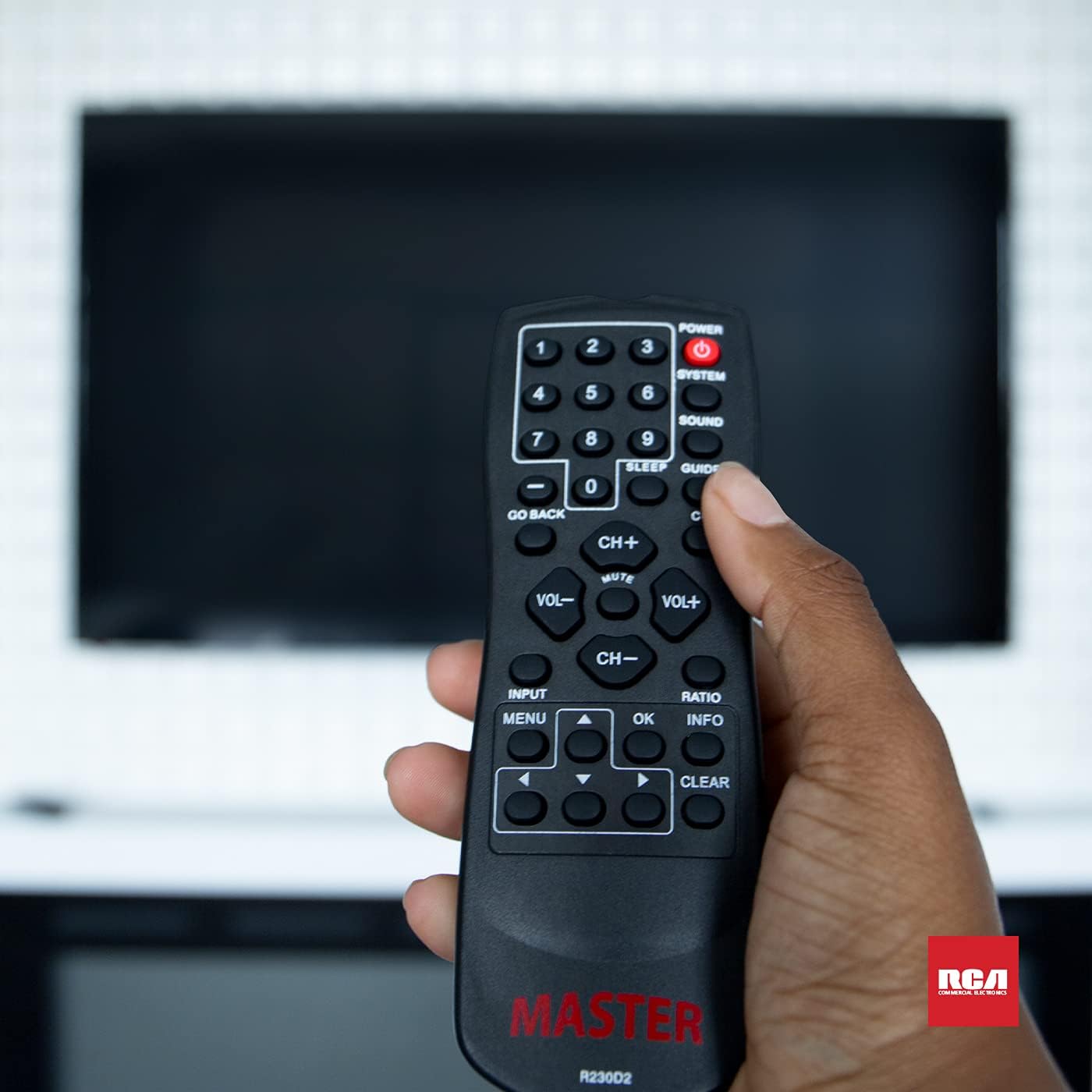
Figure 3: Using the R230D2 Master TV Remote with a television.
- מאַכט: Turns the television on or off.
- סיסטעם: Accesses system-specific functions or menus.
- SOUND: Adjusts sound modes or settings.
- גייד: Displays the electronic program guide (EPG).
- שלאָף: Sets a timer for the TV to automatically turn off.
- פֿאַרמאַכטע אונטערשריפֿט (CC): Toggles closed captions on or off.
- גיין צוריק: Returns to the previous channel or menu screen.
- נומער קנעפּלעך (0-9): Directly input channel numbers.
- טש+ / טש-: טוישט קאַנאַלן אַרויף אָדער אַראָפּ.
- VOL + / VOL-: פאַרגרעסערט אָדער פאַרקלענערט דעם באַנד.
- שטום: Mutes or unmutes the television sound.
- אַרייַנשרייַב: Selects the input source (e.g., HDMI 1, AV).
- MENU: Opens the television's main menu.
- OK: Confirms a selection or enters a submenu.
- INFO: Displays information about the current program or input.
- RATIO: Adjusts the screen aspect ratio.
- קלאָר: Clears input or exits certain functions.
- נאַוויגאַציע פײַלן (אַרויף, אַראָפּ, לינקס, רעכטס): Navigates through menus and options.
Accessing Commercial Menus
The R230D2 remote is designed to access commercial menus on compatible RCA and Continu.us televisions. The specific button or sequence to access these menus may vary by TV model. Typically, this function is integrated within the סיסטעם or MENU buttons, or a combination thereof. Refer to your television's specific user manual for detailed instructions on accessing its commercial menu features.
וישאַלט
כדי צו זיכער מאַכן די לאַנגלעבעניש און אָפּטימאַלע פאָרשטעלונג פון דיין ווייַט קאָנטראָל, נאָכפאָלגן די פּשוט וישאַלט גיידליינז:
- רייניקונג: Wipe the remote with a soft, dry cloth. For stubborn dirt, slightly dampווישט דעם שטאָף מיט וואַסער אָדער אַ מילדן, נישט-שרייַבנדיקן רייניגער. ניצט נישט שטרענגע כעמיקאַלן און טונקט נישט איין דעם ווייַטקאָנטראָל אין פליסיקייט.
- באַטערי פאַרבייַט: Replace batteries when the remote's response becomes sluggish or stops working. Always replace both batteries at the same time with new AA batteries. Do not mix old and new batteries, or different types of batteries.
- סטאָרידזש: האַלט די ווײַטקאָנטראָלירטע אַפּאַראַטור אין אַ קיל, טרוקן אָרט, ווײַט פֿון דירעקטער זון, עקסטרעמע טעמפּעראַטורן און הויכער פֿײַכטקייט.
- ויסמיידן טראפנס: באַשיצט דעם ווײַטקאָנטראָל פֿון פֿיזישן קלאַפּ, ווײַל פֿאַלן קענען שאַטן אינעווייניקסטע קאָמפּאָנענטן.
טראָובלעשאָאָטינג
If you encounter issues with your R230D2 remote, try the following solutions:
- ווייַט ניט ריספּאַנדינג:
- קאָנטראָלירט צי די באַטעריעס זענען ריכטיק אַרײַנגעשטעלט מיט דער ריכטיקער פּאָלאַריטעט.
- פאַרבייַטן די באַטעריז מיט פריש אָנעס.
- זיכער מאַכן אַז עס זענען נישטאָ קיין שטערונגען צווישן דעם ווײַטקאָנטראָל און דעם טעלעוויזיע'ס אינפֿראַרעד סענסאָר.
- זייט זיכער אז איר זענט אין דער עפעקטיווער ראַנגע פון דעם טעלעוויזיע'ס IR ריסיווער.
- TV Not Turning On/Off:
- Confirm the TV is plugged into a working power outlet.
- Try turning the TV on/off using its physical power button.
- ספּעציפֿישע פֿונקציעס אַרבעטן נישט:
- Some functions may require the TV's menu to be open or a specific input selected.
- Ensure the remote is pointed directly at the TV.
- Remote Still Not Working:
- If the remote was recently dropped or exposed to moisture, internal damage may have occurred.
- קאָנטאַקט קונה שטיצן פֿאַר ווייַטער הילף.
ספּעסאַפאַקיישאַנז
| שטריך | דעטאַל |
|---|---|
| סאָרט | Continu.us |
| מאָדעל נומער | R230D2 |
| קאַמפּאַטאַבאַל דעוויסעס | RCA and Continu.us Televisions |
| קאַנעקטיוויטי טעכנאָלאָגיע | ינפרערעד |
| מאַכט מקור | 2 אַאַ באַטעריז (ניט אַרייַנגערעכנט) |
| פּונקט וואָג | 1.76 אונסעס |
| פּראָדוקט דימענשאַנז | 6 X 2 X 1 אינטשעס |
| מאַקס נומער פון שטיצט דעוויסעס | 1 |
וואָראַנטי און שטיצן
Continu.us products are designed and tested to high standards. We pride ourselves on offering excellent customer support.
קונה שטיצן
If you require assistance with your R230D2 Master TV Remote, our support and technical team are available to help. Please reach out via phone or email for any pressing issues or questions.
For the most up-to-date contact information, please visit the official Continu.us webזייטל אדער זעה די פּראָדוקט פּאַקאַדזשינג.
וואָראַנטי אינפֿאָרמאַציע
Specific warranty details for the R230D2 remote are typically provided with the product packaging or can be found on the Continu.us official webזייטל. ביטע באַהאַלטן אייער קויפן באַווייַז פֿאַר וואָראַנטי קליימז.