הקדמה
This manual provides comprehensive instructions for the safe and efficient use of your Tronsmart Apollo Air TWS Bluetooth Earphones. Please read this manual thoroughly before using the product and retain it for future reference.
זיכערקייַט אינפֿאָרמאַציע:
- Do not expose the earphones or charging case to extreme temperatures, humidity, or corrosive environments.
- פֿאַרמײַדט צו פֿאַלן, קלאַפּן אָדער צענעמען דאָס אַפּאַראַט.
- האַלטן אַוועק פון קינדער און פּעץ.
- ניצט נאָר די צוגעשטעלטע אָדער סערטיפיצירטע טשאַרדזשינג קייבלס.
- פארלענגערטע אויסשטעלונג צו הויכע קול לעוועלס קען שאַטן די הערן.
פּראָדוקט איבערview
פּעקל אינהאַלט
- Tronsmart Apollo Air TWS Bluetooth Earphones (Left and Right)
- טשאַרדזשינג קאַסע
- וסב טשאַרדזשינג קאַבלע
- אויער עצות (פאַרשיידענע סיזעס)
- באַניצער מאַנואַל (דעם דאָקומענט)
קאָמפּאָנענט לעגיטימאַציע
Familiarize yourself with the main components of your Tronsmart Apollo Air earphones and charging case.
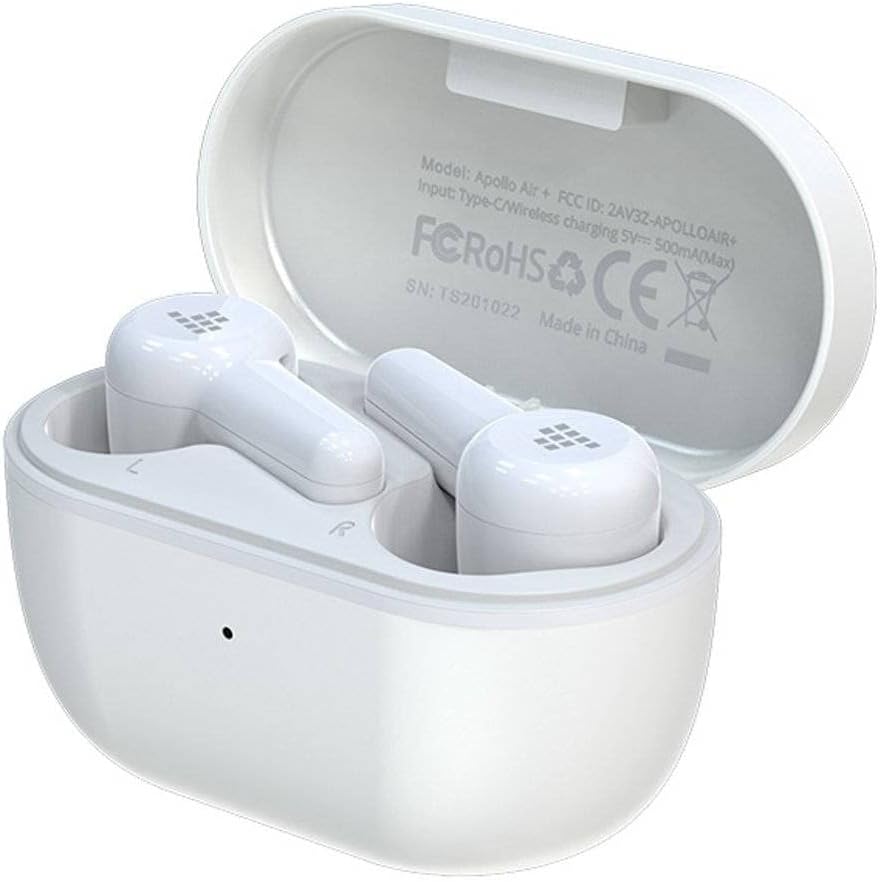
Image: Tronsmart Apollo Air TWS Earphones placed inside their open charging case. The case lid displays model information and certifications.

Image: Tronsmart Apollo Air TWS Earphones. One earbud is shown outside the charging case, highlighting its design and the charging contacts within the case.

בילד: א נאָענטע בילד view of the two Tronsmart Apollo Air TWS Earbuds, showcasing their ergonomic shape, ear tips, and touch control areas.
סעטאַפּ
טשאַרדזשינג די ירפאָונז און קאַסטן
- טשאַרדזשינג די קאַסטן: Connect the provided USB charging cable to the charging port on the case and to a USB power adapter (not included) or a computer's USB port. The indicator light on the case will show charging status.
- טשאַרדזשינג די ירפאָונז: Place the earphones into the charging case. Ensure they are correctly seated in their respective slots (L for left, R for right). The earphones will automatically begin charging. The indicator lights on the earphones will show charging status.
- Fully charge the earphones and case before first use.
בלועטאָאָטה פּערינג
- ערשט פּאָרינג: Open the charging case. The earphones will automatically enter pairing mode, indicated by flashing lights (refer to product for specific light patterns).
- אויף אייער דעווייס (סמאַרטפאָן, טאַבלעט, אאז"וו), אַקטיווירט בלועטוט און זוכט פֿאַר פֿאַראַן דעווייסעס.
- Select "Tronsmart Apollo Air" from the list of found devices.
- אַמאָל פארבונדן, וועט אַ קול פּראָמפּט אָדער אינדיקאַטאָר ליכט באַשטעטיקן געראָטן פּאָרינג.
- ריפּערינג: If the earphones do not connect automatically, ensure Bluetooth is enabled on your device and the earphones are charged. You may need to manually select "Tronsmart Apollo Air" from your device's Bluetooth menu.
אפערירן די אויערפאנען
מאַכט אויף / אַוועק
- מאַכט אויף: עפֿנט דעם טשאַרדזשינג קעסטל, אדער נעמט ארויס די אויערפֿאָנען פֿון דעם קעסטל. זיי וועלן זיך אויטאָמאַטיש אָנצינדן.
- מאַכט אַוועק: לייגט די אויערפאָנען צוריק אין די טשאַרדזשינג קעסטל און מאַכט צו דעם דעקל. זיי וועלן זיך אויטאָמאַטיש אויסלעשן.
- מאַנואַל מאַכט אַוועק: (If supported) Long press the touch control area on both earbuds for approximately 5 seconds until the indicator light turns off.
Touch Controls (General)
The Tronsmart Apollo Air earphones feature touch-sensitive controls. Specific functions may vary slightly, but common operations include:
- שפּיל / פּויזע: איין צאַפּן אויף יעדער עאַרבוד.
- ווייַטער שפּור: צאַפּ צוויי מאָל אויף די רעכטע אויערקנעפּל.
- פֿריִערדיקע שפּור: צאַפּ צוויי מאָל אויף די לינקע אויערקנעפּל.
- ענטפֿערן / סוף רופן: איין צאַפּן אויף יעדער עאַרבוד.
- אָפּוואַרפן רופן: לאַנג דריקן אויף יעדן אויערקנעפּעל פֿאַר 2 סעקונדעס.
- אַקטאַווייט קול אַססיסטאַנט: טרייפאַך צאַפּן אויף יעדן אויערקנעפּעל.
- באַנד קאָנטראָל: (If supported) Long press on the right earbud to increase volume, long press on the left earbud to decrease volume.
Note: Refer to the quick start guide included in your package for precise touch control mappings if different from above.

Image: A smartphone screen showing an equalizer application with various sound presets (e.g., Default, Deep Bass, Hi-Fi, Rock, Vocal). The Tronsmart Apollo Air earphones and charging case are visible in the background, suggesting compatibility with audio customization apps.
וישאַלט
רייניקונג
- ווישט אָפּ די אויערפאָונז און די טשאַרדזשינג קעסטל מיט אַ ווייכן, טרוקענעם, לינט-פֿרייע שטאָף.
- ניצט נישט קיין שרײַבנדיקע רייניגער, אַלקאָהאָל, אדער כעמישע סאָלווענטן.
- אַראָפּנעמען די אויער־שפּיצן און רייניקן זיי באַזונדער מיט מילד זייף און וואַסער אויב נייטיק, און זיכער מאַכן אַז זיי זענען גאָר טרוקן איידער איר זייט זיי צוריק צוטשעפּען.
- Ensure charging contacts on both the earphones and case are clean and free of debris.
סטאָרידזש
- ווען נישט אין באַנוץ, שטענדיק האַלטן די אויערפאָונז אין זייער טשאַרדזשינג קעסטל צו באַשיצן זיי און האַלטן זיי טשאַרדזשד.
- האַלט דעם אַפּאַראַט אין אַ קיל, טרוקן אָרט, אַוועק פון דירעקט זונשייַן און עקסטרעמע טעמפּעראַטורן.
טראָובלעשאָאָטינג
If you encounter issues with your Tronsmart Apollo Air earphones, please refer to the following common solutions:
Earphones not pairing or connecting
- Ensure both earphones are charged and taken out of the charging case.
- אויסלעשן און אנשטעלן בלועטוט אויף אייער דעווייס.
- Delete "Tronsmart Apollo Air" from your device's Bluetooth list and attempt to re-pair.
- Try resetting the earphones (refer to product-specific reset instructions if available, otherwise, place them back in the case, close, then reopen).
ניט געזונט אָדער נידעריק באַנד
- Check the volume level on both your connected device and the earphones.
- זייט זיכער אַז די אויערפאָונז זענען ריכטיק אַרײַנגעזעצט אין אייערע אויערן.
- באַשטעטיקן אַז די אויערפאָונז זענען פארבונדן צו די ריכטיקע אַודיאָ אַרויסגאַנג אויף דיין מיטל.
- Clean any debris from the earphone speaker grilles.
טשאַרדזשינג ישוז
- זיכער מאַכן אַז דער טשאַרדזשינג קאַבל איז זיכער פארבונדן צו ביידע דעם קעסטל און די מאַכט מקור.
- באַשטעטיקן אַז די מאַכט מקור אַרבעט.
- רייניקט די טשאַרדזשינג קאָנטאַקטן אויף די אויערפאָונז און אינעווייניק פון דער קעסטל.
- פּרוּווט אַן אַנדער USB טשאַרדזשינג קאַבל אָדער מאַכט אַדאַפּטער.
ספּעסאַפאַקיישאַנז
| שטריך | דעטאַל |
|---|---|
| סאָרט | טראָנסמאַרט |
| מאָדעל נאָמען | אַפּאָללאָ לופט |
| נומער מאָדעל נומער | 372452 |
| קאַנעקטיוויטי | בלועטוט, וויירלעס |
| קאָליר | ווייַס |
| פאָרם פאַקטאָר | In-Ear, Basic Case |
| מאַטעריאַל | גומע |
| פּונקט וואָג | 100 ג |
| פּראָדוקט דימענשאַנז | 10 X 5 X 3 סענטימעטער |
| וואַסער קעגנשטעל מדרגה | ניט וואַסער קעגנשטעליק |
| קאַמפּאַטאַבאַל טעלעפאָן מאָדעלס | Please check description (Generally compatible with most Bluetooth-enabled devices) |

Image: Technical diagram illustrating the precise dimensions of the Tronsmart Apollo Air charging case and individual earbuds in millimeters and inches.
וואָראַנטי און שטיצן
Tronsmart products are designed and manufactured to the highest quality standards. For detailed warranty information, please refer to the warranty card included with your purchase or visit the official Tronsmart webפּלאַץ.
For technical support, troubleshooting assistance, or to inquire about replacement parts, please contact Tronsmart customer service through their official channels. Contact information can typically be found on the product packaging or the official Tronsmart webפּלאַץ.


