1. הקדמה
This user manual provides essential information for the safe and efficient operation of your Qoltec 51758 Mains & Inverter Adapter. This power adapter is designed to provide reliable power to compatible HP notebooks, featuring advanced protection mechanisms against overvoltage, overload, short circuit, and overheating. Please read this manual thoroughly before using the product to ensure proper functionality and longevity.
2. זיכערקייַט אינסטרוקציעס
To prevent injury or damage to your device, always follow these safety precautions:
- שטעלט נישט אויס דעם אַדאַפּטער צו וואַסער, פייכטקייט, אדער הויכער הומידיטי.
- נישט צענעמען, מאדיפיצירן אדער פרובירן צו פאררעכטן דעם אדאפטער. איבערגעבן אלע סערוויסינג צו קוואליפיצירטע פערסאנעל.
- זיכער מאַכן אַז די עלעקטרישע אַוטלעט איז שטאַרקtage is compatible with the adapter's specifications.
- פֿאַרמײַדט צו שטעלן דעם אַדאַפּטער אין דירעקטער זון אָדער לעבן היץ־קוואַלן.
- Do not use the adapter if the cable or connector is damaged.
- האַלטן אויס פון דערגרייכן פון קינדער.
- נעמט ארויס דעם אַדאַפּטער פֿון דער עלעקטרישער אַוטלעט ווען ער איז נישט אין באַנוץ פֿאַר לענגערע פּעריאָדן.
3. פּראָדוקט איבערview
The Qoltec 51758 adapter is a compact and efficient power solution. It includes the main adapter unit and various interchangeable tips to ensure compatibility with a range of HP notebooks.
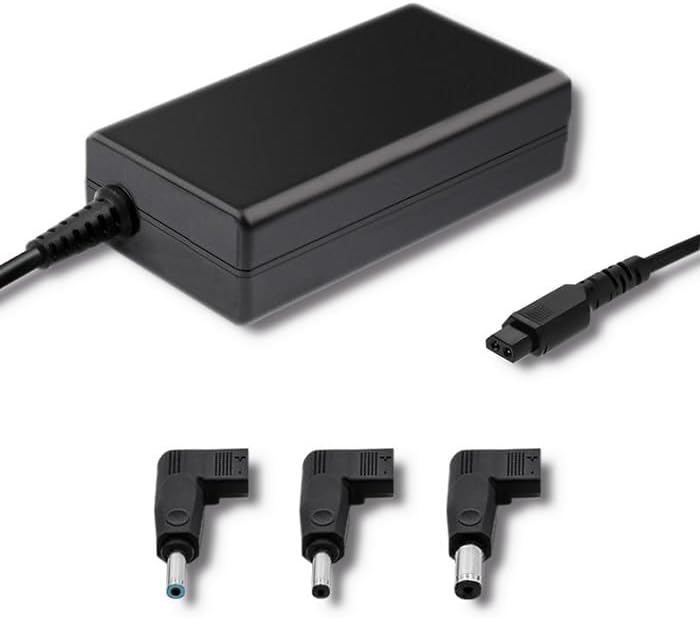
פיגורע 3.1: פראָנט view of the Qoltec 51758 power adapter showing the main unit and three common interchangeable tips.

פיגורע 3.2: דערציען view of the Qoltec 51758 power adapter, highlighting the AC input port and the three interchangeable tips.
The adapter features a robust design with a standard AC input port and a DC output cable that connects to the interchangeable tips. These tips ensure a secure and correct fit for various HP notebook models.
4. סעטאַפּ
- Identify the Correct Tip: Select the interchangeable tip that matches the power input port of your HP notebook. Ensure it fits snugly and securely.
- Connect the Tip: Attach the selected tip to the DC output cable of the Qoltec 51758 adapter.
- Connect to Notebook: Insert the connected tip into the power input port of your HP notebook.
- פאַרבינדן צו מאַכט אָוטלעט: Plug the AC input cable of the adapter into a standard wall power outlet.
- באַשטעטיקן קשר: Confirm that the power indicator light (if present on your notebook or adapter) illuminates, indicating a successful power connection.
5. אָפּערייטינג
Once properly set up, the Qoltec 51758 adapter operates automatically to provide power to your connected HP notebook. It will charge the notebook's battery and/or power the notebook directly.
- טשאַרדזשינג: When connected, the adapter will charge your notebook's battery until it reaches full capacity.
- Direct Power: The adapter can also power your notebook directly, even if the battery is fully charged or removed (if supported by the notebook).
- שוץ פֿעיִקייטן: The adapter is equipped with built-in protections against overvoltage, overload, short circuit, and overheating. In case of an anomaly, the adapter may temporarily cease operation to protect itself and the connected device. Disconnect and reconnect to reset if this occurs.
6. וישאַלט
געהעריקע אויפהאלטונג גאראנטירט די לאנגעוויטי און אפטימאלע פאָרשטעלונג פון אייער אַדאַפּטער.
- רייניקונג: טרענט אָפּ דעם אַדאַפּטער פֿון אַלע שטראָם־קוואַלן און דעווייסעס איידער איר רייניקט. ניצט אַ ווייכן, טרוקענעם שטאָף צו ווישן די ייבערפֿלאַך. ניצט נישט פֿליסיקע רייניגער אָדער אַעראָזאָלן.
- סטאָרידזש: When not in use, store the adapter in a cool, dry place away from direct sunlight and extreme temperatures. Avoid tightly winding the cables to prevent damage.
- קאַבלע זאָרגן: Regularly inspect the power cables and connectors for any signs of wear, cuts, or damage. Replace if necessary.
7. טראָובלעשאָאָטינג
| פּראָבלעם | מעגלעך סיבה | לייזונג |
|---|---|---|
| Adapter not providing power. | No power from outlet; loose connection; damaged cable/adapter. | Check outlet with another device. Ensure all connections are secure. Inspect cables for damage. |
| Notebook not charging. | Incorrect tip used; notebook power port issue; adapter fault. | Verify the correct tip is used and fully inserted. Test with another compatible adapter if possible. |
| אַדאַפּטער פילט זיך הייס. | Normal operation under load; poor ventilation; overload. | Ensure adequate ventilation around the adapter. If excessively hot, disconnect and allow to cool. Reduce load if possible. |
If the problem persists after attempting these solutions, please contact Qoltec customer support.
8. ספּעסאַפאַקיישאַנז
| שטריך | דעטאַל |
|---|---|
| סאָרט | קאָלטעק |
| מאָדעל | 51758 |
| וואָסtage | 65 וואטס |
| פּראָדוקט דימענשאַנז | 2.79 X 24.64 X 16.51 סענטימעטער |
| פּונקט וואָג | 214 גראַמז |
| קאַמפּאַטאַבאַל דעוויסעס | HP Notebooks |
| שוץ פֿעיִקייטן | אָווערוואָלtage, Overload, Short Circuit, Overheat Protection |
| קאַנעקטער טיפּ | Interchangeable DC Power Tips |
| קאַנעקטיוויטי טעכנאָלאָגיע | Wired Power Adapter |
| ערשטער דאַטע בנימצא | 29 אפריל 2022 |
באַמערקונג: די ספּעסאַפאַקיישאַנז קענען זיין געביטן אָן באַמערקן.
9. וואָראַנטי און שטיצן
Qoltec products are manufactured to high quality standards. For information regarding warranty coverage, terms, and conditions, please refer to the warranty card included with your product or visit the official Qoltec webפּלאַץ.
For technical support, troubleshooting assistance, or inquiries about replacement parts, please contact Qoltec customer service through their official channels. Have your product model number (51758) and purchase details ready when contacting support.
Qoltec Official Webפּלאַץ: www.qoltec.com (באַמערקונג: דאָס איז אַ פּלאַץ האָלדער URL, please refer to actual Qoltec webפּלאַץ פֿאַר שטיצן.)


