1. הקדמה
Thank you for choosing the AUKEY Sprint Wireless Power Bank PB-Y32. This device is designed to provide portable power for your mobile devices, featuring both wired and wireless fast charging capabilities. Please read this manual carefully before use to ensure optimal performance and safety.
2. פּראָדוקט פֿעיִקייטן
- 10000 mAh קאַפּאַציטעט: High-capacity battery to charge your devices multiple times.
- שנעלע טשאַרדזשינג שטיצע: Supports Quick Charge 3.0 and Power Delivery for rapid charging of compatible devices.
- ווירעלעסס טשאַרדזשינג: Conveniently charge Qi-compatible devices at up to 10W.
- קייפל רעזולטאַט פּאָרץ: Equipped with USB-C and USB-A ports for versatile charging.
- סאָליד און פּאָרטאַטיוו פּלאַן: גרינג צו טראָגן פֿאַר מאַכט אויף דער גיין.
- זיכערקייַט פֿעיִקייטן: Built-in protections against overcharge, over-discharge, overcurrent, and short circuits.
3. פּעקל אינהאַלט
- AUKEY Sprint Wireless Power Bank PB-Y32
- וסב-א צו C קאַבלע
- באַניצער מאַנואַל
4. אויפשטעלן און ערשטע באנוץ
4.1 אויפלאָדן די פּאַוער באַנק
Before first use, fully charge the power bank. It takes approximately 7 hours to fully charge the power bank using a compatible USB-C power adapter.
- Connect the included USB-A to C cable to the power bank's USB-C input port.
- פֿאַרבינדט דעם אַנדערן עק פֿונעם קאַבל צו אַ USB וואַנט טשאַרדזשער (נישט אַרייַנגערעכנט).
- The LED indicators will light up to show the charging status. All four LEDs will be solid when fully charged.
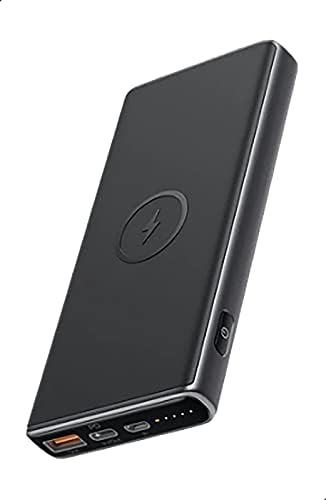
Image: The AUKEY Sprint Wireless Power Bank PB-Y32, showcasing its sleek black design and port layout.
5. אַפּערייטינג ינסטרוקטיאָנס
5.1 דראָטיקע טשאַרדזשינג
To charge your device using a cable:
- Connect your device's charging cable to either the USB-A output port or the USB-C output port on the power bank.
- פאַרבינדן די אנדערע סוף פון די קאַבלע צו דיין מיטל.
- די פּאַוער באַנק וועט אויטאָמאַטיש אָנהייבן טשאַרדזשינג דיין מיטל.
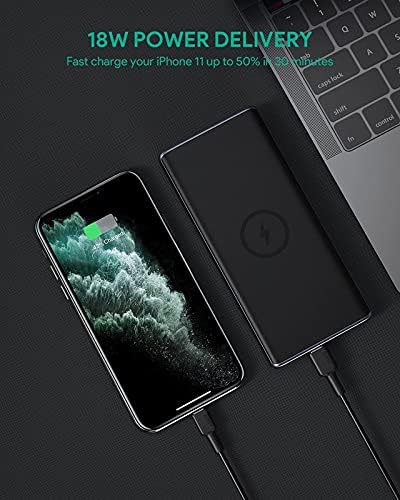
Image: The power bank connected via cable to a smartphone, demonstrating 18W Power Delivery fast charging.

Image: A smartphone connected to the power bank, illustrating Qualcomm Quick Charge 3.0 capabilities for rapid charging.
5.2 ווירעלעסס טשאַרדזשינג
To charge your Qi-compatible device wirelessly:
- Place your Qi-compatible device directly onto the wireless charging pad located on the top surface of the power bank. Ensure the device is centered on the charging symbol.
- The power bank will automatically detect your device and begin wireless charging.

Image: A smartphone placed on the power bank's surface, demonstrating the wireless charging feature.

בילד: א נאָענטע בילד view of the power bank showing the silicone ring designed to keep the phone stable during wireless charging.
5.3 Low-Current Charging Mode
This mode is ideal for charging low-power devices like wireless earbuds or smartwatches.
- Press and hold the power button for 2 seconds to enter low-current charging mode. The first LED indicator will blink green.
- Connect your low-power device or place it on the wireless charging pad.
- To exit low-current charging mode, press the power button once, or it will automatically exit after 2 hours.
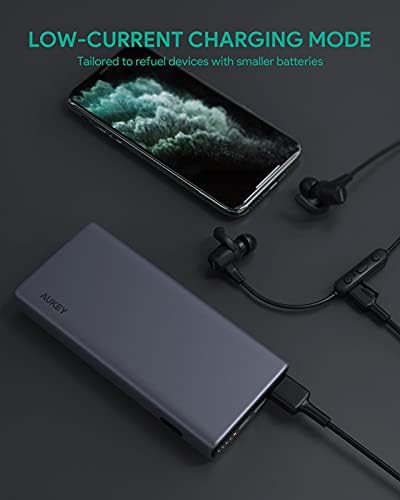
Image: The power bank connected to a smartphone and wireless earbuds, demonstrating its low-current charging mode for smaller devices.

Image: An illustration showing the power bank's broad compatibility with various devices, including smartphones, tablets, and gaming consoles.
6. וישאַלט
- Keep the power bank away from liquids, extreme heat, and strong magnetic fields.
- לאָזט נישט אַראָפּ די פּאַוער באַנק און שטעלט נישט אויס שטאַרקע קלאַפּן.
- Clean the power bank with a dry, soft cloth. Do not use corrosive cleaners.
- סטאָר די מאַכט באַנק אין אַ קיל, טרוקן אָרט ווען ניט אין נוצן.
- לאָדט אויף די פּאַוער באַנק לפּחות אַמאָל יעדע 3 חדשים צו האַלטן די באַטאַריע געזונט.
7. טראָובלעשאָאָטינג
7.1 פּאַוער באַנק לאָדט זיך נישט אויף
- זיכער מאַכן אַז דער טשאַרדזשינג קאַבל איז זיכער פארבונדן צו ביידע די פּאַוער באַנק און די וואַנט טשאַרדזשער.
- פרובירט אן אנדערן USB-C קאבל אדער וואנט טשאַרדזשער.
- Verify the wall charger's output meets the power bank's input requirements (DC 5V-3A / 9V-2A).
7.2 דעווייס לאדט זיך נישט אויף פון פאוער באנק
- זייט זיכער אז די פּאַוער באַנק האט גענוג אָפּצאָל.
- פרובירט אן אנדערן טשאַרדזשינג קאַבל פֿאַר אייער דעווייס.
- For wireless charging, ensure your device is Qi-compatible and properly aligned on the charging pad. Remove any thick cases that might interfere.
- אויב איר לאָדט אויף אַ נידעריק-מאַכט מיטל, זאָרגט אַז דער נידעריק-קראַנט טשאַרדזשינג מאָדע איז אַקטיוויזירט.
7.3 איבערהיצונג פון דער פּאַוער באַנק
- It is normal for the power bank to become slightly warm during charging or discharging.
- If it becomes excessively hot, disconnect all devices and the charging cable immediately. Allow it to cool down before resuming use.
- Ensure proper ventilation and avoid covering the power bank during use.
8. ספּעסאַפאַקיישאַנז
| שטריך | דעטאַל |
|---|---|
| מאָדעל נאָמען | ספּרינט |
| מאָדעל נומער | PB-Y32 |
| באַטאַרייע קאַפּאַציטעט | 10000 מאַה |
| וסב טיפּ- C אַרייַנשרייַב | דק 5וו-3אַ / 9וו-2אַ |
| וסב טיפּ-C רעזולטאַט | דק 5וו-3אַ / 9וו-2אַ / 12וו-1.5אַ |
| וסב טיפּ-א רעזולטאַט | 18 וו |
| מאַקס רעזולטאַט מאַכט | 18 וו |
| ווירעלעסס טשאַרדזשינג רעזולטאַט | 5W, 7.5W, 10W |
| דימענשאַנז | 144 X 67 X 17 מם |
| וואָג | 210 גראַמז |
| באַטאַרייע צעל זאַץ | ליטהיום פּאָלימער |
| ספּעציעלע פֿעיִקייטן | Short Circuit Protection, Wireless Charging |
| קאָליר | שוואַרץ |
| באַטאַרייע טשאַרדזשינג צייט | 7 שעה |
9. וואָראַנטי און שטיצן
According to the product specifications, this product comes with קיין וואָראַנטי. For any product-related inquiries or support, please refer to the retailer or manufacturer's official webפּלאַץ פֿאַר קאָנטאַקט אינפֿאָרמאַציע.


