1. פּראָדוקט איבערview
The Voice Caddie T8 is an advanced, ultra-premium smart golf GPS watch designed to enhance your golf experience. It features a color touchscreen and provides precise yardages to the green, along with advanced functionalities for strategic course management and performance tracking.
שליסל פֿעיִקייטן:
- V-Algorithm (Automatic Slope Calculation)
- Green Undulation data (indicated with heat map and arrows for break direction)
- Course Layout View (yardages to hazards & bunkers)
- Color Touch Screen with Course and Green View מיט Zoom
- Customizable Pin Placement
- Putt View with Directional Arrow Showing Break Direction
- Swing Tempo Analysis
- Automatic Scorecard Management
2. פּעקל אינהאַלט
Upon opening your Voice Caddie T8 package, please ensure all the following items are present:
- Voice Caddie T8 Golf GPS Watch
- טשאַרדזשינג קאַבלע
- באַניצער מאַנואַל (דעם דאָקומענט)
3. אויפשטעלן און ערשטע באנוץ
3.1 טשאַרדזשינג די מיטל
Before first use, fully charge your Voice Caddie T8 watch using the provided charging cable. Connect the magnetic end of the cable to the charging pins on the back of the watch and the USB end to a compatible power source (e.g., computer USB port, wall adapter).

פיגורע 1: דערציען view of the Voice Caddie T8 watch, highlighting the charging pins for connection to the magnetic charging cable.
3.2 פּאַוערינג אויף / אַוועק
To power on the device, press and hold the side button until the screen illuminates. To power off, press and hold the side button, then select 'Power Off' on the touchscreen.
3.3 Initial Setup and Course Download
For optimal performance, download the "MyVoiceCaddie" app on your smartphone. Connect your T8 watch via Bluetooth to the app to download course maps and update firmware. This ensures access to the latest course data and features.
4. אַפּערייטינג ינסטרוקטיאָנס
4.1 Course Preview (V.AI 2.0)
The T8's V.AI 2.0 automatically provides applicable information from your location on the course. A course preview will automatically display at the tee box, showing a line across the map and hazards in the landing area based on your preset driver distance. This assists in strategic course management by identifying all hazards and traps.
Video 1: T8 Features and Benefits. This video demonstrates the V.AI 2.0 functionality, including automatic course preview and hazard identification for strategic play.

Figure 2: Course Layout View on the T8, showing yardages to hazards and bunkers for informed shot planning.
4.2 Real Green Undulation (Smart Green View)
When the green is within approachable distance, the "Real Green Undulation" view will automatically display. This feature shows the undulation of the green in 11 steps, allowing for precise approach and putting. The T8's innovative display of slope degree with arrows makes green assessment easier.
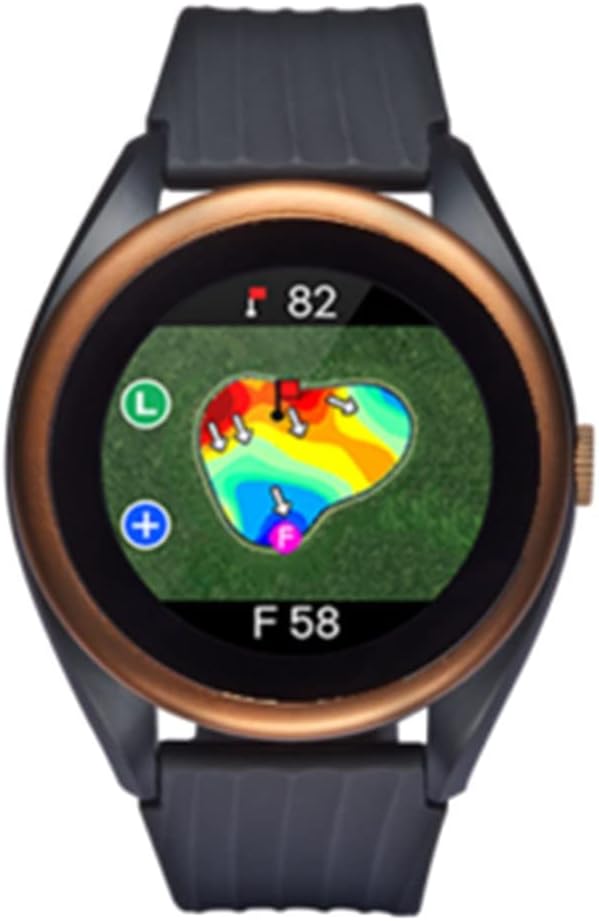
Figure 3: Real Green Undulation view on the T8, showing a heat map of green contours to aid in putting.

Figure 4: Putt View on the T8, indicating elevation differences and distance to the pin for accurate putting.
Green Zoom & Pin Reload:
You can zoom in (x2) and out of the green view by tapping the "+" or "-" buttons on the screen. You can also manually set the pin location with the Pin Reload function, and the Active Green View™ displays the green from different angles based on your position.
4.3 Putt View
The T8's new "Putt View" shows you the undulation and the distance from the ball to the pin. It also displays the difference in elevation to the pin. To use, get behind the ball, touch the "Ball" icon, then stand next to the pin and touch the "Pin" icon. The undulation and distance will be displayed. You can zoom in and out from the "Putt View" by tapping the "+" & "-" and navigate around the green by dragging a point on the screen.
4.4 Course Management
Effective course management is crucial for lowering your scores. The T8 helps optimize your course management by providing detailed information:
- קורס פּרעview: With a touch of the "Course Preview" icon, view the course with information such as driver safety line, hazards, and traps.
- Course Zoom: Touch the "+" sign to zoom in and drag to navigate around the map.
- Bunker / Hazard: Touch the bunkers or hazards on the map to see the distance to the front and back. Zoom in for easier maneuver.
- ציל פונט: Touch anywhere in the map to see the distance from where you are, and the distance left to the pin.
- Pin Pointing: Touch "Pin Pointing" icon to see the direction and the distance to the pin.
- Driver Landing Area: Displays a line across the map to show where the ball is going to land based on your preset driver distance. You can set your driver distance settings.
4.5 Swing Tempo
The T8 helps improve your consistency by tracking your swing tempo. It displays your swing tempo on all your swings, including driver, irons, and even the putter. It recognizes the golfer's swing (Backswing & Downswing) and provides tempo data. When you make bad shots suddenly, it's often due to swinging out of your normal tempo. This feature is a great tool to work on your consistency.
שאָס טעמפּאָ:
After arriving at the ball landing point, touch the "Shot" icon. The distance of the previous shot and your swing tempo will display.
4.6 Scorecard Management
The T8 provides an automatic scorecard. Your score will automatically display when you hole out. You can adjust your score by swiping up or down the screen and modify your score. After entering your score, touch the check icon and the next hole information will display.
Round Score Check:
Swipe down from the "Golf Mode" to open the scorecard and you can adjust your score from there.
My Voice Caddie App Integration:
Your adjusted scorecard will be automatically saved in your "MyVoiceCaddie" App when you connect to the App. You can analyze your round with the "MyVoiceCaddie" App, viewing your best score, average driver distance, score history by course, Green In Regulation (GIR), putts per round, and even round replay.

Figure 5: The Voice Caddie T8 displaying the current time and date, indicating its functionality beyond golf tracking.
Various Convenience Functions:
The T8 also offers call, text, and SNS notifications when connected to your smartphone, helping you stay connected while on the course. Improve your handicap by consistently tracking your score.
5. וישאַלט און קער
To ensure the longevity and optimal performance of your Voice Caddie T8 Golf GPS Watch, please follow these maintenance guidelines:
- רייניקונג: Wipe the watch body and screen with a soft, damp שטאָף. ויסמיידן ניצן אַברייסיוו קלינערז אָדער סאָלוואַנץ וואָס קען שעדיקן די ענדיקן.
- סטאָרידזש: האַלט די זייגער אין אַ קיל, טרוקן אָרט אַוועק פון דירעקט זונשייַן און עקסטרעמע טעמפּעראַטורן ווען נישט אין באַנוץ.
- טשאַרדזשינג: Always use the original charging cable. Ensure the charging pins are clean and dry before connecting.
- וואַסער קעגנשטעל: The T8 is designed to be water-resistant for typical golf conditions (rain, sweat). Avoid prolonged submersion or high-pressure water exposure.
6. טראָובלעשאָאָטינג
If you encounter any issues with your Voice Caddie T8, please refer to the following common troubleshooting steps:
- מיטל נישט פּאַוערינג אויף: Ensure the device is fully charged. If the issue persists, try performing a soft reset by holding the power button for an extended period (e.g., 15-20 seconds).
- פּראָבלעמען מיט GPS סיגנאַל: זייט זיכער אז איר זענט אין אן אפענעם ארט מיט א קלארן view of the sky. Update course maps via the MyVoiceCaddie app.
- די באַטאַרייע איז געשווינד ויסגעשעפּט: Reduce screen brightness, disable unnecessary notifications, and ensure background app usage is minimized.
- Connectivity Problems (Bluetooth): Ensure Bluetooth is enabled on both the watch and your smartphone. Try unpairing and re-pairing the devices.
- Inaccurate Yardage: Ensure the latest course maps are downloaded. Verify your location on the course.
For persistent issues, please contact Voice Caddie customer support.
7. ספּעסאַפאַקיישאַנז
| שטריך | דעטאַל |
|---|---|
| נומער פּעקל דימענשאַנז ל רענטגענ וו רענטגענ ה | 6.34 X 3.78 X 2.8 אינטשעס |
| פּעקל וואָג | 0.26 קילאָגראַמס |
| נומער דימענשאַנז לקסווקסה | 1.8 X 1.8 X 0.52 אינטשעס |
| פּונקט וואָג | 1.7 אונס |
| סאָרט נאָמען | קול קאַדי |
| מאָדעל נאָמען | ט8 גאָלף גפּס וואַך |
| קאָליר | שוואַרץ |
| מאַטעריאַל | גומע |
| שטייענדיק פאַרשטעלן אַרויסווייַזן גרייס | 1.2 אינטשעס |
| ספּעציעלע שטריך | טאָוטשסקרעען |
| קאַנעקטיוויטי טעכנאָלאָגיע | וסב |
| ווירעלעסס קאָמוניקאַציע סטאַנדאַרד | בלועטאָאָטה |
| גפּס | געבויט-אין גפּס |
8. וואָראַנטי און שטיצן
The Voice Caddie T8 Golf GPS Watch comes with a 1 יאָר לימיטעד פאַבריקאַנט וואָראַנטי. For warranty claims, technical support, or any inquiries regarding your device, please contact Voice Caddie customer service through their official website or the MyVoiceCaddie app.


