הקדמה
This manual provides essential instructions for setting up, operating, maintaining, and troubleshooting your Blackview Tab 10 Android Tablet. The Blackview Tab 10 features a 10.1-inch FHD+ display, an MTK8768 Octa-Core processor, 4GB RAM, 64GB internal storage, and runs on Android 11 (Doke OS_P 1.0). It supports dual SIM cards for 4G phone calls and data, Wi-Fi, and Bluetooth 5.0 connectivity.
Please read this manual thoroughly to ensure proper use and to maximize your tablet's performance and longevity.

Image: The Blackview Tab 10 tablet shown from the rear in three color options: gray, golden, and silvery, highlighting its sleek design.
סעטאַפּ
פּעקל אינהאַלט
זיכער מאַכן אַז אַלע זאכן זענען פאַראַן אין פּעקל:
- שוואַרץview Tab 10 Tablet PC
- וסב קאַבלע (טיפּ-C)
- מאַכט אַדאַפּטער (9V 2A)
- באַניצער מאַנואַל
טשאַרדזשינג די באַטאַרייע
Before first use, fully charge the tablet. Connect the USB Type-C cable to the tablet's Type-C port and the other end to the provided power adapter. Plug the adapter into a power outlet. The charging indicator will show the charging status. The tablet supports 18W fast charging.
אריינשטעלן SIM און TF קארטלעך
די שווארצעview Tab 10 supports dual Nano SIM cards or one Nano SIM card and one TF (microSD) card for expandable storage up to 128GB.
- געפינט די SIM/TF קאַרטל טאַץ אויף דער זייט פון דער טאַבלעט.
- ניצט דעם צוגעשטעלטן סים ארויסווארפער געצייג צו עפענען דעם טאץ.
- Carefully place the Nano SIM card(s) and/or TF card into the designated slots on the tray. Ensure the cards are correctly oriented.
- שטופּן דעם טאַץ צוריק אין דער טאַבלעט ביז עס קליקט אַרײַן אין פּלאַץ.
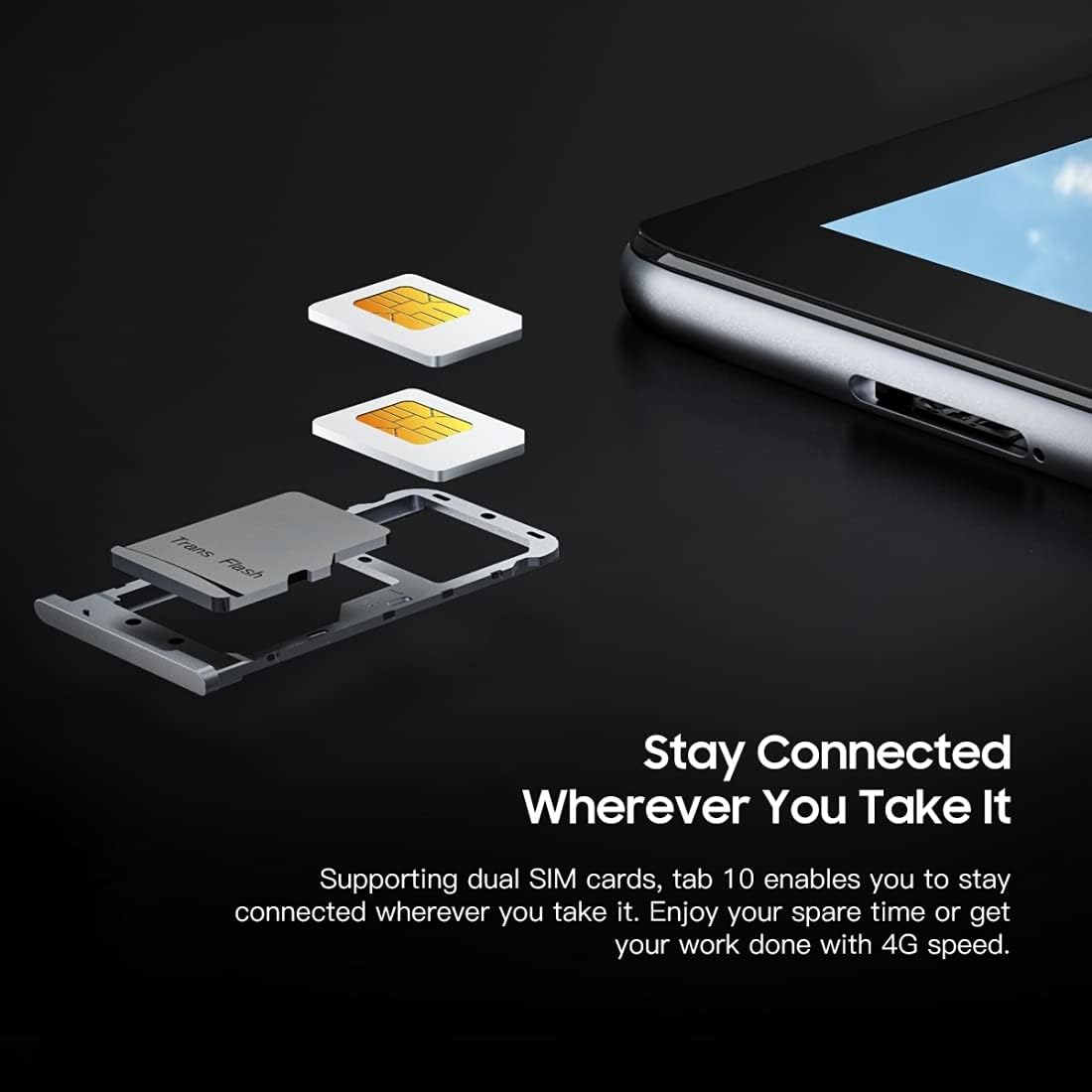
בילד: א דעטאַלירטע view of the Blackview Tab 10's SIM card tray, showing how two Nano SIM cards are inserted, illustrating the dual SIM support.
מאַכט אויף / אַוועק
- צו מאַכט אויף: Press and hold the Power button until the Blackview לאָגאָ דערשיינט.
- צו מאַכט אַוועק: דריק און האלט דעם פּאַוער קנעפּל ביז די פּאַוער אָפּציעס מעניו דערשיינט, און דערנאָך סעלעקטיר "אויסלאָשן".
- צו ריסטאַרט: דריק און האלט דעם פּאַוער קנעפּל ביז דער פּאַוער אָפּציעס מעניו דערשיינט, און דערנאָך סעלעקטיר "ריסטאַרט".
ערשט סעטאַפּ
ביים ערשטן מאָל אנצינדן, פאָלגט די אינסטרוקציעס אויפן עקראַן צו פאַרענדיקן די ערשטע סעטאַפּ:
- אויסקלייַבן דיין שפּראַך.
- פאַרבינדן צו אַ Wi-Fi נעץ.
- לאָג אַרײַן מיט אײַער גוגל אַקאַונט אָדער שאַפֿט אַ נײַעם.
- שטעלט אויף דעם עקראַן שלאָס (PIN, מוסטער, פּאַראָל).
- Review און אָננעמען די תּנאים און באַדינגונגען.
אַפּערייטינג ינסטראַקשאַנז
יקערדיק נאַוויגאַציע
- צאַפּן: רירט דעם עקראַן איין מאָל צו עפֿענען אַן אַפּ, אויסקלײַבן אַן אייטעם, אָדער דריקן אַ קנעפּל.
- ריר און האלט: דריק און האלט אן אייטעם צו צוקומען צו מער אפציעס אדער עס צו באוועגן.
- לאַקכענען: Drag your finger across the screen to scroll through pages or content.
- קניפּ: ניצט צוויי פינגער צו פארגרעסערן אדער פארקלענערן בילדער און web בלעטער.
קאַנעקטינג צו נעטוואָרקס
- ווי-פי: גיין צו סעטטינגס > נעץ און אינטערנעט > ווי-פיצינדט אָן Wi-Fi, סעלעקטירט אייער געוואונטשענע נעץ, און גיט אריין דעם פּאַראָל אויב נויטיק.
- בלועטאָאָטה: גיין צו סעטטינגס > קאָננעקטעד דעוויסעס > בלועטאָאָטה. Turn Bluetooth on, then select a device from the list to pair.
- מאָביל דאַטן (4G): If a SIM card is inserted, go to סעטטינגס > נעץ און אינטערנעט > מאָביל נעץ to enable mobile data and configure settings.
ניצן די אַפּאַראַט
די שווארצעview Tab 10 features a 13.0MP rear camera and a 5.0MP front camera.
- עפענען די אַפּאַראַט אַפּ.
- צאַפּן אויף די קאַמעראַ ייקאַן צו באַשטימען צווישן פראָנט און הינטערשטע קאַמעראַס.
- צאַפּן דעם שאַטער קנעפּל צו נעמען אַ פאָטאָ אָדער אָנהייבן/אָפּשטעלן ווידעאָ רעקאָרדינג.
- Explore various camera modes and settings within the app.

Image: The Blackview Tab 10 displaying its camera features, including an 8MP front camera and a 13MP rear camera, emphasizing its photographic capabilities.
Android 11 and Doke OS_P 1.0
Your tablet runs on Android 11 with Blackview's Doke OS_P 1.0 interface, offering enhanced privacy controls, improved notification management, and a more intuitive user experience. Explore the סעטטינגס menu to customize your device, manage apps, and optimize performance.

Image: The Blackview Tab 10 screen showing the Doke OS_P 1.0 interface based on Android 11, with various settings and app screens visible.
וישאַלט
רייניקונג די מיטל
- ניצט אַ ווייכן, לינט-פֿרייע שטאָף צו רייניקן דעם עקראַן און קערפּער פֿון דער טאַבלעט.
- פֿאַר שווערע פֿלעקן, אַ ביסל דampווישט דעם שטאָף מיט וואַסער אָדער אַ פאַרשטעלן רייניגער דיזיינד פֿאַר עלעקטראָניק.
- פֿאַרמײַדט די נוצן פֿון שאַרפֿע כעמיקאַלן, אַברייסיוו מאַטעריאַלן, אָדער אַעראָסאָל שפּריץ גלייך אויף דער טאַבלעט.
באַטערי קער
- Avoid exposing the tablet to extreme temperatures (hot or cold), as this can affect battery life.
- לאָזט נישט די טאַבלעט טשאַרדזשינג פֿאַר לענגערע פּעריאָדן נאָכדעם וואָס זי איז גאָר טשאַרדזשד.
- Use only the original charger and cable provided with the tablet.
ווייכווארג דערהייַנטיקונגען
קאָנטראָלירט און אינסטאַלירט רעגולער ווייכווארג דערהייַנטיקונגען צו זיכער מאַכן אַז אייער טאַבלעט האט די לעצטע פֿעיִקייטן, זיכערהייט פּאַטשאַז און פאָרשטעלונג פֿאַרבעסערונגען. גייט צו סעטטינגס > סיסטעם > סיסטעם דערהייַנטיקן.
טראָובלעשאָאָטינג
די מיטל איז נישט אויסגעדרייט
- זיכער מאַכן אַז די באַטאַרייע איז אויפגעלאָדן. פֿאַרבינדט די טאַבלעט צום טשאַרדזשער פֿאַר לפּחות 30 מינוט.
- דריק און האלט דעם פּאַוער קנעפּל פֿאַר 10-15 סעקונדעס צו צווינגען אַ ריסטאַרט.
Wi-Fi קאַנעקשאַן ישוז
- ריסטאַרט דיין Wi-Fi ראַוטער און די טאַבלעט.
- פארגעסט די נעץ אין די Wi-Fi סעטינגס און פארבינדט זיך ווידער.
- זייט זיכער אז איר זענט אין דער רייך פון די Wi-Fi סיגנאַל.
פּאַמעלעך פאָרשטעלונג
- שליסט נישט גענוצטע אַפּליקאַציעס וואָס לויפן אין הינטערגרונט.
- Clear cache data for apps that are frequently used.
- זיכער מאַכן אַז גענוג סטאָרידזש פּלאַץ איז פאַראַן. ויסמעקן נישט-נייטיק files אָדער אַפּפּס.
- Consider a factory reset as a last resort (back up your data first).
אַפּ קראַשיז אָדער פריזיז
- געצוואונגען צו שליסן די אַפּ: גיי צו סעטטינגס > אַפּפּס & נאָוטאַפאַקיישאַנז, select the app, then tap קראַפט האַלטן.
- Clear the app's cache and data (this will reset the app).
- נעם אַוועק און ריינסטאַל די אַפּ.
ספּעסאַפאַקיישאַנז
| מאָדעל | טאַב 10 |
| פאַרשטעלן גרייס | 10.1 אינטשעס |
| ווייַז האַכלאָטע | 1920 x 1200 (FHD+) |
| פּראַסעסער | MTK8768 Octa Core Cortex-A53 2.0GHz |
| באַראַן | 4 גיגאבייט |
| אינערלעכער סטאָרידזש | 64 גיגאבייט |
| יקספּאַנדאַבאַל סטאָרידזש | TF קאַרטל ביז 128 גיגאבייט (נישט אַרייַנגערעכנט) |
| אָפּערייטינג סיסטעם | Android 11 (Doke OS_P 1.0) |
| דערציען אַפּאַראַט | 13.0MP with AF, LED flash |
| פראָנט אַפּאַראַט | 5.0MP |
| באַטאַרייע קאַפּאַציטעט | 7480 מאַה |
| טשאַרדזשינג | 9V 2A, 18W Fast Charging |
| נעץ קאָמוניקאַציע | 4G LTE, Wi-Fi (802.11a/b/g/n/ac), Bluetooth V5.0 |
| SIM טיפּ | דואַל נאַנאָ סים |
| ינטערפייסיז | 1 x 3.5mm Earphone Port, 1 x Type-C, 1 x Magnetic Port |
| דימענסיעס (L X W X H) | 243 X 162 X 8.4 מם (9.57 X X X X X X) |
| וואָג | 523 ג (1.15 פונט) |

בילד: אן אינפאָגראַפיק ווייַזונגasing the Blackview Tab 10's main features, including its 13MP rear camera, Octa-core processor, 7480mAh battery, 10.1-inch FHD display, 8.8mm slim body, and support for dual SIM cards.
וואָראַנטי און שטיצן
די שווארצעview Tab 10 comes with a standard manufacturer's warranty. Please refer to the warranty card included in your package for specific terms and conditions, including warranty period and coverage details.
For technical support, service inquiries, or additional product information, please visit the official Blackview webזייטל אדער קאנטאקט זייער קאסטומער סערוויס דעפארטמענט. האלט אייער קויף קוויטל און פראדוקט סעריע נומער גרייט ווען איר זוכט שטיצע.
Official Blackview קראָם: שוואַרץview קראָם אויף אַמאַזאָן