1. הקדמה
This manual provides comprehensive instructions for the safe and effective use of the C-LOGIC 580 Smart Digital Multimeter. Please read this manual thoroughly before operation and retain it for future reference.
The C-LOGIC 580 is a smart digital multimeter designed for accurate and efficient electrical measurements. Its smart technology allows for automatic recognition of measurement parameters, reducing potential errors for amateur users and saving time for professionals.
2. זיכערקייַט אינפֿאָרמאַציע
Always observe safety precautions when using electrical testing equipment. Failure to do so may result in injury or damage to the device.
- נישט איבערשרייטן די מאקסימום איינגאבע ווערטן ספעציפיצירט פאר יעדער פונקציע.
- Ensure the test leads are properly connected and the function switch is in the correct position before making any measurements.
- זייט זייער פארזיכטיג ווען איר ארבעט מיט לעבעדיגע קרייזן.
- Do not use the multimeter if it appears damaged or if the test leads are compromised.
- Refer to the CAT III 600V and MAX 600V markings on the device for voltagE לימאַץ.
3. פּראָדוקט פֿעיִקייטן
- סמאַרט טעכנאָלאָגיע: Automatic recognition of measurement parameters.
- Error Reduction: Designed to minimize errors for amateur users.
- צייט שפּאָרן: Streamlines measurement processes for professional users.
- דיגיטאַל ווייַז: Clear and easy-to-read digital readout.
- קייפל פאַנגקשאַנז: Capable of measuring various electrical parameters.
4. פּעקל אינהאַלט
Verify that all items are present and undamaged upon opening the package.
- C-LOGIC 580 Smart Digital Multimeter
- טעסט דראָטן (רויט און שוואַרץ)
- באַניצער מאַנואַל
5. סעטאַפּ
5.1 באַטאַרייע ייַנמאָנטירונג
The C-LOGIC 580 is battery powered. Ensure batteries are correctly installed before first use.
- געפינט דעם דעקל פון דעם באַטעריע אָפּטייל אויף דער צוריקזייט פון דעם מולטימעטער.
- ניצן אַ שרויפנ - ציער צו עפענען די באַטאַרייע אָפּטייל.
- Insert the required batteries, observing the correct polarity (+ and -).
- פאַרבייַטן די דעקן פון די באַטאַרייע אָפּטייל און באַוואָרענען עס.
5.2 פֿאַרבינדן טעסט דראָטן
ריכטיקע פֿאַרבינדונג פֿון טעסט־לידער איז קריטיש פֿאַר גענויע און זיכערע מעסטונגען.
- שטעקט אריין די שווארצע טעסט דראָט אין די "COM" (געמיינזאם) אינפוט דזשעק.
- Insert the red test lead into the "VHz%" input jack for voltage, frequency, and duty cycle measurements.
- זיכער מאַכן אַז די פֿאַרבינדונגען זענען פֿעסט און זיכער.
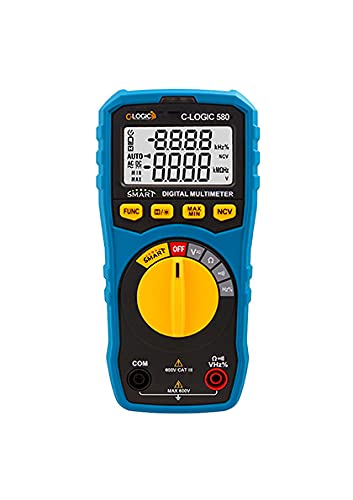
פיגורע 1: פראָנט view of the C-LOGIC 580 Smart Digital Multimeter, showing the display, rotary switch, function buttons, and input jacks (COM and VHz%). The display shows "-8.8.8.8" and "0.0.0.0" with indicators for AUTO, AC/DC, kHz%, NCV, MAX, MIN, and V. The rotary switch is set to OFF. The input jacks are labeled "COM" and "VHz%".
6. אַפּערייטינג ינסטרוקטיאָנס
6.1 פּאַוערינג אויף / אַוועק
To power on the multimeter, rotate the central yellow dial from the "OFF" position to any desired measurement function. To power off, rotate the dial back to "OFF".
6.2 Smart Measurement Mode
The C-LOGIC 580 features a smart mode that automatically identifies the type of measurement (e.g., AC voltagE, דק וואָלtage, resistance) when the leads are connected to a circuit. This simplifies operation by eliminating the need to manually select the measurement type.
6.3 פונקציאָנירן קנעפּלעך
The multimeter includes several function buttons below the display:
- FUNC: Used to cycle through different measurement modes within a single rotary switch setting (e.g., AC/DC voltagע, קעגנשטעל/קאנטינעויטעט).
- (Diode/Continuity): Activates diode test or continuity check.
- מאַקס/מין: Toggles between maximum and minimum value hold during a measurement.
- NCV: אַקטיוויזירט נישט-קאָנטאַקט וואָלtagE דיטעקשאַן.
6.4 גרונטלעכע מעסטונגען
Voltagמעסטונג (AC/DC):
- Set the rotary switch to the 'V' position.
- Connect the black test lead to the 'COM' jack and the red test lead to the 'VHz%' jack.
- פֿאַרבינדט די טעסט־לידער פּאַראַלעל צום קרייז אָדער קאָמפּאָנענט וואָס מע דאַרף מעסטן.
- דער מולטימעטער וועט אויטאָמאַטיש דעטעקטירן AC אדער DC וואָלומעןtage. Use the FUNC button if manual selection is needed.
קעגנשטעל מעזשערמאַנט:
- Set the rotary switch to the 'Ω' position.
- Connect the black test lead to the 'COM' jack and the red test lead to the 'VHz%' jack.
- זיכער מאַכן אַז די קרייַז איז דעענערדזשייזד איידער איר מעסט די קעגנשטעל.
- פֿאַרבינדט די טעסט־לידער אַריבער דעם קאָמפּאָנענט וואָס מע דאַרף מעסטן.
קאָנטינויטי טעסט:
- Set the rotary switch to the 'Ω' position.
- דרוק די (Diode/Continuity) button to select continuity mode.
- Connect the test leads across the circuit or component. A beep indicates continuity.
נאַן-קאָנטאַקט חלקtagE (NCV) דעטעקשאַן:
- Set the rotary switch to the 'NCV' position.
- Move the top part of the multimeter near a live conductor. The device will indicate the presence of AC voltagE אָן דירעקט קאָנטאַקט.
7. וישאַלט
7.1 רייניקונג
ווישט אויס דעם מולטימעטער גasinג מיט אַדamp cloth and mild detergent. Do not use abrasives or solvents. Ensure the device is dry before storage or use.
7.2 באַטערי פאַרבייַט
When the low battery indicator appears on the display, replace the batteries promptly to ensure accurate readings. Follow the battery installation steps in Section 5.1.
7.3 סטאָרידזש
Store the multimeter in a cool, dry place away from direct sunlight and extreme temperatures. If storing for extended periods, remove the batteries to prevent leakage.
8. טראָובלעשאָאָטינג
| פּראָבלעם | מעגלעך סיבה | לייזונג |
|---|---|---|
| מולטימעטער גייט נישט אן. | טויטע אדער נישט ריכטיק אינסטאלירטע באַטעריעס. | קאָנטראָלירט די פּאָלאַריטעט פון די באַטעריע אָדער פאַרבייט די באַטעריעס. |
| ומפּינקטלעך רידינגז. | Incorrect function selected; poor test lead connection; low battery. | Ensure correct function is selected (if not in smart mode); check test lead connections; replace batteries. |
| קיין קאנטינעויטעט ביפּ. | Circuit is open; continuity mode not selected. | Verify circuit integrity; press FUNC button to select continuity mode. |
9. ספּעסאַפאַקיישאַנז
| פּאַראַמעטער | דעטאַל |
|---|---|
| סאָרט | C-LOGIC |
| מאָדעל | 580 |
| מאַכט מקור | באַטאַרייע פּאַוערד |
| מעזשערמאַנט טיפּ | מולטימעטער |
| פאַבריקאַנט | C-LOGIC |
| ASIN | B0967VMK1W |
| UPC | 810053671603 |
| ערשטער דאַטע בנימצא | 31 מאי 2021 |
10. וואָראַנטי און שטיצן
For warranty information or technical support regarding your C-LOGIC 580 Smart Digital Multimeter, please contact C-LOGIC customer service. Refer to the product packaging or the official C-LOGIC webפּלאַץ פֿאַר קאָנטאַקט דעטאַילס.
באַמערקונג: ספּעציפֿישע וואָראַנטי טערמינען קענען זיין אַנדערש לויט ראַיאָן און הענדלער. ביטע האַלטן דיין קויפן באַווייַז.


