1. הקדמה
This manual provides detailed instructions for the Cellularline HUSH Bluetooth In-Ear Earbuds. These earbuds feature an interactive touch display, Active Noise Cancelling (ANC), Noise-Free Calls technology, and customizable sound with 5 EQ modes. Please read this manual carefully to ensure proper use and optimal performance of your device.
2. וואָס איז אין דער קעסטל
- Cellularline HUSH Earbuds
- טשאַרדזשינג קאַסע
- באַניצער מאַנואַל
3. פּראָדוקט איבערview
The Cellularline HUSH earbuds are designed for an advanced and personalized audio experience. The compact charging case features an interactive touch display for easy control.

Image 1: Cellularline HUSH Earbuds in their charging case, showcasing the sleek design and in-ear fit.
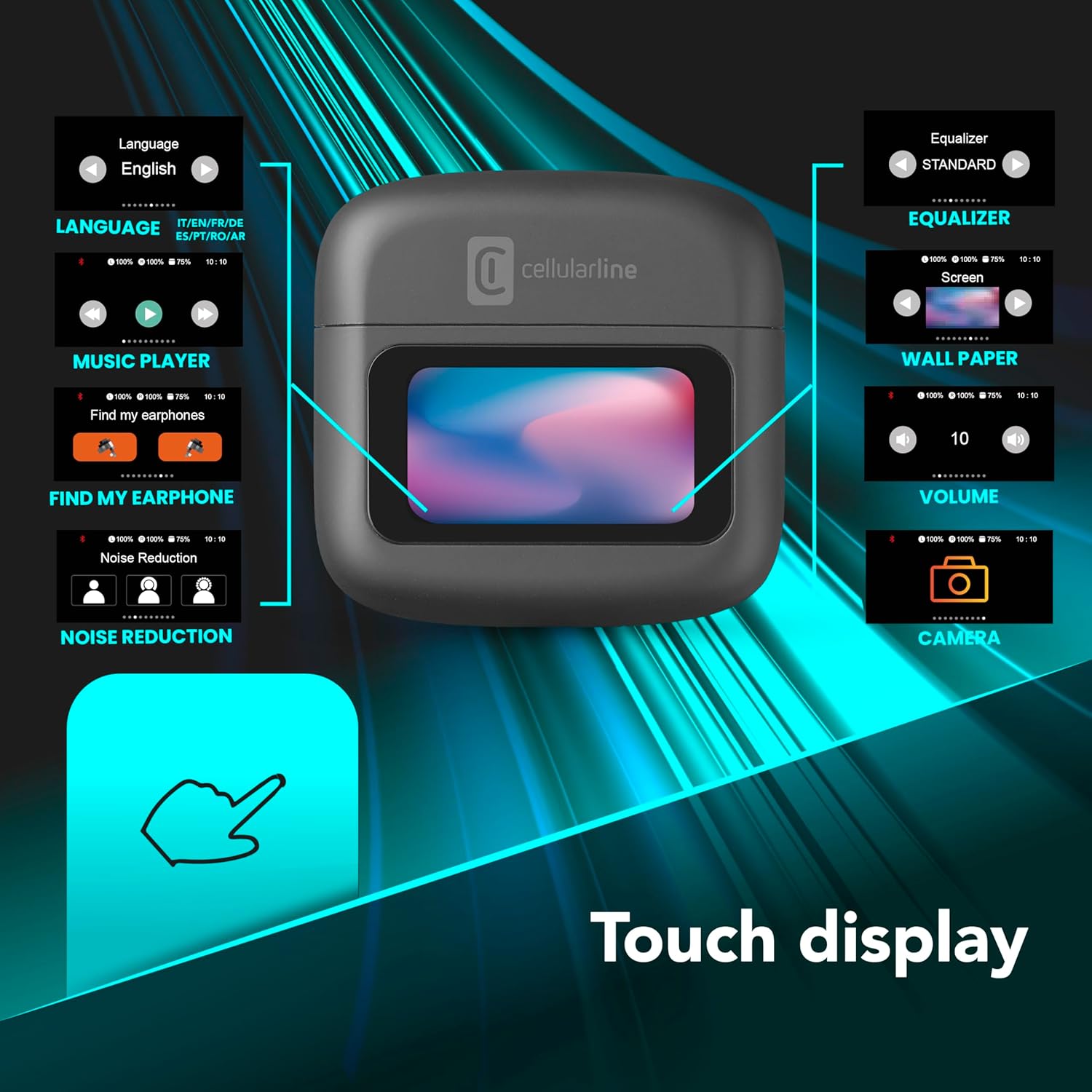
Image 2: An illustration highlighting the various functions accessible via the touch display on the charging case, including language, music player, 'Find My Earphone', noise reduction, equalizer, wallpaper, volume, and camera control.
4. סעטאַפּ
4.1 טשאַרדזשינג
Before first use, fully charge the earbuds and the charging case. Place the earbuds into the charging case. The magnetic closure ensures proper placement for charging. The case and earbuds offer up to 42 hours of total play time.

Image 3: Graphic indicating 42 hours of total play time and 6 hours of charger time for the Cellularline HUSH earbuds.
4.2 פּערינג
The earbuds feature an Autopairing function. When removed from the charging case, they will automatically enter pairing mode or reconnect to the last paired device. To pair with a new device, ensure Bluetooth is enabled on your device and select 'Cellularline HUSH' from the list of available devices.
5. אַפּערייטינג ינסטרוקטיאָנס
5.1 Touch Display Controls
The interactive touch display on the charging case allows for easy management of various functions. You can control music playback, manage calls, adjust noise reduction modes, and select EQ settings directly from the display.
5.2 אַקטיוו ראַש קאַנסאַלינג (ANC)
Activate Active Noise Cancelling to reduce ambient low-frequency noise, providing an immersive listening experience. This feature can be controlled via the touch display.
5.3 Noise-Free Calls
The integrated microphones utilize Noise-Free Calls technology to eliminate background noise, ensuring clear and crisp voice transmission during calls.

Image 4: The charging case display showing an incoming call with options to answer or decline, next to a smartphone displaying a similar call interface.
5.4 גלייכרעכטיקער (EQ) מאָדעס
Customize your audio experience by selecting one of the 5 available EQ modes through the touch display. This allows you to tailor the sound profile צו דיין פּרעפֿערענצן.
5.5 ראַש רעדוקציע מאָדעס
Switch between different noise reduction modes, including Active Noise Cancelling, Normal Mode, and Transparency Mode, to suit your environment. These modes are accessible via the touch display.

Image 5: The charging case display showing options for Noise Reduction, including Active Noise Cancelling, Normal Mode, and Transparency Mode.
6. וישאַלט
To ensure the longevity and optimal performance of your Cellularline HUSH earbuds:
- האַלט די אויערקנעפּלעך און טשאַרדזשינג קעסטל ריין און טרוקן.
- ויסמיידן יקספּאָוזינג די מיטל צו עקסטרעם טעמפּעראַטורעס אָדער הומידיטי.
- רייניקט די אויער שפּיץ רעגולער מיט אַ ווייכן, טרוקענעם שטאָף.
- האַלט די אויערקנעפּלעך אין זייער טשאַרדזשינג קעסטל ווען זיי זענען נישט אין באַנוץ.
7. טראָובלעשאָאָטינג
If you encounter issues with your Cellularline HUSH earbuds, refer to the following common solutions:
- קיין קול:
- זיכער מאַכן אַז די אויערקנעפּלעך זענען אויפֿגעלאָדן.
- קאָנטראָלירט די בלועטוט פֿאַרבינדונג צו אייער מיטל.
- אַדזשאַסטירן די באַנד אויף ביידע אויערקנעפּלעך און פארבונדענע דעווייס.
- קען נישט פארבינדן:
- Ensure earbuds are in pairing mode (usually indicated by a flashing light).
- אויסלעשן און אנשטעלן בלועטוט אויף אייער דעווייס.
- פֿאַרגעסט דעם מיטל פֿון אייער טעלעפֿאָן'ס בלועטוט סעטטינגס און פּרוּווט ווידער צו פאַרבינדן.
- ANC ניט ארבעטן:
- Ensure ANC is activated via the touch display.
- קוקט איבער צי די אויערקנעפּלעך פּאַסן געהעריק אין אייערע אויערן.
- טשאַרדזשינג ישוז:
- ענשור אַז די טשאַרדזשינג קאַבלע איז סיקיורלי פארבונדן.
- באַשטעטיקן אַז די טשאַרדזשינג קעסטל האט מאַכט.
- רייניקט די טשאַרדזשינג קאָנטאַקטן אויף די אויערקנעפּלעך און קעסטל.
8. ספּעסאַפאַקיישאַנז
| שטריך | דעטאַל |
|---|---|
| סאָרט | סעללולאַרלינע |
| מאָדעל | BTHUSHTWSK |
| קאַמפּאַטאַבאַל דעוויסעס | בלועטאָאָטה דעוויסעס |
| קאָנטראָל מעטאָד | ריר |
| נאָך פֿעיִקייטן | Active Noise Cancellation and Noise-Free Calls |
| דורכשניטלעך באַטאַרייע לעבן | 42 שעה |
| פּונקט וואָג | 126 ג |
| קאָליר | נעראָ |
| אויער פּלייסמאַנט | אין אויער |
| פאָרם פאַקטאָר | אין אויער |
| ראַש קאָנטראָל | אַקטיוו ראַש קאַנסאַליישאַן |
| כעדפאָון דזשאַק | Jack-less |
| קאַנעקטיוויטי טעכנאָלאָגיע | ווירעלעסס |
| ווירעלעסס קאָמוניקאַציע טעכנאָלאָגיע | בלועטאָאָטה |
9. וואָראַנטי און שטיצן
For warranty information and customer support, please refer to the documentation included with your product or visit the official Cellularline webזייטל. האַלט דיין קויפן באַווייַז פֿאַר וואָראַנטי קליימז.


