הקדמה
Welcome to the user manual for your White Shark Shinobi 60% Mechanical Keyboard. This guide provides essential information for setting up, operating, maintaining, and troubleshooting your new gaming keyboard. Please read this manual thoroughly to ensure optimal performance and longevity of your device.
פּעקל אינהאַלט
איידער איר גייט ווייטער, ביטע זיכער מאכן אז אלע זאכן זענען פאראן אין אייער פעקל:
- White Shark Shinobi 60% Mechanical Keyboard
- וסב-C צו וסב-א קאַבלע
- באַניצער מאַנואַל (דעם דאָקומענט)
סעטאַפּ
Follow these steps to set up your White Shark Shinobi 60% Mechanical Keyboard:
- פֿאַרבינדן די קלאַוויאַטור: Locate the USB-C port on the back or side of the keyboard. Insert the smaller end of the provided USB-C to USB-A cable into this port.
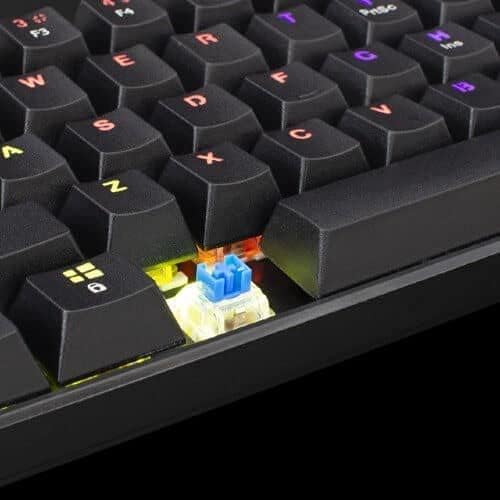
Image: Connecting the USB-C cable to the keyboard's port.
- פאַרבינדן צו קאָמפּיוטער: Insert the larger USB-A end of the cable into an available USB port on your computer.
- דרייווער ינסטאַלירונג: The keyboard is plug-and-play. Your operating system (Windows, macOS, Linux) should automatically detect and install the necessary drivers. No manual driver installation is typically required.
- ערשטע איינשטראָם: Once connected, the keyboard's backlight should illuminate, indicating it is powered on and ready for use.
אַפּערייטינג ינסטראַקשאַנז
The White Shark Shinobi 60% Mechanical Keyboard features a compact layout. Many functions are accessed via function (Fn) key combinations.
שליסל אויסלייג און פונקציעס

בילד: איבערview of the Shinobi 60% keyboard layout.
The 60% layout means some standard keys are accessed through a secondary function layer, typically by holding the Fn שליסל.
באַקלייט קאָנטראָל
The keyboard features customizable RGB backlighting.
- טוישן לייטינג מאָדע: ניצן פֿן + \ | to cycle through various lighting effects.
- סטרויערן ברייטנאַס: ניצן פֿן + ] } (פאַרגרעסערן) און פֿן + [ { (decrease) to adjust backlight brightness.
- סטרויערן גיכקייַט: ניצן Fn + ; : (פאַרגרעסערן) און פֿין + ' " (decrease) to adjust the speed of dynamic lighting effects.
- טוישן קאָליר: ניצן Fn + אַרייַן to change the color of static lighting modes.
Multimedia and Function Keys
Access multimedia controls and other functions using the Fn key in combination with other keys. Refer to the keycaps for secondary legends.
| שליסל קאָמבינאַציע | פֿונקציע |
|---|---|
| fn + א | שפּיל / פּויזע |
| פן + ז | פֿריִערדיקע שפּירט |
| Fn + D | ווייַטער שפּור |
| Fn + F | באַנד אַראָפּ |
| Fn + G | באַנד אַרויף |
| Fn + H | שטום |
| Fn + J | מיין קאָמפּיוטער |
| Fn + K | בלעטערער |
| Fn + L | בליצפּאָסט |
| פן + וו | טוישן WASD און פײַל קנעפּלעך |
| Fn + ספּאַסעבאַר | Lock/Unlock Fn key (for continuous access to secondary functions) |
וישאַלט
Proper maintenance ensures the longevity and performance of your mechanical keyboard.
רייניקונג די קלאַוויאַטור
- באַזייַטיקונג פון שטויב: ניצט קאמפרעסט לופט צו בלאזן אוועק שטויב און דעבריס פון צווישן די קלאַוויאַטורן.
- ייבערפלאַך רייניקונג: Gently wipe the keycaps and keyboard surface with a soft, lint-free cloth slightly dampגעוואשן מיט וואַסער אָדער אַ מילדער, נישט-שרייַבנדיקער רייניקונג לייזונג. פֿאַרמייַדן איבעריקע פֿײַכטקייט.
- טיף רייניקונג (קנעפּלעך): For a deeper clean, keycaps can be carefully removed using a keycap puller (not included). Wash them with mild soap and water, rinse thoroughly, and ensure they are completely dry before reattaching.

Image: Detail of a mechanical switch under a keycap.
סטאָרידזש
ווען נישט אין באַנוץ פֿאַר לענגערע פּעריאָדן, האַלט די קלאַוויאַטור אין אַ קיל, טרוקן אָרט אַוועק פון דירעקט זונשייַן און עקסטרעמע טעמפּעראַטורן.
טראָובלעשאָאָטינג
If you encounter issues with your White Shark Shinobi keyboard, refer to the following common solutions:
קלאַוויאַטור ניט ריספּאַנדינג
- טשעק קאַבלע קאַנעקשאַן: Ensure the USB-C cable is securely plugged into both the keyboard and the computer. Try unplugging and re-plugging it.
- פרובירט אן אנדערן USB פארט: פֿאַרבינדט די קלאַוויאַטור צו אַן אַנדער USB פּאָרט אויף אייער קאָמפּיוטער.
- ריסטאַרט קאָמפּיוטער: א פשוטע קאמפיוטער ריסטארט קען אפט פאררעכטן קאנעקטיוויטי פראבלעמען.
- פּרובירן אויף אן אנדער קאָמפּיוטער: If possible, test the keyboard on another computer to determine if the issue is with the keyboard or your original computer's setup.
Backlight Not Working or Incorrect
- קוק ברייטנאַס: Ensure the brightness is not set to the lowest level using פֿן + ] }.
- ציקל מאָדעס: Try cycling through lighting modes using פֿן + \ |.
- פאַבריק באַשטעטיק: Some keyboards have a factory reset combination (e.g., Fn + Esc for 3-5 seconds). Refer to specific product documentation if available, or try this common combination.
שליסלען רעגיסטרירן זיך נישט אדער טייפן צוויי מאל
- רייניקן אונטער די קלאַוויאַטור קאַפּס: Dust or debris under the keycap or switch can cause issues. Refer to the "Maintenance" section for cleaning instructions.
- ווייכווארג אריינמישונג: Ensure no conflicting software (e.g., macro programs, other keyboard drivers) is running.
ספּעסאַפאַקיישאַנז
Key technical specifications for the White Shark Shinobi 60% Mechanical Keyboard:
| שטריך | דעטאַל |
|---|---|
| מאָדעל נאָמען | Shinobi 60% |
| סאָרט | ווייסע שאַרק |
| קאַנעקטיוויטי טעכנאָלאָגיע | ווייערד וסב |
| קלאַוויאַטור באַשרייַבונג | גיימינג, מעכאניש |
| ספּעציעלע שטריך | הינטער-באַלויכטע (RGB) |
| נומער פון קיז | 61 |
| באַשטימען טיפּ | Tactile (Blue Switches) |
| קאַמפּאַטאַבאַל דעוויסעס | לאַפּטאַפּ, דעסקטאָפּ קאָמפּיוטער |
| ASIN | B093C63NSG |

Image: Product packaging indicating blue switches.
וואָראַנטי אינפֿאָרמאַציע
Specific warranty terms and conditions for the White Shark Shinobi 60% Mechanical Keyboard may vary by region and retailer. Please retain your proof of purchase for warranty claims. For detailed warranty information, refer to the official White Shark webזייטל אדער קאָנטאַקט אייער קויפן-פונקט.
שטיצן
For further assistance, technical support, or frequently asked questions, please visit the official White Shark support webפּלאַץ.
באַאַמטער Webפּלאַץ: While a direct link is not provided, search for "White Shark Gaming" to find their official support page.


