1. הקדמה
א דאנק פארן קויפןasing the Udreamer Turntable Vinyl Record Player Model UD001. This manual provides essential information for the proper setup, operation, and maintenance of your new record player. Please read these instructions carefully before use to ensure optimal performance and longevity of the product. Keep this manual for future reference.

Image 1.1: Udreamer Turntable Vinyl Record Player Model UD001. This image shows the turntable with its clear dust cover open, revealing the black platter, tonearm, and cartridge.
2. זיכערקייַט אינסטרוקציעס
- מאַכט מקור: ניצט נאָר דעם ספּעציפֿירטן מאַכט אַדאַפּטער. זיכערט זיך אַז דער וואָלומעןtage שוועבעלעך דיין היגע מאַכט צושטעלן.
- וואַסער און נעץ: Do not expose the unit to rain, moisture, or liquids. Do not place objects filled with liquids, such as vases, on the unit.
- היץ: שטעלט נישט דעם אַפּאַראַט לעבן היץ־קוואַלן ווי ראַדיאַטאָרן, היץ־רעגיסטערס, אויוון, אדער אַנדערע אַפּאַראַטן (אַרייַנגערעכנט ampליפיערס) וואָס פּראָדוצירן היץ.
- ווענטילאַטיאָן: זיכער מאַכן אַז עס איז דאָ געהעריקע ווענטילאַציע. נישט פֿאַרשטאָפּן קיין ווענטילאַציע עפענונגען.
- רייניקונג: נעמט ארויס דעם אַפּאַראַט פֿון דער וואַנט־ווענטיל איידער איר רייניקט. ניצט נאָר אַ ווייכן, טרוקענעם שטאָף.
- סערוויס: דו זאלסט נישט פּרווון צו דינען דעם פּראָדוקט זיך. קאָנטאַקט אַלע קוואַלאַפייד סערוויס פּערסאַנעל.
- אָרט: Place the unit on a stable, level surface to prevent damage from falling.
3. פּעקל אינהאַלט
ביטע קאָנטראָלירט אַז אַלע זאכן וואָס זענען ליסטעד אונטן זענען אַרייַנגערעכנט אין דיין פּעקל:
- Udreamer Turntable Unit
- שטויב קאָווער
- פּלאַטטער
- פּעלץ מאַטע
- קאָונטערוואָג
- 45 רפּם אַדאַפּטער
- מאַכט אַדאַפּטער
- וסב קאַבלע
- באַניצער מאַנואַל (דעם דאָקומענט)
4. פּראָדוקט איבערview
Familiarize yourself with the various parts and controls of your Udreamer Turntable.

Image 4.1: Key features of the Udreamer Turntable. This image highlights the turntable's capabilities such as Vinyl to Computer conversion, Bluetooth output, iron platter, built-in phono equalizer, needle pressure adjustment, speed alignment, and moving magnet cartridge.

בילד 4.2: דעטאַלירט view of the turntable's components. This image shows the solid iron platter for stability and the moving magnet cartridge, which provides accurate audio reproduction and has a longer lifespan.

Image 4.3: Internal and external components of the turntable system. This diagram illustrates the belt-driven mechanism, arm lifter, record mat, foot pads for vibration isolation, and the 45 RPM adapter.
4.1 פראָנט און אויבן View
- שטויב דעקל: באַשיצט דעם טעלער און טאָנאַרם פֿון שטויב.
- טעלער: The surface on which records are placed.
- שפּינדל: האַלט די רעקאָרד אין פּלאַץ אויף די טעלער.
- Felt Mat: Provides cushioning for records and reduces static.
- טאָנאַרם: האלט די פּאַטראָן און סטילוס.
- Cartridge with Stylus: לייענט די גרובן פון דער פּלאַטע.
- קאַונטערווייט: Balances the tonearm and adjusts tracking force.
- קוינג לעווער: הייבט און נידעריגערט דעם טאָנאַרם לײַכט.
- טונעאַרם מנוחה: זיכערט דעם טאָנאַרם ווען נישט אין באַנוץ.
- גיכקייַט סעלעקטאָר: Switches between 33 1/3 and 45 RPM.
- קאָנטראָל קאָנטראָל: Adjusts playback speed fine-tuning.
4.2 דערציען פּאַנעל
- LINE/BT OUT/PHONO Switch: Selects output mode (Line Out, Bluetooth Out, Phono Out).
- RCA אויסגאַנג דזשעקס (L/R): Connects to external active speakers or an ampליפער.
- USB-PC Port: Connects to a computer for vinyl-to-digital conversion.
- DC IN Jack: קאַנעקץ די מאַכט אַדאַפּטער.
- מאַכט באַשטימען אויף / אַוועק טורנס די אַפּאַראַט אויף אָדער אַוועק.
5. סעטאַפּ
5.1 אַנפּאַקינג און פּלייסמאַנט
- נעמט פֿאָרזיכטיק אַרויס דעם דרייפּלאַץ פֿון זײַן פּאַקעט. האַלט די פּאַקעט פֿאַר שפּעטערדיקן טראַנספּאָרט.
- Place the turntable on a stable, level surface, away from direct sunlight, heat sources, and excessive dust or vibrations.
5.2 טעלער און גאַרטל אינסטאַלאַציע
- לייגט דעם פלאטער אויף דער צענטראלער שפינדל.
- Carefully lift the felt mat to expose the drive belt underneath the platter.
- Locate the motor pulley (a small brass cylinder) on the top left of the turntable chassis.
- Using the provided ribbon or your fingers, gently stretch the drive belt and hook it around the motor pulley. Ensure the belt is flat and not twisted.
- Place the felt mat back on the platter.
5.3 Counterweight Adjustment
Proper counterweight adjustment is crucial for optimal sound quality and to prevent damage to your records and stylus.

Image 5.1: Counterweight and Pitch Adjustment. This image illustrates how to accurately adjust the tonearm pressure using the counterweight and fine-tune the playback speed with the pitch control.
- פֿאָרזיכטיק אַראָפּנעמען דעם סטיילוס פּראָטעקטאָר.
- Place the counterweight onto the rear of the tonearm. Rotate it clockwise until it is fully threaded.
- Release the tonearm from its rest. Move the cueing lever to the down position.
- Carefully rotate the counterweight until the tonearm is perfectly balanced horizontally, floating freely without touching the surface or rising too high.
- Once balanced, hold the counterweight steady with one hand and rotate the numbered ring on the front of the counterweight until '0' aligns with the line on the tonearm.
- Rotate the entire counterweight (including the numbered ring) counter-clockwise to the recommended tracking force. For the pre-installed magnetic cartridge, a typical tracking force is between 2.5 to 3.5 grams. Refer to your cartridge's specific recommendations if available.
- Return the tonearm to its rest and engage the tonearm clamp.
5.4 שטויב דעקל אינסטאַלאַציע
Insert the hinges of the dust cover into the hinge receptacles at the rear of the turntable chassis.
5.5 מאַכט קאַנעקשאַן
Connect the power adapter to the DC IN jack on the rear of the turntable, then plug the adapter into a wall outlet.
6. אַפּערייטינג ינסטרוקטיאָנס
6.1 Basic Record Playback
- Place a record on the platter. If playing a 45 RPM single, place the 45 RPM adapter on the spindle first.
- Select the appropriate speed (33 1/3 or 45 RPM) using the speed selector switch.
- Ensure the LINE/BT OUT/PHONO switch is set to 'LINE OUT' or 'PHONO' if connecting to external speakers, or 'BT OUT' for Bluetooth.
- Turn on the turntable using the Power ON/OFF switch.
- Release the tonearm from its rest.
- הייבט אויף דעם טאָנאַרם מיטן קיוינג לעווער.
- פּאַזיציאָנירן מאַנועל דעם טאָנאַרם איבער דער געוואונטשענער אָנהייב רינע פון דער פּלאַטע.
- Gently lower the tonearm using the cueing lever. The stylus will make contact with the record, and playback will begin.
- At the end of the record, the auto-stop function will stop the platter rotation. Lift the tonearm, return it to its rest, and turn off the turntable.
6.2 פּיטש אַדזשאַסטמענט
Use the Pitch Control knob (refer to Image 5.1) to fine-tune the playback speed. Rotate the knob to increase or decrease the speed slightly.
6.3 Bluetooth Output
The turntable can wirelessly stream audio to Bluetooth-enabled devices such as headphones, speakers, or soundbars.

Image 6.1: Bluetooth Output functionality. This image demonstrates the turntable's ability to wirelessly connect to various Bluetooth receivers like earphones, soundbars, and external speakers.
- Ensure the LINE/BT OUT/PHONO switch on the rear is set to 'BT OUT'.
- Turn on your Bluetooth receiving device (e.g., speaker, headphones) and set it to pairing mode.
- Turn on the turntable. The Bluetooth indicator light on the turntable will flash, indicating it is searching for a device.
- Once paired, the Bluetooth indicator light will become solid. Audio from the turntable will now play through your Bluetooth device.
- If pairing fails, turn off both devices and try again.
6.4 Vinyl to Computer Recording (USB-PC)
You can convert your vinyl records into digital audio files using the USB-PC output.

Image 6.2: Vinyl to Computer conversion setup. This image shows the turntable connected to a laptop via a USB cable, illustrating the process of converting vinyl audio to MP3 format for computer playback.
- Connect the USB cable from the turntable's USB-PC port to an available USB port on your computer.
- Ensure the LINE/BT OUT/PHONO switch is set to 'LINE OUT' or 'PHONO'.
- Install and open audio recording software on your computer (e.g., Audacity, a free open-source software).
- In your recording software's preferences, select the turntable as the audio input device (it may appear as 'USB Audio CODEC' or similar).
- Start recording in the software, then begin playing your record on the turntable (refer to Section 6.1).
- Once the record finishes, stop recording in the software and save your digital audio file.
6.5 Connecting External Speakers (RCA)
The turntable features RCA output jacks for connecting to external active speakers or an ampליפער.
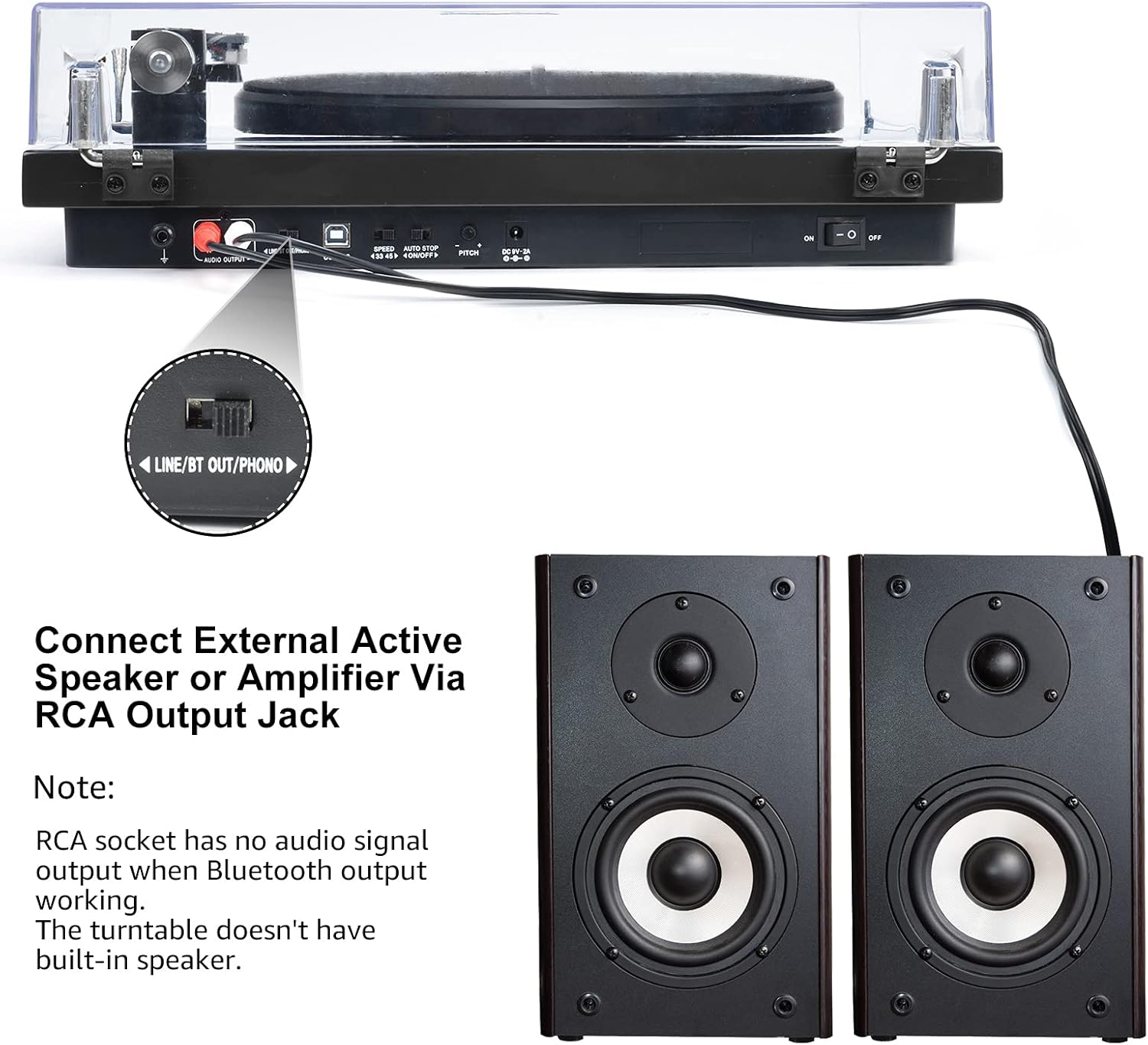
Image 6.3: Connecting to external speakers. This image shows the rear panel of the turntable with the RCA output jacks connected to a pair of external active speakers, indicating how to route audio for amplified playback.
- Ensure the LINE/BT OUT/PHONO switch on the rear is set to 'LINE OUT' if connecting to active speakers (speakers with their own ampליפיער) אָדער אַ amplifier's 'LINE IN' input. Set to 'PHONO' if connecting to an amplifier with a dedicated 'PHONO' input.
- Connect the RCA cables (red for right channel, white for left channel) from the turntable's RCA output jacks to the corresponding input jacks on your active speakers or ampליפער.
- Turn on your external audio system and adjust the volume.
באַמערקונג: The Udreamer Turntable Model UD001 does not have built-in speakers. An external audio system (active speakers, amplifier, or Bluetooth device) is required for sound output.
7. וישאַלט
7.1 רייניקונג
- Turntable Unit: Wipe the exterior with a soft, dry, lint-free cloth. Do not use harsh chemicals or abrasive cleaners.
- שטויב דעקל: Clean with a soft cloth and a mild, non-abrasive cleaner. Avoid scratching the surface.
- סטילוס: Use a soft stylus brush, brushing gently from back to front (in the direction of play) to remove dust and debris. Never use your fingers.
7.2 Stylus Replacement
The stylus (needle) is a consumable part and will wear out over time, typically after 300-500 hours of playback. A worn stylus can damage your records and degrade sound quality. Replace the stylus when you notice a decrease in sound quality or visible wear.
- Gently grasp the front of the cartridge body.
- Pull the old stylus assembly downwards and forwards to detach it from the cartridge body.
- Align the new stylus assembly with the cartridge body and push it upwards and backwards until it clicks into place.
- Re-adjust the tracking force if necessary after replacing the stylus.
8. טראָובלעשאָאָטינג
If you encounter issues with your turntable, refer to the following common problems and solutions:
| פּראָבלעם | מעגלעך סיבה | לייזונג |
|---|---|---|
| קיין מאַכט | Power adapter not connected; Power switch off | Ensure power adapter is securely plugged in; Turn power switch ON |
| קיין געזונט | Incorrect output mode selected; External speakers not connected/powered; Bluetooth not paired | Set LINE/BT OUT/PHONO switch correctly; Connect/power on external speakers; Pair Bluetooth device |
| Sound distorted or skipping | Stylus dirty or worn; Tracking force incorrect; Turntable not level; Record dirty or damaged | Clean or replace stylus; Adjust counterweight; Place turntable on a level surface; Clean record |
| טעלער דרייט זיך נישט | Drive belt dislodged or broken; Auto-stop engaged | Re-install or replace drive belt; Ensure tonearm is over the record to disengage auto-stop |
| בלועטאָאָטה פּערינג פיילז | Device too far; Device not in pairing mode; Interference | Move devices closer; Ensure receiving device is in pairing mode; Restart both devices |
9. ספּעסאַפאַקיישאַנז
| שטריך | באַשרייַבונג |
|---|---|
| פּראָדוקט דימענשאַנז | 12.8 X 9.8 X 4.7 אינטשעס |
| פּונקט וואָג | 5.79 פונט |
| נומער מאָדעל נומער | ודקסנומקס |
| סאָרט | אודרימער |
| ספּעציעלע שטריך | געבויט-אין בלועטאָאָטה ופנעמער |
| מאַטעריאַל | פּלאַסטיק |
| סטייל | וויןtage |
| קאַמפּאַטאַבאַל דעוויסעס | כעדפאָון, רעדנער |
| מאָטאָר טיפּ | אַק מאָטאָר |
| סיגנאַל פֿאָרמאַט | דיגיטאַל |
| מאַכט מקור | קאָרדעד עלעקטריק |
| סיגנאַל-צו-נויז ראַטיאָ | 60 דב |
10. וואָראַנטי און שטיצן
Udreamer products are designed and manufactured to the highest quality standards. For warranty information or technical support, please refer to the contact details provided with your purchase or visit the official Udreamer website. Please have your model number (UD001) and purchase information ready when contacting support.


