1. וויכטיק סאַפעטי אינסטרוקציעס
Before using this product, please read this user manual carefully and save it for future reference. Failure to follow these instructions may result in electric shock, fire, or serious injury.
- דער אַפּפּליאַנסע איז נישט בדעה פֿאַר נוצן דורך מענטשן (אַרייַנגערעכנט קינדער) מיט רידוסט גשמיות, סענסערי אָדער גייַסטיק קייפּאַבילאַטיז, אָדער פעלן פון דערפאַרונג און וויסן, סייַדן זיי האָבן באקומען השגחה אָדער לימעד וועגן די נוצן פון דעם אַפּפּליאַנסע דורך אַ מענטש פאַראַנטוואָרטלעך פֿאַר זייער זיכערקייַט.
- דו זאלסט נישט נוצן די וואַקוום קלינער ינ דרויסן אָדער אויף נאַס סערפאַסיז.
- לאָזט נישט קינדער שפּילן מיטן אַפּאַראַט. נאָענטע השגחה איז נייטיק ווען עס ווערט גענוצט דורך אָדער לעבן קינדער.
- נישט אויפהייבן ברענענדיקע אדער פארברענענדיקע מאטעריאלן, ווי בענזין, אדער ניצן אין געביטן וואו זיי קענען זיין פאראן.
- דו זאלסט נישט קלייַבן עפּעס וואָס ברענט אָדער סמאָוקינג, אַזאַ ווי סיגאַרעטטעס, שוועבעלעך אָדער הייס אַש.
- דו זאלסט נישט נוצן אָן שטויב זעקל און / אָדער פילטערס אין פּלאַץ.
- Turn off the appliance before making any adjustments, changing accessories, or storing the vacuum cleaner.
- ניצן בלויז ווי דיסקרייבד אין דעם מאַנואַל. ניצן בלויז פאַבריקאַנט ס רעקאַמענדיד אַטאַטשמאַנץ.
- דו זאלסט נישט שעפּן די טשאַרדזשער אָדער אַפּפּליאַנסע מיט נאַס הענט.
2. פּראָדוקט איבערview
The Roborock H7 is a cordless stick vacuum cleaner designed for versatile and efficient cleaning. It features a lightweight design, powerful suction, and a long-lasting battery.
2.1 אַרייַנגערעכנטע קאָמפּאָנענטן
The following components are typically included with your Roborock H7 vacuum cleaner:
- H7 שטעקן וואַקוום
- מולטי-סורפאַסע באַרשט
- שטויב באַג האָלדער
- שטויב זעקל (x2)
- Baton (Extension Wand)
- דאַקינג סטאַנציע
- דאַסטינג באַרשט
- מאָטאָרייזד מיני באַרשט
- מאַכט צושטעלן
- פלעקס רער
- קרעוויסע טול
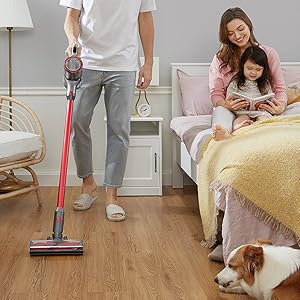
Image: All components included in the Roborock H7 package.
3. סעטאַפּ און אַסעמבלי
3.1 צוזאמענשטעלן דעם וואַקוום
- Attach the extension wand (baton) to the main vacuum body until it clicks into place.
- Connect the desired cleaning head (e.g., Multi-Surface Brush) to the other end of the extension wand.
- For handheld use, attach accessories directly to the main vacuum body.
3.2 ינסטאָלינג די דאַקינג סטאַנציע
The wall-mountable docking station provides convenient storage and charging. Ensure it is installed on a stable wall surface.

Image: Roborock H7 mounted on its wall docking station.
The MagBase system allows accessories to be magnetically attached to the docking station or other magnetic surfaces for easy access.

Image: Flexible MagBase accessories storage.
4. טשאַרדזשינג און באַטאַרייע
The Roborock H7 is powered by a Lithium-Ion battery, offering extended cleaning time.
4.1 אויפלאָדן דעם וואַקוום קלינער
- Connect the power supply to the docking station and plug it into a wall outlet.
- Place the vacuum cleaner onto the docking station. The OLED screen will indicate charging status.
- A full charge from empty takes approximately 2.5 hours.
4.2 באַטעריע לויף-צייט
The vacuum offers varying runtimes depending on the selected cleaning mode:
- עקאָ מאָדע: אַרויף צו 90 מינוט
- נאָרמאַל מאָדע: אַרויף צו 45 מינוט
- מאַקסימום מאָדע: אַרויף צו 8 מינוט
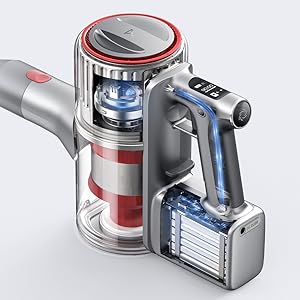
Image: Battery runtime and recharge time details.
5. אַפּערייטינג ינסטרוקטיאָנס
5.1 אײַנשטעלן/אויסשטעלן און זויג מאָדעס
The vacuum cleaner features 160 AW constant suction power for effective cleaning across various surfaces.
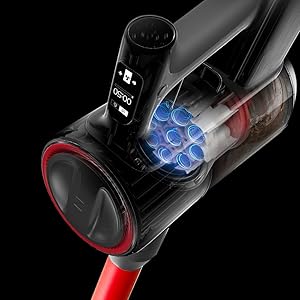
Image: Roborock H7 demonstrating its suction power.
- דרוק די מאַכט קנעפּל צו קער די וואַקוום אויף אָדער אַוועק.
- Use the mode selection button to cycle through the three cleaning modes: Eco, Standard, and Max.
- The OLED screen displays the current mode and remaining battery life.
5.2 OLED Screen Information
The integrated OLED screen provides real-time updates on the vacuum's status, including:
- רוען באַטאַרייע פּראָצענטtage and estimated runtime.
- Current cleaning mode.
- Maintenance alerts (e.g., filter cleaning reminder).
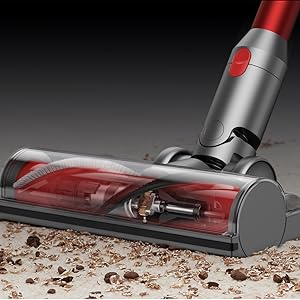
Image: OLED screen displaying operational information.
5.3 Using Various Attachments
The Roborock H7 comes with several attachments for different cleaning needs:
- Multi-Surface באַרשט: Ideal for carpets and hard floors.
- מאָטאָריזעד מיני באַרשט: Effective for pet hair and upholstery.
- קרעוויסע געצייַג: פֿאַר שמאָלע פּלעצער און ווינקלען.
- דאַסטינג באַרשט: פֿאַר שוואַכע ייבערפלאַכן און שטויב-ווישן.
- Flex Tube: Provides extended reach and flexibility for awkward areas.
Image: Roborock H7 in various cleaning scenarios with different attachments.
6. וישאַלט
Regular maintenance ensures optimal performance and extends the lifespan of your Roborock H7 vacuum cleaner.
6.1 אויסליידיקן דעם מיסטקאסטן
Empty the dustbin after each use or when the MAX line is reached. The H7 supports both bagless operation and disposable dust bags for convenience.
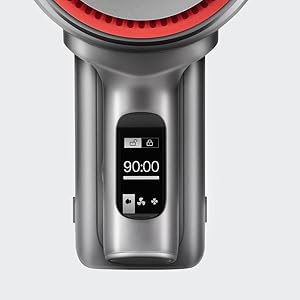
Image: Emptying the 560ml dust bag.
- זיכער מאַכן אַז דער וואַקוום איז אויסגעלאָשן.
- דריקן די אָפּפאַל קנעפּל און אַראָפּנעמען די אָפּפאַל.
- Open the dustbin lid and empty contents into a trash receptacle.
- If using a dust bag, remove the full bag and replace it with a new one.
- Reattach the dustbin to the vacuum until it clicks securely.
6.2 רייניקונג די פילטערס
די פינף-סtage HEPA air filtration system helps maintain clean air. Filters should be cleaned regularly.

Image: Five-stage HEPA air filtration system.
- אַרויסנעמען דעם מיסטקאַסטן און דערנאָך פֿאָרזיכטיק אַרויסנעמען די פֿילטערס.
- קלאַפּט די פֿילטערס לײַכט צו באַזײַטיקן לויזן שטויב.
- Rinse the filters under running water. Ensure they are completely dry before reinserting (allow 24 hours).
- Replace filters if they are damaged or heavily soiled.
6.3 רייניקן דעם באַרשט קאָפּ
Periodically check the brush head for tangled hair or debris and clean as needed.
- Turn off the vacuum and detach the cleaning head.
- Use scissors or a cleaning tool to cut and remove any tangled hair or fibers from the brush roll.
- זיכער מאַכן אַז די באַרשט ראָל דרייט זיך פריי איידער איר עס צוריק באַפעסטיקט.
7. טראָובלעשאָאָטינג
זעט דעם אָפּטייל פֿאַר געוויינטלעכע פּראָבלעמען און זייערע לייזונגען.
| פּראָבלעם | מעגלעך סיבה | לייזונג |
|---|---|---|
| וואַקוום טוט זיך נישט אָן. | באַטערי איז דיפּליטיד. | לאָדט דעם וואַקוום גאָר אויף. |
| נידעריק סאַקשאַן מאַכט. | Dustbin is full; Filters are clogged; Brush head is obstructed. | Empty dustbin; Clean or replace filters; Clear brush head of debris. |
| Brush head stops rotating. | Obstruction in the brush roll. | Turn off the vacuum and remove any tangled hair or debris from the brush roll. |
| OLED screen displays an error code. | א ספעציפישע אינערליכע פראבלעם. | זעט דעם ספּעציפֿישן טעות קאָד אין דעם גאַנצן מאַנואַל אָדער קאָנטאַקטירט קונה שטיצע. |
8. ספּעסאַפאַקיישאַנז
| שטריך | דעטאַל |
|---|---|
| סאָרט | ראָבאָראָק |
| מאָדעל | H7 |
| ספּעציעלע פֿעיִקייטן | Cordless, HEPA Filtration, Lightweight |
| פילטער טיפּ | HEPA פילטער |
| וואָסtage | 160 וואטס |
| טשאַרדזשינג צייט | 2.5 שעה |
| רעקאָממענדעד ניצט | Deep Clean Carpets, Indoor Use |
| פאָרם פאַקטאָר | שטעקן |
| פּראָדוקט דימענשאַנז | 11.2"ל x 4.4"בר x 9.1"ה |
| באַטערי טיפּ | ליטהיום-יאָן |
| ראַש מדרגה | 74 דעציבעלן |
| באַטעריע לעבן (מאַקס) | 90 minutes (Eco Mode) |
| פּונקט וואָג | 3.1 פונט |
| נומער פון גיכקייטן/מאַכט לעוועלס | 3 |
9. אפיציעלע פּראָדוקט ווידעאָס
Watch these official videos for visual guidance on using and maintaining your Roborock H7.
Video: Detailed overview and demonstration of the Roborock H7's features and operation (4:18 duration).
Video: In-depth guide to the Roborock H7, including assembly and usage tips (6:15 duration).
Video: Comprehensive demonstration of the Roborock H7's capabilities and maintenance (7:57 duration).
Video: User guide for the Roborock H7, covering various aspects of its use (5:01 duration).
10. וואָראַנטי און שטיצן
The Roborock H7 Cordless Stick Vacuum Cleaner comes with a manufacturer's warranty. Please refer to the warranty card included in your product packaging for specific terms and conditions.
For technical support, troubleshooting assistance, or to inquire about replacement parts, please contact Roborock customer service through their official webזייטל אדער די קאָנטאַקט אינפֿאָרמאַציע וואָס איז צוגעשטעלט אין אייער פּראָדוקט דאָקומענטאַציע.


