1. הקדמה
Thank you for choosing the A4Tech Fstyler FG30S Silent Wireless Mouse. This optical mouse is designed for comfortable and quiet operation, featuring advanced 2.4 GHz wireless technology for a stable connection. This manual provides essential information for setting up, operating, maintaining, and troubleshooting your device.
2. פּעקל אינהאַלט
ביטע טשעק די פּאַקעט פֿאַר די פאלגענדע זאכן:
- A4Tech Fstyler FG30S Silent Wireless Mouse
- נאַנאָ וסב ופנעמער
- באַניצער מאַנואַל (דעם דאָקומענט)
באַמערקונג: An AA alkaline battery is required for operation and is not included in the package.
3. סעטאַפּ
Follow these steps to set up your A4Tech Fstyler FG30S mouse:
- אַרייַנלייגן באַטערי: Locate the battery compartment on the underside of the mouse. Open the cover and insert one AA alkaline battery, ensuring correct polarity. Close the battery cover securely.
- פאַרבינדן וסב ופנעמער: Plug the Nano USB receiver into an available USB port on your computer (desktop PC or laptop).
- מאַכט אויף די מויז: Slide the On/Off switch, located on the underside of the mouse, to the 'ON' position. The mouse should now be detected by your computer.
- דרייווער ינסטאַלירונג: Your computer's operating system (e.g., Windows XP, Linux, or newer versions) should automatically detect and install the necessary drivers. No manual driver installation is typically required.
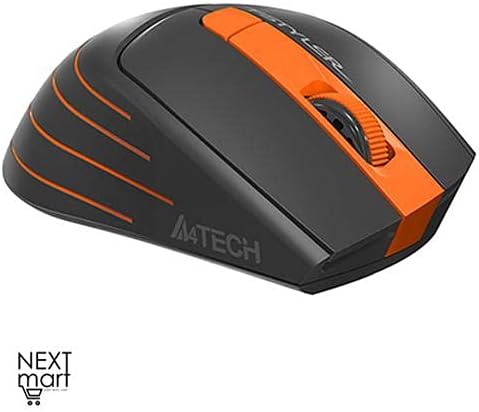
פיגור 3.1: פון אויבן אַראָפּ view of the A4Tech Fstyler FG30S Silent Wireless Mouse, highlighting its ergonomic shape and orange design elements.
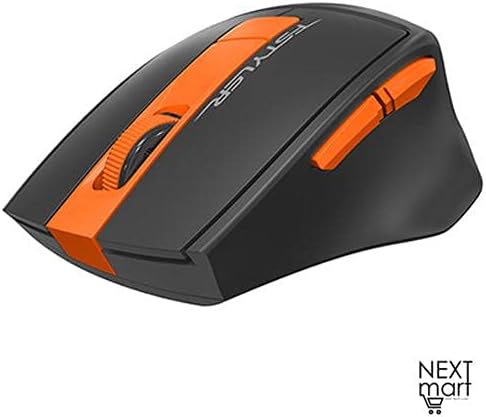
פיגור 3.2: ווינקלדיק view of the A4Tech Fstyler FG30S Silent Wireless Mouse, illustrating the placement of its side buttons and the textured scroll wheel.
4. אַפּערייטינג ינסטרוקטיאָנס
Your A4Tech Fstyler FG30S mouse offers several features for enhanced productivity:
- שטילע קליקן: The mouse features silent click technology, reducing noise during use and minimizing disturbance to others.
- דפּי אַדזשאַסטמאַנט: The mouse has 3 adjustable DPI levels (1000/1600/2000 DPI). Press the DPI button (usually located near the scroll wheel) to cycle through the sensitivity settings.
- 6 קנעפּלעך: In addition to the standard left, right, and scroll wheel buttons, the mouse includes additional buttons for various functions. These can often be customized through software (if available from the manufacturer).
- 16-in-One Shortcut Commands: This feature allows you to assign up to 16 customizable shortcut commands or gestures to specific mouse actions, enhancing workflow efficiency. Refer to the manufacturer's website for any specific software required for customization.
- אָנ / אַוועק באַשטימען: Use the On/Off switch on the underside of the mouse to conserve battery power when the mouse is not in use or during transport.
- מאַכט שפּאָרן: The mouse incorporates 4-level adjustable power-saving modes. It will enter sleep mode after 0.2 seconds of inactivity to extend battery life.

Figure 4.1: Feature overview of the A4Tech Fstyler FG30S mouse, detailing DPI settings, button lifespan, programmable gestures, silent operation, power management, and the power switch.
5. וישאַלט
צו זיכער מאַכן אָפּטימאַלע פאָרשטעלונג און לאַנגלעבעדיקייט פון דיין מויז:
- רייניקונג: ניצט אַ ווייכע, טרוקענע שטאָף צו רייניקן די מויז ייבערפלאַך. פֿאַר דעם אָפּטישן סענסאָר, ניצט אַ וואַטע שטעכל וואָס איז לייכט געווישט.ampבאדעקט מיט רייבן אַלקאָהאָל, זיכער מאַכנדיק אַז קיין פליסיקייט גייט נישט אַרײַן אין דער מויז.
- באַטערי פאַרבייַט: When the mouse performance degrades or it stops responding, replace the AA battery. Always use a fresh, high-quality alkaline battery.
- סטאָרידזש: When not in use for extended periods, turn off the mouse using the On/Off switch and consider removing the battery to prevent leakage. Store in a cool, dry place.
6. טראָובלעשאָאָטינג
If you encounter issues with your mouse, try the following solutions:
| פּראָבלעם | לייזונג |
|---|---|
| מויז ניט ריספּאַנדינג |
|
| יראַטיק לויפֿער באַוועגונג |
|
| קורץ וויירליס קייט |
|
7. ספּעסאַפאַקיישאַנז
| שטריך | דעטאַל |
|---|---|
| סאָרט | A4Tech |
| מאָדעל נומער | FG30S |
| קאָליר | מאַראַנץ |
| מויז טיפּ | אָפּטיש מאַוס |
| קשר טיפּ | דראָטלאָז (2.4 GHz) |
| ווירעלעסס ראַנגע | 10-15 מעטער |
| דפּי לעוועלס | 1000 / 1600 / 2000 DPI (Adjustable) |
| נומער פון קנעפּלעך | 6 |
| ופנעמער טיפּ | נאַנאָ וסב ופנעמער |
| מאַכט מקור | 1 x AA אַלקאַליין באַטאַרייע (נישט אַרייַנגערעכנט) |
| באַטערי לעבן | אַרויף צו 12 חדשים |
| ספּעציעלע פֿעיִקייטן | Silent Clicks, 4-Level Adjustable Power Saving, Anti-slip Side, On/Off Switch, 16-in-One Shortcut Commands |
| קנעפּל לייפספּאַן | אַרויף צו 5 מיליאָן קליקס |
| קאַמפּאַטאַבאַל דעוויסעס | דעסקטאָפּ פּיסי, לאַפּטאָפּ |
| אַפּערייטינג סיסטעמס | Linux, Windows XP (and newer versions) |
| האַנט אָריענטירונג | אַמבידעקסטראַס |
| פּונקט וואָג | 160 גראַמז |
| דימענשאַנז (פּאַקאַץ) | 19.6 X 13 X 6.2 סענטימעטער |
8. וואָראַנטי און שטיצן
The A4Tech Fstyler FG30S mouse is designed for durability, with a button lifespan of up to 5 million clicks. For warranty claims or technical support, please refer to the retailer where you purchased the product or visit the official A4Tech webזייטל פֿאַר קאָנטאַקט אינפֿאָרמאַציע און ווייטערדיקע הילף.


