1. הקדמה
This manual provides instructions for the BAOFENG ABBREE PL2303 USB Programming Cable. This cable is designed to facilitate programming and customizing various two-way radios, including models like UV-5R, BF-F8HP, UV-21R, and others, using compatible software such as CHIRP.
The cable features a PL2303 chip, which often provides drive-free compatibility with modern operating systems, simplifying the setup process for users. Its robust design ensures reliable data transfer for efficient radio management.
2. סעטאַפּ
2.1 סיסטעם רעקווירעמענץ
- Operating System: Windows 10, Windows 11, or macOS.
- בנימצא וסב פּאָרט.
- Compatible radio programming software (e.g., CHIRP).
2.2 דרייווער ינסטאַלירונג
The BAOFENG ABBREE PL2303 USB Programming Cable is designed to be drive-free for most modern operating systems. In many cases, your computer will automatically install the necessary drivers upon first connection.
- Connect the USB end of the programming cable to an available USB port on your computer.
- Allow your operating system to detect the device and attempt automatic driver installation.
- Verify successful installation in your computer's Device Manager (Windows) or System Information (macOS). Look for a "Prolific USB-to-Serial Comm Port" or similar entry under "Ports (COM & LPT)" or "USB Devices."
If automatic installation fails or if you encounter issues, you may need to manually install drivers. Drivers are typically provided on a CD included with the cable or can be downloaded from the Prolific Technology website. Ensure you download the correct driver for the PL2303 chip and your operating system version.

Figure 1: BAOFENG ABBREE PL2303 USB Programming Cable with included Driver CD. The cable is red with a USB-A connector on one end and a two-pin K-type connector on the other. The USB connector housing is labeled "ABBREE".
3. אָפּעראַציע
3.1 Connecting to a Radio
- Ensure your two-way radio is powered off.
- Connect the two-pin K-type connector of the programming cable to the microphone/speaker jack on your radio. Ensure a secure fit.
- פאַרבינדן די וסב סוף פון די קאַבלע צו דיין קאָמפּיוטער.
- Power on your two-way radio.

Figure 2: The red BAOFENG USB Programming Cable connected to a Baofeng UV-5R two-way radio and a laptop. This illustrates the typical setup for programming.
3.2 Using Programming Software (CHIRP Exampל)
This cable is compatible with various radio programming software, including CHIRP. The following steps outline a general process using CHIRP:
- Launch your preferred radio programming software (e.g., CHIRP) on your computer.
- In the software, navigate to the "Radio" menu and select "Download From Radio" or "Upload To Radio" depending on your task.
- Select the correct COM port that corresponds to your programming cable. This can usually be found in your computer's Device Manager.
- Choose your radio's manufacturer and model from the software's list.
- Initiate the read/write process. Follow any on-screen prompts from the software.
For detailed instructions on using specific programming software, refer to the software's documentation or online resources.
Video 1: Official BAOFENG USB Programming Cable overview. This video demonstrates the cable's features and general use for programming two-way radios.
4. וישאַלט
4.1 קאַבל זאָרג
- Avoid sharp bends or kinks in the cable to prevent internal wire damage.
- Store the cable in a clean, dry environment when not in use.
- שטעלט נישט אויס דעם קאַבל צו עקסטרעמע טעמפּעראַטורן אדער דירעקטער זון פֿאַר לאַנגע פּעריאָדן.
- Clean the connectors periodically with a dry, lint-free cloth to ensure good contact.
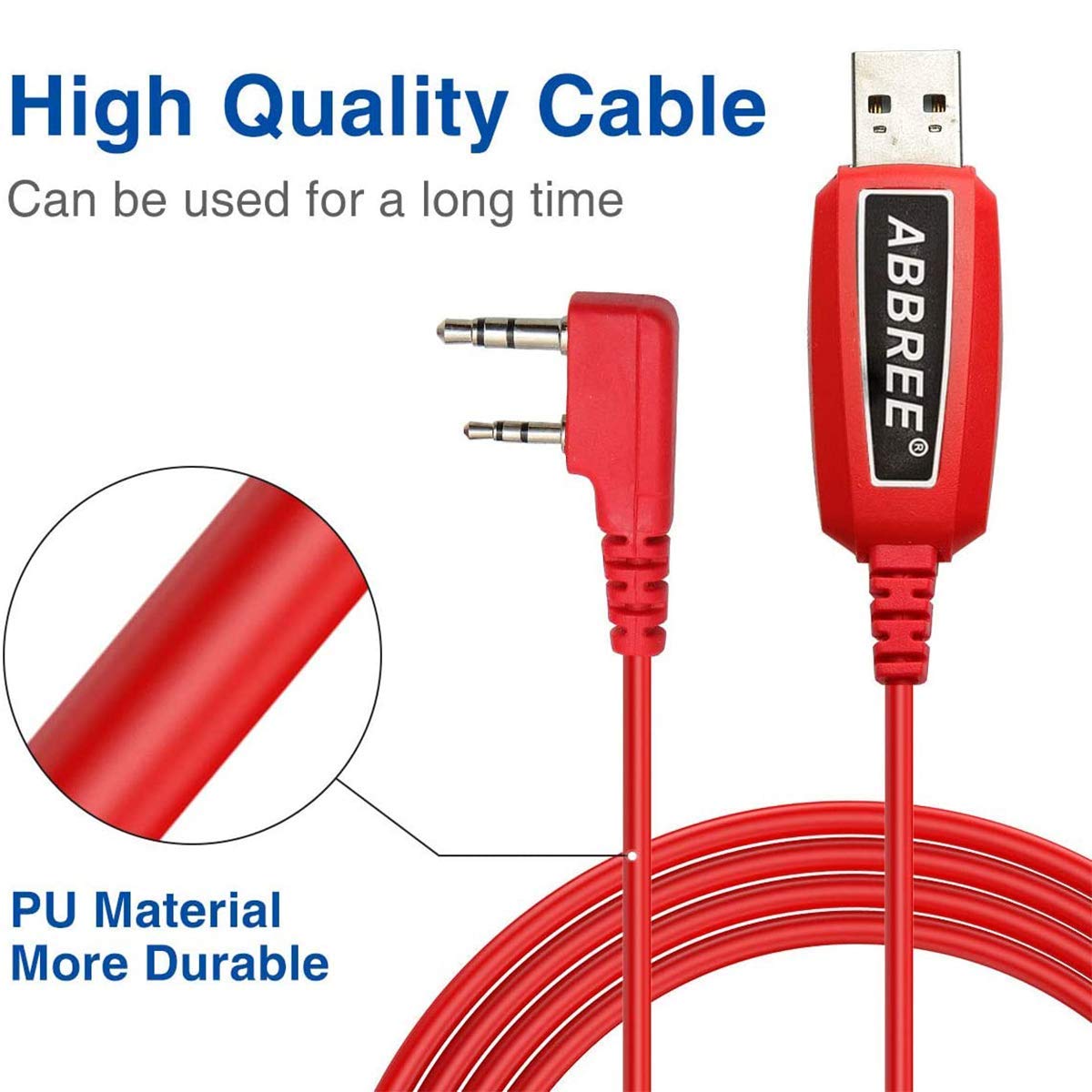
פיגורע 3: נאָענט-אַרויף view highlighting the durable PU material of the red programming cable, designed for longevity and resistance to wear.
5. טראָובלעשאָאָטינג
5.1 פּראָסט ישוז און סאַלושאַנז
- Cable Not Detected:
- Ensure the cable is firmly connected to both the computer and the radio.
- פּרוּווט אַ אַנדערש וסב פּאָרט אויף דיין קאָמפּיוטער.
- Verify driver installation in Device Manager. If the driver is missing or shows an error, manually install the correct PL2303 driver.
- ריסטאַרט דיין קאָמפּיוטער און פּרובירן ווידער.
- Communication Error with Radio:
- Confirm the radio is powered on and the cable is securely connected.
- In your programming software, ensure the correct COM port, radio manufacturer, and model are selected.
- Close other applications that might be using the COM port.
- Try a different version of the programming software if available.
- ינטערמיטאַנט קשר:
- קוק איבער די קאבל אדער קאנעקטארן פאר פיזישע שאדן.
- Ensure the radio's battery is sufficiently charged.
- פֿאַרמײַדן צו שטעלן דעם קאַבל לעבן קוועלער פֿון עלעקטראָמאַגנעטישע שטערונגען.
6. ספּעסאַפאַקיישאַנז
| שטריך | דעטאַל |
|---|---|
| סאָרט | BAOFENG |
| מאָדעל נומער | PL2303 |
| קאַנעקטער טיפּ | Auxiliary, USB (K-type 2-pin to USB-A) |
| טיפּ קאַבלע | וסב פּראָגראַממינג קאַבלע |
| קאַמפּאַטאַבאַל דעוויסעס | PC, various Baofeng two-way radios (e.g., UV-5R, BF-F8HP, UV-21R, UV-5G Plus, GM-5RH, K5PLUS, AR-152, UV-17R, BF-888S, GM-15PRO, UV-S9 Plus) |
| ספּעציעלע שטריך | Data Transfer, Drive-Free (PL2303 Chip), CHIRP Support |
| רעקאָממענדעד ניצט | Programming and customizing two-way radios |
| קאַנעקטער דזשענדער | זכר צו זכר |
| נומער פון פּינס | 4 (on K-type connector) |
| קאַבלע לענג | בעערעך 39 אינטשעס (100 סענטימעטער) |
| מאַטעריאַל | PU (Polyurethane) for durability |
| פּונקט וואָג | 1.76 אונסעס |
| פּעקל דימענשאַנז | 6.1 X 5.43 X 0.59 אינטשעס |

Figure 4: Detailed measurements of the two-pin K-type connector, showing pin lengths of 12mm and 15mm, and an 8mm spacing between them, with an 11mm width.
7. וואָראַנטי & שטיצן
For warranty information and technical support, please refer to the documentation included with your product or contact BAOFENG customer service directly. Keep your purchase receipt for warranty claims.
Online resources and community forums for CHIRP software and Baofeng radios can also provide valuable assistance for programming-related queries.


