1. הקדמה
This manual provides comprehensive instructions for the installation, operation, and maintenance of your CALEX Smart Mini Indoor IP Camera. Please read this manual thoroughly before using the product to ensure proper functionality and safety.
The CALEX Smart Mini Indoor IP Camera is a Wi-Fi surveillance camera offering 1080P Full HD resolution, night vision capabilities, two-way audio communication, and flexible storage options via MicroSD card or cloud.
2. פּעקל אינהאַלט
באַשטעטיקן אַז אַלע זאכן זענען פאַראַן אין פּעקל:
- 1 x CALEX Smart Mini Indoor IP Camera
- 1 x Power Adapter (AC 220-240 V, 50/60 Hz input; DC 5 V output)
- קסנומקס רענטגענ וסב קאַבלע
- 1 x באַניצער מאַנואַל (דאָס דאָקומענט)
- Mounting accessories (if applicable, not explicitly listed but common for cameras)

Figure 2.1: CALEX Smart Mini Indoor IP Camera and its retail packaging. The packaging highlights 1080P Full HD, Wi-Fi 2.4 GHz, and compatibility with the Calex Smart app.
3. פּראָדוקט איבערview
Familiarize yourself with the components of your CALEX Smart Mini Indoor IP Camera.
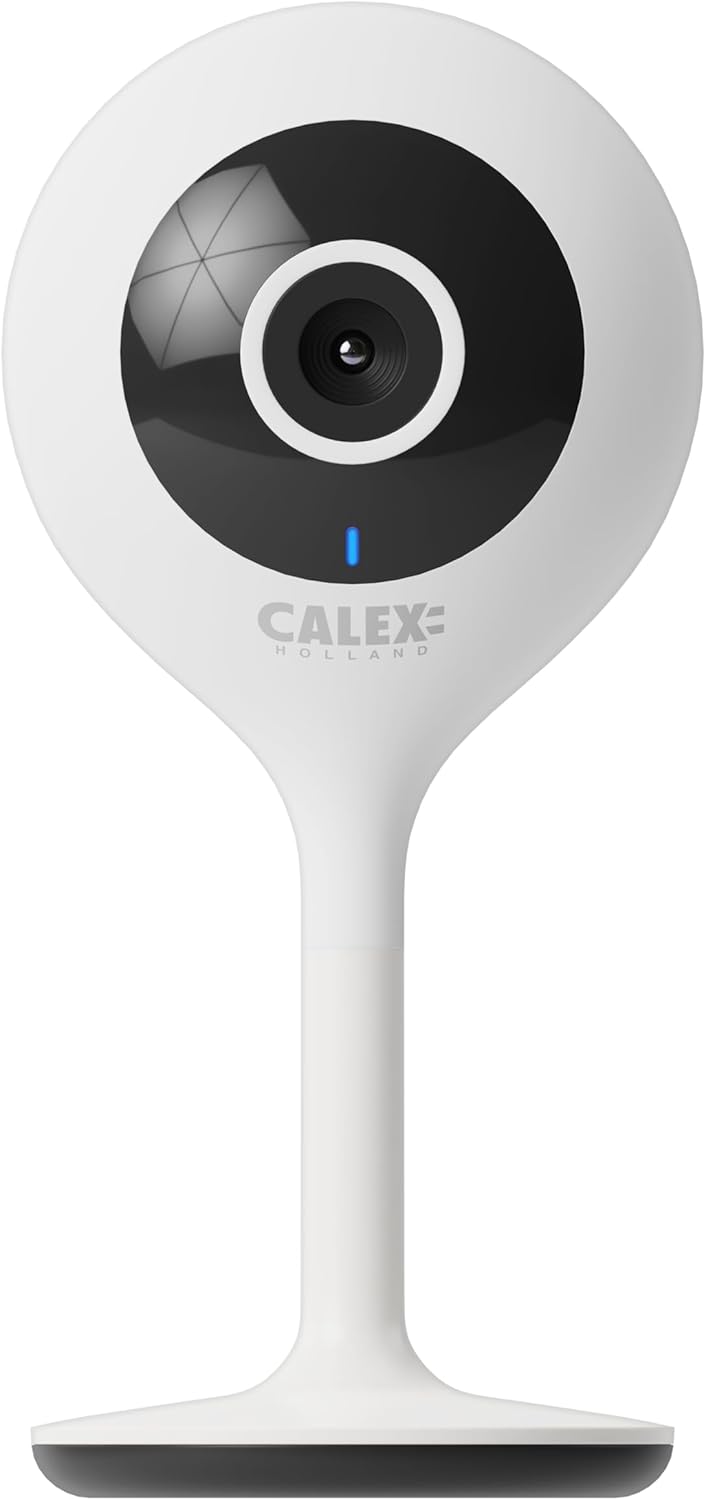
פיגורע 3.1: פראָנט view of the CALEX Smart Mini Indoor IP Camera. It features a central lens, an indicator light, and the CALEX HOLLAND logo.

פיגורע 3.2: דערציען view of the CALEX Smart Mini Indoor IP Camera. This view shows the speaker grille, a reset button, and the MicroSD card slot. The USB power input is located at the base.
שליסל פֿעיִקייטן:
- Full HD 1080P האַכלאָטע: גיט קלאָר און דיטיילד ווידעא פאָאָtage.
- נאַכט זעאונג: Equipped with infrared LEDs for clear monitoring in low-light or dark conditions.
- צוויי-וועג אַודיאָ: איינגעבויטער מיקראָפאָן און רעדנער פֿאַר קאָמוניקאַציע.
- Wi-Fi קאַנעקטיוויטי: Connects to your home Wi-Fi network (2.4 GHz only).
- לאקאלע סטאָרידזש: Supports MicroSD card for continuous recording or event-triggered recording.
- וואָלקן סטאָרידזש: Optional cloud storage service for secure off-site recording.
- באַוועגונג דעטעקשאַן: Alerts and records upon detecting movement.
- מאָביל אַפּ קאָנטראָל: פירן און view live feed via the Calex Smart app.
- קול אַססיסטאַנט קאַמפּאַטאַבילאַטי: Works with Amazon Alexa and Google Home.
4. סעטאַפּ און ייַנמאָנטירונג
4.1 איידער איר אָנהייבן
- Ensure your Wi-Fi network is 2.4 GHz. The camera does not support 5 GHz Wi-Fi.
- האַלט דיין Wi-Fi נעץ נאָמען (SSID) און פּאַראָל גרייט.
- Download the "Calex Smart" app from your mobile device's app store.
- Place the camera within range of your Wi-Fi router.

Figure 4.1: QR codes for downloading the Calex Smart app. Scan the appropriate QR code for your device (iOS or Android) to download the application.
Download the Calex Smart app here: יאָס אַפּ סטאָר | Google פּלייַ סטאָר
4.2 ערשטע אויפשטעל טריט
- מאַכט אויף: Connect the camera to a power outlet using the provided USB cable and power adapter. The camera's indicator light will begin to flash, indicating it is ready for pairing.
- Open Calex Smart App: Launch the Calex Smart app on your smartphone. If you are a new user, register an account. If you already have an account, log in.
- לייג דיווייס: Tap the "+" icon in the top right corner of the app to add a new device. Select "Security & Video Surveillance" and then "Smart Camera".
- Confirm Indicator Status: Follow the in-app instructions. Confirm that the indicator light on your camera is flashing rapidly.
- אַרייַן Wi-Fi דעטאַילס: אַרייַן דיין 2.4 GHz Wi-Fi נעץ נאָמען און פּאַראָל ווען געבעטן.
- יבערקוקן QR קאָד: The app will generate a QR code. Hold your phone with the QR code approximately 15-20 cm (6-8 inches) in front of the camera lens. The camera will emit a sound when it successfully scans the QR code.
- קשר: Tap "I heard a prompt" in the app. The camera will then attempt to connect to your Wi-Fi network. Once connected, the indicator light will turn solid blue.
- נאמען מיטל: Once connected, you can name your camera (e.g., "Living Room Camera", "Nursery Camera").


פיגורע 4.2: עקסamples of the Calex Smart app interface. The left image shows a live camera feed with options for screenshot, speaking, and recording. The right image shows a settings screen within the app.
5. אפערירן אייער קאמערא
5.1 לעבן View
Open the Calex Smart app and select your camera from the device list to access the live video feed. You can view the feed in portrait or landscape mode.

פיגור 5.1: א באַניצער viewing the live feed from the CALEX Smart Mini Indoor IP Camera on their smartphone.
5.2 צוויי-וועג אַודיאָ
בשעת אין לעבן view, tap the microphone icon to speak through the camera's speaker. Tap the speaker icon to listen to audio from the camera's microphone.
5.3 רעקאָרדינג און פּלייבאַק
- מאַנואַל רעקאָרדינג: Tap the "Record" button in the live view interface to start or stop manual recording. Recordings are saved to your phone's gallery.
- סקרעענשאָט: דריקט דעם "סקרינשאָט" קנעפּל צו כאַפּן אַ סטיל בילד פֿון דעם לייוו פֿיד.
- מיקראָסד קאַרטל רעקאָרדינג: Insert a MicroSD card (up to 128GB, not included) into the camera's slot for continuous or event-triggered recording. Ensure the card is formatted within the app settings.
- וואָלקן סטאָרידזש: Subscribe to the cloud storage service via the app for secure, off-site storage of event recordings.
- פּלייבאַק: אַקסעס רעקאָרדעד פאָאָtage from the "Playback" section within the camera's settings in the app.

Figure 5.2: The Calex Smart app interface displaying options for cloud storage and video playback. This allows users to review רעקאָרדירטע געשעענישן.
5.4 באַוועגונג דעטעקציע און וואָרענונגען
Configure motion detection sensitivity and alert settings in the app. You will receive push notifications on your smartphone when motion is detected.
5.5 שטימע קאנטראל (אלעקסא/גוגל היים)
To integrate your camera with Amazon Alexa or Google Home, follow the instructions in the respective voice assistant app to enable the "Calex Smart" skill/action. You can then use voice commands to view די קאַמעראַ פיד אויף קאָמפּאַטיבלע סמאַרט דיספּלייז.

Figure 5.3: A couple using voice commands with an Amazon Echo device, demonstrating the camera's compatibility with smart home ecosystems like Alexa and Google Home.
6. וישאַלט
- רייניקונג: ניצט אַ ווייכע, טרוקענע שטאָף צו רייניקן די קאַמעראַ לינזע און קערפּער. ניצט נישט פליסיקע רייניגער אָדער אַעראָזאָלן.
- Firmware דערהייַנטיקונגען: Periodically check the Calex Smart app for available firmware updates for your camera. Keeping the firmware updated ensures optimal performance and security.
- באַשטעטיק די אַפּאַראַט: If you experience connectivity issues or need to reconfigure the camera, locate the reset button on the back of the device (refer to Figure 3.2). Use a pin or a straightened paperclip to press and hold the reset button for approximately 5-10 seconds until the indicator light flashes rapidly. This will restore the camera to factory settings.
7. טראָובלעשאָאָטינג
| פּראָבלעם | מעגלעך סיבה | לייזונג |
|---|---|---|
| די קאַמעראַ קען זיך נישט פֿאַרבינדן צו Wi-Fi. | Incorrect Wi-Fi password; 5 GHz Wi-Fi network; camera too far from router; Wi-Fi signal interference. |
|
| No live video feed. | Camera offline; poor internet connection; app issue. |
|
| מיקראָסד קאַרטל נישט דערקענט. | Card not inserted correctly; card corrupted; unsupported card size/format. |
|
| צוויי-וועג אודיאָ אַרבעט נישט. | Microphone/speaker muted in app; low volume; app permissions. |
|
8. ספּעסאַפאַקיישאַנז
| שטריך | דעטאַל |
|---|---|
| מאָדעל נאָמען | סמאַרט זיכערהייַט |
| מאָדעל נומער | 5501000300 |
| האַכלאָטע | 1080 פּ גאַנץ הד |
| קאַנעקטיוויטי | Wi-Fi (נאָר 2.4 GHz) |
| מאַכט אַרייַנשרייַב | AC 220-240 Volts, 50/60 Hz |
| מאַכט רעזולטאַט (אַדאַפּטער) | דק 5 וואלטס |
| מאַכט קאַנסאַמשאַן | 5 וואטס |
| דימענסיעס (L X W X H) | 3.2 X 5.3 X 11 סענטימעטער (1.26 X 2.09 X 4.33 אינטשעס) |
| וואָג | 167 גראַמז (0.37 לבס) |
| מאַטעריאַל | פּלאַסטיק |
| קאָליר | ווייַס |
| סטאָרידזש אָפּציעס | מיקראָסד (ביז 128 גיגאבייט), וואָלקן סטאָרידזש |
| ספּעציעלע פֿעיִקייטן | Night Vision, Two-Way Audio, Motion Detection, Compatible with Alexa/Google Home |
| באַניץ סוויווע | דרינענדיק |
9. וואָראַנטי און שטיצן
CALEX products are designed and manufactured to the highest quality standards. For warranty information and technical support, please refer to the official CALEX webזייטל אדער קאנטאקט זייער קאסטומער סערוויס גלייך.
פאַבריקאַנט: CALEX
פֿאַר ווייַטער הילף, באַזוכן די CALEX Official Webפּלאַץ.
10. זיכערקייַט אינפֿאָרמאַציע
- Do not expose the camera to water or moisture. This product is designed for indoor use only.
- פרובירט נישט צו צענעמען אדער פאררעכטן די קאמערא אליין. לאָזט איבער אלע סערוויסעס צו קוואַליפֿיצירטע פּערסאָנעל.
- Use only the provided power adapter and cable to prevent damage or fire.
- Keep the camera away from direct sunlight, heat sources, and strong magnetic fields.
- Ensure the camera is placed on a stable surface to prevent it from falling.


