1. הקדמה
א דאנק פארן קויפןasing the ONIKUMA K1 RGB Gaming Headset. This manual provides detailed instructions for setup, operation, maintenance, and troubleshooting to ensure optimal performance and longevity of your headset. Please read this manual carefully before use and retain it for future reference.
2. פּראָדוקט איבערview
The ONIKUMA K1 is a wired gaming headset designed for multi-platform compatibility, featuring vibrant RGB lighting, 7.1 surround sound, and a noise-cancelling microphone. It is built for comfort during extended gaming sessions.
שליסל פֿעיִקייטן:
- 7.1 סאָונד סאָונד: Provides immersive audio for an enhanced gaming experience.
- ראַש-קאַנסאַלינג מיקראָפאָן: זיכערט קלאָרע קאָמוניקאַציע דורך רעדוצירן הינטערגרונט ראַש.
- RGB לייטינג: Dynamic lighting effects for an aesthetic appeal.
- מולטי-פּלאַטפאָרם קאַמפּאַטאַבילאַטי: Works with PC, PlayStation (PS3, PS4), Mobile devices, and Xbox (Xbox One requires an adapter, not included).
- באַקוועם פּלאַן: Features soft protein earpads, an adjustable headband, and cozy head cushions.
- אין-ליניע קאָנטראָלס: Easy access to volume adjustment and microphone mute.
קאַמפּאָונאַנץ:
The headset includes the main unit with integrated microphone and a wired connection featuring a 3.5mm audio jack and a USB connector for RGB lighting.

Figure 1: Headset with in-line volume and microphone mute control, USB connector for RGB lighting, and 3.5mm audio jack.

Figure 2: Flexible microphone with 160-degree adjustment and 360-degree voice pick-up for clear communication.

Figure 3: Soft protein earpads, adjustable headband, and cozy head cushions designed for supreme comfort.
3. סעטאַפּ אינסטרוקציעס
Follow these steps to connect your ONIKUMA K1 headset to your device.
מולטי-פּלאַטפאָרם קאַמפּאַטאַבילאַטי:
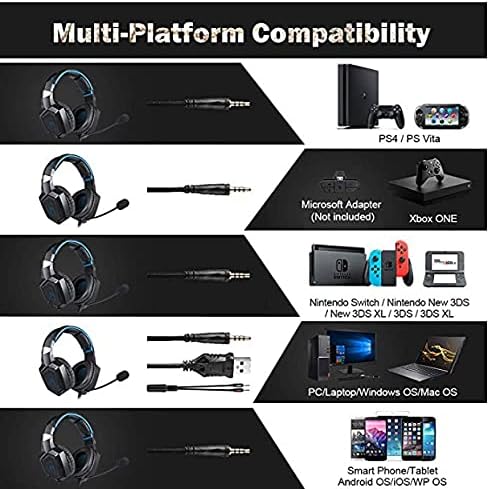
פיגור 4: קאָמפּאַטאַביליטי איבערview for PC, PlayStation, Xbox, Nintendo Switch, and mobile devices.
- For PC/Laptop (Windows OS/Mac OS):
Connect the 3.5mm audio jack to your computer's audio output/input port. Connect the USB cable to a USB port for RGB lighting. Ensure your sound settings are configured to use the headset. - For PlayStation (PS4/PS Vita/PS3):
Connect the 3.5mm audio jack to the controller or console's audio port. For PS4, go to Settings > Devices > Audio Devices > Output to Headphones > All Audio. Connect the USB for RGB lighting if a USB port is available. - For Xbox ONE:
An additional Microsoft Adapter (not included) is required for older Xbox One controllers. Connect the 3.5mm audio jack to the adapter, then connect the adapter to your controller. Newer Xbox One controllers have a built-in 3.5mm jack. Connect the USB for RGB lighting if a USB port is available on the console. - For Nintendo Switch/New 3DS XL/3DS/3DS XL:
Connect the 3.5mm audio jack directly to the console's audio port. - For Smart Phone/Tablet (Android OS/iOS/WP OS):
Connect the 3.5mm audio jack directly to your mobile device's headphone jack.
4. אַפּערייטינג ינסטרוקטיאָנס
Once connected, you can begin using your headset. Here are the basic operating functions:
- באַנד קאָנטראָל: Use the in-line volume roller to adjust the audio output level. Roll up to increase volume, roll down to decrease.
- מיקראָפאָן שטום: Use the in-line switch to mute or unmute the microphone. Slide the switch to the 'OFF' position to mute and 'ON' to unmute.
- מיקראָפאָן אַדזשאַסטמענט: The microphone is flexible. Adjust its position closer to your mouth for optimal voice pickup or away when not in use.
- RGB לייטינג: The RGB lighting is powered via the USB connection. Once the USB is plugged in, the lighting will activate automatically. There are no user-adjustable controls for the RGB lighting patterns on the headset itself.
- העאַדסעט פּאַסיק: Adjust the headband to ensure a comfortable and secure fit over your ears. The earpads should fully cover your ears for optimal sound isolation and comfort.
5. וישאַלט
געהעריגע זאָרג וועט פֿאַרלענגערן דאָס לעבן פֿון אײַער כעדסעט.
- רייניקונג: Use a soft, dry cloth to clean the headset. Do not use liquid cleaners or abrasive materials.
- סטאָרידזש: האַלט די כעדסעט אין אַ קיל, טרוקן אָרט אַוועק פון דירעקט זונשייַן און עקסטרעמע טעמפּעראַטורן.
- קאַבלע זאָרגן: Avoid sharp bends or excessive pulling on the cables to prevent damage. The cable is designed to be tangle-free.
- ויסמיידן נעץ: The headset is not water-resistant. Keep it away from liquids.
6. טראָובלעשאָאָטינג
אויב איר טרעפט פּראָבלעמען מיט אייער כעדסעט, ביטע באַציעט זיך צו די פאלגענדע געוויינטלעכע לייזונגען:
| פּראָבלעם | מעגלעך לייזונג |
|---|---|
| ניט געזונט אָדער נידעריק באַנד |
|
| מיקראָפאָן טוט נישט אַרבעטן |
|
| RGB לייטינג טוט נישט אַרבעטן |
|
| Sound quality issues (e.g., no 7.1 surround sound) |
|
7. ספּעסאַפאַקיישאַנז
| שטריך | דעטאַל |
|---|---|
| מאָדעל נאָמען | K1-B-Black RGB |
| קאַנעקטיוויטי טעכנאָלאָגיע | ווייערד |
| כעדפאָון דזשאַק | 3.5 מם דזשאַק |
| סענסיטיוויטי | 104 דב |
| אָפטקייַט ענטפער | Not specified (Original data: 3045 Unknown Rate) |
| ראַש קאָנטראָל | אַקטיוו ראַש קאַנסאַליישאַן |
| כעדפאָון פאָרם פאַקטאָר | איבער-אויער |
| אויער פּלייסמאַנט | איבער-אויער |
| קאָליר | שוואַרץ |
| סאָרט נאָמען | ONIKUMA |
| פּראָדוקט דימענשאַנז | 22.5 X 19.5 X 10.5 סענטימעטער |
| פּונקט וואָג | 394 גראַמז |
| קאַבלע שטריך | פּלאָנטערן-פריי |
| קאָנטראָל טיפּ | באַנד קאָנטראָל |
| קאַמפּאַטאַבאַל דעוויסעס | מולטי-פּלאַטפאָרמע |
| רעקאָממענדעד ניצט | Gaming, Making Calls |
| ספּעציפֿישע פּראָדוקט ניצט | גיימינג העאַדסעט |
| מאַטעריאַלס | Plastic, Polycarbonate Leather (PC) |
| עלטער ראַנגע באַשרייַבונג | דערוואַקסן |
| וואַסער קעגנשטעל מדרגה | ניט וואַסער קעגנשטעליק |
8. וואָראַנטי און שטיצן
For warranty information or technical support, please refer to the documentation included with your purchase or contact the seller directly. Keep your proof of purchase for any warranty claims.


