הקדמה
Thank you for choosing the Hoco ES32 Plus Series TWS Wireless Bluetooth Headset. This manual provides detailed instructions on how to set up, operate, and maintain your new headset. Please read this manual carefully before use to ensure optimal performance and longevity of your device.
פּעקל אינהאַלט
- Hoco ES32 Plus TWS Wireless Bluetooth Headset (Left and Right Earbuds)
- טשאַרדזשינג קאַסע
- טשאַרדזשינג קאַבלע
- סיליקאָנע קאַסע
- קרוק
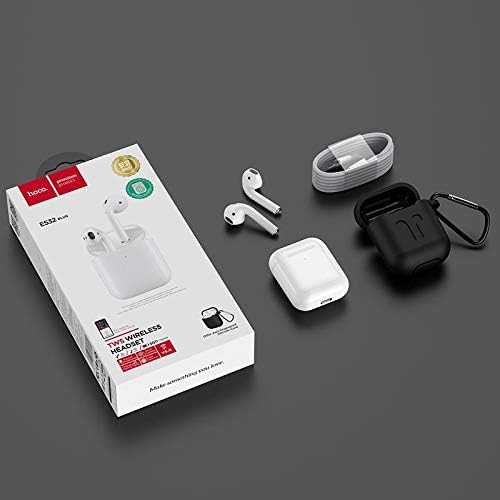
Image: Contents of the Hoco ES32 Plus package, including the earbuds, charging case, charging cable, silicone case, and hook.
פּראָדוקט איבערview און פֿעיִקייטן
The Hoco ES32 Plus headset is designed for a seamless wireless audio experience. Key features include:
- בלועטאָאָטה וו5.0: זיכערט סטאַבילע און עפֿעקטיווע וויירלעסע קאָנעקטיוויטי.
- Airoha AB1536U Chip: Provides reliable performance.
- באַטאַרייע קאַפּאַציטעט: 350mAh for the charging case, 30mAh for each earbud.
- לאנג באַטאַרייע לעבן: Approximately 3 hours of talk/music time, 200 hours standby time.
- סאָליד פּלאַן: Earbuds and case are lightweight and portable.
- Pop-Up Window Support: For Apple mobile phones, enabling quick pairing and battery display.
- מאַסטער-שקלאַף סוויטשינג: Allows independent use of either earbud.
- אין-אויער דעטעקשאַן: Automatically pauses/plays audio when earbuds are removed/inserted.
- ווירעלעסס טשאַרדזשינג שטיצן: Convenient charging without cables.
- ריר אָפּעראַציע: אינטואיטיווע קאָנטראָלס פֿאַר מוזיק און רופֿן.

בילד: א דעטאַלירטע view of the Hoco ES32 Plus wireless earbuds, highlighting their design.
סעטאַפּ גייד
1. ערשטע אויפלאָדונג
Before first use, fully charge the charging case and earbuds. Place the earbuds into the charging case. Connect the charging cable to the case and a USB power source, or place the case on a compatible wireless charger.

Image: The Hoco ES32 Plus charging case being charged wirelessly on a charging pad.
2. פּערינג מיט דיין מיטל
- Ensure the earbuds are in the charging case and the case has sufficient charge.
- עפֿנט דעם דעקל פֿונעם אָפּלאָד־קעסטל. די אויערקנעפּלעך וועלן אויטאָמאַטיש אַרײַן אין פּערינג־מאָדוס.
- On your mobile device (e.g., iPhone, Samsung, Huawei, Oppo), go to Bluetooth settings and turn Bluetooth on.
- זוכן פֿאַר available devices. You should see "HOCO ES32 Plus" or similar in the list.
- Select "HOCO ES32 Plus" to connect. For Apple devices, a pop-up window may appear for quick pairing.
- אַמאָל פארבונדן, די אויערקנעפּלעך זענען גרייט פֿאַר נוצן.

Image: Visual guide demonstrating the pairing process for the Hoco ES32 Plus headset with an iPhone, including the pop-up window for connection and battery status.
אַפּערייטינג ינסטראַקשאַנז
ריר קאָנטראָלס
The Hoco ES32 Plus earbuds feature intuitive touch controls on the outer surface of each earbud.
- שפּיל / פּויזע: איין צאַפּן אויף יעדער עאַרבוד.
- ווייַטער שפּור: טאָפּל צאַפּן אויף די רעכט עאַרבוד.
- פֿריִערדיקע שפּור: טאָפּל צאַפּן אויף די לינקס עאַרבוד.
- ענטפֿערן / סוף רופן: איין צאַפּ אויף יעדן אויערקנעפּל בעת אַן אינקאַמינג רוף.
- אָפּוואַרפן רופן: דריק און האלט איינע פון די אויערקנעפל פאר 2 סעקונדעס בעת אן אנקומענדיקן רוף.
- אַקטיווירן שטימע אַסיסטאַנט (סירי/גוגל אַסיסטאַנט): דריק דריי מאָל אויף איינעם פון די אויערקנעפּלעך.
אין-אויער דעטעקטיאָן
The earbuds are equipped with in-ear detection. Music will automatically pause when you remove an earbud and resume when you put it back in.
וישאַלט
- רייניקונג: ניצט אַ ווייכע, טרוקענע, לינט-פֿרייע שטאָף צו רייניקן די אויערקנעפּלעך און די טשאַרדזשינג קעסטל. ניצט נישט קיין שאַרפע כעמיקאַלן אָדער אַברייסיוו מאַטעריאַלן.
- סטאָרידזש: ווען נישט אין באַנוץ, לייגט די אויערן-קנעפּלעך אין זייער טשאַרדזשינג קעסטל צו באַשיצן זיי און האַלטן זיי טשאַרדזשד.
- באַטערי זאָרגן: כדי צו פארלענגערן די לעבן פון די באַטעריע, זאָלט איר נישט אָפט אויסלאָדן די באַטעריע. לאָדט דאָס אַפּאַראַט רעגולער אויף, אפילו אויב איר ניצט עס נישט קעסיידער.
- וואַסער קעגנשטעל: די אויערקנעפּלעך זענען נישט וואַסערפּרוף. פֿאַרמייַדן אויסשטעלונג צו וואַסער, שווייס, אָדער הויך הומידיטי.
טראָובלעשאָאָטינג
| פּראָבלעם | מעגלעך לייזונג |
|---|---|
| אויערקנעפּלעך פאַרבינדן זיך נישט/פּאַרירן זיך נישט |
|
| קיין געזונט פון איין עאַרבוד |
|
| טשאַרדזשינג פאַל ניט טשאַרדזשינג |
|
| נעבעך געזונט קוואַליטעט |
|
ספּעסאַפאַקיישאַנז
| שטריך | דעטאַל |
|---|---|
| בלועטאָאָטה ווערסיע | V5.0 |
| טשיפּסעט | Airoha AB1536U |
| טשאַרדזשינג קאַסע באַטאַרייע קאַפּאַציטעט | 350 מאַה |
| Earbud Battery Capacity (Single) | 30 מאַה |
| רעדן / מוזיק צייט | בעערעך. 3 שעה |
| סטאַנדביי צייט | 200 שעה |
| דימענסיעס (קאַסע) | 53.8 X 44.3 X 21.4 מם |
| וואָג (גאַנץ) | 47ג |
| קאַנעקטיוויטי | ווירעלעסס |
| קאָליר | ווייַס |
| מאָדעל נומער | ES32 פּלוס |
| קאַמפּאַטאַבאַל דעוויסעס | מאָביל פאָנעס |
| ספּעציעלע פֿעיִקייטן | Dual ear, Pop-up window support (Apple), Master-slave switching, In-ear detection, Wireless charging support |
וואָראַנטי און שטיצן
For warranty information and technical support, please refer to the official Hoco website or contact your local retailer where the product was purchased. Keep your proof of purchase for any warranty claims.
פֿאַר ווייטערדיקע הילף, קענט איר באַזוכן די Hoco brand page on Amazon.eg.


